

Table of Contents
Key Takeaways:
- Effective patient management reduces administrative burdens, ensuring patients aren’t delaying or skipping care.
- Centralized patient data allows staff to quickly access records and coordinate care efficiently.
- Automated scheduling and reminders improve patient adherence and minimize no-shows.
- Patient portals and secure messaging enhance engagement, communication, and trust.
- Integrated workflows connect clinical, administrative, and financial processes for smoother overall patient management.
Introduction
Patient management goes far beyond admin work; it’s the very backbone of quality healthcare. Done right, it minimizes errors, improves outcomes, and keeps both staff and patients aligned but traditional methods can’t keep up. A clunky front desk, endless paper trails, and scattered spreadsheets don’t just slow you down, they put patient care at risk.
One U.S. study found that 33.4% of patients delayed or skipped care due to administrative burdens, with nearly one in four experiencing this at the population level. That’s a huge red flag for modern practices.
This guide will explore what is patient management software and how it helps clinics of all sizes from family medicine and dentistry to optometry and specialty care, streamline workflows, improve efficiency, and keep patients engaged and healthy.
What is Patient Management Software?
Patient management software Unifies billing, patient records, and communications, keeping everything in one place for smoother practice operations, so your team spends less time juggling systems and more time focusing on care.
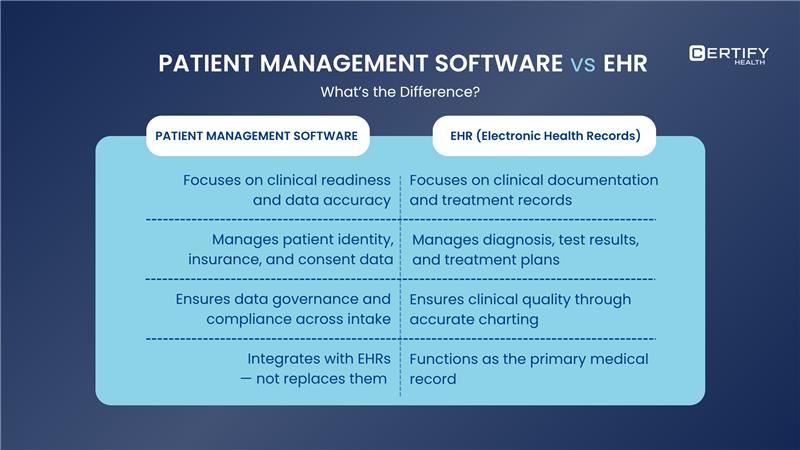
It brings together patient identity, clinical preparedness, insurance coverage, and consent data — giving practices a single source of truth for every patient.
It ensures your clinical and front-desk teams have accurate, verified, and compliant information before care begins.
Unlike systems that automate workflows, patient management focuses on data accuracy, coordination, and readiness, helping practices move patients confidently through the care process.
Here’s what patient management software does for you:
- Organizes and verifies patient data (identity, demographics, insurance, and consent).
- Connects with EHRs and EMRs to ensure clinical documentation is accurate and accessible.
- Enables secure, compliant intake through forms and verification tools.
- Strengthens coordination between front desk, clinical staff, and billing teams.
Types of Healthcare Settings That Use Patient Management Software
- Family medicine practices needing quick scheduling and billing.
- Dental offices managing routine visits and cosmetic treatments.
- Optometry practices where patient communication and documentation matter.
- Specialty healthcare settings like dermatology centers, urgent care, or behavioral health clinics.
Wherever patients are walking through the door (or logging in virtually), patient management software scales to fit.
Patient management software vs EHR: What’s the Difference?
Truth is, you usually need both. The good news is that the best patient management platforms integrate smoothly with EHR, giving you the best of both worlds.
The Role of Patient Management Software in Healthcare
TL; DR:
What function does patient management software serve in healthcare?
- Centralize patient data in one accessible hub.
- Reduce paperwork, manual entry, and inefficiencies.
- Improve outcomes and accurate documentation.
- Give practices financial visibility with revenue cycle management tools.
- Elevate patient engagement via portals and telemedicine integration.
The role of patient management software is straightforward but powerful, ensuring every patient encounter starts with accurate, complete, and verified information.
he role of patient management software is straightforward but powerful, ensuring every patient encounter starts with accurate, complete, and verified information.
Centralize Patient Data
Don’t dig through files! Store all patient info in one hub (history, appointments, insurance, etc.) so your team finds what they need instantly and works smarter, not harder.
Cut Paperwork and Enhance Efficiency
Cut Paper forms and manual entry. Digital intake, insurance verification, and consent capture reduce errors and streamline preparation before every visit – letting staff stay focused on patient care.
Improve Clinical Outcomes
Get the right info when you need it. Patient management software ensures accurate records, smooth workflows, and fewer mistakes, so your team can make confident decisions and deliver better patient care for every visit.
Gain Financial Visibility
Stop guessing about revenue. Patient management software gives real-time billing insights, tracks claims, and reduces denials, helping your practice stay profitable without the stress of last-minute scrambles.
Elevate Patient Engagement
Patients want convenience and control. Secure digital forms, biometric ID verification, and self-service check-ins create a seamless experience that builds trust from the moment they arrive.
Key Features of Patient Management Software
TL; DR:
What are the essential features of patient management software?
Patient management software streamlines healthcare operations with these core features:
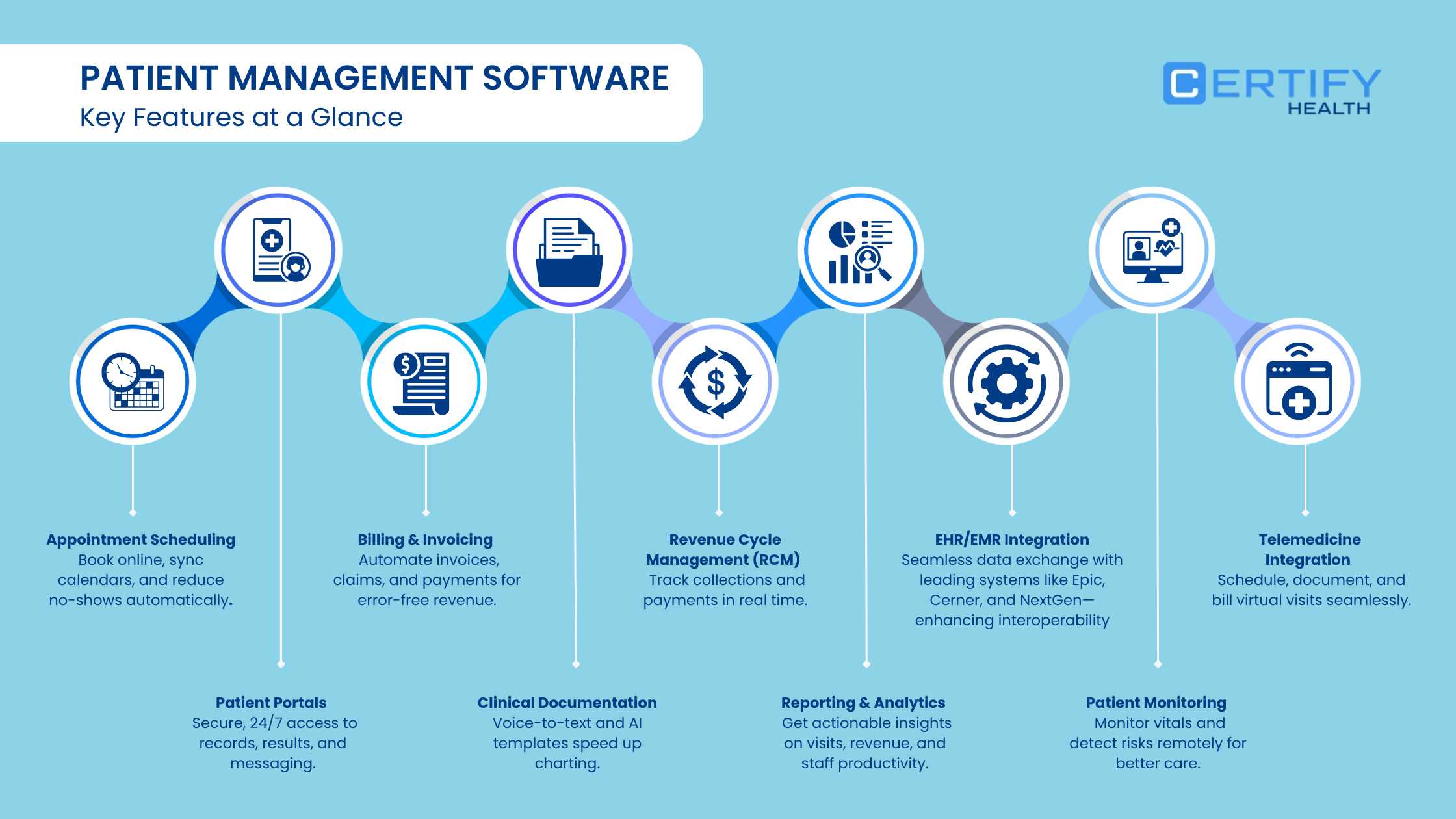
- Appointment Scheduling: Online booking, synced calendars, automated reminders reduce no-shows.
- Patient Portals: Secure access to records, messaging, lab results, and visit summaries.
- Billing & Invoicing: Automated claims, insurance verification, accurate payment tracking.
- Clinical Documentation: Voice-to-text and AI templates speed charting.
- Revenue Cycle Management: Track collections, reimbursements, and payment lags easily.
- Reporting & Analytics: Insights on visits, revenue, and staff productivity for better decisions.
- Patient Monitoring: Real-time vitals tracking and chronic care management.
- EHR/EMR Integration: Seamless push and pull with leading systems (Epic, Cerner, NextGen, AdvancedMD, etc.), reinforcing interoperability without replacing existing tools.
- Telemedicine Integration: Schedule, document, and bill virtual visits seamlessly.
Let’s roll up our sleeves and dive into the heart of patient management software, the features that make or break the system.
Appointment Scheduling
Gone are the days of endless phone calls. Patient management software enables:
- Online booking directly from your website or patient portal.
- Calendar syncing for staff and providers.
- Automated reminders that cut down on no-shows by up to 30%.
Patient Portals
Self-service is the new gold standard in healthcare. Patient portals within patient management software allow patients to:
- View lab results or visit summaries.
- Message providers securely.
- Access their data without waiting on hold for staff assistance.
This builds trust and improves patient satisfaction.
Billing and Finance Management
Billing doesn’t have to be a nightmare. Patient management software simplifies workflows with:
- Automated invoice generation.
- Claims submission and insurance verification.
- Accurate payment posting and outstanding balance tracking.
This creates smoother revenue cycle management and fewer errors that lead to claim denials.
Pro tip: With integrated payment gateways like CERTIFY Health’s CERTIFY Pay, practices can take billing & financial management one step further.
CERTIFY Pay enables fast and secure (PCI DSS compliant) patient and merchant payments through digital pay links, QR codes, stored cards, hosted payments, etc.
By offering flexible online payment options, practices reduce outstanding balances, speed up collections, and improve the overall patient financial experience.
Clinical Documentation
Modern patient management software platforms often include voice-to-text recognition and AI-driven templates for documentation. Providers spend less time typing and more time engaging with patients.
Revenue Cycle Management (RCM)
Patient management software dashboards let you track KPIs like collections, reimbursements, and payment lags. Think of it as a CFO in your pocket, keeping the financial health of your practice visible 24/7.
Reporting and Analytics
How do you know if your clinic is running efficiently? Analytics.
Patient management software platforms deliver:
- Patient visit trends.
- Revenue forecasts.
- Staff productivity insights.
This data-driven approach means you make better decisions, not guesses.
Patient Monitoring
For patients managing chronic conditions, patient management software can integrate remote patient monitoring tools. This ensures:
- Real-time alerts on vitals.
- Early detection of health risks.
- Better compliance with care plans.
EHR/EMR Integration
Seamless push and pull of data with leading EHR and EMR systems like Epic, Cerner, NextGen, and AdvancedMD ensures smooth information exchange across platforms.
This integration enables clinicians to access accurate, real-time patient data without switching systems.
Telemedicine Integration
Virtual visits aren’t just for pandemics. Telemedicine is here to stay. Patient management software integrates:
- Secure virtual appointment scheduling.
- Documentation of virtual visits alongside in-person records.
- Billing support for telehealth encounters.
Benefits of Using Patient Management Software
Let’s break down the direct benefits across three perspectives:
For Healthcare Practices
- Increase collection rates with optimized revenue cycle management.
- Reduce inefficiencies in administrative workflows.
- Deliver measurable ROI with integrated reporting and analytics.
For Patients
- Faster appointment scheduling and fewer delays.
- Empowerment through patient portals.
- More convenient access to telemedicine and self-service billing.
- Overall enhancement in patient safety and quality of care.
For Clinical Care Teams
- Quicker, accurate clinical documentation.
- Reduced repetition with patient management software-EHR integration.
- Improved coordination through centralized patient data.
How to Choose the Right Patient Management Software
Not all Patient management software platforms are created equal. Here’s what to look for:
- Features: Consider must-have & nice-to-have features in patient management software
| Must-Have Features | Description |
|---|---|
| Appointment Scheduling | Allows online booking, calendar management, and automated reminders to reduce no-shows. |
| Patient Portal | Secure access for patients to view health information, lab results, and communicate with staff. |
| Billing and Invoicing | Automates billing, claim submission, insurance integration, and payment tracking. |
| Revenue Cycle Management | Tracks the entire financial cycle to optimize cash flow and reimbursement accuracy. |
| EHR Integration | Enables real-time access to clinical data for improved care coordination. |
| Nice-to-Have Features | Description |
|---|---|
| Telemedicine Integration | Supports virtual visit scheduling and management within the PMS. |
| Remote Patient Monitoring | Provides tools for chronic condition management with alerts and notifications. |
| Voice Recognition Documentation | Converts voice to text to speed up clinical documentation and reduce manual entry. |
| Advanced Reporting & Analytics | Offers deep insights into practice performance, patient trends, and financial metrics. |
- Integration capabilities: Choose systems that integrate with EHR, labs, and payment networks.
- Ease of use: Adoption sinks if the system is clunky for staff or patients.
- Support and training: Ongoing help from your vendor is as important as the software itself.
- Scalability and specialty fit: A one-size-fits-all patient management software won’t suit every practice. Dermatology vs optometry vs dentistry require different customizations.
Pro tip: Factor in user feedback and reviews. Real-world ratings are often more useful than sales brochures.
Conclusion
Managing a modern healthcare practice without patient management software is like trying to navigate a busy clinic with a paper map while your competitors use GPS.
Patient management software isn’t just software, it’s the engine that powers administrative workflow, clinical workflow, patient satisfaction, and practice growth. From appointment scheduling to revenue cycle management, from patient portals to telemedicine integration, these systems deliver practical results.
If your goal is to improve patient care, streamline operations, and improve your bottom line, investing in the right patient management software should be at the top of your to-do list.