Table of Contents
Patient Intake Forms: Types, Examples, and a Digital Checklist
A patient intake form succeeds only when it collects the right information for a defined purpose, reaches the right person through a usable channel, routes each answer to the right destination, and gives staff a visible way to resolve what is incomplete, inconsistent, or unable to move downstream.
This guide is about the forms themselves: what types a healthcare organization may need, how to decide which fields belong, how to separate acknowledgments from authorizations and clinical consent, how to design accessible completion paths, and how to convert a paper packet into a governed digital workflow. For the end-to-end process from scheduling through visit readiness, use the patient intake guide.
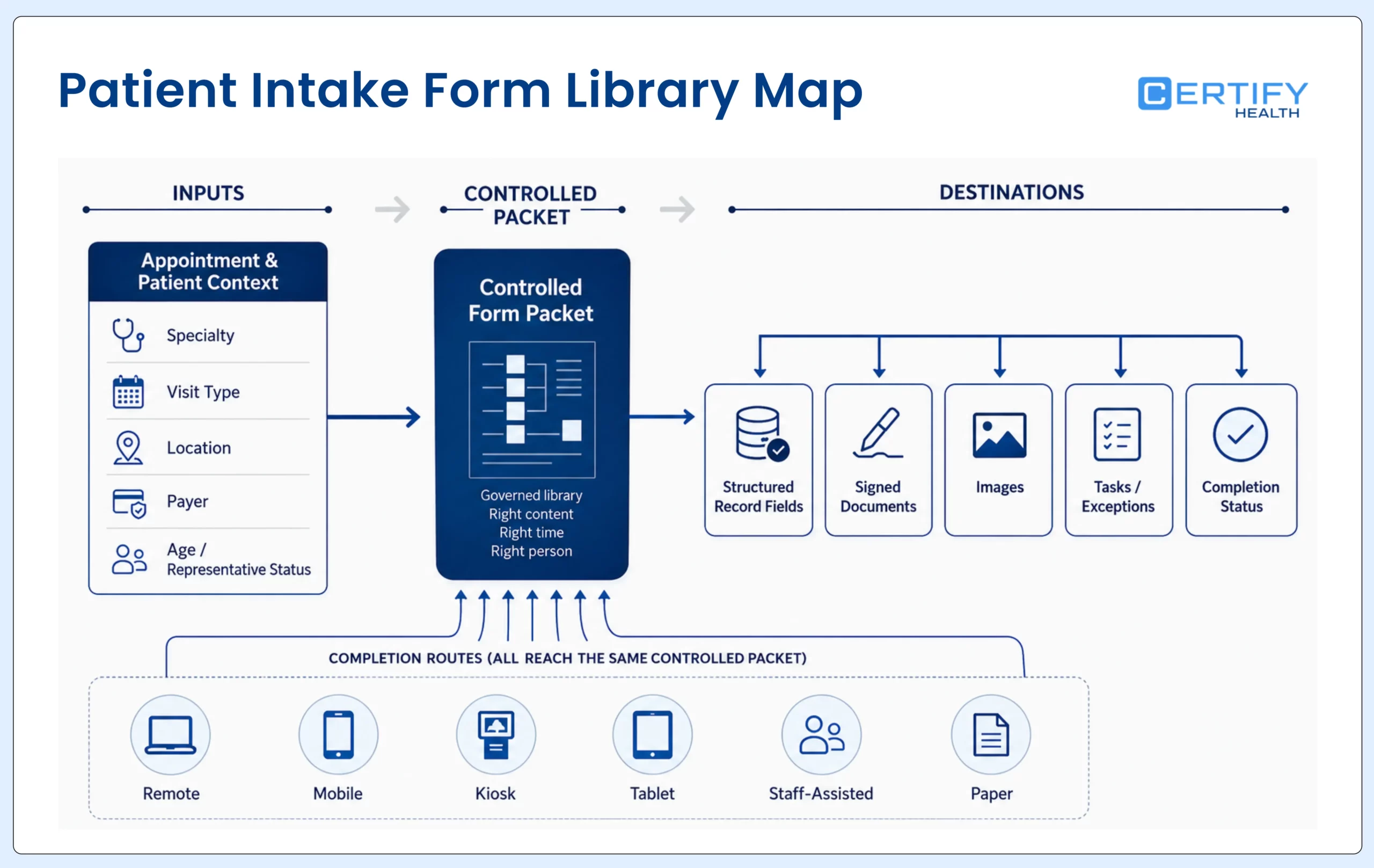
Start with ownership: Do not ask one generic intake form to serve every specialty, visit type, age group, payer situation, legal requirement, and delivery channel. Create a controlled form library in which every document and field has an owner, purpose, trigger, destination, review date, and exception path.
What Is a Patient Intake Form?
A patient intake form is a structured document used to collect essential patient information before a clinical encounter.
The form may be paper or digital. It may collect demographics, contact preferences, insurance, clinical history, visit-specific questions, acknowledgments, authorizations, signatures, uploads, or financial information. But no single list is automatically required for every encounter. The organization must decide why each item is collected, who may use it, where it belongs, how long it remains valid, and what happens if the patient cannot or does not provide it.
| A form is | A form is not | Operational test |
|---|---|---|
| A controlled way to request and record defined information | The entire patient-intake process | Can the team state the purpose, owner, trigger, destination, and exception path for every section? |
| One component of visit readiness | Proof that the patient is ready for the visit | Can staff see which required items are complete, reviewed, accepted, rejected, or still unresolved? |
| A data-collection and documentation interface | A guarantee that submitted information is correct or in the right record | Are matching, validation, review, correction, and reconciliation built into the workflow? |
| A channel that can be offered remotely or in the facility | A reason to remove assisted or paper alternatives | Can people complete the required work when the primary digital route is inaccessible, unavailable, or inappropriate? |
| A configurable part of an existing EHR, EMR, or practice-management environment | Automatic replacement of the system of record | Does the implementation map every field, document, image, signature, task, and status to its intended destination? |
Seven form types to govern separately
| Form type | Typical job | Examples | Owner and review question |
|---|---|---|---|
| Registration and demographics | Identify and contact the patient or responsible party | Legal or preferred name as operationally appropriate, date of birth, address, phone, email, emergency contact, communication preference | Registration and HIM: which fields are required for matching, communication, and the record? |
| Insurance and financial | Prepare coverage, responsibility, and collection workflows | Plan, member and group identifiers, subscriber relationship, card images, guarantor details, financial-policy acknowledgment | Eligibility, billing, and compliance: what is collected, verified, estimated, acknowledged, or paid at this stage? |
| Clinical history and screening | Give the clinical team relevant pre-visit information | Conditions, procedures, medications, allergies, symptoms, risk or screening instruments, specialty history | Clinical owner: what is necessary for this visit, who reviews it, and how are urgent answers escalated? |
| Visit-specific questionnaires | Collect information tied to an appointment, procedure, referral, or service | Reason for visit, preparation, device or telehealth readiness, referral documents, pre-op questions | Service-line owner: which appointment context triggers the form and when does it expire? |
| Consent and authorization instruments | Document a specific permission, informed decision, or authorization where required | Treatment consent, procedure consent, release authorization, communication permission, financial agreement | Legal and clinical owners: is this acknowledgment, consent, or authorization; what law and workflow govern it? |
| Notice acknowledgments | Record receipt of a notice or policy without turning it into a broader permission | Notice of Privacy Practices acknowledgment, office or financial policy receipt | Privacy and operations: what must be provided, what acknowledgment is sought, and what happens if it is not obtained? |
| Update and recertification | Confirm what changed without forcing a complete new packet | Contact and insurance pulse check, medication or allergy update, annual or visit-based document renewal | Form owner: which data can be prefilled, what must be reconfirmed, and which change creates an exception? |
Generic won’t cut it for specialists.
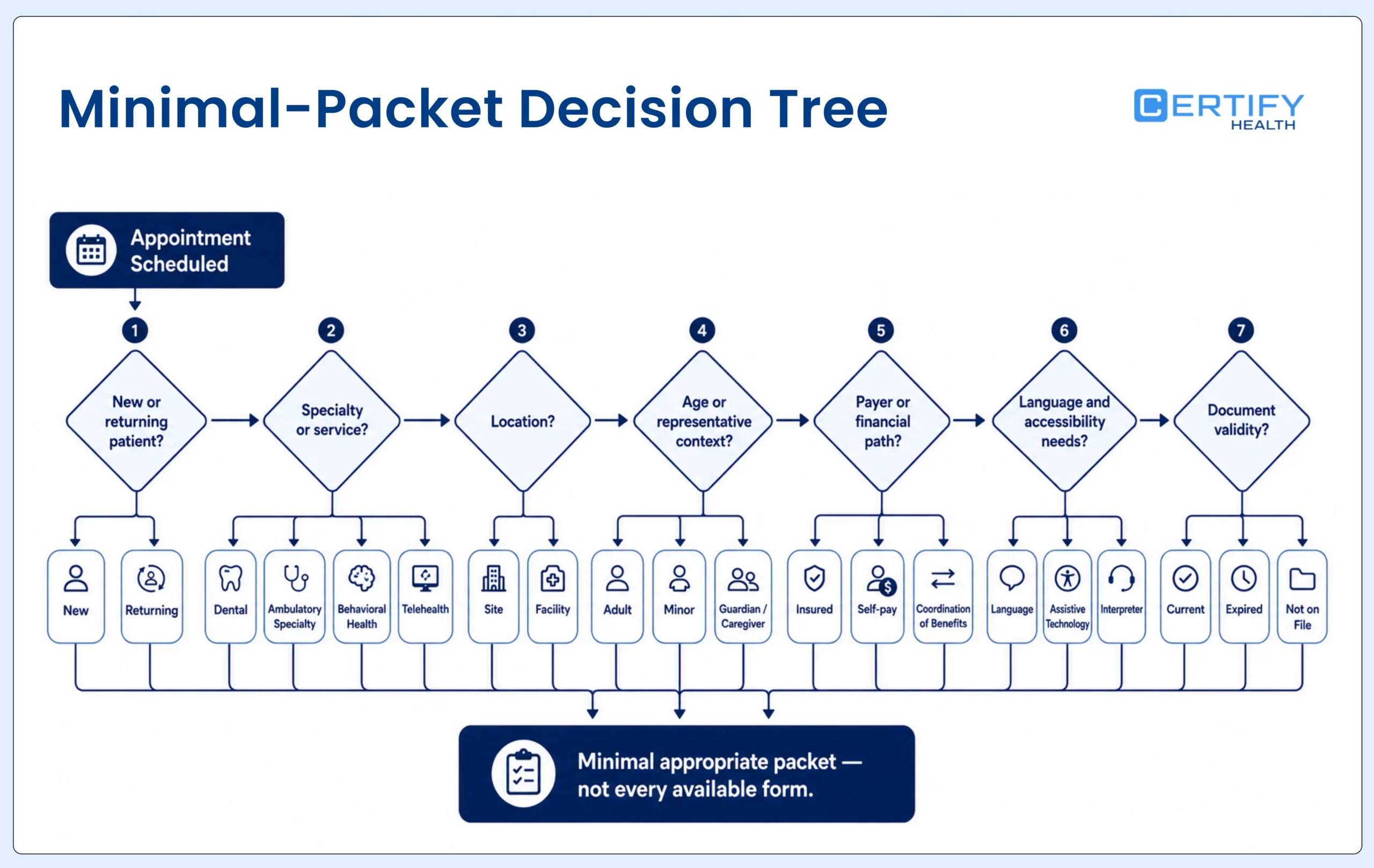
Specialty variation should be deliberate, not a duplicate packet with a different logo. Keep shared demographics and governance rules consistent, then add only the clinical, procedural, payer, caregiver, or facility questions that change the job of the form.
Use this field-by-field intake form template
Treat the table below as a design worksheet, not a copy-and-paste form. A clinical, privacy, legal, billing, accessibility, health-information, and technical owner should decide which rows apply to the intended workflow.
| Information group | Purpose and design questions | Destination and validation | Common exception |
|---|---|---|---|
| Identity and demographics | Which identifiers support matching and registration? Which name fields are needed for legal, clinical, billing, and respectful communication uses? | Match to the patient and appointment; normalize dates, phones, addresses, and names without overwriting reviewed data silently | Potential duplicate, mismatch, dependent, newborn, alias, or changed name |
| Contact and communication | Which channel may be used for which purpose? Is a confidential or alternative communication request relevant? | Write to approved contact fields and preference records; verify ownership and consent rules for the channel | Shared device, landline, proxy contact, invalid number, bounced email, or privacy request |
| Emergency contact and representative | Is the person only an emergency contact, involved in care or payment, or legally authorized to act? | Store relationship and authority separately; route representative evidence for staff review | Minor, guardian, caregiver, interpreter, power of attorney, or authority not established |
| Insurance and guarantor | Which identifiers, subscriber details, card images, and guarantor data are needed for the scheduled service? | Route structured coverage data and source images to the eligibility or billing workflow; verify rather than assume coverage | Unreadable card, changed plan, coordination of benefits, subscriber mismatch, or self-pay |
| Clinical history | What does the clinician need before this specific encounter? Which answers require immediate review? | Send structured items, signed questionnaires, or a review task to the defined clinical destination | Urgent symptom, medication uncertainty, conflicting history, missing answer, or wrong instrument |
| Allergies and medications | Will the patient confirm existing data, add an item, or submit a free-text list? Who reconciles it? | Route to the correct reconciliation workflow; do not treat patient submission as clinician verification | Duplicate, unknown dose, discontinued item, adverse reaction, or no response |
| Visit purpose and specialty | Which appointment or procedure triggered the question and which branches are relevant? | Tie the response to the appointment and service line; suppress irrelevant sections | Appointment type changed, referral missing, branch logic fails, or free text indicates another service |
| Language, disability, and assistance | What language, communication, device, accessibility, interpreter, caregiver, or assisted-completion support is needed? | Route a service or accommodation task without exposing sensitive details beyond the staff who need them | Requested language unavailable, assistive technology barrier, proxy use, timeout, or in-office assistance needed |
| Acknowledgments and signatures | What document was shown, which version, for what purpose, and whose acknowledgment or signature is required? | Store the signed or acknowledged artifact with version, timestamp, signer role, and status appropriate to the workflow | Refusal, inability to sign, representative authority, expired form, changed document, or emergency exception |
| Uploads and supporting documents | Which file is needed, what formats are accepted, and who verifies legibility and relevance? | Store the original or approved derivative in the correct document class; create a task when review fails | Wrong file, malware or unsupported format, unreadable image, expired card, or sensitive overcollection |
Minimum-necessary caution: The HIPAA minimum necessary standard applies to many uses, disclosures, and requests, but it has exceptions, including certain treatment disclosures. Do not turn it into a universal instruction to delete clinical fields. Use it as one governance lens and have privacy, legal, and clinical owners determine the appropriate data for the purpose.
Do not combine every consent, notice, and authorization into one signature
| Document job | What the workflow should record | Key implementation question |
|---|---|---|
| Notice acknowledgment | The notice version provided, delivery method, date, acknowledgment status, and good-faith effort or reason not obtained when applicable | Does the organization distinguish acknowledgment of receipt from permission for other uses or disclosures? |
| Treatment or procedure consent | The specific service or procedure, information presented, clinician or staff process, patient or representative, signature or other evidence, and any limits or refusal | Which parts are clinical conversation and which parts may be supported—but not replaced—by a digital document? |
| HIPAA authorization | The defined information, people or organizations, purpose, expiration, signature, date, representative authority, and required statements for the intended authorization | Does counsel confirm that an authorization is required and that the current form contains the required elements? |
| Communication permission or preference | Channel, purpose, recipient, limitations, shared-device concerns, and effective period | Is the organization recording a preference, obtaining consent, or satisfying another specific legal or contractual rule? |
| Financial policy acknowledgment | The current policy version, responsibility or estimate context, signer, date, and exception or dispute route | Does the form explain what is known, estimated, not covered, or still subject to payer adjudication? |
| Representative or guardian evidence | Relationship, authority type, supporting evidence, scope, validity period, and review status | Can staff tell who completed the form, for whom, under what authority, and which actions are permitted? |
For organization-level role, BAA, policy, safeguard, training, and incident-response questions, use the HIPAA patient intake compliance guide. For threat, access, session, device, logging, connected-service, and recovery controls, use the digital patient intake security guide.
HHS explains that a direct-treatment provider generally must provide the Notice of Privacy Practices by first service delivery and make a good-faith effort to obtain written acknowledgment; acknowledgment is not the same as agreement to special uses or disclosures. See HHS Notice of Privacy Practices guidance.
Design patient intake forms people can understand and complete
- Use a visible label for every field. Instructions, examples, required status, and format expectations should be available before the patient makes an error.
- Ask one clear question at a time. Replace internal jargon with everyday language, explain why a sensitive or unfamiliar item is being requested, and test the material with patients.
- Identify errors in text, associate them with the affected field, preserve valid answers, and explain how to correct the problem. Do not rely on color alone.
- Test keyboard navigation, focus order, screen readers, zoom, reflow, contrast, date controls, signature steps, uploads, conditional questions, and review screens.
- Warn before a session expires, allow more time where appropriate, support save-and-return safely, and explain what was submitted versus what remains incomplete.
- Offer language assistance and translated workflows that preserve meaning, field mapping, entered values, document version, and downstream processing—not only translated button labels.
- Provide an assisted route for people who need help, a representative route when appropriate, and a paper or equivalent alternative when digital completion is inaccessible or unsuitable.
- Measure abandonment, errors, assistance requests, and completion by device, channel, language, location, and accessibility scenario so aggregate completion does not hide exclusion.
Design references: AHRQ Health Literacy Universal Precautions Toolkit, AHRQ Tool 11 for understandable and actionable materials, WCAG 2.2, and HHS Section 504 fact sheet. Applicability and legal requirements must be confirmed for the organization; WCAG is also a practical design and test reference.
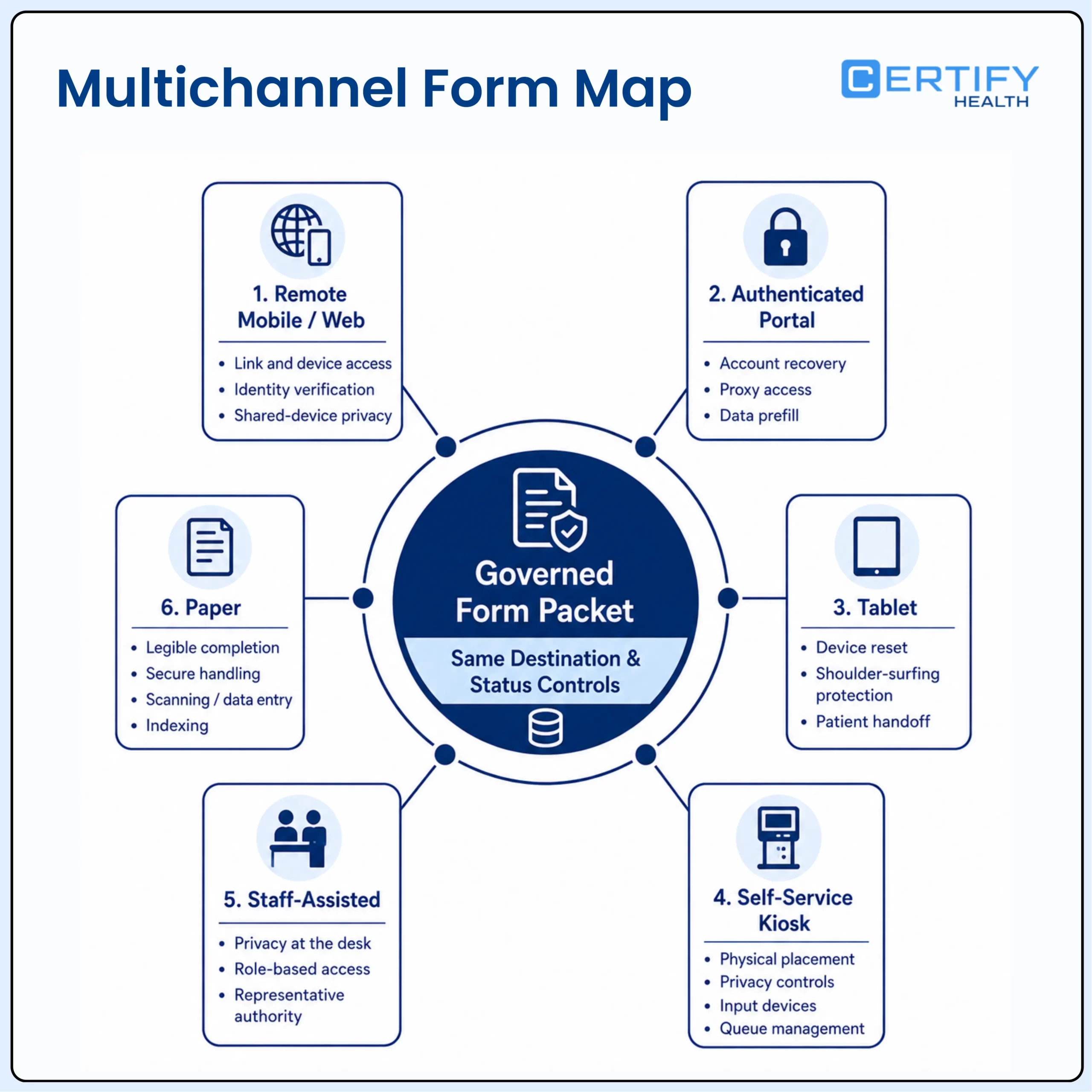
Choose the completion channel by patient and visit context
Paper forms are still widely used. They work.
A digital intake form isn’t just a paper form slapped onto a screen.
| Channel | Good fit | Design and risk checks | Fallback |
|---|---|---|---|
| Remote mobile or web | Pre-registration before arrival; time to gather history, insurance, and documents | Link and device access, identity, shared-device privacy, save-and-return, upload, accessibility, language, timeout, support | Resend, switch device, phone or staff help, complete in facility |
| Authenticated portal | Returning patients and ongoing document or questionnaire workflows | Account recovery, proxy access, data prefill, stale information, notices, accessibility, record matching | Guest or assisted route where approved; in-office completion |
| Tablet | Staff-guided in-office intake or a portable alternative to a kiosk | Device reset, shoulder surfing, cleaning, accessibility settings, handoff between patients, offline behavior | Staff-assisted or paper process |
| Self-service kiosk | Arrival, check-in, identity, card capture, forms, consent, or payment in a managed space | Physical placement, privacy, reach, input devices, accessibility, queue, session clearing, failure recovery, staff assistance | Mobile handoff, accessible station, staff desk, paper or other equivalent route |
| Staff-assisted | Language, disability, technology, distress, complex representative, or exception scenarios | Privacy at the desk, role access, read-back, patient confirmation, representative authority, auditability | Private room, interpreter or communication support, paper or alternate device |
| Paper | Downtime, patient preference or need, legal or clinical context, or inaccessible digital route | Current version, legibility, secure handling, scanning or data entry, indexing, correction, storage and destruction | Controlled digital conversion and reconciliation |
For a deeper channel decision, see kiosk vs. mobile patient check-in. For in-facility design and rollout, use the patient check-in kiosk guide.
Map every answer to a destination and an owner
- Trigger the correct packet from a defined appointment, specialty, patient, location, payer, language, age, provider, procedure, or document-validity rule.
- Match the person, representative, appointment, and destination record before accepting or writing information. Route uncertainty to a visible queue.
- Prefill only approved data. Show what the patient is being asked to confirm, allow correction, and prevent stale values from silently overwriting reviewed data.
- Apply conditional logic carefully. Test every branch, including no-answer, contradictory answer, skipped field, changed appointment, representative completion, and expired document scenarios.
- Decide the destination for each item: structured field, signed document, image, clinical or billing task, alert, status, or no downstream storage beyond the approved workflow.
- Make review status explicit. Submitted, complete, reviewed, accepted, rejected, corrected, expired, and failed are different states and should not be collapsed into one green checkmark.
- Test writeback, retries, duplicates, late submissions, correction, version changes, downtime, recovery, export, and reconciliation with the actual EHR, EMR, or practice-management configuration.
- Monitor exceptions after go-live. New forms, fields, integrations, staff workarounds, policies, service lines, and vendor releases can change the risk and data flow.
Not every answer belongs in a structured field: A response may belong as a structured field, a signed document, an image, a task, a status, or a clinician-reviewed artifact. Define the clinical and operational use first. Then test the destination, presentation, correction, and downstream effect.
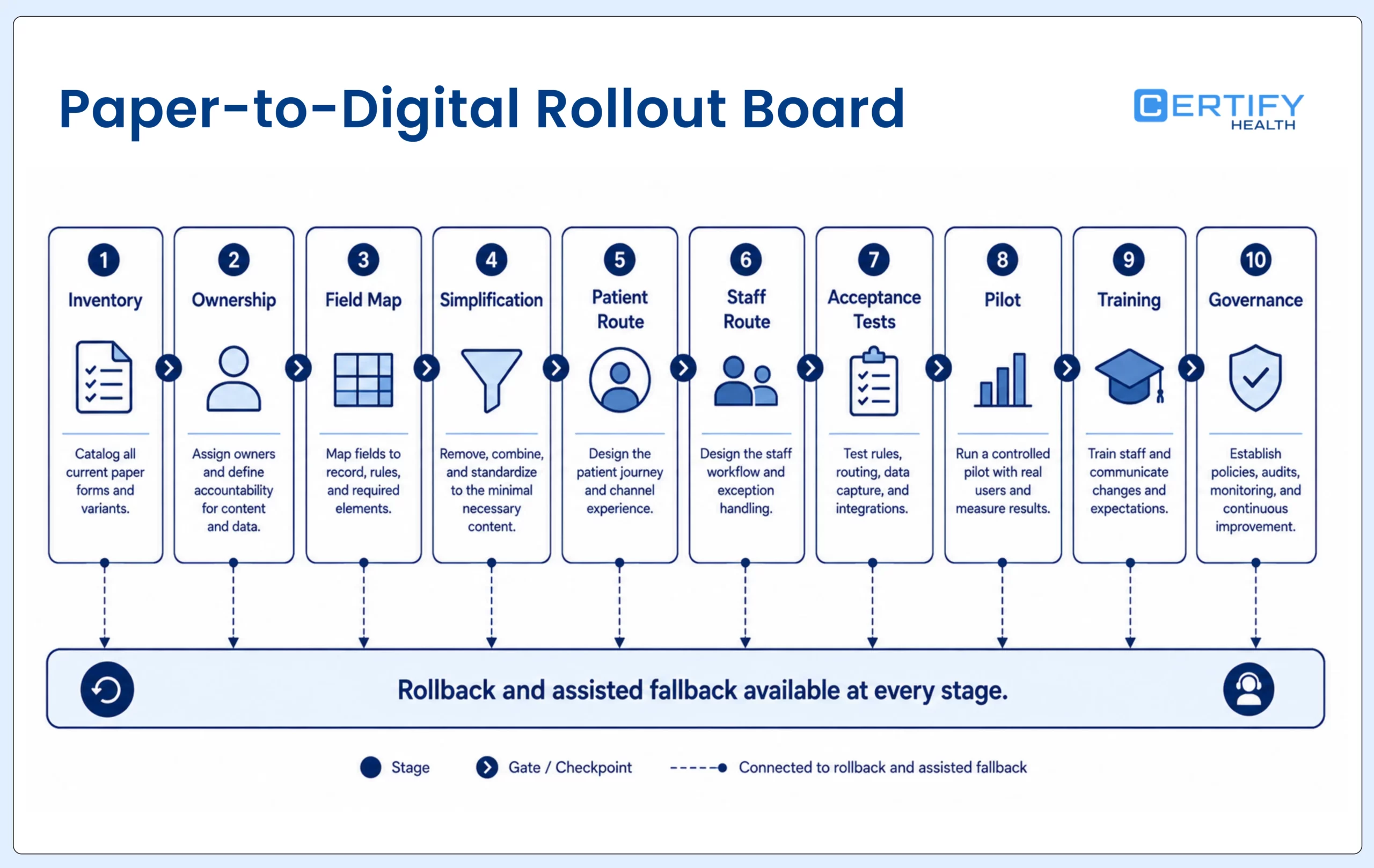
Paper-to-digital patient intake form checklist
- Inventory every live form, version, owner, audience, language, location, trigger, signature, storage location, retention rule, downstream use, and duplicate. Include shadow forms kept in shared drives, local desktops, email templates, scanners, and vendor portals.
- Choose one owner for each form and one owner for each destination workflow. Confirm clinical, privacy, legal, billing, accessibility, health-information, and technical requirements before redesign.
- Map every field. Record its purpose, required or optional status, source, help text, validation, branch logic, role access, destination, refresh trigger, correction method, and exception owner.
- Remove duplicate questions and split unrelated purposes. Use conditional sections or separate documents when the audience, signer, legal instrument, specialty, validity period, or downstream destination differs.
- Design the patient route. Define when and how the packet is sent, reminder cadence, identity and representative path, supported devices, language, accessibility, save-and-return, assisted completion, paper alternative, and contact for help.
- Configure the staff route. Show assignment, progress, incomplete items, urgent answers, matching exceptions, failed uploads, missing signatures, writeback failures, corrections, and who closes each item.
- Run acceptance tests with realistic patients and visits. Include normal, error, accessibility, language, caregiver, dependent, downtime, duplicate, changed appointment, expired form, late submission, and integration-failure scenarios.
- Pilot with a controlled location or visit type. Capture a baseline, monitor exceptions daily, keep a rollback and downtime path, and resolve problems before expanding the packet or rollout.
- Train by role. Front desk, clinical, billing, privacy, technical support, and managers should each know what they see, what they may change, what they escalate, and how they recover when the workflow fails.
- Govern after launch. Review field additions, form versions, translations, accessibility findings, completion and error patterns, connected systems, vendor releases, retention, exports, access, and retirement on a defined cadence.
Examples: how intake forms change by care setting
| Setting | Form-workflow differences to evaluate | Do not assume |
|---|---|---|
| Dental and DSO | Dental history, current conditions and medications, insurance card and subscriber details, treatment and financial documents, location or brand rules, recurring updates, multi-site governance | That one packet applies to every practice, state, procedure, plan, or patient |
| Ambulatory specialty | Specialty history, validated screening instruments where approved, referral and prior records, visit-specific symptoms, medication or allergy reconciliation, provider review timing | That generic questions are clinically sufficient or that patient-submitted data is already reconciled |
| Ambulatory surgery center | Procedure, pre-op, responsible adult or transportation, consent workflow, eligibility and financial readiness, clinical escalation, time-sensitive expiration | That a digital signature replaces the clinical consent process or that a completed form means procedure-ready |
| Behavioral health | Sensitive information, privacy and communication preferences, crisis or urgent-answer routing, validated instruments, caregiver or representative context, recurring assessments | That every answer should be visible to every operational role or sent through ordinary messaging |
| Pediatrics | Parent or guardian identity and authority, dependent matching, age and consent context, vaccination or history workflows as clinically determined, multiple responsible parties | That the person completing the form is always the patient or has authority for every action |
| Telehealth | Visit location, contact and backup channel, technology and accessibility needs, required pre-visit history, consent and policy workflow as applicable, failure or conversion to another modality | That a working video link proves the patient is ready or that one telehealth form fits every jurisdiction and service |
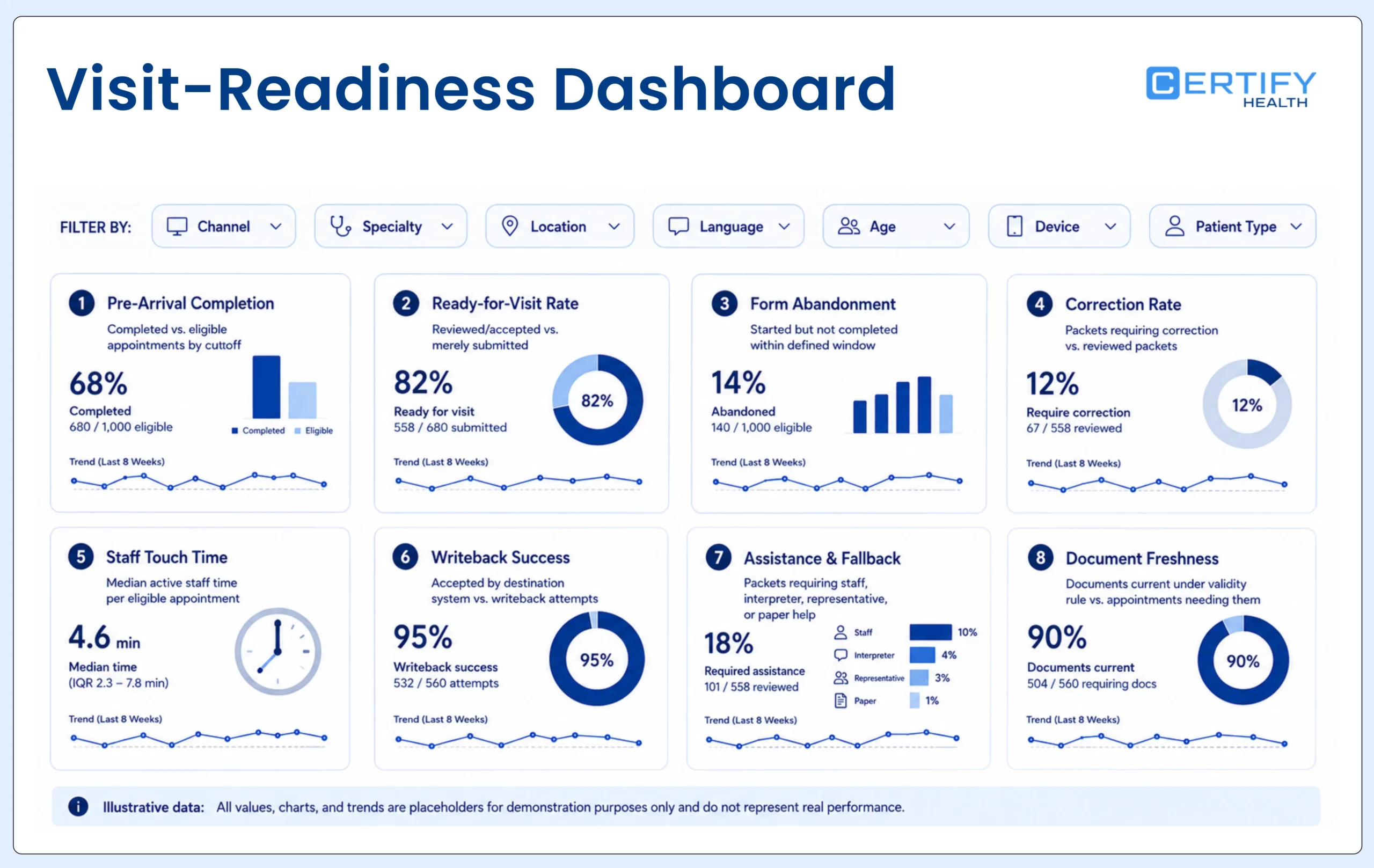
Measure whether the forms create visit readiness
| Metric | Definition | Segment and diagnostic |
|---|---|---|
| Pre-arrival completion | Appointments with the required packet complete by the agreed cutoff divided by eligible appointments | New or returning, specialty, location, age, channel, language, device, payer, form packet |
| Ready-for-visit rate | Eligible appointments with every required item reviewed or accepted—not merely submitted—by the cutoff | Separate incomplete, unreviewed, mismatched, expired, rejected, and failed-writeback reasons |
| Form abandonment | Started packets without completion within the defined window | Step, field, branch, device, browser, language, accessibility scenario, timeout, upload, signature |
| Correction rate | Submitted packets requiring patient or staff correction divided by reviewed packets | Field, source, prefill, free text, OCR, card image, representative, wrong patient, outdated data |
| Staff touch time | Median active staff time spent assigning, chasing, reviewing, correcting, rekeying, filing, and reconciling per eligible appointment | Role, location, visit type, normal versus exception, channel |
| Writeback success | Expected data or documents accepted by the intended destination within the defined window divided by writeback attempts | System, version, object, field or document class, error, retry, duplicate, reconciliation status |
| Assistance and fallback | Packets requiring staff, interpreter, representative, alternative device, paper, or other assistance | Reason, completion outcome, wait, privacy location, accessibility or language need |
| Document freshness | Required documents current under the approved validity rule divided by appointments needing them | Document type, version, location, provider, specialty, age or representative context |
| Downstream readiness | Eligibility, clinical, consent, payment, or other defined workflows able to proceed without intake-related missing information | Name the downstream job; do not combine unrelated outcomes into one score |
How CERTIFY Health can support the form workflow
CERTIFY Health positions its digital forms and eConsents within a configurable patient-intake workflow around an existing EHR, EMR, or practice-management environment. Depending on the purchased and implemented scope, the workflow can support remote pre-registration, portal, tablet, and kiosk routes; demographics and contact updates; insurance and card capture; health questionnaires; typed or drawn signatures; document rules based on patient, visit, provider, facility, language, validity, or other configured context; staff status views; and data, document, image, task, or status movement into supported host-system workflows.
Those are configurable capabilities, not a statement that every deployment includes every route, rule, integration, identity method, language, document, report, or outcome. A scoped demonstration and acceptance test should prove the actual packet, patient route, role model, destination, error behavior, accessibility, assistance path, and reconciliation process.
For one large multi-location dental group, digital intake addressed a workflow in which 30% of required documentation had been missing before the visit. Patients could confirm or update contact and insurance information before arrival, and pre-registration completion reached 87% overall, including 73% among patients older than 75. The operational value was straightforward: more complete records reached the practice earlier, giving staff time to review exceptions before check-in instead of discovering them at the front desk.
The standard is not paperless. It is ready, usable, and governed.
A strong patient intake form program does not begin with a template download or a paperless target. It begins by defining the job of each form, collecting only the information appropriate to that job, presenting it through accessible and assisted routes, mapping each answer to a known destination, separating acknowledgment from consent or authorization, and giving staff a visible way to resolve exceptions before they affect the visit.
If you are evaluating platforms rather than redesigning the form library, compare the eight HIPAA-enabled form solutions and use the digital intake selection guide for the broader buyer decision.
Frequently asked questions
What information should be on a patient intake form?
Is there one universal patient intake form template?
No. A reusable design worksheet is helpful, but the final packet depends on specialty, visit type, patient and representative context, location, payer, organization, jurisdiction, clinical need, document validity, and downstream workflow. Shared fields can be governed centrally while conditional or separate forms handle meaningful differences.
Should every field be required?
No. Required status should follow the purpose and risk of the field. A required field can block completion, so test why it is necessary, whether the patient can reasonably answer, whether ‘unknown’ or ‘prefer not to answer’ is appropriate, who resolves missing information, and what happens when the person needs assistance or an alternative route.
Should every answer write into a structured EHR field?
No. Some answers belong in structured fields, while others belong as signed documents, images, tasks, alerts, statuses, or clinician-reviewed artifacts. Define how the information will be used and corrected, then test the field, document class, timing, failure behavior, and reconciliation in the actual host-system configuration.
How often should intake forms be updated?
Use a defined review and validity rule for each form and field. Trigger review when clinical guidance, law, policy, payer rules, service lines, languages, accessibility requirements, host systems, integrations, patient context, or document content changes. Patient information can be reconfirmed through focused update requests instead of forcing the full new-patient packet every time.
Can a practice require digital intake forms?
The organization should obtain legal and accessibility guidance for its circumstances. Operationally, it should preserve an effective route for people who cannot use the primary digital channel, need language or disability support, require a representative, encounter downtime, or have another legitimate completion barrier. Test the alternative as part of the normal workflow rather than treating it as an improvised exception.