Table of Contents
Introduction
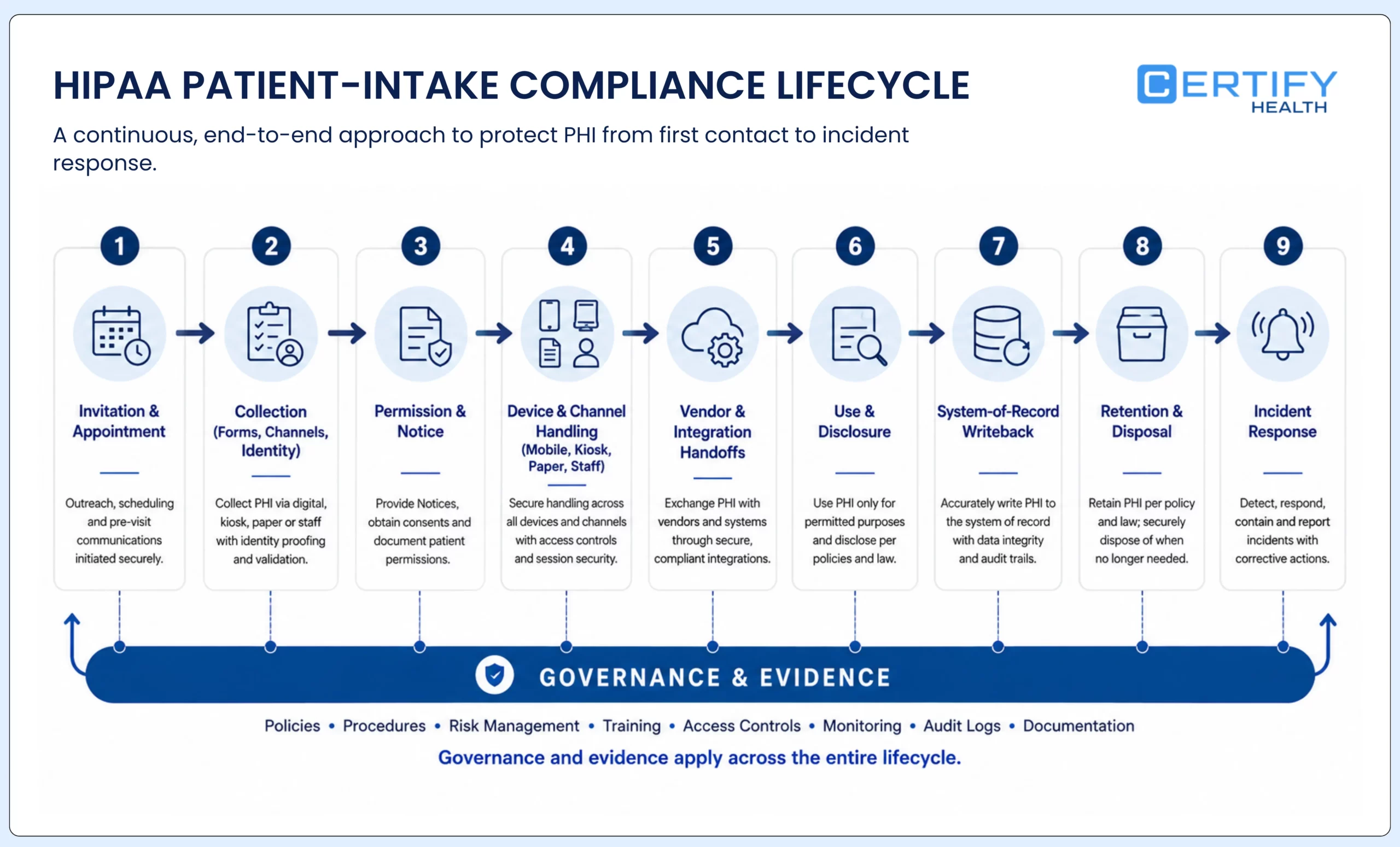
HIPAA compliance in patient intake is not a label attached to a form or software vendor. It is the way a regulated organization governs protected health information from the first invitation or front-desk conversation through collection, use, disclosure, storage, system-of-record writeback, retention, disposal, and incident response.
That distinction matters because the same intake workflow can cross a website, text or email message, personal phone, shared tablet, kiosk, scanner, payment step, identity service, cloud platform, interface, EHR or practice-management system, work queue, support ticket, report, and paper fallback. A BAA or encrypted page may be important, but neither proves that the complete workflow is compliant.
The practical goal is not to collect the least information at any cost or to force every patient through one channel. It is to collect and use information for a defined purpose, apply the rules that govern that purpose, protect the information in every format, preserve patient rights and reasonable alternatives, and retain evidence that the approved process is working.
The short answer
- Confirm whether each organization and vendor is acting as a covered entity, business associate, subcontractor, or another type of party for the specific service.
- Map every intake field, file, channel, recipient, destination, log, export, and exception before approving the workflow.
- Separate a Privacy Rule permission, a patient authorization, a Notice of Privacy Practices acknowledgment, and a consent required by another law or policy; they are not interchangeable.
- Apply current Privacy, Security, and Breach Notification requirements to the actual deployment, and keep proposed changes clearly labeled as proposed.
- Test paper, mobile, kiosk, tablet, and staff-assisted routes—including failure and fallback—not only the ideal digital path.
- Maintain an evidence pack with decisions, contracts, notices, configurations, training, test results, incidents, remediation, owners, and review dates.
Review Your Digital Intake and Pre-Visit Readiness Workflows
CERTIFY Health helps outpatient practices address paper forms, missing insurance cards, incomplete consents, and front-desk rework so teams can turn intake into cleaner visit readiness.
What HIPAA compliance means during patient intake
The HIPAA Privacy Rule establishes national standards for protected health information held or transmitted by covered entities and their business associates. It applies to health plans, health care clearinghouses, and health care providers that conduct certain covered transactions electronically. A software company, messaging provider, cloud service, consultant, or other vendor may be a business associate when its work for a covered entity involves creating, receiving, maintaining, or transmitting PHI—but the role depends on the relationship and service, not the vendor’s marketing label.
PHI is individually identifiable health information in any form or medium when the HIPAA definition and entity relationship are met. ePHI is the subset transmitted by or maintained in electronic media. That means the Privacy Rule can matter to spoken conversations and paper forms, while the Security Rule specifically governs ePHI. State privacy, medical-record, biometric, consumer-protection, consent, retention, and specialty rules may add obligations; HIPAA is not the only possible source of requirements.
| Rule or duty | What it governs | Patient-intake questions |
|---|---|---|
| Privacy Rule | Permitted and required uses and disclosures of PHI; safeguards; notices; individual rights | Why is the information collected? May it be used or disclosed for this purpose? Is authorization required? Is the current notice available? |
| Security Rule | Administrative, physical, and technical safeguards for ePHI | What ePHI exists across forms, devices, vendors, integrations, logs, and backups? What risks and safeguards apply to the configured environment? |
| Breach Notification Rule | Assessment and notification after a breach of unsecured PHI | What happened, what information was involved, who received it, was it acquired or viewed, what mitigation occurred, and which notices are required? |
| Business-associate duties | Contractual and direct HIPAA duties for qualifying service relationships | Which party performs which function, who handles PHI, which subprocessors are involved, what does the BAA require, and how are incidents escalated? |
| Other applicable law and policy | Requirements outside HIPAA, including state, specialty, biometric, accessibility, record, and payer obligations | Does the patient population, information type, state, specialty, channel, or use trigger an additional rule or a more protective standard? |
Legal boundary: This guide is an operational framework, not legal advice. The organization should have privacy and legal counsel confirm entity status, permissions, notices, authorizations, contracts, state-law requirements, record obligations, and incident decisions for the actual workflow.
Map the intake lifecycle before reviewing a form
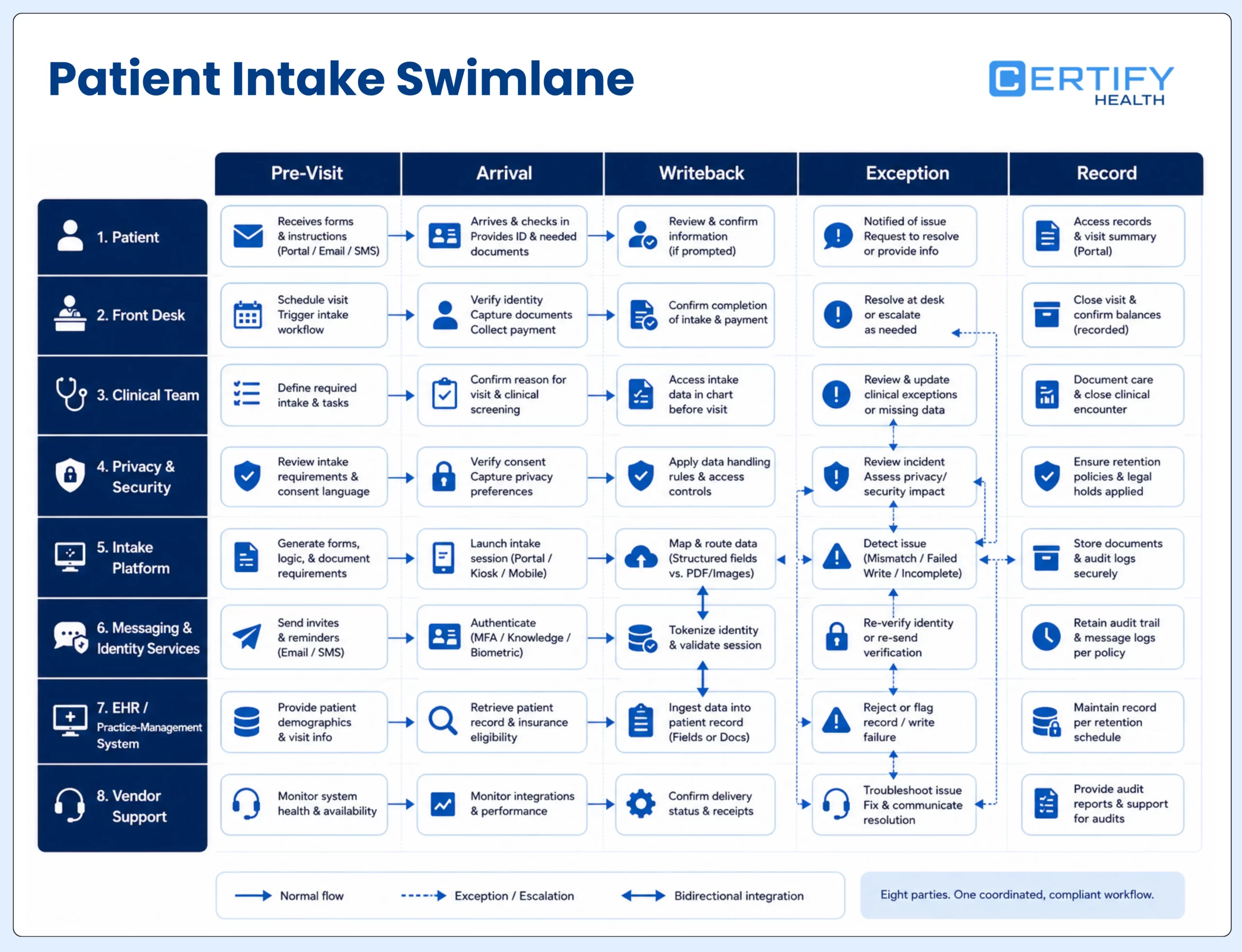
Begin with the actual patient journey, not the vendor questionnaire. Choose one visit type and trace it from appointment creation through pre-registration, arrival, rooming, billing, correction, and record retention. Include the paper or staff-assisted route because it often reveals disclosures, duplicate entry, printouts, scans, and workarounds that a digital-only diagram misses.
| Inventory item | Questions to answer | Evidence to retain |
|---|---|---|
| Purpose and fields | What is collected, for what purpose, and for which visit types or populations? Which fields are required, optional, conditional, derived, or uploaded? | Field dictionary; form version; purpose and permission; approver; effective date |
| Channel and context | Is information provided by phone, paper, web, text link, email link, personal device, tablet, kiosk, scanner, or staff entry? What privacy and accessibility conditions exist? | Channel map; environmental review; alternate route; accessibility and privacy tests |
| Parties and roles | Which covered entity, workforce member, business associate, subcontractor, payer, provider, or other recipient handles the information? | Role determination; contract; BAA where applicable; subprocessor list; contact owner |
| Destination and writeback | Where does each value, document, signature, image, status, error, or payment result land? What happens when matching or writeback fails? | Field-level interface map; test cases; exception queue; reconciliation record |
| Use and disclosure | Who uses the information and for which treatment, payment, operations, authorization, legal, public-health, or other purpose? | Permission analysis; authorization template where needed; access role; disclosure procedure |
| Retention and disposal | How long is each form, attachment, export, log, scan, cache, and backup kept? Which record obligation controls? | Approved schedule; system configuration; legal hold rule; disposal evidence |
| Incident and recovery | How will the team detect misdelivery, wrong-patient matching, inappropriate access, lost paper, device exposure, failed writeback, or vendor incidents? | Alert and escalation map; incident record; breach assessment; recovery and reconciliation test |
The output should be one shared map used by operations, privacy, security, legal, IT, revenue cycle, clinical leadership, and the vendor. If each group maintains a different version of the workflow, gaps will appear at the handoffs.
Do not treat every intake signature as the same permission
A patient may sign several documents during intake, but their legal jobs differ. A registration acknowledgment, financial policy, clinical consent, HIPAA authorization, Notice of Privacy Practices acknowledgment, assignment of benefits, communication preference, and specialty-specific consent should not be collapsed into one undifferentiated checkbox.
| Instrument or decision | What it does | Intake implementation question |
|---|---|---|
| Privacy Rule permission | Allows certain uses or disclosures without a patient authorization when the rule's conditions are met, including many treatment, payment, and health care operations activities | Which permission supports this use or disclosure, and do minimum-necessary or other conditions apply? |
| HIPAA authorization | Provides permission for a use or disclosure that requires a valid authorization and must contain required elements | Is authorization actually required, is the form valid for the intended purpose, and can the patient receive care without agreeing where applicable? |
| Voluntary consent | A covered entity may choose a consent process for treatment, payment, and operations; it is not the same as an authorization | Does policy use consent, and is the workflow clear about its scope and consequences? |
| NPP acknowledgment | Documents a good-faith effort to obtain acknowledgment that the notice was received; it is not agreement with the notice or blanket permission | Was the current notice delivered at the required time, was acknowledgment requested, and was failure to obtain it documented? |
| Other consent or agreement | May be required by clinical, state, payer, research, biometric, communication, financial, or specialty rules or policy | Which authority requires it, what elements and timing apply, and how are revocation or refusal handled? |
HHS states that covered direct-treatment providers generally must provide the NPP no later than first service delivery, make a good-faith effort to obtain written acknowledgment except in specified emergency situations, keep the latest notice available at the facility, and prominently post the notice on a customer-services or benefits website. Electronic first service has additional notice-delivery expectations. The acknowledgment documents receipt; it does not convert every future use into an authorized disclosure.
2026 NPP review: HHS published revised model NPP materials in February 2026 reflecting Part 2-related changes and remaining NPP modifications. Compare the organization’s actual notice, services, entity type, and applicable Part 2 status with current HHS materials. Do not paste a model notice without legal review and organization-specific completion.
Apply minimum necessary without breaking the visit
The Privacy Rule generally requires covered entities to make reasonable efforts to limit many uses, disclosures, and requests for PHI to the minimum necessary to accomplish the intended purpose. HHS also identifies situations where the standard does not apply, including certain disclosures to or requests by a health care provider for treatment. That is why ‘collect as little as possible’ is not a complete intake policy.
- Name the operational or clinical purpose for every field, attachment, signature, and derived value.
- Define when the item appears: every visit, first visit, specialty visit, payer condition, procedure, age range, language, location, or risk trigger.
- Identify who uses it, where it writes back, whether it is visible to the patient or staff, and which downstream process depends on it.
- Remove duplicate collection when trusted data can be confirmed, updated, or reused under the organization’s policy and applicable requirements.
- Separate required, optional, and conditional fields in both interface design and reporting; do not use a single red asterisk as the entire governance model.
- Review free-text fields and uploads carefully because they can collect more sensitive information than the form designer anticipated.
- Record the approval, form version, effective date, and retirement date so the organization can explain what a patient was shown at a particular time.
This review often improves completion as well as privacy. Patients are less likely to abandon a form that asks relevant questions once, explains why sensitive information is needed, and saves completed work appropriately. Staff are less likely to create shadow notes when the approved form captures the information the next workflow actually needs.
Protect privacy across paper, mobile, kiosk, and assisted intake
A paper form can be seen on a clipboard, misfiled, left in a scanner, or discarded improperly. A mobile form can be opened on a shared phone, sent to the wrong number, or left in a browser session. A kiosk can expose a screen or an abandoned session. Staff-assisted intake can be overheard or recorded in free text. Compliance depends on reasonable safeguards for the actual setting.
| Channel | Privacy and compliance questions | Acceptance evidence |
|---|---|---|
| Paper | Where are blank and completed forms held? Who can see sign-in information? How are scans verified, stored, returned, and disposed of? | Walkthrough; locked storage; scan reconciliation; approved disposal method; incident route |
| Personal mobile or web | How are links delivered, expired, and recovered? What appears in messages and notifications? What happens on shared devices or after abandonment? | Delivery and expiry tests; content review; session behavior; accessible alternative; support script |
| Shared tablet or kiosk | Can the next user see prior information? Are the screen, camera, scanner, printer, and help interactions private? Is an assisted alternative available? | Placement review; privacy filter decision; peripheral and session-clear tests; cleaning and support procedure |
| Staff-assisted | Can conversations be overheard? What does staff enter, where, and under whose credentials? How are language, disability, proxy, and privacy needs handled? | Role-based script; private-space option; interpreter and accessibility process; access and audit review |
| Fallback and downtime | What happens when a patient declines, cannot use, or cannot complete the primary channel? How is later reconciliation controlled? | Approved alternate route; downtime form; temporary storage; reconciliation owner and completion record |
HHS permits appropriately limited patient sign-in sheets and calling patient names when reasonable safeguards are in place. A sign-in sheet should not display unnecessary medical information. The practical lesson is not that every lobby disclosure is prohibited; it is that teams should limit what is exposed and design the setting intentionally.
For a detailed channel decision, see the guide to choosing between kiosk, mobile, and assisted patient check-in.
Use the Security Rule as a risk-management process
For ePHI, the current HIPAA Security Rule requires administrative, physical, and technical safeguards and protection of confidentiality, integrity, and availability. HHS describes risk analysis as foundational. The analysis should address all ePHI the regulated entity creates, receives, maintains, or transmits—including information in devices, interfaces, logs, exports, support processes, and backups, not only the final record.
| Safeguard area | Intake examples | Questions for the configured deployment |
|---|---|---|
| Administrative | Risk analysis, risk management, workforce access, training, vendor management, incident and contingency procedures | Who owns each risk and decision? How are access, changes, training, vendors, incidents, and recovery reviewed and evidenced? |
| Physical | Lobby placement, screens, printers, scanners, tablets, kiosks, paper storage, workstation and media controls | What can another person see, hear, remove, print, scan, cache, or reuse? What happens during cleaning, repair, relocation, and disposal? |
| Technical | Unique access, authentication, session behavior, transmission, integrity, audit events, alerts, writeback, backup and restoration | Which controls apply to patients, workforce, administrators, vendors, devices, and interfaces? What evidence shows they work in normal and failure states? |
Current versus proposed: As of the primary sources reviewed on August 5, 2026, the January 2025 HIPAA Security Rule publication is a notice of proposed rulemaking, not a final rule. The current Security Rule remains in effect. Recheck HHS, the Federal Register, and eCFR immediately before publishing; do not present proposed requirements as current law.
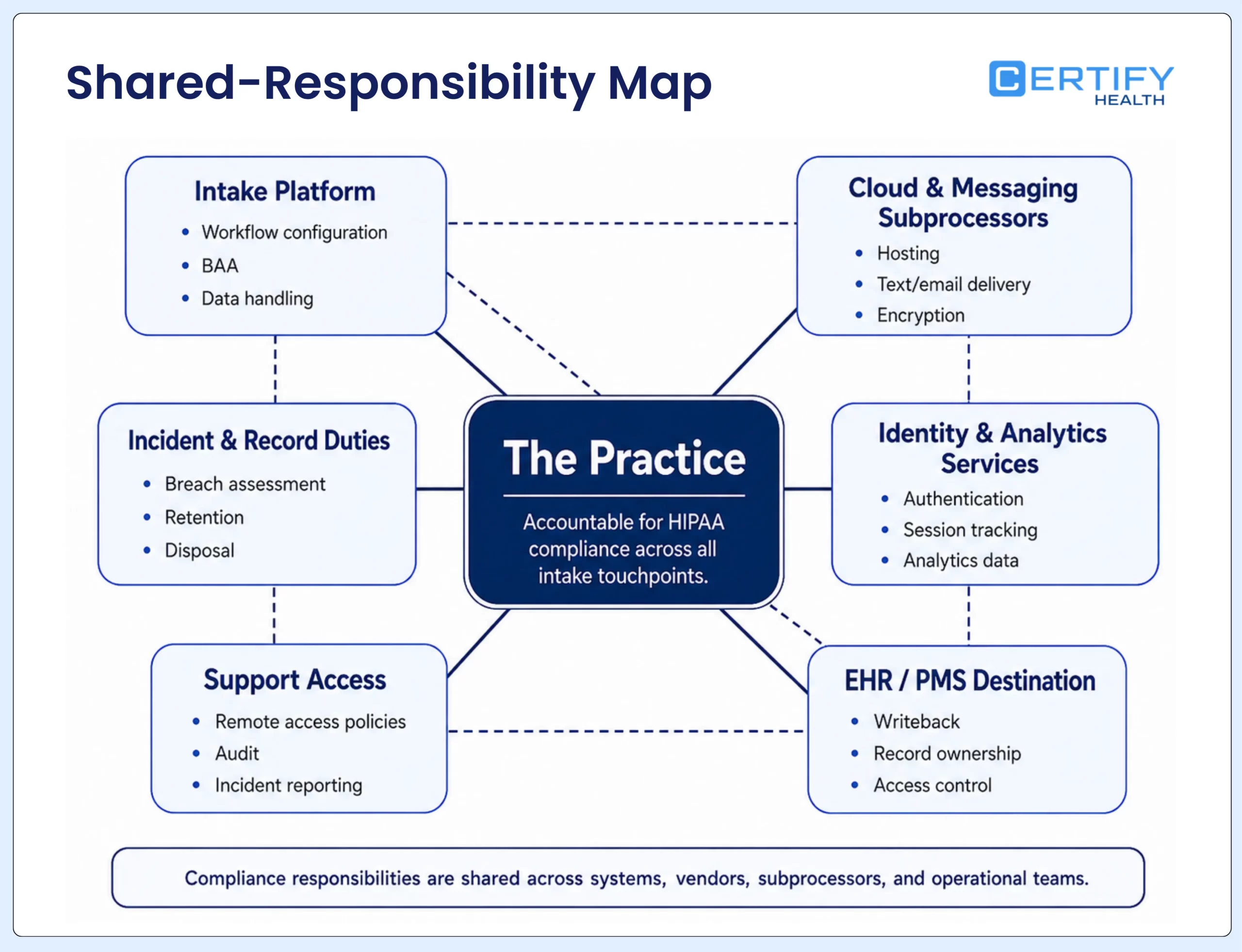
Treat vendors and integrations as part of the intake workflow
HHS explains that a covered entity may disclose PHI to a business associate when it obtains satisfactory assurances through a contract or other written arrangement that meets the rule’s requirements. Business associates and qualifying subcontractors also have direct obligations. A BAA matters, but it is not a compliance certificate and does not answer whether a particular collection, disclosure, configuration, or integration is permitted and controlled.
| Review area | Evidence to request | Failure to avoid |
|---|---|---|
| Role and scope | Service description; covered-entity or business-associate analysis; BAA where applicable; permitted and required uses and disclosures | Signing a generic BAA without mapping the actual service and data |
| Data and location | Field and file inventory; storage and processing locations; encryption scope; keys and access; retention and deletion behavior | Assuming a secure webpage describes every copy, cache, log, export, backup, and support path |
| Subprocessors | Current subprocessor list; functions; PHI access; contracts; change notice; downstream incident obligations | Reviewing only the primary vendor while ignoring messaging, hosting, identity, analytics, and support services |
| Integration | Authentication; field map; patient and visit matching; retry; duplicate protection; error handling; reconciliation; audit events | Calling an API connection compliant without testing wrong-patient, failed-writeback, and exception states |
| Tracking and analytics | Inventory of scripts and tags by page; data disclosed; recipient role; Privacy Rule permission or authorization; BAA where applicable; risk analysis | Assuming a cookie banner or downstream de-identification automatically resolves HIPAA obligations |
| Operations and exit | Support access; admin roles; incident timing; evidence delivery; backup and restoration; export; deletion; termination plan | Discovering during an incident or contract exit that the practice cannot retrieve logs, records, or configurations |
Build a Stronger Pre-Visit Workflow
This is where the workflow usually breaks down. Review how CERTIFY Health connects digital intake and pre-visit readiness workflows to help outpatient practices turn intake into cleaner visit readiness.
Separate patient identification from workforce access
Intake can involve at least four identity decisions: whether a link reached the intended person, whether submitted information belongs to the correct patient and visit, whether a workforce member should see or change it, and whether an administrator or vendor may configure the system. One control does not settle all four.
- Define matching and escalation rules for new patients, returning patients, dependents, proxies, guardians, shared contact details, name changes, duplicate records, and uncertain matches.
- Assign workforce access by job responsibility and review it after role changes, terminations, location changes, incidents, and on an approved risk-based cadence.
- Separate ordinary staff, supervisors, privacy staff, security staff, system administrators, integration accounts, vendor support, and emergency access where the environment supports those roles.
- Log meaningful events and make sure reviewers can distinguish patient actions, staff actions, automated changes, interface events, and vendor support without collecting unnecessary PHI in logs.
- Train staff to use the approved correction and exception process rather than sharing credentials, editing the wrong chart, creating shadow documents, or bypassing identity checks to keep the line moving.
FaceCheck boundary: Where FaceCheck is deployed, describe it as a biometric patient-identification layer within a configured workflow. Do not call it universal authentication, fraud prevention, or HIPAA compliance proof. Confirm notice, consent, retention, refusal, accessibility, alternate identification, and state-law requirements for the actual deployment.
Control versions, retention, and disposal
A form does not disappear from governance after the patient signs it. The organization should be able to identify which version was presented, what the patient completed or declined, when and how it was delivered, who changed the result, where it was stored, how it entered the designated record, and which policy controls retention and disposal.
| Record or copy | Questions to resolve | Control evidence |
|---|---|---|
| Form, notice, consent, or authorization | Which version and language applied? Was a signature, acknowledgment, or refusal required? Can the organization reproduce what the patient saw? | Version register; effective dates; completed record; delivery or acknowledgment evidence |
| Clinical or billing record | Which system is the designated destination? Did every item write back to the right patient, visit, field, and document type? | Field map; reconciliation; exception resolution; record policy |
| Temporary scan, cache, draft, or export | Why does it exist, who can access it, and when should it be removed after verified transfer? | Configuration; access list; transfer verification; disposal log where appropriate |
| Log or support record | What event evidence is necessary, does the log expose excess PHI, who can review it, and how long is it useful? | Log schema; access; retention rule; ticket-handling standard; review record |
| HIPAA-required documentation and contracts | Which regulatory provision or agreement governs retention? When does the relevant creation or last-effective date begin? | Approved schedule; legal review; BAA and amendment register; policy version history |
| Paper and media | How are physical forms, labels, storage media, printouts, and damaged devices secured and rendered unreadable before disposal or reuse? | Approved disposal method; vendor terms; chain of custody; destruction or reuse evidence |
The safest rule is not ‘keep everything’ or ‘delete immediately.’ It is to assign each record class an approved purpose, owner, retention trigger, legal-hold rule, storage location, and disposal method—then test that the technology and paper process can follow the policy.
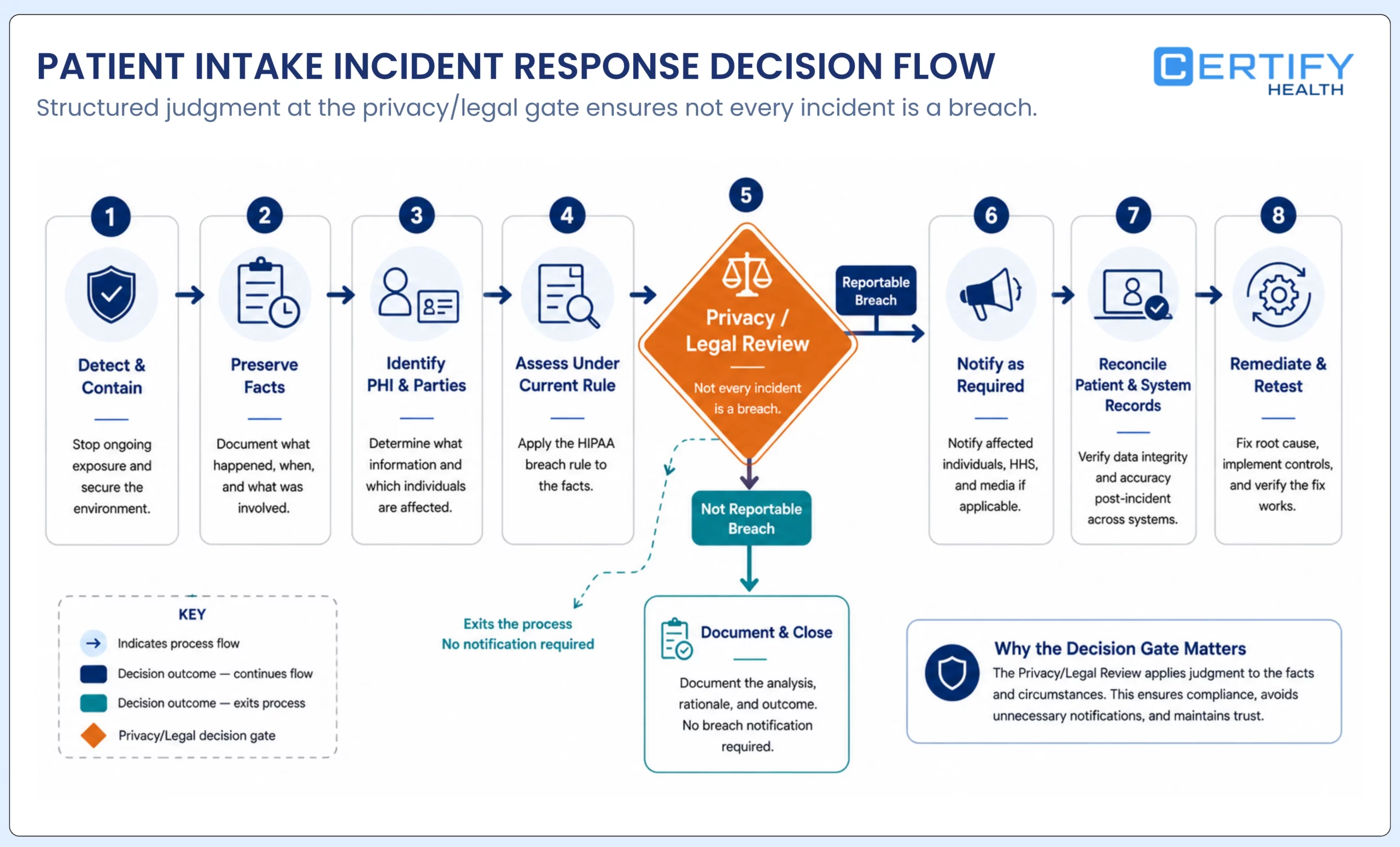
Prepare for an intake incident before deciding whether it is a breach
Start by preserving facts and reducing harm: stop an unsafe disclosure or workflow where appropriate, protect logs and affected records, identify the information and systems involved, confirm whether the wrong patient or visit was affected, coordinate with business associates, restore required operations, and document decisions. Avoid destroying evidence or changing records without an approved correction trail.
- Triage the event: lost paper, misdirected message, wrong-patient writeback, abandoned session, inappropriate access, vendor incident, malware, unavailable service, improper disposal, or another failure.
- Preserve relevant evidence: form version, delivery route, access and audit events, interface messages, support records, configuration, recipients, timestamps, mitigation, and affected workflows.
- Have the designated privacy and legal decision-makers assess whether PHI was involved, whether an impermissible use or disclosure occurred, whether an exception applies, and whether the presumption of breach is overcome under the current four-factor assessment.
- Coordinate required notices and timing for affected individuals, HHS, media where applicable, and covered-entity or business-associate partners based on the current rule and verified facts.
- Correct the operational record: reconcile failed or wrong-patient intake data, contact affected care and billing teams, restore services, update access or configuration, and document the final disposition.
- Feed the lesson back into risk analysis, forms, training, contracts, monitoring, downtime, and acceptance tests.
Leadership teams need training on incident response protocols and breach notification timelines.
Document all actions for HHS audits, including revised risk assessments and training logs.
A practical HIPAA patient-intake review
- Set scope: identify legal entities, locations, visit types, patient populations, specialties, channels, systems, vendors, and record destinations.
- Map data and purpose: inventory every field, file, message, signature, notice, derived value, log, export, and paper copy.
- Classify each decision: Privacy Rule permission, minimum-necessary analysis, authorization, NPP delivery or acknowledgment, other consent, contract, or policy.
- Confirm roles and agreements: covered entity, business associate, subcontractor, provider, payer, workforce, support, and integration relationships; obtain and review BAAs where applicable.
- Complete the current-rule risk analysis for ePHI and select reasonable and appropriate administrative, physical, and technical safeguards for the deployment.
- Configure and test every route: paper, mobile, web, tablet, kiosk, staff-assisted, language and accessibility support, proxy or guardian, refusal, downtime, and abandonment.
- Test data integrity and writeback: patient and visit matching, duplicate prevention, required and optional fields, document status, retries, error queues, reconciliation, and audit events.
- Train by role: front desk, patient access, clinical, billing, IT, privacy, security, administrators, and vendor support should practice the decisions they actually own.
- Exercise incidents and recovery: misdelivery, wrong-patient data, lost paper, device exposure, vendor event, unavailable service, failed interface, restoration, and downstream correction.
- Approve with evidence: close or accept findings through named decision-makers, record residual risk and due dates, and schedule review after meaningful changes or incidents.
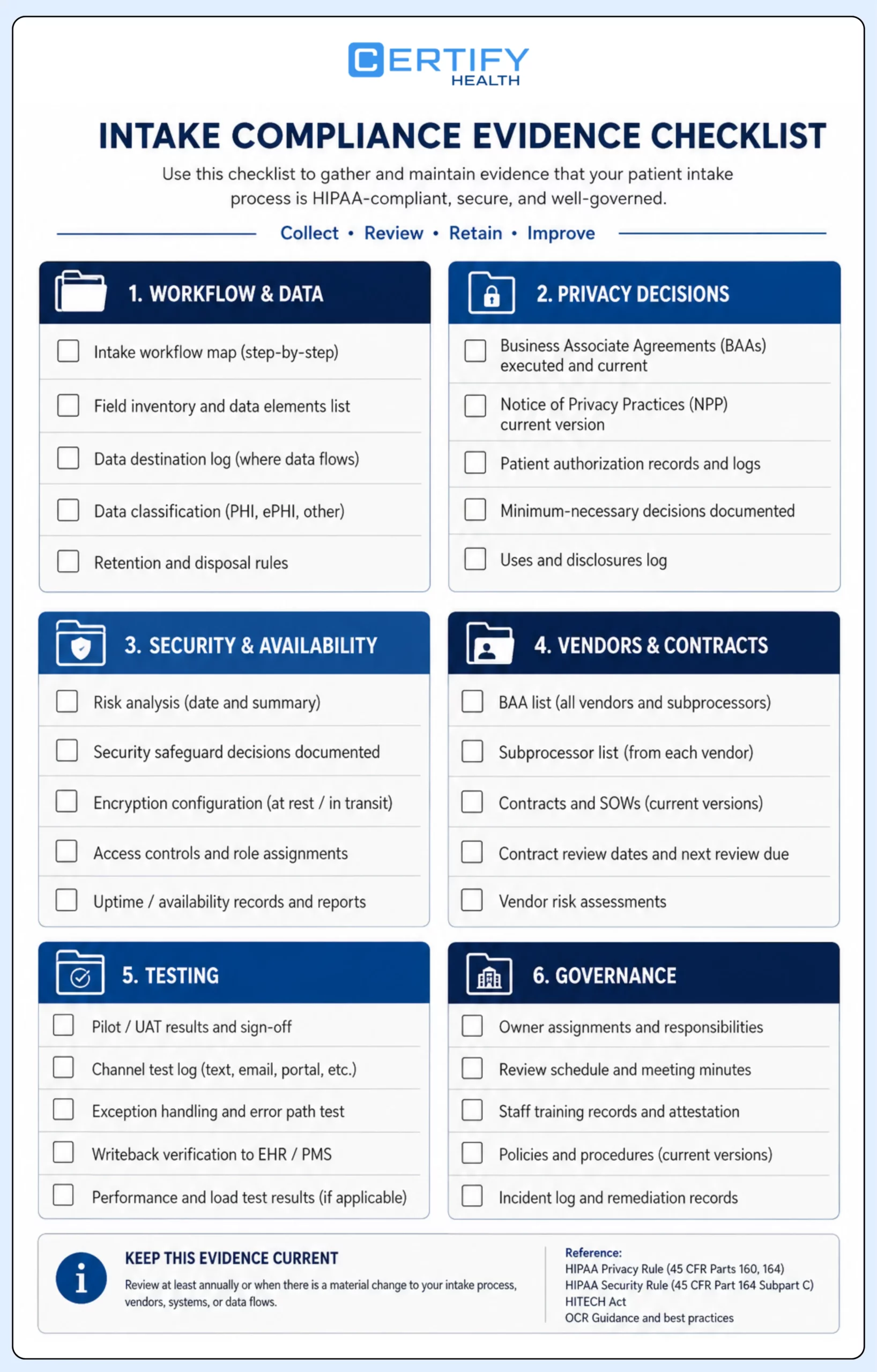
| Evidence pack | Minimum useful contents | Owner or approver |
|---|---|---|
| Workflow and data | Swimlane, field dictionary, system and vendor inventory, interface map, record destination, exception path | Operations, IT, privacy |
| Privacy decisions | Permissions, minimum-necessary decisions, notices, acknowledgments, authorizations, other consents, communication and tracking review | Privacy and legal |
| Security and availability | Risk analysis, safeguards, access matrix, device baseline, logs, monitoring, incident and contingency tests | Security and IT |
| Vendor and contract | Role analysis, BAA where applicable, subprocessors, permitted uses, incident duties, evidence, exit and deletion terms | Legal, privacy, procurement |
| Testing | Normal, failure, privacy, accessibility, wrong-patient, writeback, session, downtime, restore, and reconciliation results | Implementation and operations |
| People and governance | Policies, training by role, owners, findings, approvals, accepted risk, review date, change and incident triggers | Executive sponsor and compliance |
Where CERTIFY Health fits
CERTIFY Health helps teams move intake work before the visit through digital forms, insurance capture, consents, and check-in workflows.
Configured deployments can support patient portal and check-in steps, document and consent workflows, identity options, user and terminal administration, reporting, exception views, and integration with an existing EHR, EMR, or practice-management environment. The exact modules, data routes, controls, roles, and writeback behavior depend on the implementation.
Product evidence boundary: Product documentation supports workflow capabilities and configuration evidence. It is not legal advice, a security certification, a penetration-test report, a BAA, or proof that every capability is active in every deployment. The practice remains responsible for its policies, decisions, configuration, training, contracts, and use of the system.
HIPAA-compliant intake is a governed workflow, not a product badge
A credible patient-intake compliance program can answer five questions at any time: what information is involved, why it is used or disclosed, which rule or policy supports the decision, how the workflow protects patients and operations, and what evidence proves the approved process is working.
That standard applies equally to a clipboard, phone call, mobile link, shared tablet, kiosk, vendor integration, and system-of-record update. Technology can make the process easier to control and review, but only when roles, permissions, notices, safeguards, contracts, alternatives, testing, incidents, and records are governed together.
Frequently asked questions
What makes a patient intake form HIPAA compliant?
Does a patient have to sign the Notice of Privacy Practices?
For covered direct-treatment providers, HHS describes a good-faith effort to obtain written acknowledgment of receipt except in specified emergency situations. An acknowledgment is evidence that the notice was received; it is not the same as agreeing to the notice or authorizing every use or disclosure. Confirm the exact workflow with privacy counsel.
Does HIPAA require patient authorization for treatment, payment, and health care operations?
The Privacy Rule generally permits many uses and disclosures for treatment, payment, and health care operations without a HIPAA authorization, subject to conditions and limits. A covered entity may use a voluntary consent process. Other uses, information types, or laws may require a valid authorization or another consent.