Table of Contents
Introduction
The strongest patient check-in model is not the one with the newest device or the highest digital-use percentage. It is the one that lets each patient complete the right work through an appropriate channel while staff see one trustworthy readiness state, one exception process, and one record of what happened.
The short answer
- Choose mobile when eligible patients can complete meaningful work before arrival on their own devices and the workflow preserves unfinished or changed tasks for arrival.
- Choose a kiosk when a managed on-site station solves a real arrival need, such as walk-ins, document capture, configured payment steps, or patients who arrive without a suitable personal device.
- Keep staff-assisted check-in as an equivalent service and exception path. It is part of the operating model, not evidence that digital check-in failed.
- Use a hybrid model only when mobile, kiosk, tablet, and assisted routes follow coordinated rules and produce compatible completion, writeback, and exception states.
- Compare channels using the actual population, environment, workflow, privacy, accessibility, integration, support, and total cost—not age labels or universal speed claims.
What is actually being compared?
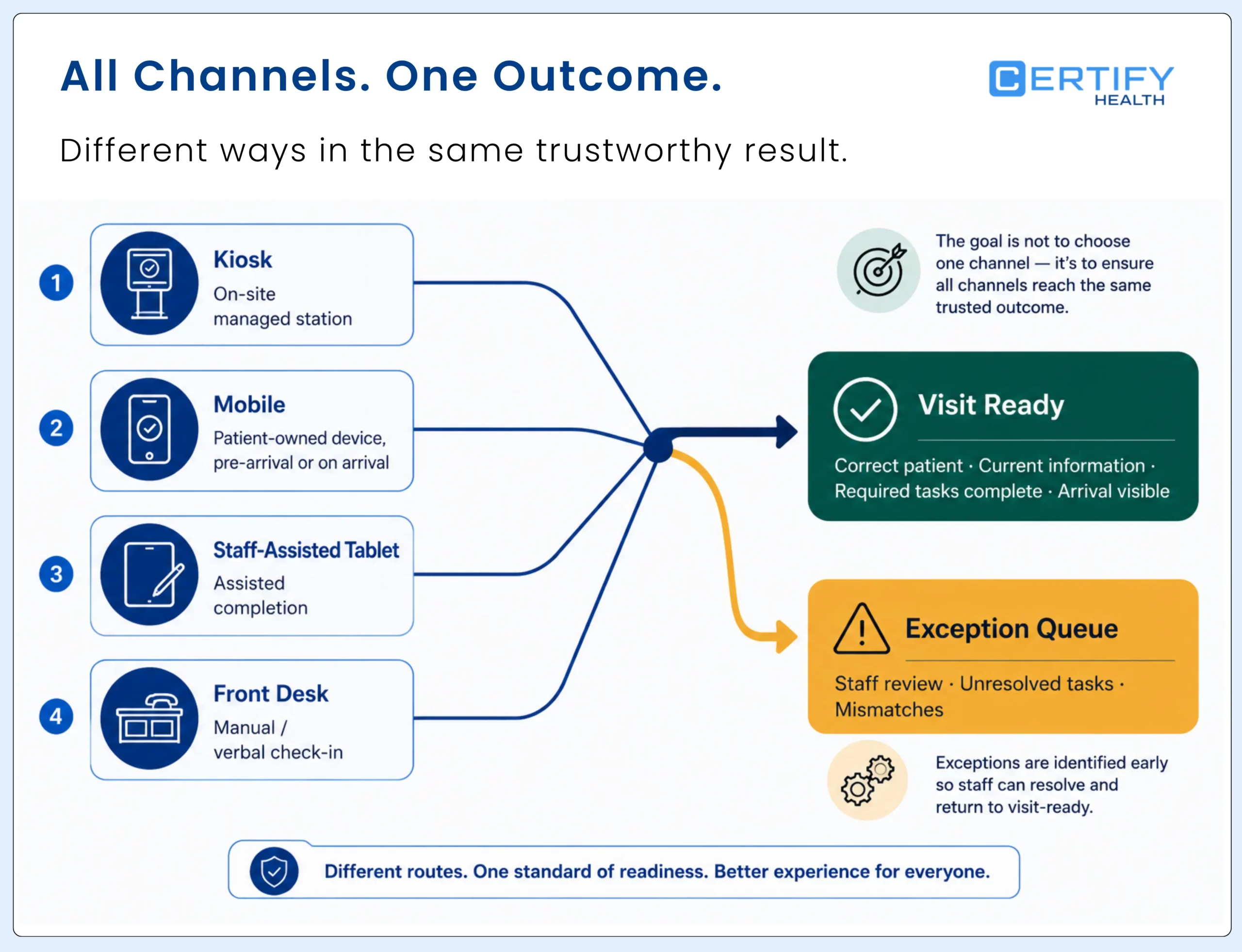
Both options improve the patient check in process. But they serve different settings and different patient populations.
| Route | Where it happens | Primary operating value | Main dependency |
|---|---|---|---|
| Mobile check-in | On a patient's personal device before arrival, near arrival, or at the facility | Moves eligible work earlier and lets patients use a familiar device | Reliable contact route, usable device, connectivity, privacy, and continuity at arrival |
| Kiosk check-in | On a managed device at the facility | Provides a consistent on-site route and can support configured peripherals | Placement, accessibility, privacy, device operations, staff help, and throughput |
| Staff-assisted tablet or desk | With a staff member at or near arrival | Resolves ambiguity, supports patients, and completes exceptions | Training, authorization, privacy, capacity, and visible ownership |
| Hybrid check-in | Across coordinated mobile, kiosk, tablet, and assisted routes | Offers more than one appropriate path without creating separate records or rules | Shared workflow logic, completion states, content governance, writeback, and exceptions |
For the complete kiosk workflow, use the patient check-in kiosk guide. For hardware, placement, pilot, support, and rollout, use the healthcare self-service kiosk implementation guide.
When kiosk check-in is the stronger route
A patient check-in kiosk is a facility-managed station that presents a configured arrival workflow. It may help a patient match an appointment, confirm information, complete assigned forms or consents, capture an insurance card or photo ID, complete configured payment steps, record arrival, receive instructions, or ask for help. The exact tasks and integrations vary by deployment.
| Kiosk may fit when | Question to resolve | Do not assume |
|---|---|---|
| Walk-ins or on-site arrivals need a visible managed route | How are appointments, walk-ins, duplicates, and wrong-location visits matched? | Every patient can or should use the same path |
| The workflow uses approved on-site peripherals | Which scanner, camera, payment device, or printer is required and who supports it? | A peripheral improves accuracy or collections by itself |
| Patients arrive without a suitable personal device or link | What accessible, private, and assisted alternatives exist? | Age predicts device access, preference, or ability |
| Staff need a standardized arrival point | Can staff see completion, abandonment, assistance, writeback, and exceptions? | Device uptime equals workflow readiness |
| The facility can operate a shared device safely | Who owns placement, cleaning, updates, access, incidents, downtime, replacement, and session clearing? | A kiosk is automatically private, secure, accessible, or compliant |
Kiosk constraint: On-site availability does not remove the need for staff assistance. A managed station can reduce dependence on a patient’s device, but it introduces shared-screen, physical-access, throughput, hardware, and recovery responsibilities.
When mobile check-in is the stronger route
Mobile patient check-in lets a patient use a personal phone, tablet, or browser to complete configured work before or during arrival. It may begin from a text, email, portal, QR code, or another approved route. The workflow should recognize prior completion, preserve progress where supported, and show only the work still required for the visit.
| Mobile may fit when | Question to resolve | Do not assume |
|---|---|---|
| Meaningful intake work can occur before arrival | When is the link sent, when does it expire, and what changes require reconfirmation? | Sent, opened, submitted, reviewed, and ready are the same state |
| Patients can use their own device privately | What happens with shared phones, inaccessible content, limited data, low battery, poor connectivity, or no device? | Every patient has a private, current, usable smartphone |
| The organization wants to reduce repetition at arrival | Does the kiosk or staff view recognize what is complete, changed, expired, or missing? | Mobile completion prevents all repeated questions |
| Arrival can be confirmed separately from pre-registration | How is physical arrival established for each setting and exception? | Form completion or geolocation always proves arrival |
| The team can monitor delivery and abandonment | Can staff see delivery failure, bounce, expired link, partial completion, help request, and next action? | Mobile is operationally invisible because no hardware is installed |
Mobile constraint: Patient-owned hardware reduces facility device requirements, not implementation work. Messaging, identity, content, privacy, accessibility, integration, support, exceptions, payments, and arrival-state design still need owners and tests.
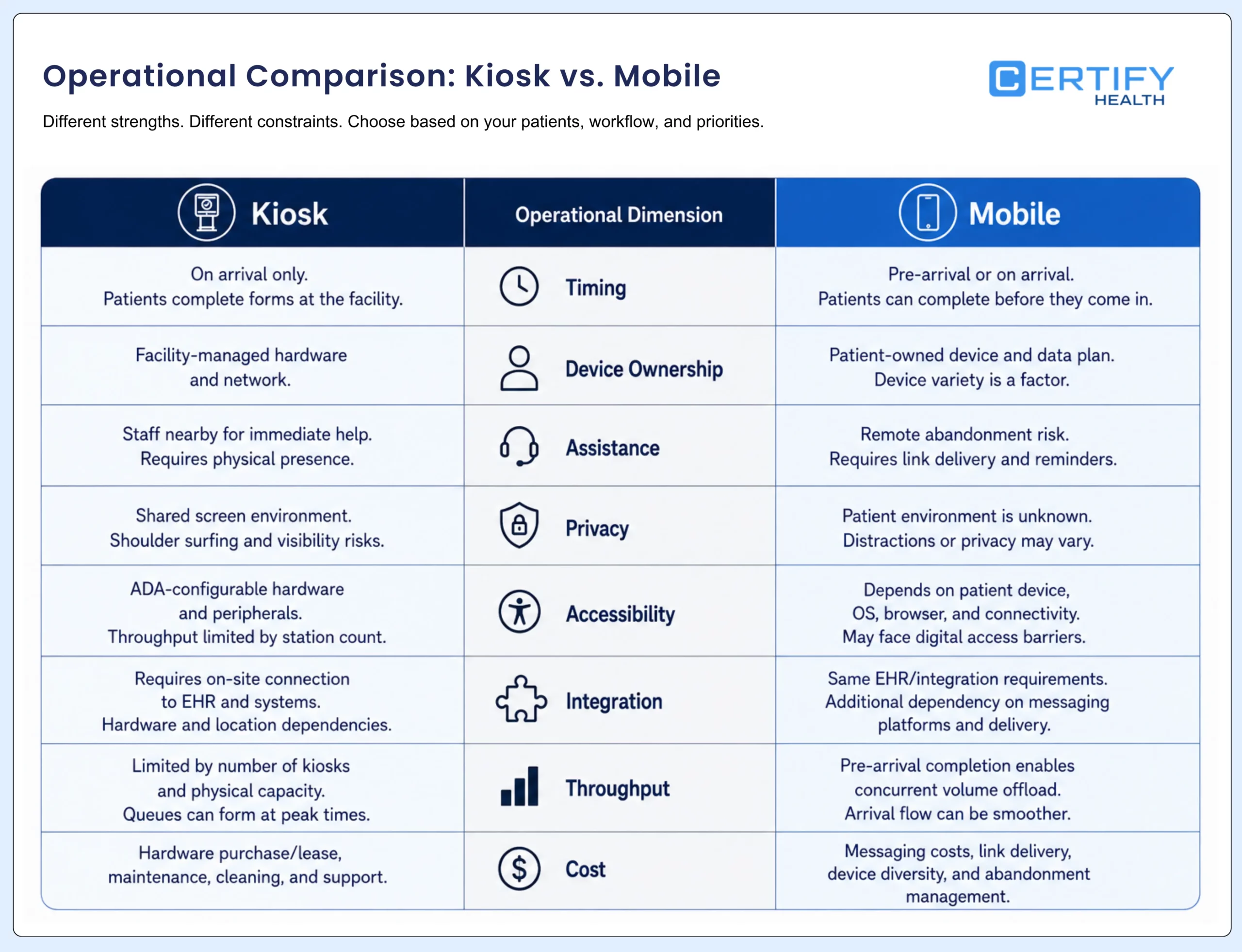
Kiosk vs. mobile check-in: an operational comparison
| Dimension | Kiosk | Mobile | Hybrid design question |
|---|---|---|---|
| Timing | Usually begins at the facility | Can begin before arrival or at the facility | Can prior completion carry forward without repetition? |
| Device | Organization-managed hardware and peripherals | Patient-owned device and connection | What route exists when either device path is unavailable? |
| Physical environment | Requires placement, reach, privacy, power, network, cleaning, and safe circulation | Requires usable content across devices and a sufficiently private patient context | How is equivalent service provided across settings? |
| Document and payment hardware | Can use configured on-site scanner, camera, printer, or payment terminal | Can use device camera, browser, wallet, or card entry where supported | Do both routes create comparable image, payment, receipt, and exception records? |
| Assistance | Staff may be nearby, but availability and privacy must be designed | Help may be remote, asynchronous, or deferred to arrival | Can staff take over without restarting or losing context? |
| Throughput | Constrained by station availability, session duration, failures, and assistance | Distributed across patient devices but constrained by delivery, completion, device, and support conditions | Does the arrival workflow prevent one route from becoming a hidden queue? |
| Privacy and security | Shared-screen, session, physical, administrative, peripheral, and device risks | Link, device, browser, identity, shared-phone, network, and messaging risks | Are data flow, access, retention, logging, incidents, and alternatives governed consistently? |
| Accessibility | Physical and digital access plus immediate equivalent assistance | Digital content, device compatibility, timing, language, and alternate route | Can people move between routes without disadvantage or repeated work? |
| Integration | Appointment lookup, data capture, arrival state, payments, documents, and exceptions may need read/write support | Delivery, pre-registration, updates, arrival proof, payments, documents, and exceptions may need read/write support | Do both routes use the same source-of-truth, version, status, and correction rules? |
| Cost | Hardware, site, peripherals, installation, device management, support, replacement, and software | Software, messaging, identity, support, browser/device testing, payments, and communications | What shared integration, content, governance, analytics, and internal labor remain? |
Choose by scenario, not stereotype
There is no universal answer.
| Scenario | Likely primary route | Required safeguard |
|---|---|---|
| Scheduled patient can complete assigned work privately before arrival | Mobile | Arrival recognizes prior completion and shows only changed, expired, or missing work |
| Walk-in or patient arrives without a usable personal device or link | Kiosk or assisted | Appointment/walk-in handling, accessible placement, privacy, and visible help |
| Patient needs language, sensory, motor, cognitive, caregiver, or technical support | Whichever route is accessible, plus assisted service | Equivalent service without delay, stigma, lost work, or reduced privacy |
| Workflow needs an approved on-site payment device, scanner, or printer | Kiosk or assisted | Peripheral support, failure handling, reconciliation, privacy, and alternate completion |
| Patient begins on mobile but arrives incomplete | Hybrid handoff | Resume or identify remaining work without forcing a full restart |
| High-volume arrival has mixed appointments, walk-ins, and exceptions | Hybrid | Routing rules, station capacity, staff queue, completion states, and surge fallback |
Age alone is a weak way to route patients. At one large multi-location dental group, 73% of patients older than 75 completed pre-registration before the visit. The practical takeaway is simple: offer a usable digital option, measure where people need help, and keep an assisted route available. Let actual completion and support needs guide the channel decision, not assumptions about age.
Privacy and accessibility change by channel
| Question | Kiosk test | Mobile test | Shared control |
|---|---|---|---|
| Who can see or hear the information? | Screen angle, nearby queue, reflections, audio, abandoned output, staff support | Shared phone, notifications, browser history, location, caregiver, public setting | Masking, content minimization, privacy instructions, and alternate route |
| Can the patient operate the route? | Approach, reach, posture, touch, audio, vision, timing, language, error recovery | Device/browser compatibility, zoom, assistive technology, timing, data, battery, connectivity | Equivalent assisted service and transfer without restart |
| What happens at session end? | Completion, inactivity, abandonment, restart, support access, and next patient | Link expiry, logout, browser state, saved images, shared device, and re-entry | Defined session, retention, and recovery rules |
| How is identity handled? | Managed device plus configured patient-identification route and alternatives | Link, credentials, device, patient data, or configured identity step | Risk-based methods, notice, consent where applicable, alternatives, and staff review |
| Who owns an incident? | Facility, device, network, peripheral, software, and vendor responsibilities | Messaging, browser, device, account, software, and vendor responsibilities | One incident process, audit trail, escalation, and patient support |
HHS’s Section 504 rule includes a general nondiscrimination requirement when covered recipients use kiosks in health programs. That does not create one kiosk technical standard that guarantees compliance, and it does not make mobile the automatic alternative. Evaluate the complete service and provide an equivalent path for patients who cannot use the offered route.
Use the digital patient intake security risk guide for the deeper data-flow and vendor-control review.
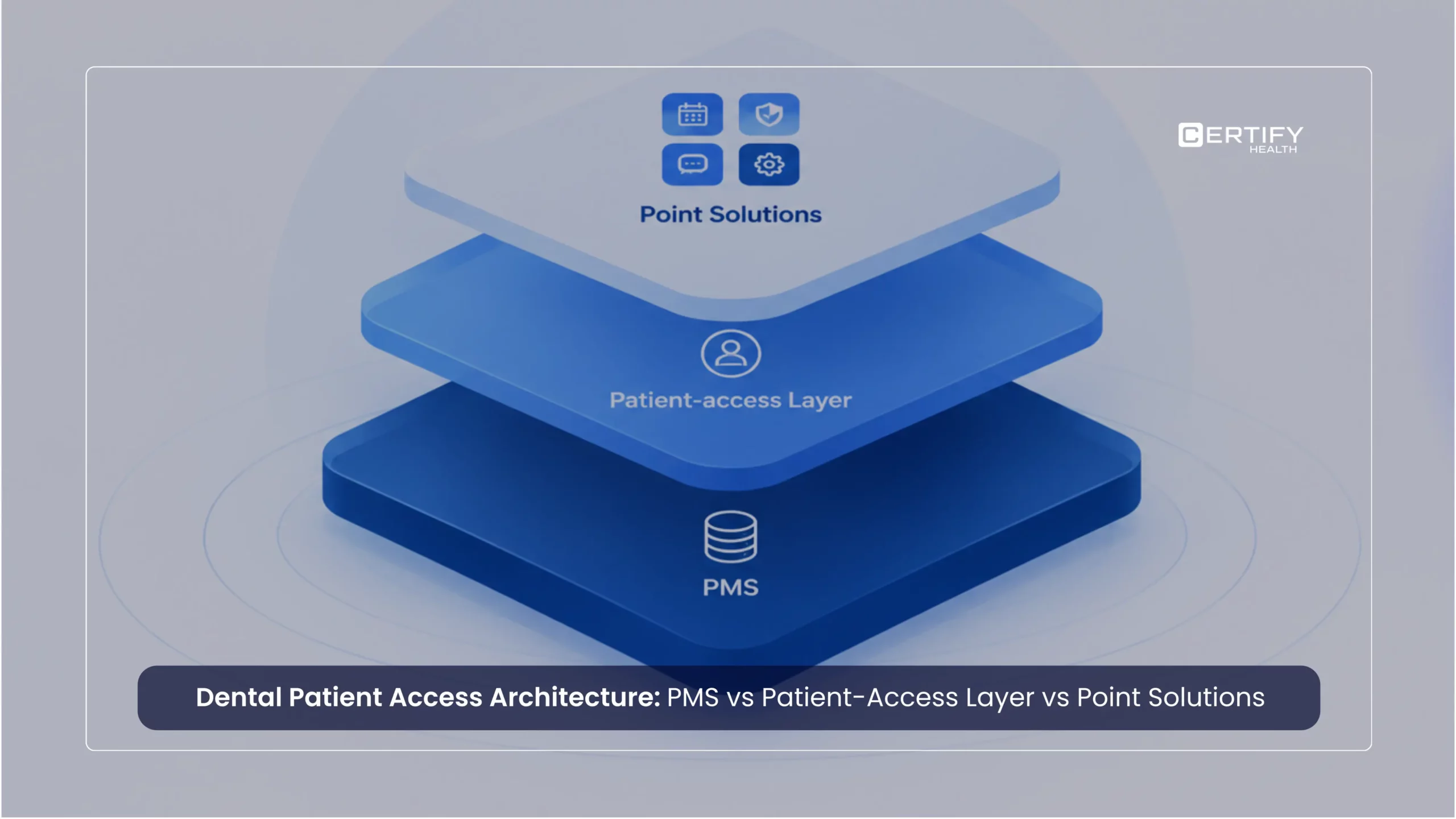
A hybrid model needs one operating truth
Digital check-in cannot replace front-desk staff completely. Some patients still need help with forms, questions, or tech problems. The best systems help staff spend less time on paperwork and more time helping patients.
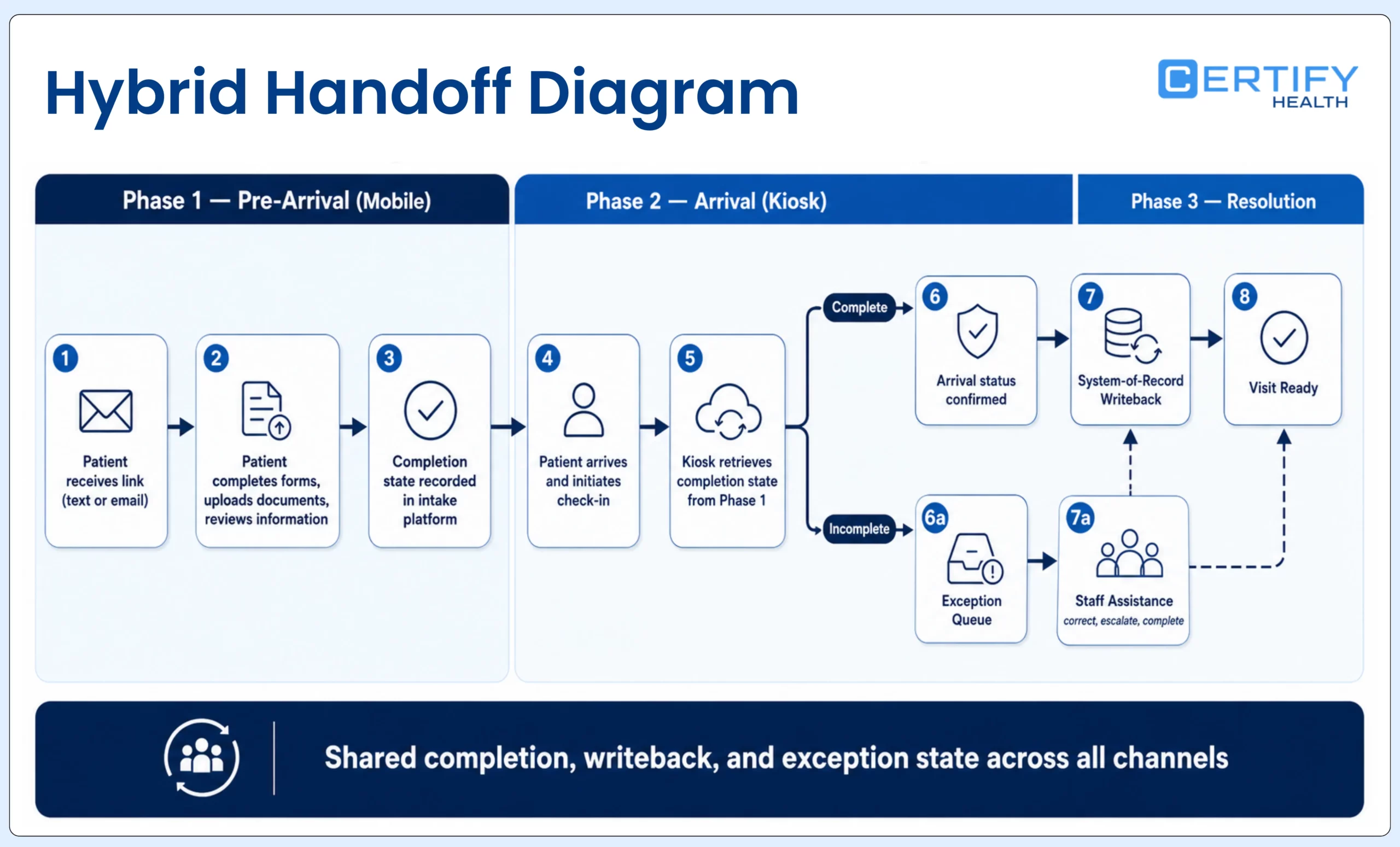
A hybrid model should not mean two separate check-in systems. It should mean several patient routes governed by the same visit requirements, content versions, completion definitions, information rules, exception ownership, and readiness state. The handoff is the design problem.
| Continuity control | Required behavior | Failure to watch |
|---|---|---|
| Patient and visit match | All routes identify the intended patient, appointment, location, provider, and visit using approved methods | Duplicate record, wrong visit, walk-in mismatch, or forced restart |
| Task and content assignment | Each route uses the correct current forms, consent, instructions, language, and conditional rules | Different versions or required tasks by channel |
| Progress and resume | Completed work is recognized and unfinished work can continue or transfer appropriately | Patient repeats every question or loses signed work |
| Arrival and ready state | Pre-registration, physical arrival, checked-in, reviewed, exception, and ready states remain distinct and visible | Form submission is mistaken for arrival or readiness |
| Writeback and correction | Data and documents reach the intended destination with visible review and correction paths | One route writes automatically while another creates hidden manual work |
| Assistance and exception | Staff receive context, owner, priority, age, and next action without asking the patient to start over | Channel failure becomes an unowned queue |
Questions to answer before choosing a channel mix
- Which patient, visit, and arrival scenarios are eligible for each route, and who approves those rules?
- Which steps can occur before arrival, which require physical presence, and which require staff judgment?
- How does each route read, write, validate, reconcile, and recover information in the existing EHR, EMR, or practice management environment?
- Can a patient move between mobile, kiosk, and assisted routes without repeating completed work or losing context?
- How are privacy, accessibility, language, caregiver use, identity, payment, and equivalent service handled in each route?
- Who sees delivery failure, abandonment, device failure, writeback error, changed information, payment uncertainty, or a help request—and who owns the next action?
- What one-time, recurring, internal, transaction, hardware, messaging, support, security, integration, and change costs belong to each route and to the shared platform?
- What pilot evidence will support a go, hold, modify, or stop decision?
| Measure | Definition | Why compare by route |
|---|---|---|
| Eligible-route adoption | Successful sessions divided by arrivals actually offered and eligible for that route | Prevents mobile or kiosk percentages from using different denominators |
| Successful completion | Sessions reaching the defined end state without unresolved required work | Separates device activity from readiness |
| Assisted completion | Sessions completed after staff help or takeover | Shows support demand and whether handoff works |
| Abandonment | Started sessions ending without completion or intentional transfer | Reveals route-specific content, device, delivery, privacy, or usability friction |
| Exception volume and age | Issues by type, owner, priority, and resolution time | Shows whether one route exports work to staff |
| Writeback and correction | Required data and states reaching the intended destination correctly | Tests information quality and rekeying, not interface branding |
| Time to ready status | Time from recognized arrival to the organization's defined ready state | Measures the whole arrival service rather than screen or form time |
| Total cost | Channel-specific and shared costs, including internal labor and failure recovery | Avoids labeling mobile cheap or kiosk expensive from incomplete scopes |
How CERTIFY Health can support a coordinated channel mix
CERTIFY Health can support mobile and kiosk check-in as configurable patient-access workflows around an organization’s existing EHR, EMR, or practice management environment. Depending on the deployment, the experience may connect appointment matching, patient identification, demographics, forms and eConsent, insurance-card or photo-ID capture, configured eligibility or payment steps, arrival status, communications, reporting, and staff exception handling.
The exact channels, modules, identity methods, peripherals, systems, fields, directions, timing, payment functions, language options, accessibility behavior, reporting, and support must be confirmed for the target environment. FaceCheck should be described as a biometric patient-identification layer where deployed—not as universal authentication—and CERTIFY should not be described as automatically replacing the system of record.
Frequently asked questions
Is mobile check-in always cheaper than a kiosk?
No. Mobile may avoid facility-owned kiosk hardware, while still creating software, messaging, identity, device/browser testing, support, security, integration, payment, and communications costs. Compare complete route-specific and shared costs for the actual scope.
Are kiosks better for older patients?
Age alone should not decide the route. Evaluate device access, privacy, language, disability, caregiver use, digital experience, preference, visit context, and need for help. Offer an accessible route and equivalent assisted service, then measure actual completion and assistance.
Can mobile check-in replace arrival confirmation?
Not automatically. Pre-registration can complete work before the visit, but the organization still needs an approved method to establish physical or virtual arrival and update the appropriate staff-facing state.
Does hybrid check-in mean maintaining two systems?
It should not. A strong hybrid model uses coordinated route rules, content, patient and visit matching, completion states, information exchange, exception ownership, and readiness definitions. Confirm the actual architecture and integrations for the deployment.
Which route should a practice pilot first?
Pilot the route that addresses the best-defined patient and staff problem with a representative population and controllable risk. Establish a baseline, include exceptions and assistance, and use predefined go, hold, modify, or stop criteria.
The decision
The right patient check in solution comes down to three questions: Who are your patients? What does your workflow need? And how ready is your team to support a new system?
Add four more: Where can the patient complete the work privately and accessibly? What must move into and out of the system of record? How will staff see and resolve failures? What evidence will justify scale? The answer may be mobile, kiosk, assisted service, or a coordinated mix. The goal is not maximum digital use. It is reliable visit readiness through an appropriate route.