
Table of Contents
Introduction
Stop right there. Before you power through another chaotic day of no-shows, billing nightmares, and staff burnout—let’s address the real issue: your practice is drowning in admin overload.
Whether you are running a fast-paced ambulatory clinic, a growing behavioral health center, or a multispecialty practice, one thing’s clear… You need a better system.
Medical practice management software isn’t just another tool on your tech stack. It’s your lifeline.
Think of it as your all-in-one command center: from front-desk scheduling chaos to back-end billing workflows, it streamlines everything. So, you and your team can get back to doing what you actually signed up for—caring for patients.
In this guide, we’ll break down must-know benefits of practice management software, and share smart, practical tips to help you choose the right one—whether you are a solo provider or managing multiple locations.
Let’s get into it. Your future, frictionless practice awaits.
💡 Did you know?
According to a study, U.S. practice management system market is expected to more than double, jumping from $5.89B in 2024 to $13.7B by 2033—growing at a CAGR of 10%. Why? Because healthcare is finally done with clunky workflows and paper trails.
What is a Medical Practice Management System?
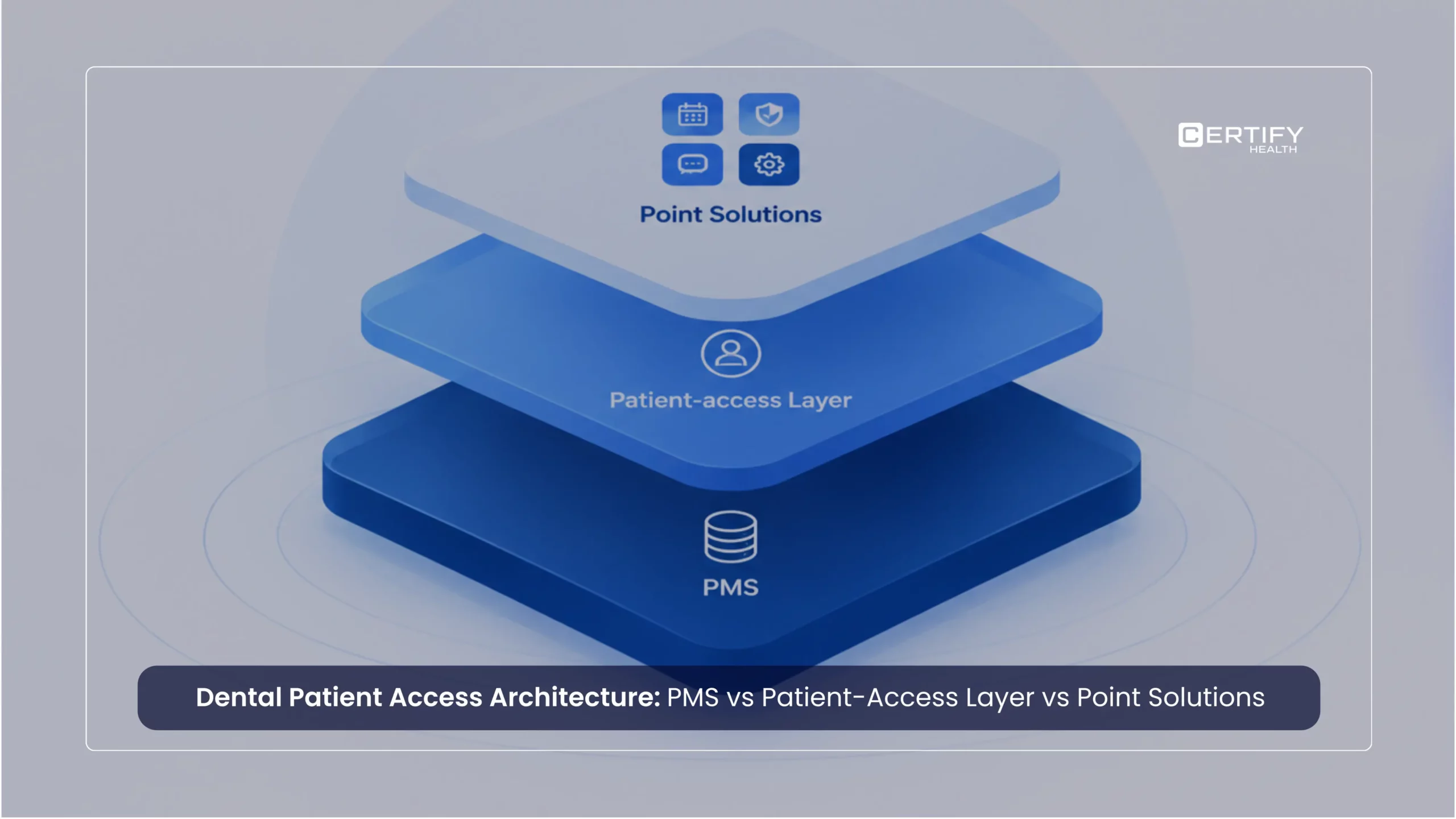
Practice management system definition: A practice management system is software that runs the business side of your medical practice— Appointment Scheduling, Patient Registration and Demographics, Insurance Verification and Eligibility, Billing and Invoicing, Claims Management, Reporting and Analytics, Patient Portal, Communication Tools, Integration with Electronic Health Records and Compliance Management – all in one place.
The terms “practice management systems” and “medical practice management” are frequently used interchangeably in the healthcare industry. That’s because medical practice management is essentially powered by a practice management system—they go hand in hand.
Still not clear, “What is a practice management system, really? Think of it as the digital hub where all your practice operations come together.
It keeps your front desk, billing team, and admin staff moving like a well-maintained machine—no more juggling paper charts or switching between five different tools to do one job.
Here’s what it handles:
- Appointment scheduling and patient flow
- Insurance eligibility and verification
- Billing, coding, claims, and payment tracking
- Demographic and financial reporting
The best part? It streamlines routine tasks and ensures seamless coordination between departments to prevent oversights.
You may be asking yourself, “Isn’t my EHR covering all of this?” at this point. That’s a common question.
While both EHR and PMS are essential for running a healthcare practice, they’re not the same—and mixing them up can lead to workflow gaps or missed opportunities for efficiency.
What is the difference between EHR and PMS?
Now let’s clear up the difference between EHR and PMS—because yes, they are different:
- Electronic Health Records (EHR) = Clinical data: patient histories, prescriptions, treatment plans.
- PMS Practice Management Systems = Admin engine: scheduling, billing, revenue management.
They serve different purposes—but when integrated? You get a powerful, unified platform that handles both care and operations seamlessly.
In healthcare, having a solid PMS isn’t optional—it’s essential. Whether you are managing a busy ambulatory clinic or a behavioral health facility, a good practice management system helps you scale, stay compliant, and focus on what actually matters: patient care.
Also read: How Practice Management Software Solves Your Medical Practice’s Biggest Challenges
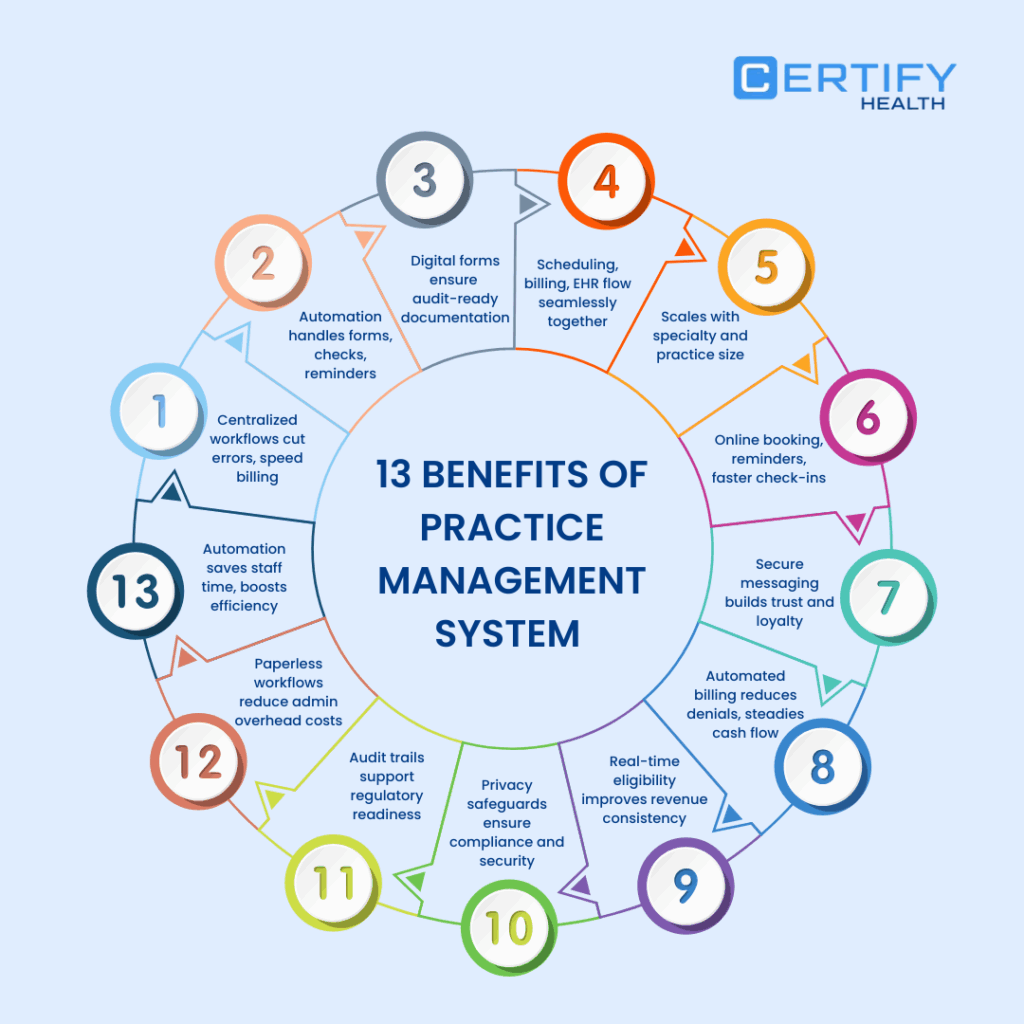
9 Benefits of Medical Practice Management Systems

TL; DR:
What are the main benefits of practice management system integration?
For Practices & Staff
- Efficiency Boost → Centralized workflows cut errors, speed billing, and improve team coordination.
- Automation Wins → Routine tasks like insurance checks, forms, and reminders run on autopilot.
- Accurate Docs → Digital forms + audit-ready records = less stress, more compliance.
- Seamless Integration → Scheduling, billing, EHR, and reporting flow together in one platform.
- Scalable & Custom → Grows with your practice, adapts to your specialty and size.
For Patients
- Friction-Free Visits → Online booking, reminders, faster check-ins = stress-free experience.
- Better Connection → Timely nudges + secure messaging = stronger trust and loyalty.
For Healthcare Organizations
- RCM Simplified → Automated billing, real-time eligibility, fewer denials, predictable cash flow.
- Stronger Compliance → Built-in privacy, secure storage, and audit trails.
- Lower Costs → Paperless workflows + automation slash admin overhead.
Benefit For Practice & Staff
1. Improved Efficiency & Streamlined Workflow
Juggling spreadsheets, sticky notes, and outdated software is no way to run a modern medical practice.
At its core, a practice management system exists to simplify how your entire practice runs. Appointment scheduling? Automated. Billing? Integrated. Patient intake? Seamless.
No more wasting hours looking for missing information or switching between disconnected tools. On a single, centralized platform, your entire team can access anything you need in real time.
Here’s what that means for your practice:
- Fewer errors and delays
- Faster turnaround on billing and claims
- Smooth coordination between front desk, clinical staff, and billing team
The result? A practice that runs like clockwork.
And here’s where it gets even better—workflow optimization isn’t just about speed. It’s about collaboration. When your team isn’t bogged down by redundant tasks, communication improves, staff morale climbs, and your patients notice the difference.
2. Improved Organization
Imagine this: All your patient records, schedules, and billing data—organized and accessible in one place. No more shifting from one screen to another or going hunting for paper charts.
That’s the power of medical practice management systems. They bring improved organization to your practice by centralizing every piece of critical information.
- Need to pull up a patient’s history? Done.
- Verify insurance on the fly? Easy.
- Access billing records without the usual headache? Absolutely.
And convenience isn’t the only factor. Additionally, these systems include strong security features to safeguard private information, ensuring that your clinic remains compliant and that your patients’ trust is maintained.
The impact? No more lost files. No more missed appointments. No more billing delays.
3. Enhanced Automation
You Didn’t Hire Your Staff to Chase Paperwork
Let’s be real—your team didn’t sign up to spend half their day verifying insurance or sending payment reminders.
That’s where enhanced automation in medical practice management systems steps in—and saves the day.
We’re talking about the kind of smart automation of repetitive tasks that handles the boring stuff:
- Insurance checks? Done.
- Pre-visit forms? Sent.
- Bill-pay alerts? Fired off automatically.
No more human error. No more hours lost to manual admin.
One of the biggest benefits of a practice management system is that it gives your team their time (and sanity) back. Instead of drowning in busywork, they can focus on what actually grows your practice—better patient care, smoother ops, and real human connection.
And guess what happens when you remove burnout from the equation? Happier staff. Lower turnover. Better results.
It’s not magic. It’s simply smart automation at its most efficient.
💡 Did you know?
Physicians still spend nearly 8 hours a week on routine paperwork and admin tasks during work hours—and over 20% of them log 8+ additional hours after-hours (so‑called “pajama time”) managing EHR.
Now, imagine if your front‑desk staff are buried in manual insurance checks, data entry, and referral follow‑ups—easily 5–10 hours per week per person—on stuff a modern PMS could handle instantly. That’s a huge drain.
But with PMS like CERTIFY Health, those hours turn into minutes—freeing your team to focus on care, not clipboard chaos.
4. Efficient Billing and Revenue Cycle Management
If your revenue cycle feels like a rollercoaster—you are not alone. Billing complexities are one of the biggest headaches in healthcare.
But here’s the good news: Medical practice management systems like CERTIFY Health’s medical practice management software take that chaos and turn it into clarity.
With efficient billing tools built right in, these systems automate claim submissions, verify insurance eligibility in real time, and streamline payment processing—so you’re not chasing down errors or resubmitting claims for the third time.
The result?
- Fewer denials
- Faster reimbursements
- Predictable cash flow
Your practice as a whole benefits when billing functions flawlessly. Admin costs drop. Revenue becomes more consistent. And you can finally stop wondering when the next payment will hit
💡 Did you know?
As per research, practices using PM systems see 20% fewer claim errors—which means faster reimbursements, fewer denials, and a healthier bottom line.
5. Accurate and Efficient Documentation
Are you sick and weary of charts, sticky notes, and endless forms? Yeah, your staff is too.
One of the biggest benefits of a practice management system is how it flips the script on documentation. No more handwriting chaos or digging through files—just clean, fast, efficient documentation at your fingertips.
- Digital forms.
- Automated data entry.
- Integrated patient records.
It is completed more quickly and with fewer mistakes by your team. That’s accurate documentation without the mental acrobatics.
But this isn’t just about saving time. It’s about staying ready. When your documentation is complete, consistent, and audit-proof, compliance becomes second nature—not a stressful scramble.
Regulators come knocking? You’re covered. Need proof of care delivery? It’s already in the system.
6. Total Integration
Here’s where medical practice management systems go from useful… to unstoppable. Why? Two words: total integration.
Stop switching between your mailbox, scheduling tools, billing software, and EHR. A modern PMS like CERTIFY Health connects it all— Appointment Scheduling, Patient Registration and Demographics, Insurance Verification and Eligibility, Billing and Invoicing, Claims Management, Reporting and Analytics, Patient Portal, Communication Tools, Integration with Electronic Health Records and Compliance Management —into one seamless platform where data flows like it should.
That’s the power of integration and interoperability. Patient data gets entered once and updates everywhere. No duplication. No confusion. No errors.
Your team works from the same playbook. Your records stay consistent. And your compliance? Spot on—yes, even for HIPAA.
Worried you’ll have to ditch your current EHR? Don’t. Today’s top PMS platforms are built with EHR compatibility in mind. They plug right into your existing systems, enhancing—not replacing—what you already use.
Ensure – Smooth operations. Stronger collaboration. And way less stress.
7. Simplified Scheduling
Tired of playing calendar Tetris every day? Scheduling chaos ends here.
One of the biggest benefits of practice management systems is how they take the stress out of appointment coordination. PMS with scheduling capabilities like CERTIFY Health’s patient scheduling software comes with intuitive, drag-and-drop scheduling tools, your staff can manage provider calendars, recurring visits, and last-minute changes—without breaking a sweat.
Got multiple providers across locations? No problem. Need to juggle patient preferences and complex time slots? Easy.
And here’s the real game-changer: automated reminders. Text, email, or voice—patients get a heads-up, and you get fewer no-shows. It’s a win-win.
- Fewer gaps in the schedule.
- More productive days.
- And way less time spent dialing phones or chasing confirmations.
Instead of wrestling with appointment books, your team can focus on what really matters—delivering great care and improving patient experiences.
8. Comprehensive Reporting and Analytics
You can’t grow what you can’t measure. That’s why the best medical practice management system doesn’t just manage appointments and billing—it powers smart, data-driven decisions.
Built-in analytics and reporting tools give you a 360° view of your practice—what’s working, what’s leaking revenue, and where you’re leaving money (or time) on the table.
- Want to track patient demographics?
- Monitor staff productivity?
- Pinpoint why your cash flow feels stuck?
It’s all there—in real time.
CERTIFY Health’s practice management software offers customizable reports. It lets you zero in on what you care about, whether it’s financial performance, compliance metrics, or operational workflows. No more guessing. Just smart, actionable insights.
And when will you have a clear understanding of what goes on behind the scenes? You can plan better. Scale smarter. And turn your practice into a data-powered machine.
9. Scalability and Customization
Your practice isn’t cookie-cutter. So why settle for a system that treats it like one?
The best medical practice management systems offer true scalability and customization—meaning they adapt to you, not the other way around.
Solo provider? You’re covered. Multi-location, growing fast? Still covered.
From specialty-specific workflows to custom user roles, the system bends to fit your unique needs—and keeps pace as you grow.
And let’s talk about scalability:
- Adding new providers? Easy.
- Expanding to new locations? Done.
- Need remote access for hybrid care? It’s built in.
All this, powered by secure cloud-based platforms that give you 24/7 access and built-in disaster recovery. Your data is safe, your team stays connected, and your operations stay resilient—no matter what.
Bottom line? You don’t outgrow a good PMS. It grows with you.
Benefits For Patients
1. A Smoother Patient Experience
Let’s be real, patients hate – waiting, juggling phone calls, or filling in the same forms twice.
A modern practice management system flips that script. From booking online to getting gentle reminder nudges and instant record access, it removes the friction.
The result? Visits that feel simple, predictable, and way less stressful.
2. Communication That Actually Works
Nobody likes chasing down providers or missing an appointment because the reminder got lost.
With practice management software, patients receive timely reminders, easy rescheduling options, and secure ways to connect with their care team. It strengthens communication, builds trust, and turns satisfied patients into loyal ones.
It’s not just about reminders, it’s about making patients feel heard, connected, and actively part of their care journey.
Benefits for Healthcare Organization
1. Efficient Billing and Improved Revenue Cycle Management
If your revenue cycle feels like a rollercoaster—you are not alone. Billing complexities are one of the biggest headaches in healthcare.
But here’s the good news: Medical practice management systems like CERTIFY Health’s medical practice management software take that chaos and turn it into clarity.
With efficient billing tools built right in, these systems automate claim submissions, verify insurance eligibility in real time, and streamline payment processing—so you’re not chasing down errors or resubmitting claims for the third time.
The result?
- Fewer denials
- Faster reimbursements
- Predictable cash flow
Your practice as a whole benefits when billing functions flawlessly. Admin costs drop. Revenue becomes more consistent. And you can finally stop wondering when the next payment will hit.
2. Adherence to Compliance & Security Rules
Data breaches? Compliance slip-ups? Nobody wants that.
A smart practice management system keeps you covered with built-in privacy safeguards, secure storage, and audit trails.
Translation: peace of mind. Your patient data stays protected, your practice stays compliant, and you stop sweating over HIPAA headaches.
3. Reduced Admin Costs
Still spending on paper forms and manual admin? That’s yesterday’s game.
With automation and paperless workflows, a PMS slashes unnecessary costs tied to staffing, time, paper, clipboards, fax, and storage.
Less clutter, fewer errors, and more money saved without cutting corners on patient care.
💡 Did you know?
As per research, practices using Practice management systems see 20% fewer claim errors—which means faster reimbursements, fewer denials, and a healthier bottom line.
How to Find the Best Medical Practice Management System for Your Practice
TL; DR:
How to Find the Best Medical Practice Management System?
Here’s how you can choose best medical practice management system for your practice:
- Start with your pain points—billing issues, scheduling mess, reporting gaps? Name them.
- Make a feature wishlist with your team—they know what’s broken.
- Prioritize must-haves: billing automation, scheduling tools, EHR integration, real-time reports.
- Don’t ignore user experience—your staff shouldn’t need a PhD to use the dashboard.
- Make sure it plays nice with your EHR, labs, and other systems you already use.
- Demand airtight security—HIPAA compliance, audit trails, regular updates. No shortcuts.
- Choose a system that grows with you—scalable, customizable, and specialty-ready.
- Great support matters. Look for vendors that train, respond, and actually stick around.
- Budget smart. It’s not about the cheapest—it’s about real ROI and long-term value
Selecting the best medical practice management system requires a strategic approach that goes beyond flashy features and marketing promises. The right system can transform your practice, while the wrong choice can create more problems than it solves.
You might also like to read: 10+ Questions to Ask When Selecting Practice Management Software
1. Assess Your Practice's Needs
You can’t find the best medical practice management system if you don’t know what you are looking for.
Start by getting brutally honest about your current pain points.
What’s slowing you down?
- Billing delays?
- Scheduling chaos?
- Reporting gaps?
Now flip the script—what features would make your day easier?
Think: Billing automation, scheduling tools, custom reports, and compliance support.
Make a list—and don’t do it alone. Talk to your front desk, billers, and providers—they’re the ones living the workflow headaches every day.
Then, zoom out. What’s your practice size? Specialty? Patient volume? Are you growing fast or staying lean?
Because the needs of a solo behavioral health practitioner aren’t the same as those of a multi-location surgical group. Instead of being “one-size-fits-all,” the ideal medical practice management system is customized to fit your practice needs.
When you know what you need, choosing the right system becomes a lot less overwhelming—and a lot more strategic.
2. Evaluate Core Features
If you are buying the best medical practice management system, don’t get dazzled by shiny extras before checking the essentials.
At the very least, your PMS should come with:
- Smart scheduling
- Integrated documentation
- Seamless EHR compatibility
- Real-time reporting
- Enhanced automation built right in
And here’s the big one: efficient billing. If the system can’t handle complex billing, multiple payers, or give you crystal-clear insight into your revenue cycle, it’s a no-go. Seriously. Your cash flow depends on it.
The best medical practice management system should work for your staff—not make them jump through hoops. That means intuitive dashboards, clean interfaces, and tools they can master without needing a week-long training bootcamp.
3. Consider Integration and Interoperability
As already discussed, switching systems shouldn’t mean tearing everything down.
That’s why integration and interoperability matter. Your new practice management system should work with your existing tools—not against them.
Look for solutions with strong EHR compatibility, plus the ability to connect with labs, imaging centers, and other key platforms you already rely on.
The goal? A seamless, connected workflow where data flows automatically between systems. When everything talks to everything else, your staff works smarter—and your practice runs smoother.
4. Prioritize Security and Compliance
In healthcare, shortcuts on security aren’t just risky—they’re expensive.
Make sure your medical practice management system is built with security and compliance at its core. Ask about automated backups, audit trails, access controls, and HIPAA compliance.
Look for systems that push regular updates, maintain certifications, and don’t treat patient data like an afterthought. Because when it comes to protected health information, peace of mind isn’t optional—it’s non-negotiable.
5. Scalability and Customization
Your practice won’t look the same next year. Your system shouldn’t stay stuck in version 1.0 either.
The right PMS offers scalability and customization—meaning you can add users, adjust workflows, and tailor modules to your specialty without starting over.
Growing fast? Adding providers? No problem. You deserve a tool that keeps up as your needs change.
6. Vendor Support and Training
A great tool means nothing if there’s no one there to back it up. Look for vendors with strong onboarding, accessible training, and ongoing customer support that doesn’t ghost you after go-live.
Read real reviews. Ask for references. Choose a partner that’s invested in your long-term success—not just a flashy demo.
7. Budget and Return on Investment
Cheapest isn’t always best. The right system should pay for itself in reduced errors, saved time, and better cash flow.
Compare subscription models, per-provider or per-encounter pricing, and don’t forget to factor in training and support. Look for features like bill-pay alerts and automated workflows that boost revenue and minimize manual tasks.
The best medical practice management systems deliver lasting ROI—not just a quick fix.
Conclusion
Let’s be clear: medical practice management systems aren’t just digital tools. They are full-blown practice transformers.
We’re talking about a shift from chaos to clarity—where automation of repetitive tasks takes the weight off your staff, billing becomes a breeze, compliance is baked in, and your entire workflow actually works.
The nine benefits of practice management systems we have explored are not just upgrades. They are the foundation of sustainable growth, better team morale, and world-class patient care.
Because when you remove the friction of admin overload, your people can do what they do best—heal, support, and connect.
But here’s the deal: choosing the best medical practice management system takes more than a quick Google search. You need a system that fits your size, specialty, and future goals—one that delivers scalability, integration, and compliance without compromise.
So, what now? Take A Look at Our List of Top 10 Medical Practice Management Software
Frequently Asked Questions
What does a practice management software do?
A practice management system handles all the administrative tasks of your medical practice. In the background, it handles tasks like –
- Appointment scheduling
- Patient registration
- Insurance verification
- Billing and claims
- Reporting and analytics
It also brings serious efficiency by automating repetitive tasks and streamlining workflows—so your team stops drowning in paperwork and starts working smarter.
What is the difference between PMS and EHR?
An Electronic Health Record (EHR) focuses on clinical information—like patient history, diagnoses, medications, treatment plans, and provider notes—everything related to direct patient care.
A Practice Management System (PMS), in contrast, manages the administrative side of the practice—scheduling appointments, handling billing, verifying insurance, managing the revenue cycle, and generating reports.
While EHRs keep the clinical engine running, PMS keeps the front desk, billing team, and admin staff moving efficiently. And when they integrate? That’s healthcare harmony.
How quickly can you set up and start using a new PMS?
It depends on your setup—but here’s a quick breakdown:
- Small practice: 2 to 4 weeks
- Mid – large multi-location clinic: 6 -12 weeks
- Complex integrations or data migration needs? Expect longer.
Key factors include:
- Data migration requirements
- Staff training time
- Customization needs
- Vendor support quality
What mistakes should you avoid when selecting a practice management system?
Common PMS Selection Mistakes (and How to Avoid Them)
- Choosing the cheapest option: Low price ≠ high value. You’ll pay later in missing features or weak support.
- Leaving staff out: Your team uses it daily—get their input before you decide.
- Ignoring integration: If it doesn’t sync with your EHR or billing tools, expect double work and frustration.
- Overlooking training and support: No onboarding = slow adoption. Pick a vendor that sticks around post-sale.
- Skipping a needs assessment: If you don’t know what you need, even the “best” PMS won’t fit.
Avoid these traps, and you’re already ahead of the curve.
What is an example of practice management?
Here’s an example of practice management in action: A patient schedules an appointment through a self-service portal. On the back end, staff using a practice management system like CERTIFY Health can view the booking, send out digital intake and consent forms, and verify insurance—all from a single platform, without toggling between multiple systems.
Practice management systems, such as CERTIFY Health, support the core operations that keep a clinic functioning smoothly behind the scenes:
- Scheduling appointments
- Insurance eligibility checks
- Billing and claims processing
- Managing patient records
- Regulatory compliance
- Provider coordination
What are the benefits of integrating billing and scheduling in practice management?
Integrating billing and scheduling within a practice management system eliminates one of the biggest sources of administrative headaches—data silos. When both functions talk to each other:
- Appointments are directly linked to billing codes, reducing claim errors.
- Real-time insurance verification ensures patients know their coverage before the visit.
- Automated reminders lower no-shows, which improves revenue consistency.
- Front-desk staff save hours by managing schedules and payments from one dashboard.
For local clinics and healthcare groups, this integration means fewer denied claims, faster reimbursements, and smoother patient check-ins—leading to higher satisfaction and predictable cash flow.
How do practice management systems help with recurring patient appointments?
Recurring visits like follow-ups, chronic care management, or physical therapy sessions—are difficult to track manually. A modern practice management system simplifies this by:
- Offering automated recurring scheduling that books appointments in advance.
- Sending timely reminders (text, email, or voice) to reduce missed visits.
- Allowing patients to confirm, cancel, or reschedule digitally without calling the clinic.
- Syncing recurring appointments with billing so every visit is properly documented and charged.
This not only reduces scheduling chaos but also ensures continuity of care—a critical factor for better patient outcomes and practice growth.
What are the main benefits of practice management system integration?
The true power of a practice management system (PMS) lies in its ability to integrate multiple workflows into one unified platform. Here’s what you gain:
- Centralized data access: Patient records, schedules, billing, and insurance all in one place.
- Reduced duplication & errors: Information entered once updates everywhere.
- Improved compliance: Built-in safeguards for HIPAA and local healthcare regulations.
- Faster workflows: Staff spend less time switching between disconnected systems.
- Scalability: From solo practices to multi-location clinics, the system adapts as you grow.
When integrated properly, a PMS becomes more than software—it’s a single source of truth for your entire practice, boosting efficiency, profitability, and patient trust.
How can clinics provide after-hours support using practice management software?
Today’s patients expect 24/7 access to their care team—and practice management systems make this possible without overburdening staff. Clinics can:
- Offer online self-scheduling so patients can book after business hours.
- Enable secure patient portals where individuals can message providers, request refills, or check results.
- Use AI-powered chatbots to handle FAQs or route urgent queries.
- Send automated updates (e.g., appointment confirmations, payment reminders) even when staff are offline.
For local healthcare providers, this means you stay accessible, responsive, and competitive, all while maintaining work-life balance for your staff.
What are the advantages of unified platforms for practice management?
A unified practice management platform like CERTIFY Health brings every moving part of a clinic together—front desk, billing, providers, and patients—on a single, connected system. Key advantages include:
- Smoother collaboration: Staff work from the same playbook, reducing miscommunication.
- Higher productivity: No wasted time switching between multiple tools.
- Stronger patient experience: Patients enjoy seamless scheduling, faster billing, and reliable communication.
- Cost savings: Consolidating software means lower IT and training expenses.
- Future-proofing: Cloud-based platforms allow remote access, scalability, and integration with EHRs.
In short, a unified PMS helps clinics run like clockwork—efficient, compliant, and patient-centered.