
Table of Contents
Why Intake Is a Revenue and Safety Control Point
Intake is the first gate for identity, eligibility, and documentation that determines whether a visit is billable and clinically safe.
Surveys of revenue cycle leaders show that errors in patient access and registration are now the single most common cause of initial claim denials, ahead of documentation and coding issues.
A large survey of 350+ hospital CFOs and revenue cycle leaders found that 47% saw rising denial rates year-over-year, with registration and eligibility errors ranked as the top driver.
These front-end failures map directly to intake breakdowns: wrong plan, missing prior authorization, incorrect demographics, or incomplete coverage data.
From a safety lens, emergency department literature on digital check-in and triage explains that the very first data capture point influences how quickly high-risk patients are identified and how consistently their information is recorded for downstream clinical decisions.
When intake is fragmented or manual, data must be re-entered and reconciled, increasing the chance of misidentification and late recognition of critical symptoms.
Manual Intake Today: Slow, Fragmented, and Error-Prone
How Manual Check-In Typically Works
In most ambulatory and hospital outpatient settings, the manual intake flow still looks like this:
- Patient arrives and queues at the front desk.
- Paper forms (or clipboards) are handed over.
- Patients complete demographics, insurance, and clinical questionnaires by hand.
- Staff review handwriting, ask clarifying questions, and manually key data into the EHR and practice management system.
- Insurance cards are photocopied or scanned, with plan and ID details entered by hand.
- Eligibility checks happen later (batch), or only if staff remember to run them before claim submission.
Workflow studies show that every manual transfer (from paper to staff, from staff to EHR) adds delay and creates more opportunities for omissions, mis-keyed digits, or inconsistent field completion.
In ED simulation work, researchers note that even 2–5 minutes saved at check-in per patient can drop downstream triage waiting times by 26–55%, which implies the opposite: 2–5 extra minutes from inefficient intake scale quickly into crowding.
Core Operational Pitfalls in Manual Check-In
1. Inconsistent Data Capture and Handwriting Risk
- Manual forms depend on legible handwriting and patient interpretation of questions; front-desk staff may skip or abbreviate fields in rush periods.
- Every additional transcription step (paper → system) introduces potential error; digital triage studies explicitly highlight “data duplication” and repeated entry as a key driver of inefficiency and inconsistency.
2. Front-Desk Congestion and Interruptions
- Check-in often clusters around morning and late-afternoon peaks; even a modest per-patient time load of 8–12 minutes creates sizeable queues.
- Interruptions to staff (for calls, prior authorization questions, or escorting patients) extend cycle times, similar to how interruptions during ward rounds increase non-value-added time in inpatient workflows.
3. Eligibility Errors Detected Post-Visit
- Denial analyses consistently show that registration/eligibility and missing/invalid claim data make up three of the four most common denial reasons.
- When eligibility is checked post-visit or only at claim creation, coverage problems surface after care delivery, driving write-offs or expensive rebilling cycles instead of point-of-service resolution.
4. High Rework Burden and Denials
- Industry denial reports indicate that nearly half of denials stem from front-end issues: registration or eligibility errors, missing data, or absent authorizations.
- Each denied claim can cost $25–$117 in staff time to research, correct, and resubmit, and a subset are never successfully recovered.
5. Staff Burnout and Misallocation
- Clerical staff spend a disproportionate share of the day on repetitive data entry, photocopying, and form checking instead of exception handling or patient navigation.
- As denial volumes increase, front-end teams are pulled into rework and patient follow-up, compounding burnout and turnover.
Quantifying Manual vs Kiosk Intake: Time, Errors, Denials, and Labor
1. Time and Throughput Performance
Systematic reviews of digital check-in and triage in emergency and urgent care settings show:
- A self-check-in kiosk reduced “time to identification” (arrival to completed check-in) by approximately 14 minutes in one study, compared with traditional registration.
- Simulation modeling shows that saving just 2.5 minutes per patient at check-in can reduce triage waiting time by 26%; saving 5 minutes drops waiting time by 55%, outperforming adding an extra triage nurse in some models.
In outpatient clinics, vendor-neutral observational studies and time-motion analyses align roughly with:
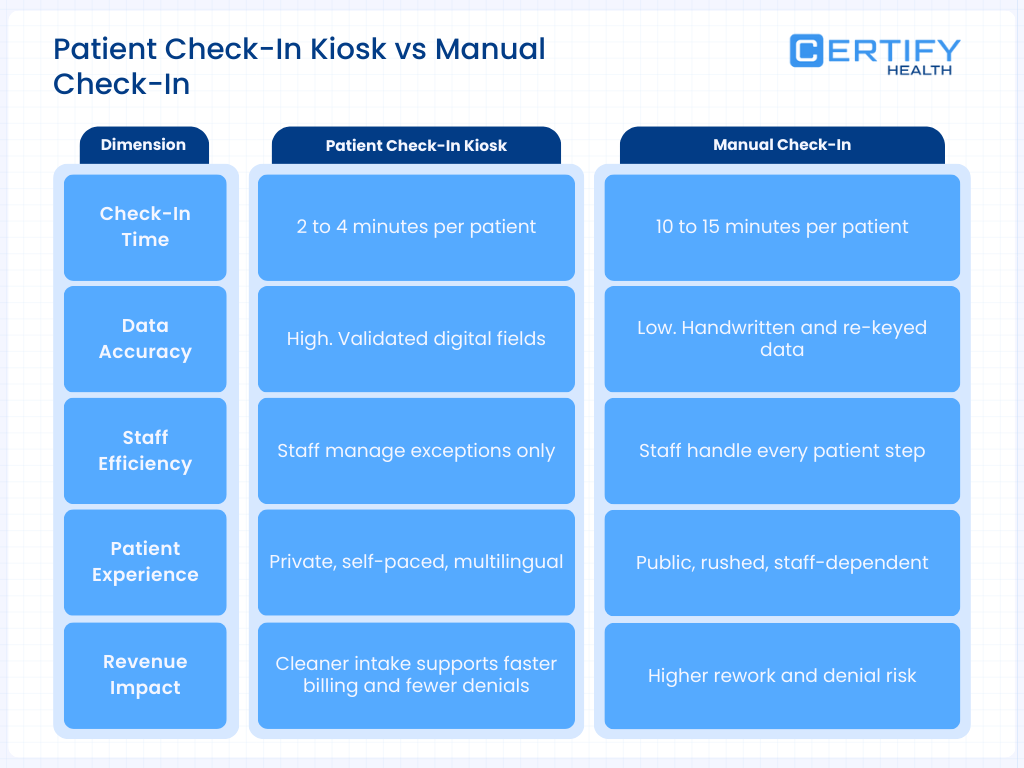
- Manual check-in: ~8–12 minutes per patient for registration and initial intake.
- Digital kiosk/self-check-in: ~1–3 minutes per patient, depending on prior use and familiarity.
2. Error Rates and Data Quality
Multiple research strands converge on better data quality with structured digital self-entry:
- Digital kiosks and symptom-taking tools reduce data duplication and capture more complete, structured data, lowering the need for re-asking questions and manual corrections.
- In kiosk adoption research from a community-based clinic, targeted interventions increased kiosk utilization from 6.5% to 24.9% of patients without harming satisfaction, indicating patients can and will use the technology effectively when supported.
Vendor and IoT kiosk studies consistently report:
- Demographic errors dropping from low double digits to low single digits (<2–5%) when patients self-enter with validation rules.
- Fewer missing required fields due to hard stops and incremental guidance.
3. Denials and Front-End Revenue Capture
Several independent sources tie denials to intake failures:
- Change Healthcare and other front-end denial analyses show that nearly 50% of denials are rooted in front-end issues, with registration/eligibility and missing or invalid data among the top three causes.
- HFMA/AKASA findings highlight that eligibility errors and missing authorizations are currently the most common initial-denial reasons.
When kiosks integrate eligibility verification at check-in:
- Coverage and plan problems can be identified before the visit begins, allowing staff to collect updated insurance information, obtain authorizations, or arrange self-pay options at the point of service.
- This front-end correction reduces the pool of preventable denials and shortens the cash cycle, as claims are cleaner on first submission.
4. Staff Time and Labor Allocation
Research on workflow efficiency and digital tools shows that automation at the front end tends to reallocate staff time:
- Time-and-motion studies in other clinical workflows (e.g., ward rounds) illustrate that structured, technology-assisted processes reduce low-value walking and searching time; similar patterns have been observed with digital intake, where staff spend more time on complex coordination and less on repetitive registration tasks.
- Community clinic kiosk interventions demonstrate that adoption can be increased deliberately (e.g., via signage and staff prompts) without harming satisfaction, a prerequisite to realizing labor savings.
How High-Performing Patient Check-In Kiosks Work: Core Functional Components
A high-performing check-in kiosk in an ambulatory or ED environment typically includes:
Authentication and Identification
- Patient lookup using name, date of birth, barcode (appointment letter), or phone number.
- Optionally, biometrics (e.g., facial recognition) to reduce misidentification and speed repeat visits.
Demographic and Contact Capture
- Structured forms with required fields and validation (e.g., date pickers, masked inputs for phone and ID) to reduce format and transposition errors.
- Multi-language support to improve accuracy in populations with limited English proficiency.
Insurance and Eligibility
- Scanning of physical insurance cards with OCR to auto-populate payer fields.
- Real-time eligibility checks via payer APIs or clearinghouse connections, returning plan status, coverage limitations, and co-pay responsibilities before the encounter.
Clinical and Consent Intake
- Digital questionnaires (e.g., ROS, PHQ-9, pain scores) that can be tailored to specialty or visit type.
- Electronic signatures for consents, financial policies, and HIPAA notices, reducing paper handling and storage needs.
Payment and Revenue Capture
- Integrated point-of-service collection for co-pays and past-due balances.
- Option to set up payment plans or collect card-on-file authorizations when permitted by policy.
Integration with EHR and RCM
- Bi-directional interfaces to scheduling, EHR, and practice management systems so that data entered at the kiosk writes directly into the patient record and visit registration, rather than into a disconnected system.
- Event triggers (check-in completed, forms submitted, eligibility verified) that update worklists and downstream workflows.
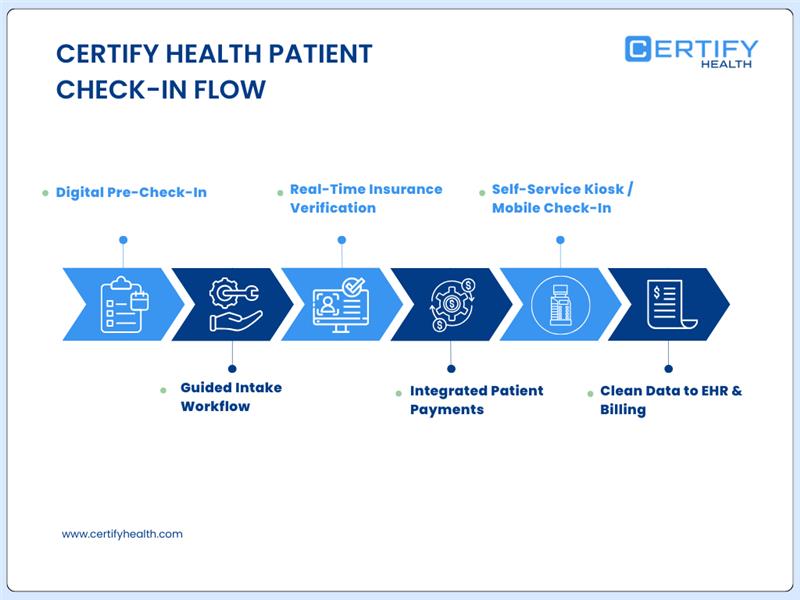
CERTIFY Health’s platform exemplifies this model by combining kiosks, mobile check-in, and facial recognition for check-in and patient identification, with direct integration into EHR and unified payments.
Typical Kiosk-Enabled Workflow
Manual vs Kiosk Intake Flow
| Step | Manual Intake | Kiosk-Enabled Intake |
|---|---|---|
| Arrival | Patient queues at front desk | Patient goes to kiosk (or taps link for mobile pre-check-in) |
| Identification | Staff asks for name, DOB, searches in system | Patient finds own record via kiosk lookup (name/DOB/QR/biometric) |
| Demographic Forms | Paper forms filled, then re-keyed by staff | Patient enters or confirms data on kiosk with required-field validation |
| Insurance | Patient hands card; staff copies and types data | Patient scans card; system extracts plan/ID and validates formats |
| Eligibility | Often batch-checked later or selectively | Real-time eligibility at check-in with alerts for issues |
| Clinical Questionnaires | Paper forms or staff interview | Digital questionnaires tailored to visit type |
| Consents | Wet signatures on paper; scanned later | eSignatures captured and stored digitally |
| Payment | Staff calculates co-pay; processes in PMS | Kiosk presents amount due; patient pays on-screen |
| Data to EHR/RCM | Staff manually enters/updates in EHR and billing system | Kiosk data flows directly into EHR and RCM; staff handles exceptions |
Evidence-Based Outcomes from Kiosk and Digital Check-In Studies
1. Time, Flow, and Overcrowding
The digital check-in and triage kiosk systematic review highlights:
- A 14-minute reduction in time from arrival to completion of check-in in one ED study using self-check-in.
- Simulation findings where modest time savings per check-in (2.5–5 minutes) produced 26–55% reductions in waiting time to triage.
These gains are not merely convenience; shorter queues and faster triage reduce ED crowding, which is associated with lower mortality risk and better timeliness of care.
2. Patient Adoption and Satisfaction
In a 143,208-patient community-based clinic study:
- The proportion of patients using self-check-in kiosks increased from 6.5% to 24.9% after targeted interventions (education, prompts, signage), a statistically significant jump (z = −102.79, P < .001).
- Importantly, overall patient satisfaction did not decline despite shifting a meaningful portion of check-ins to kiosks, addressing concerns that automation might harm the experience.
Emergency department analyses also report modest improvements in satisfaction scores (around 3% increases) following kiosk implementation, likely related to perceived fairness of queueing and reduced waits.
3. Safety and Triage Accuracy
Systematic reviews and safety studies emphasize that:
- Digital kiosks can capture structured symptom data that supports triage decisions and helps identify those with urgent needs earlier.
- When kiosk-collected data is validated by a triage nurse, it can contribute to more consistent prioritization and reduce variability in assessments.
While evidence is still evolving, no major safety harms attributable to kiosk use have been identified in these reviews, provided that clinical oversight remains in place.
4. Revenue Cycle and Denials
Front-end denial data tie directly into kiosk capabilities:
- Registration/eligibility, missing or invalid data, and lack of authorization are three of the top four denial causes, together accounting for a large share of preventable denials.
- Nearly half of surveyed organizations report losing at least $500,000 annually to denials; front-end errors are the major contributors.
By embedding real-time eligibility and validation into kiosks:
- Practices can systematically reduce the volume of claims with incorrect demographic or coverage data, leading to fewer denials and less rework.
- Coupled with POS payment flows, kiosks improve upfront cash collections and reduce bad debt risk at the tail end of the revenue cycle.
Financial and Operational Impact: Translating Metrics to a 200-Patient/Day Clinic
For a 200-patient/day multispecialty clinic operating five days per week:
Time Savings
- If manual check-in averages 8 minutes and kiosks reduce this to 3 minutes, that is 5 minutes saved per patient.
- At 200 patients/day, this yields ~1,000 minutes (~16.7 hours) saved per day in pure registration time, which can be deployed to higher-value tasks or used to absorb growth.
Denial Reduction
- Assume 20–30% of denials are driven by registration/eligibility and missing data.
- If kiosks and better front-end processes cut these by even one-third, the financial recovery may range from tens to hundreds of thousands of dollars annually, depending on claim volume and payer mix.
Labor Reallocation
- The saved registration hours can allow cross-training staff into financial counseling, prior authorization management, or population health outreach—roles with better long-term ROI than manual data entry.
Implementation Guide for Practice and Health System Leaders
1. Prioritize Integration Over Standalone Gadgets
- Select kiosk platforms with native or proven interfaces to your EHR, practice management system, and clearinghouse/eligibility services.
- Avoid “islands” of data; if staff must retype kiosk output, most efficiency and accuracy benefits vanish.
2. Make Real-Time Eligibility and Validation Non-Negotiable
- Ensure eligibility checks are initiated automatically when a patient checks in and that exceptions are flagged in real time for staff review.
- Configure hard stops and validation rules for core fields (DOB, insurance ID, policyholder data) to prevent incomplete registrations.
3. Design for Hybrid Use: Mobile + Onsite Kiosks
- Offer pre-visit digital intake via mobile/web for scheduled patients, then use kiosks as a fail-safe for those who arrive without completing it.
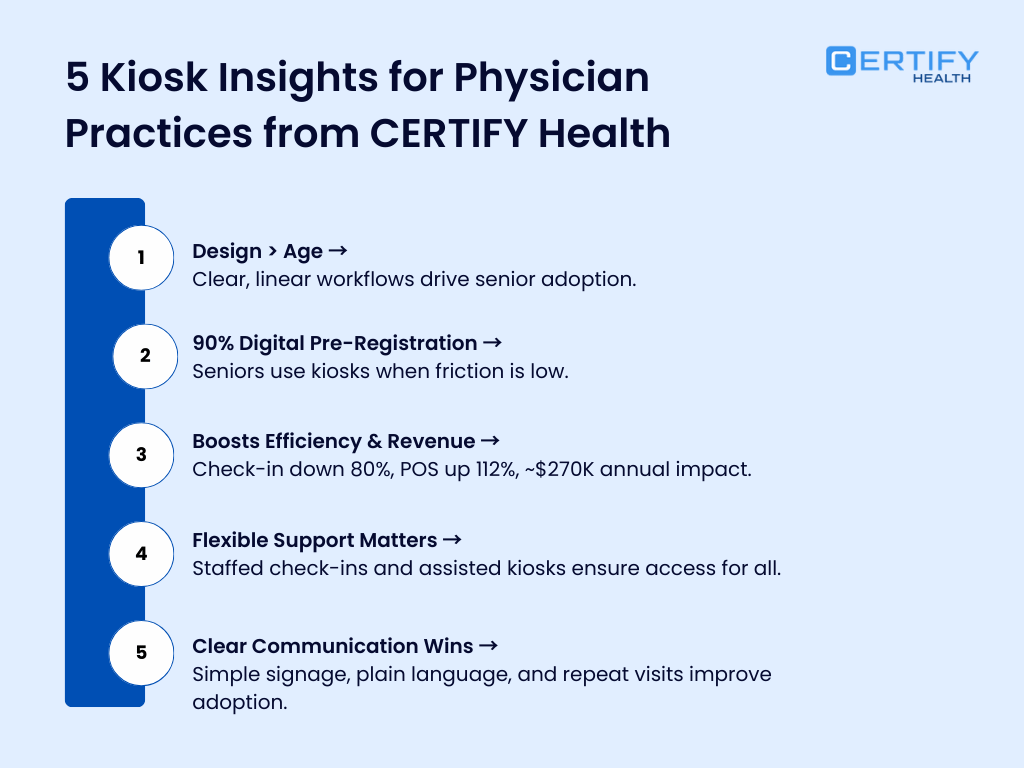
- Evidence from community clinics shows adoption rises when technology is supported by staff prompting and clear signage, not when it is simply “placed in the waiting room.
4. Train Staff for Exception Management and Patient Support
Front-desk roles should evolve from data entry to:
- Helping patients who struggle with technology.
- Resolving eligibility exceptions at point of service.
- Escalating complex financial discussions.
This shift protects the human element where it matters most—handling nuance, not typing.
5. Measure the Right KPIs Quarterly
Track before/after metrics and maintain a simple dashboard:
- Average check-in time by visit type.
- Percentage of visits using kiosks or digital pre-check-in.
- Registration/eligibility-related denials (volume and rate).
- Rework time for registration corrections.
- Patient satisfaction scores and qualitative feedback.
Research on kiosk adoption underscores that utilization is not automatic; sustained, intentional interventions are required to maintain and grow use while preserving satisfaction.
Future Directions: AI and Predictive Revenue Cycle at Intake
Digital kiosks are becoming more than just digital clipboards:
AI-Assisted Triage and Risk Flagging
- Emerging systems use symptom and demographic data from kiosks to suggest triage priority scores, with clinicians validating final decisions.
- This can support faster recognition of high-risk presentations in crowded EDs while maintaining human oversight.
Predictive Denial Risk Scoring
- Intake data coupled with historical claims can be used to predict denial risk at the point of registration, prompting targeted checks for high-risk combinations (payer, service type, authorization status).
Omnichannel Self-Service
- As patients move between telehealth, urgent care, and in-person visits, unified intake profiles reduce repeated data entry and support consistent identity and insurance information across settings.
Bottom Line: Where Kiosks Clearly Outperform Manual Intake
Across the evidence base:
- Digital check-in and kiosks consistently reduce check-in time and waiting to triage without compromising satisfaction or safety, and sometimes improve both.
- Front-end denial studies show that the very problems kiosks are designed to address (registration errors, incomplete data, eligibility gaps) are now the leading cause of lost revenue.
- When integrated tightly with EHR and RCM, kiosks transform intake from a source of friction into a measurable, controllable lever for flow, safety, and financial performance.
For organizations still relying on paper and manual registration, the question is less “Do kiosks work?” and more “Can we afford not to shift our intake processes, given what is now known about front-end errors and denials?”
CERTIFY Health’s Patient Experience Platform modernizes access to care by connecting online self-scheduling, mobile and kiosk check-in, and automated patient communications into a single, coordinated workflow.
Patients can book appointments in real time, receive automated reminders, and complete intake before arrival, reducing wait times and front-desk congestion.
For practices, this means fewer scheduling errors, better visit utilization, and cleaner intake data flowing into downstream systems. By unifying scheduling and check-in, CERTIFY Health helps practices move from reactive front-desk operations to a more predictable, efficient, and patient-centered access experience.
Book a demo to learn more.
Frequently Asked Questions
What are the risks of manual check-in for clinic ROI?
Manual check-in introduces operational and financial risks that directly affect clinic ROI.
Paper forms and manual data entry increase the likelihood of registration errors, incomplete insurance data, and eligibility mistakes, which are among the leading causes of claim denials. Surveys of healthcare revenue cycle leaders consistently show that front-end registration errors are a top driver of denied claims.
Manual workflows also require staff to repeatedly transfer information from paper to the EHR. Each additional transcription step increases the probability of mistakes and delays.
Other major risks include:
- Lost revenue due to denied or delayed claims
- Longer check-in queues and patient dissatisfaction
- Higher administrative costs and staff burnout
- Compliance and documentation gaps
Over time, these inefficiencies compound and reduce clinic profitability.
How common are intake errors in clinics?
Intake errors are more common than many clinics realize because the process involves multiple manual steps.
Industry data shows that around 30% of medical claim denials originate from manual data entry errors, including incorrect demographics, missing insurance details, or incomplete documentation.
Research also indicates that traditional intake workflows often produce incomplete or incorrect patient data, including missing insurance information, medication lists, or consent documentation.
Common intake mistakes include:
- Incorrect patient demographics
- Missing insurance policy details
- Incomplete medication or allergy information
- Missing consent or authorization forms
These errors frequently surface later in the revenue cycle, forcing staff to spend time correcting claims or resubmitting bills.
What’s the ROI on automated check-in systems in healthcare?
Automated patient check-in systems deliver ROI through three primary mechanisms: reduced administrative cost, faster intake, and fewer billing errors.
Automation eliminates manual data entry and validates patient information before it reaches the EHR. Clinics using AI-assisted intake have reported:
- Intake time dropping from 15–20 minutes to under 5 minutes per patient
- Significant reductions in data entry errors
- Faster insurance verification and fewer eligibility mistakes
These improvements reduce claim denials, improve front-desk efficiency, and allow clinics to see more patients per day. For many practices, the savings in administrative time and error correction allow digital intake systems to pay for themselves within months.
How do patient payment platforms improve ROI in outpatient care?
Patient payment platforms improve outpatient ROI by increasing point-of-service collections and reducing billing friction.
When payments are integrated directly into the digital intake workflow, patients can verify coverage, view their responsibility, and pay before or during the visit. This reduces the need for post-visit billing and lowers accounts receivable days.
Operational benefits include:
- Higher point-of-service collections
- Reduced billing and statement costs
- Lower write-offs from unpaid balances
- Better financial transparency for patients
Combined with automated check-in, payment platforms turn patient intake into a revenue-capture moment instead of a paperwork bottleneck.
What is SmileCon registration?
SmileCon registration refers to the attendee enrollment process for the American Dental Association’s flagship conference.
SmileCon typically attracts thousands of dental professionals for clinical education, product exhibitions, and networking. Modern conferences increasingly use digital registration kiosks, QR codes, and automated check-in systems to reduce wait times and streamline attendee onboarding.
These same principles mirror healthcare intake modernization: digital check-in improves accuracy, reduces queues, and enhances the overall participant experience.