
Table of Contents
Key Takeaways
- The right medical practice management software cuts claim denials and recovers thousands in lost revenue annually.
- Automating scheduling and intake reduces no-shows and frees staff from hours of repetitive daily work.
- Most mid-size practices see full ROI on their software investment within four to six months.
Physicians spend two extra hours daily on EHR and desk work. Patient care suffers. Practices lose revenue.
Medical practice management software was built to fix that.
This guide covers:
- What the software does
- Who needs it
- How to choose it
- What ROI to expect
Solo practice or multi-location group, you’ll leave knowing your next step.
1. What Is Medical Practice Management Software?
Medical practice management software (also called PMS) is a digital tool. It handles the admin and financial side of running a healthcare practice.
It manages:
- Patient scheduling and reminders
- Insurance eligibility checks
- Billing, claims, and payment collection
- Patient registration and intake
- Reports and performance data
It keeps the front office running. Allowing your team to spend more time attending to patients.
It is not the same as an EHR. An EHR stores clinical notes and medical history. A PMS handles scheduling, billing, and admin. Many platforms connect both.
2. Who Needs Practice Management Software Healthcare?
Almost every care setting benefits from PMS. But the pain points differ.
Solo & Small Practices
Small practices do everything at once. The front desk books appointments, checks insurance, and handles complaints, all at the same time.
Medical office practice management software handles the repeat tasks. A two-person team can do the work of five.
Large Medical Groups
Big groups need to see data across locations, providers, and payers. The right clinic management software puts it all in one place. No manual tracking. No data silos.
Specialty Clinics
Orthopedics, behavioral health, cardiology, each has its own billing codes and workflows. The best medical practice software handles those needs right away.
Providers Moving Off Paper
Practices leaving paper or old systems gain the most. Modern medical office software cuts denied claims, speeds up collections, and delivers data practices have never had.
3. Key Issues Practice Management Software Solves
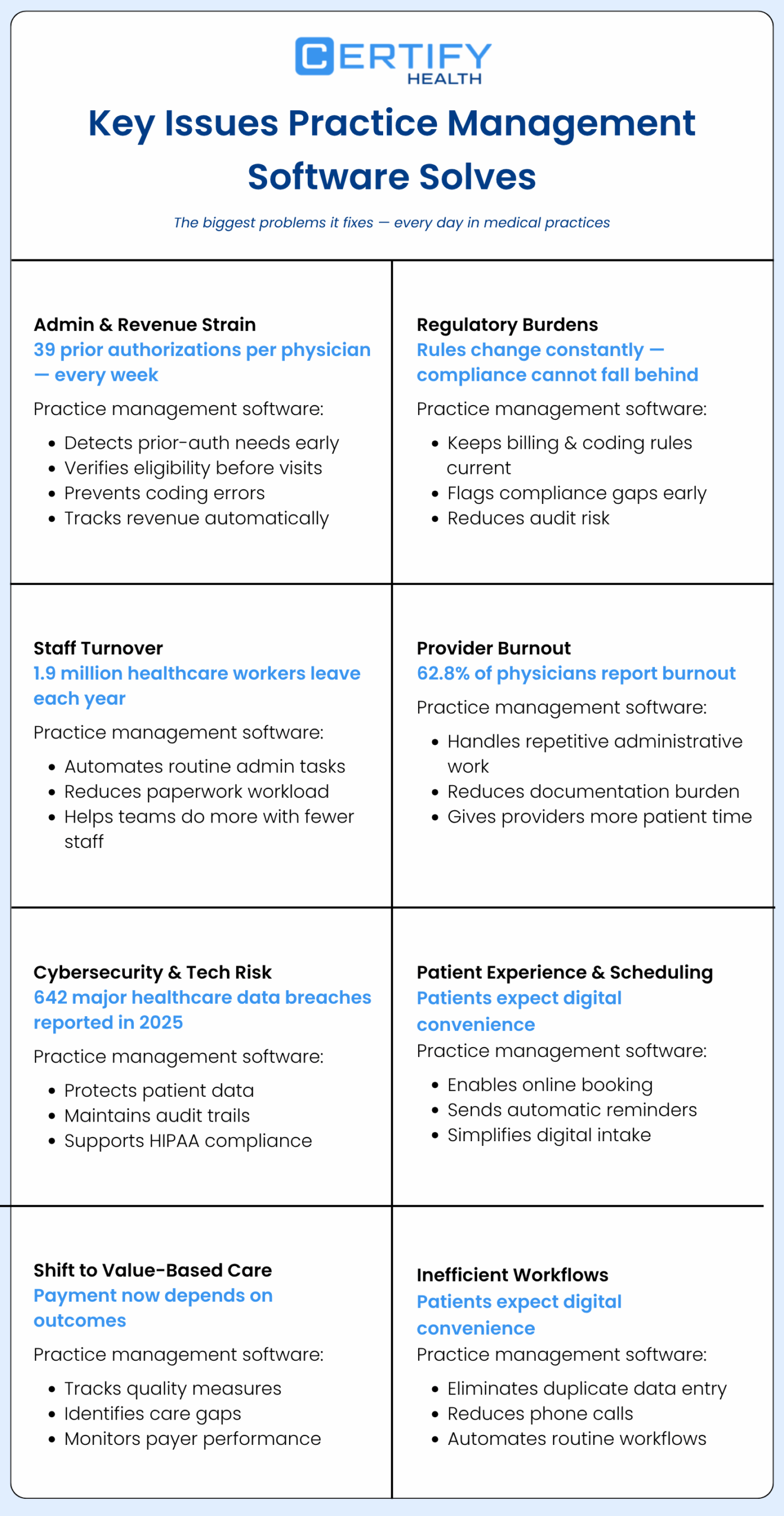
Here are the biggest problems it fixes.
3.1 Admin & Revenue Strain
Practices handle nearly 39 prior authorization requests per physician each week. That adds real cost to the revenue cycle.
Medical practice management software catches prior-auth needs early. It checks eligibility before visits. It finds coding errors before claims go out. It tracks every dollar.
3.2 Regulatory Burdens
HIPAA, prior-auth rules, ICD-10 updates, the rules keep changing.
Medical management software keeps billing rules current. It flags gaps before they become problems.
3.3 Staff Turnover
Healthcare loses about 1.9 million workers each year. Many leave due to burnout from too much paperwork.
Automation streamlines reminders and insurance checks without the need for extra staff.
3.4 Provider Burnout
A 2022 study showed that nearly 63% of physicians experienced burnout. Too much paperwork is a top reason.
When medical practice management software handles routine tasks, doctors spend more time with patients, and less time on admin.
3.5 Cybersecurity & Tech Adoption
In 2025, more than 642 healthcare data incidents affected 500 or more people per breach.
The best medical practice management systems come with built-in compliance and security safeguards. That means encryption, audit logs, and HIPAA-compliant storage, all included.
3.6 Patient Experience & Scheduling
Patients want the same ease from their doctor’s office as they get from their bank app.
Online booking. Auto reminders. Digital intake forms. Medical practice software delivers all three, without extra staff effort.
3.7 Shifting to Value-Based Care
Value-based contracts pay for outcomes, not visits. Thus, you require actual data.
Practice management software healthcare tracks quality scores, care gaps, and payer performance. So, practices can hit targets and get paid for the work they do.
3.8 Inefficient Workflows
Double data entry. Phone tag for confirmation. Manual insurance lookups.
Each one seems small. Together, however, they consume hours each week.
The right medical practice management system cuts most of them out, automatically.
4. Medical Practice Management Software Features
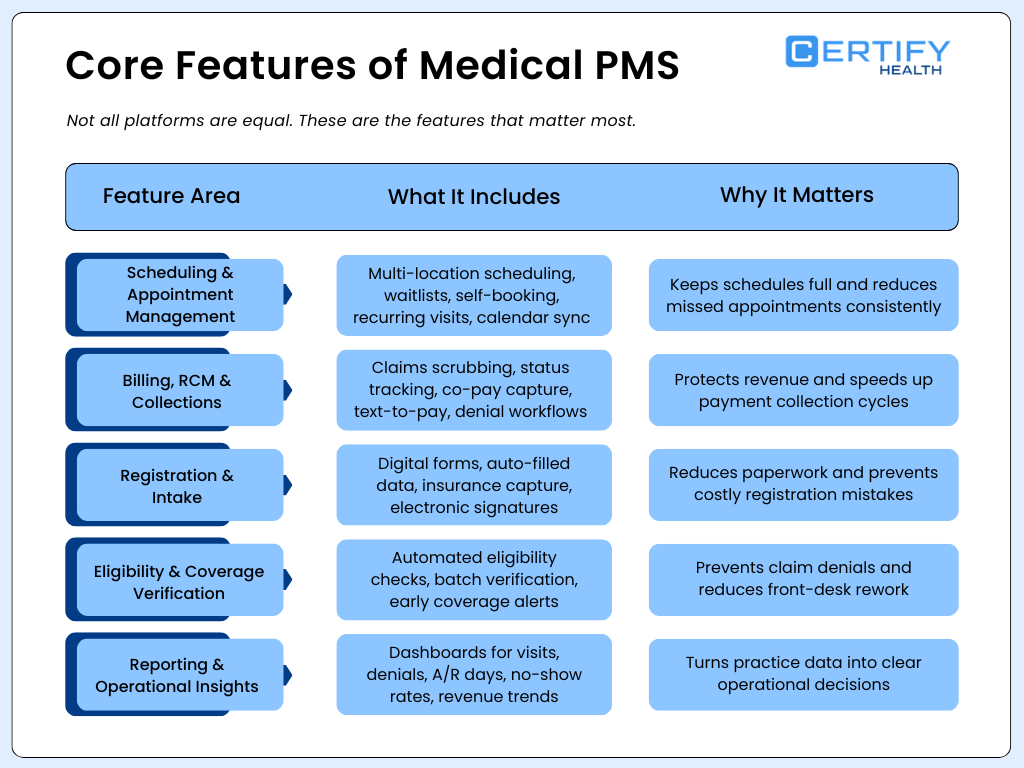
Not all platforms are equal. Here are the Practice management features that matter:
4.1 Scheduling & Appointment Management
Scheduling sounds simple. It isn’t.
A strong scheduling module inside medical practice management software should include:
- Multi-location scheduling — book across sites from one screen
- Waitlist automation — fill cancellations without staff phone calls
- Patient self-scheduling — 24/7 online booking through a portal or website
- Recurring appointment automation — set it once; the system handles the rest
- Provider calendar sync — see real-time provider availability in one place
- Blocked slots logic — reserve time for walk-ins, emergencies, or admin tasks
No-show rates average 5–30% depending on the specialty. Automated reminders and self-scheduling together can cut that number significantly.
4.2 Billing, RCM & Collections
Most practices lose money in the billing process. Look for:
- Automated claims scrubbing before submission
- Real-time claim status tracking
- Co-pay collection at check-in — before the patient leaves
- Text-to-pay — patients get a link by text and pay in seconds
- Denial management workflows — flag and resubmit fast
- Payment plans with automated installment tracking
Practices using digital payment options collect 30% more patient balances than those using paper statements alone.
4.3 Registration & Intake
Paper forms slow everything down. They also cause errors.
Modern medical clinic software replaces paper with:
- Digital intake forms sent by text or email before the visit
- Auto-fill the chart with patient information
- Insurance card scanning and upload
- Consent forms with e-signatures
Less paper. Fewer errors. Fewer denied claims.
4.4 Eligibility & Coverage Verification
Checking eligibility by hand takes hours at busy practices.
Good medical practice management software runs batch checks the night before appointments, on its own. It flags issues early so staff can fix them before the patient arrives.
This one feature stops the most common cause of claim denials: ineligible coverage.
4.5 Reporting & Operational Insights
Collecting data is not enough; its value comes from how it is utilized. Look for dashboards that show:
- Appointments by provider, location, and payer
- Claim denial rates and reasons
- Days in accounts receivable (A/R)
- No-show rates by provider and visit type
- Revenue per visit
The best medical practice management software turns numbers into clear next steps, no data analyst needed.
5. Use Cases of Medical Practice Management Software
Use Case 1 — Fixing Claim Denials and Lost Revenue
The Challenge
A medical clinic was losing money.
Many insurance claims were denied.
Staff checked insurance by hand. Mistakes happened often.
How the PMS Helped
The clinic started using practice management software that:
- Checked insurance in real time
- Helped staff choose the right billing codes
- Sent claims to payers automatically
The Result
- Fewer claims were denied
- Payments came faster
- Staff spent less time fixing errors
Use Case 2 — Handling More Patients Without Hiring More Staff
The Challenge
An urgent care clinic was very busy.
Phones kept ringing all day.
Staff felt rushed and stressed.
How the PMS Helped
The clinic used practice management software healthcare that:
- Let patients book visits online
- Sent reminders before appointments
- Collected payments during check-in
The Result
- Check-in became faster
- Staff had less work to do
- The clinic saw more patients each day
Use Case 3 — Managing Multiple Clinics in One System
The Challenge
A specialty group oversaw multiple clinic locations.
Each location tracked money in a different way.
Leaders could not access a complete view.
How the PMS Helped
The group moved to one practice management system that:
- Combined billing from all locations
- Showed reports in one dashboard
- Tracked payments in real time
The Result
- Leaders saw clear financial data
- Reports were easier to create
- Decisions became faster
Use Case 4 — Reducing Front-Desk Work in a Small Practice
The Challenge
A small clinic had only a few staff members.
They spent too much time on phone calls and paperwork.
Work piled up every day.
How the PMS Helped
The clinic used practice management software healthcare that:
- Sent automatic appointment reminders
- Verified insurance before visits
- Managed billing in one system
The Result
- Staff finished tasks faster
- Patients missed fewer visits
- The clinic ran more smoothly
Use Case 5 — Getting Paid Faster After Patient Visits
The Challenge
A clinic had to wait many weeks to get paid.
Bills were sent late.
Payments were hard to track.
How the PMS Helped
The clinic started using practice management software that:
- Created bills right after visits
- Sent claims quickly
- Tracked payments automatically
The Result
- Payments arrived sooner
- Staff spent less time chasing payments
- Cash flow became steady
6. EHR Vs. Medical Practice Management Software
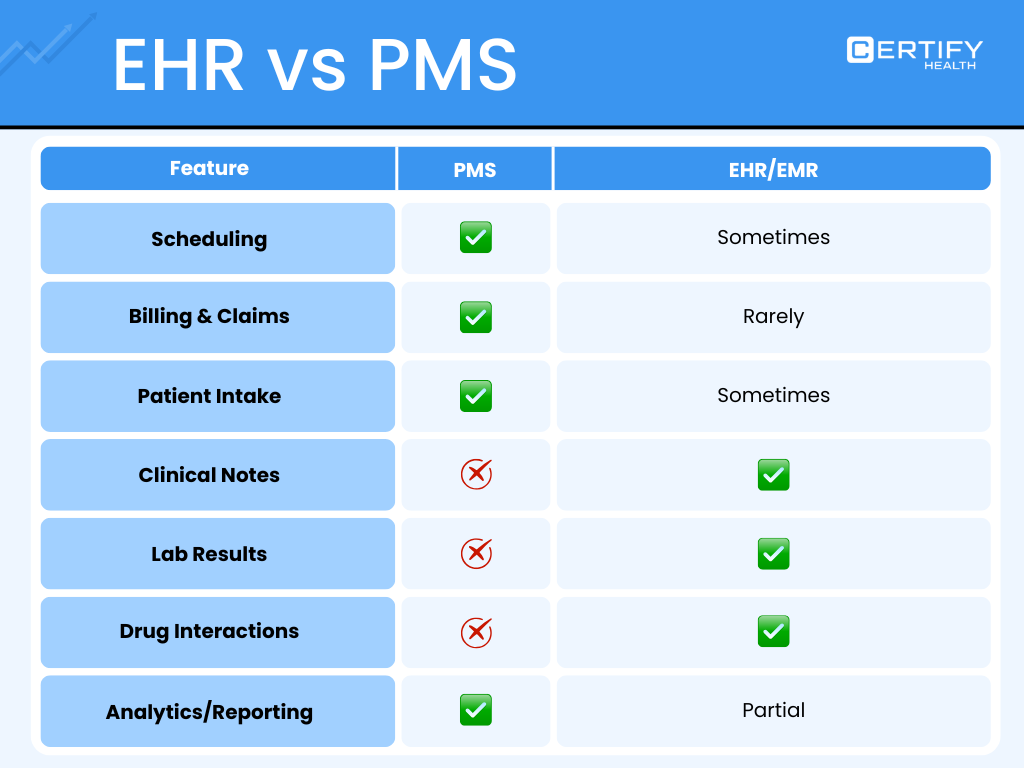
his is one of the most common confusion is EHR Vs PMS. Here’s a simple breakdown.
6.1 What a PMS Does
Medical practice management software oversees the business side:
- Scheduling — book, confirm, reschedule, and track visits
- Billing & Finance — handling claims, collections, denials, and patient payments
- Admin — eligibility, intake, reporting, staff workflows
6.2 What an EHR Does
An EHR (Electronic Health Record) manages all clinical activities.
- Clinical Data — notes, diagnoses, medications, labs, imaging
- Clinical Decision Support — drug alerts, care gap reminders, order sets
- Interoperability — data sharing with other providers and labs via HL7/FHIR. Many practices use both, a medical practice management software paired with their EHR. Others use one platform that does both.
Either way works. The key is making sure the two systems talk to each other with no gaps.
7. Integration & Interoperability
A PMS that won’t connect to your EHR is a big problem. It causes double data entry, billing mistakes, and patient safety risks.
Before you buy, consider these six factors:
EHR Integration: Can the PMS send data to your EHR on its own? Can it pull billing data back without anyone typing it in again?
Lab & Radiology: Can the system get lab results online? Or does staff still print and fax them by hand?
Patient Portal: Can patients book visits, pay bills, and fill out forms in one place online?
HIE Connectivity: Some programs like Medicaid need your system to share data with others. Find out if the vendor has HL7 FHIR support. It’s the standard used for this.
Payer Connections: To check insurance in real time, your system needs live links to payers. Ask for their payer list. It should include your top 10 at least.
API Access: Need to connect other tools? Ask if the vendor has an open API. Larger clinics often need this.
Bad connections are the top reason practices leave their medical practice management software vendor. Check integrations just as hard as you check features.
8. Security & HIPAA Compliance
Every medical practice management software must follow HIPAA rules. But compliance doesn’t always mean true security.
Ask every vendor these questions:
- Encryption — Is patient data locked when sent and when stored?
- Access controls — Can you control what each staff member can see?
- Audit logs — Does the system track every login and action?
- BAA — Does the vendor sign and share BAA? If they won’t, walk away.
- Breach plan — What happens if data gets exposed? Do they have a clear plan?
- Backups — Where is data stored? What if the system goes down?
Cloud-based medical practice management software is often safer than systems you host yourself. Vendors spend heavily on security. Most small clinics can’t match that on their own.
9. Pricing & Cost Breakdown
The cost of medical practice management software depends on your practice size, features, and setup type.
Here’s a general idea:
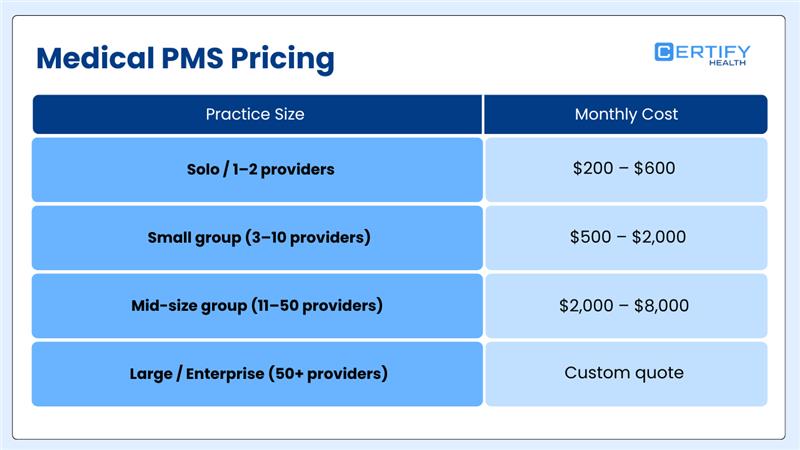
Most base plans include:
- Scheduling and billing tools
- Basic reports
- Patient portal access
- Basic support
These often cost extra:
- Text-to-pay fees (usually 2.5–3.5% per payment)
- Add-on integrations
- Advanced reports or analytics
- Extra training hours
- Moving data from your old system
Always ask for one full price. It should cover setup, training, and the first year of support.
If a vendor hides fees in the fine print — that’s a warning sign
10. How to Choose the Right Medical Practice Management Software
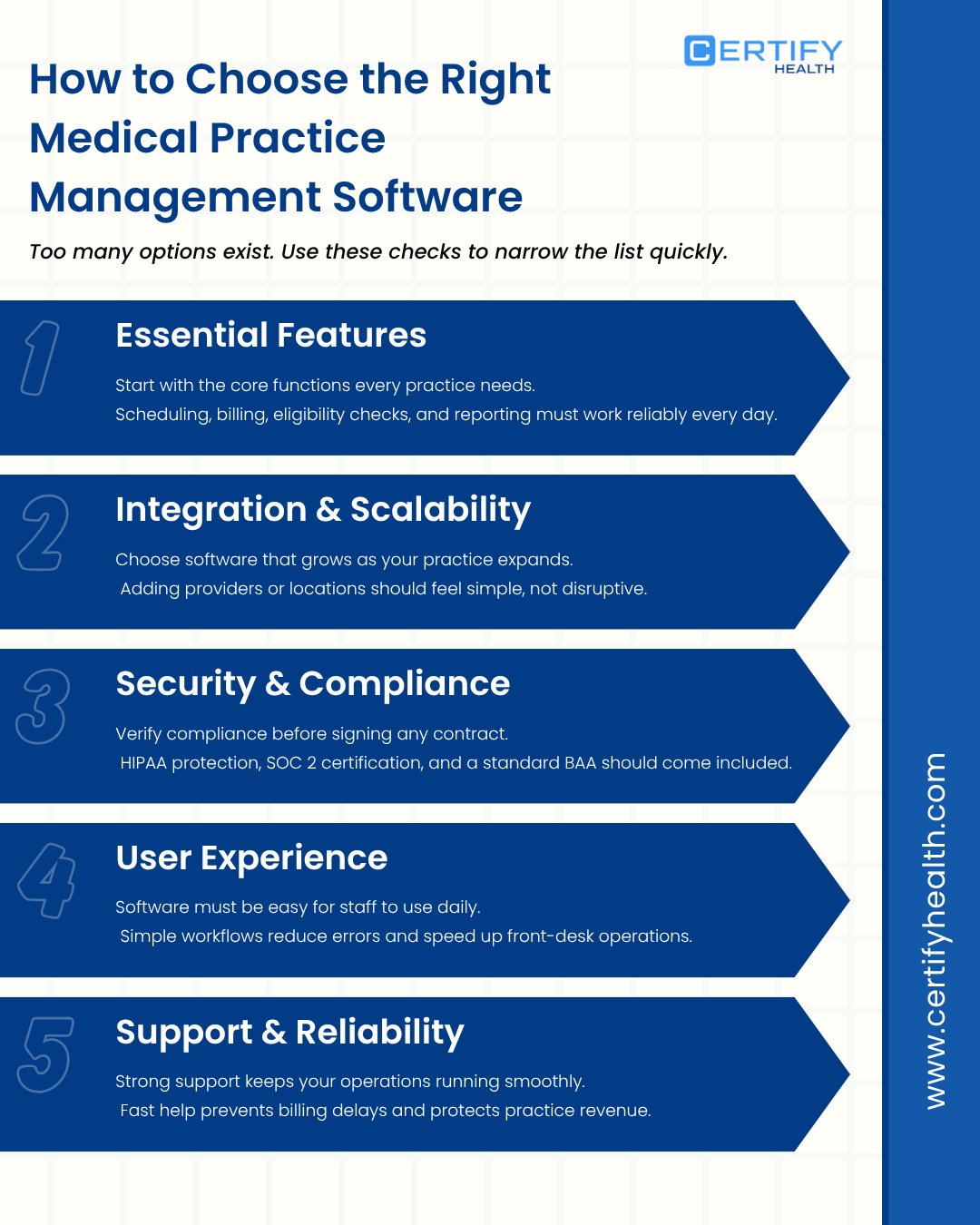
There are many options out there. Follow these steps to choose the right Medical PMS.
10.1 Essential Features
Start with must-haves. Your medical practice management software needs to handle scheduling, billing, eligibility, and reporting at the very least.
Write down your top pain points. Then check each vendor against that list.
10.2 Integration & Scalability
Will it grow with you? If you plan to add providers or locations, make sure the software can handle that. You would not want to change systems again a year or so.
10.3 Security & Compliance
Ask for HIPAA compliance documents. For cloud systems, ask for SOC 2 Type II certification. Make sure the BAA comes standard — not as a special request.
10.4 User Experience
A tool your staff won’t use helps no one. Ask for a live demo. Let your front desk and billing team try it. Their opinion matters more than the sales pitch.
10.5 Support & Reliability
How do they help when something breaks? Phone? Chat? Check reviews on G2, Capterra, or KLAS. Slow support leads to billing delays — and that costs real money.
11. Implementation Process & Timeline
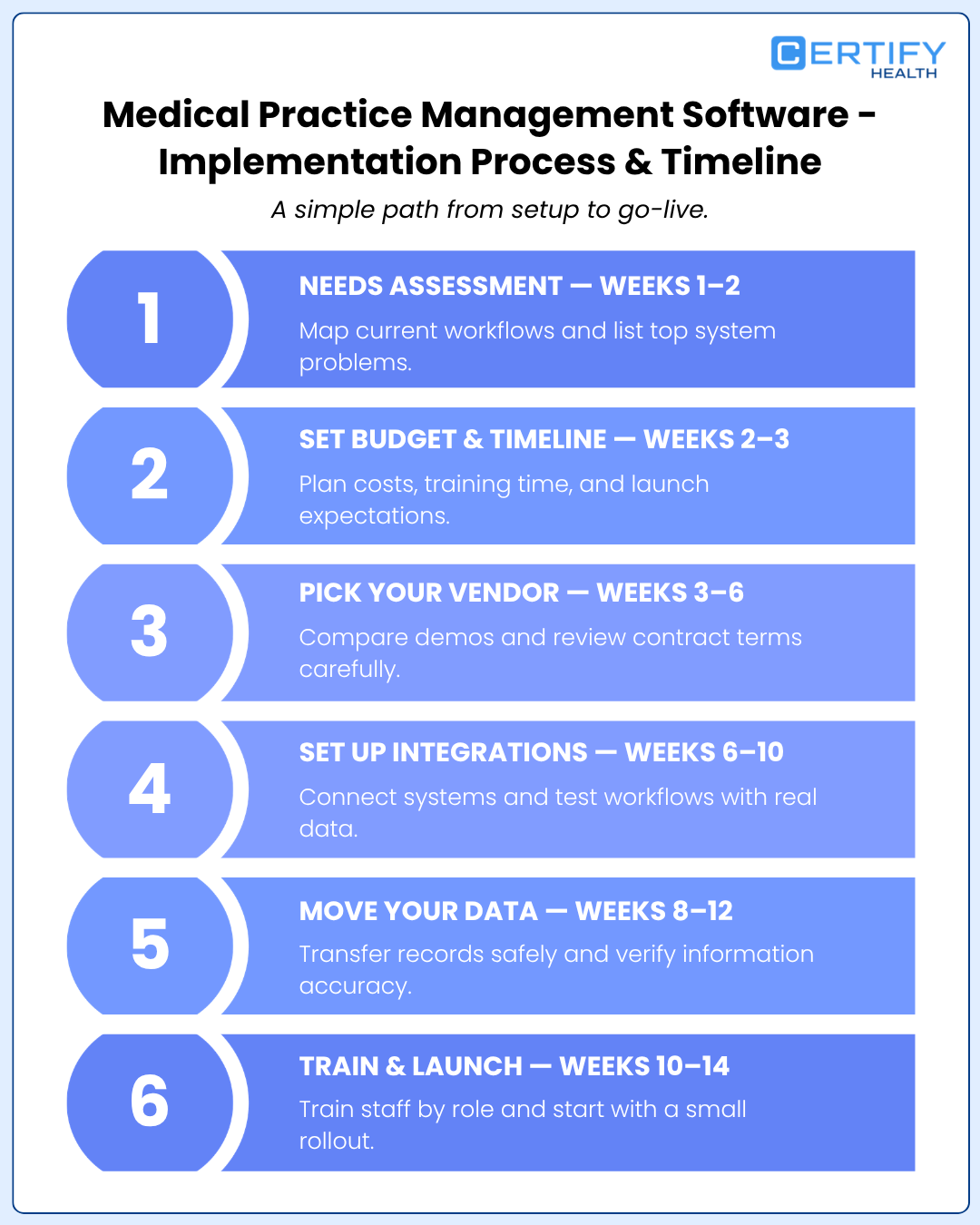
Most practices don’t realize how much work goes into setup. Here’s a simple roadmap.
11.1 Needs Assessment — Weeks 1–2
Write down how you work today. Map every manual step in scheduling, billing, and intake. Pick the top 5 problems the new system must fix.
11.2 Set Budget & Timeline — Weeks 2–3
Plan for software costs, setup fees, training, and a short dip in output during launch. Most mid-size practices need 60–90 days from sign-up to full go-live.
11.3 Pick Your Vendor — Weeks 3–6
Cut your list to 2–3 options. Run real demos. Check contract terms — data ownership, exit options, and service levels. Confirm they can match your workflow needs.
11.4 Set Up Integrations — Weeks 6–10
Connect the system to your EHR, labs, and payer portals. Test each link with real data before you go live.
11.5 Move Your Data — Weeks 8–12
Transfer patient records, appointment history, and open billing. If you can, run both systems at once for a short time. It helps catch errors early.
11.6 Train & Launch — Weeks 10–14
Train each role separately. Front desk training looks different from billing training. Start soft — launch with one provider or one location first. Then roll out to the rest.
12. Common Challenges & How to Overcome Them
12.1 Common Challenges
Staff Pushback Change is hard. Staff used to old systems will resist. This is the top reason new systems fail.
High Costs Setup costs surprise many practices. So do ongoing fees — training, upgrades, and add-ons add up fast.
Poor Training rushed training leads to shortcuts. Shortcuts lead to errors. Errors lead to denied claims.
Workflow Slowdowns. Every new system slows things down at first. Plan for it. Don’t let it catch you off guard.
Old System Conflicts. Older EHRs may not connect well with new software. If the two systems don’t work together, you’ve just swapped one problem for another.
Security Fears. Some staff worry about data breaches in the cloud. These concerns are real. Address them with facts — not dismissal.
12.2 How to Fix These Problems
12.2.1 Get Staff On Board Early. Let front desk and billing teams help pick the system. People support what they help build. Pick one “champion” per role to guide others after launch.
12.2.2 Plan Your Budget Well. Set aside money for a 90-day transition. Include overtime, slower collections, and training costs. Compare that to what the old way costs you each year. Most practices see ROI within 6 months.
12.2.3 Train by Role. Don’t do one big group training. Front desk staff need scheduling and intake training. Billers need billing training. Record every session for new hires later.
12.2.4 Slow the Rollout. Don’t switch everything at once. Keep extra time in the schedule during the first two weeks. Let staff get used to the new flow before speeding back up.
12.2.5 Check Tech Fit. First Before you sign anything, have your IT team check every system you use today. List every connection point. Get API compatibility confirmed in writing.
12.2.6 Show the Security Facts. Share the vendor’s HIPAA docs with worried staff. Walk them through the BAA, encryption details, and audit logs. Fear fades when people have clear answers.
13. Performance Tracking & Analytics
The real value of medical practice management software shows up in your numbers. Track these after launch:
Financial:
- Days in A/R — aim for under 35 days
- First-pass claim rate — aim for 95% or higher
- Net collection rate — aim for 95–99%
- Patient payments collected at the visit
Operations:
- How full your schedule is each day
- No-show and cancellation rates by provider
- Average check-in time
- Time from visit to claim submission
Patient Experience:
- How many patients use the portal
- How many complete intake forms before arriving
- Patient satisfaction tied to wait times and ease of booking
The best medical practice management software builds dashboards for all of this. It sends alerts when numbers go off track. You don’t need a data analyst. The software shows you what matters.
14. Best Medical Practice Management Software for Small & Mid-Size Clinics
Small and mid-size practices don’t need a massive system. They need something simple, fast to learn, and easy to connect with their EHR.
Look for these things:
- A clean, simple scheduling screen
- Auto eligibility checks and claims
- Digital intake and self-scheduling
- Text-to-pay and online billing
- Clear pricing with no hidden fees
CERTIFY Health: Best Medical Practice Management Software
CERTIFY Health is a unified medical practice software platform. It has one goal: make every patient interaction smooth and digital — from booking to payment.
Here’s what makes it different:
- Digital intake — patients fill out forms before they arrive. Check-in takes under 2 minutes
- Auto eligibility checks — the system runs checks overnight. Staff start the day with a clean, verified schedule
- Text-to-pay — patients get a payment link by text. They pay in seconds. Practices collect more, faster
- Self-scheduling — patients book online 24/7. No phone calls needed
- Waitlist automation — when someone cancels, the next patient on the list gets the slot. Automatically
- HIPAA-compliant — data is encrypted, access is role-based, and every action is logged
CERTIFY Health works well for practices that want to go digital without replacing their EHR. It connects with major EHR systems. It cuts front-desk work. And it helps patients feel taken care of from the start.
If your practice struggles with no-shows, slow payments, or too much paper — CERTIFY Health is worth a close look as part of your medical practice management software setup.
15. ROI & Business Impact
What does the right medical practice management software actually give back? Here’s the math:
Fewer Denied Claims. Cut denial rates from 12% to 4% on $2M in claims = $160,000 back per year
Fewer No-Shows. Cut no-shows from 20% to 10% on 100 weekly visits. That’s 10 more visits per week. At $150 per visit = $78,000 per year
Less Manual Work. Save 3 hours per day for 2 staff members on eligibility and intake = 1,500 hours per year. At $20/hour = $30,000 saved
Total: $268,000+ per year
Most practices earn back their software cost in 4–6 months. The savings grow over time as staff get faster and automation does more.
Practices using integrated medical practice management software cut their admin cost per visit by an average of 21% in the first year.
Conclusion
Medical practice management software is no longer a nice-to-have. In 2026, it’s a must.
The right system removes friction at every step. From the moment a patient books — to the moment a claim is paid.
It gives your team more time. It gives leaders clear data. It gives patients the smooth experience they expect.
Start with your biggest problem. No-shows? Denied claims? Slow intake? Burned-out staff? Find a PMS fixes that first. Then make sure it connects with your EHR and can grow with you.
If patient access and faster collections are your top goals — CERTIFY Health is worth a serious look.
The practices that win in 2026 won’t have the biggest teams. They’ll have the best systems.
Want to see how CERTIFY Health can help your practice? Request a Demo Today