

Table of Contents
Key Takeaways:
- Revenue cycle problems start earlier than most practices realize.
Small intake or eligibility errors at scheduling often trigger denials weeks later, delaying cash flow. - Denial management is no longer optional; it is a revenue protection function.
Unworked denials quietly become permanent revenue loss when teams lack structured follow-up workflows. - Technology does not just automate billing; it stabilizes cash flow.
Real-time eligibility, clean claims, and easier patient payments reduce delays and make revenue predictable.
You put in significant effort to look after your patients. But do you get paid for all that work?
Initial claim denial rates hit 11.8% in 2024 across large U.S. providers. This means rising payer friction. Reimbursements slow down.
Claims get denied. Payments take months. Patients skip bills. Staff chase insurers for hours.
That’s a big problem. It has a name: revenue cycle management.
Revenue Cycle Management (RCM) ensures you get paid for care delivered. This guide covers it all. What is revenue cycle management? How it works. Why it matters. How to fix it.
Let’s start simple.
1. Revenue Cycle Management Definition
So, what is revenue cycle management?
Here’s the short answer:
Revenue cycle management (RCM) is a system that connects patient care to payment.
It covers every step, from scheduling and registration to claims and final collection.
Effective RCM ensures accurate billing, fewer denials, and better financial performance.
Everything in between is RCM. That includes:
- Reviewing insurance eligibility prior to the appointment
- Writing down what services you provided
- Submitting a claim to the insurer
- Gathering the portion the patient is responsible to pay
Think of it this way. Your physicians and clinical staff deliver the care. Revenue cycle management handles the money side of that care.
When it works well, cash comes in on time. Errors are caught early. Your team isn’t buried in billing problems.
When it breaks down, even a little, you lose money. Sometimes a lot of it.
That’s exactly why having a clear grasp of the healthcare revenue cycle matters so much.
2. A Step-by-Step Guide to the Healthcare Revenue Cycle
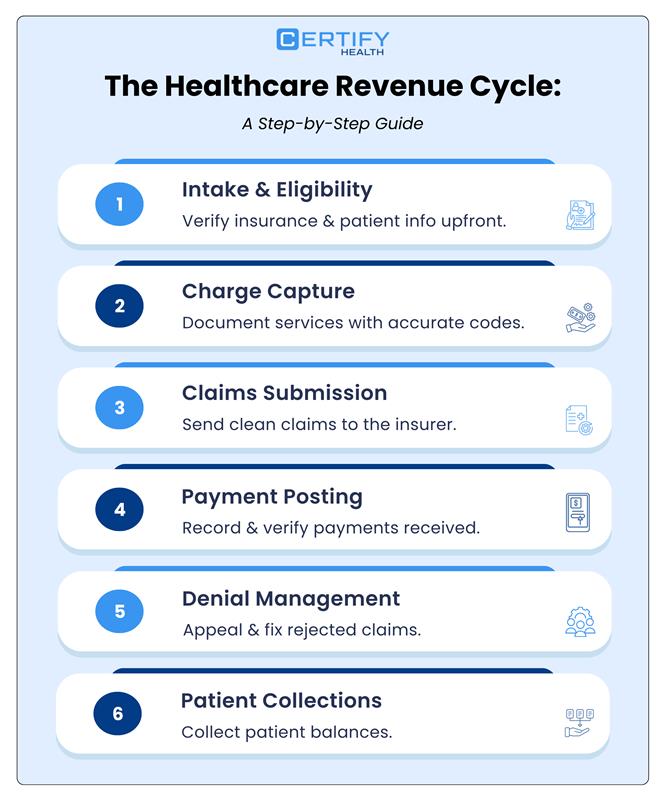
The healthcare revenue cycle is not one big task; it’s a chain of tasks.
Each step connects to the next. If one step goes wrong, the whole chain breaks.
Here’s how the full process works — from start to finish.
2.1 Patient Registration and Eligibility Verification
This is where everything begins. Prior to the patient’s arrival.
Your front desk collects basic information. The patient’s name. Date of birth. Insurance details. Contact info.
Then comes something very important: eligibility verification.
This means checking if the patient’s insurance is active. It also means finding out what their plan covers. And whether your practice is in their network.
Why does this matter so much?
Because a huge number of claim denials start right here. Wrong insurance ID. Expired coverage. Missing referral. These small errors at the front desk create big problems later.
The good news: modern healthcare revenue cycle management software can check insurance automatically. In real time. Before the patient even arrives.
Catch the problem early. Save hours of work later.
 Did You Know?
At least 26% of organizations trace frequent denials back to simple intake errors like wrong insurance details.
2.2 Charge Capture
The patient comes in. The doctor sees them. Now what?
Your team writes down everything that happened. What the doctor diagnosed. What procedures were done. What supplies were used.
Charge capture is turning all of that into a bill.
Here’s how it works. Every diagnosis has a code. It’s called an ICD-10 code. Every procedure also has a code. That’s called a CPT code.
Getting those codes right matters a lot.
Right codes = your claim gets paid. Wrong codes = your claim gets denied, delayed, or flagged for review.
Good RCM tools help make sure nothing gets missed. Every service gets billed. Every code is correct.
Did You Know?
Coding-related denials increased 126% over three years, outpacing other denial categories.
2.3 Claims Submission
Now it’s time to send the bill. You file a claim with the insurer.
This is a formal request for payment. It includes all the codes, patient details, and provider information.
But before the claim goes out, it gets checked.
This is called claim scrubbing. Think of it like spell-check for your bill. It looks for missing fields, wrong codes, and formatting errors.
A claim that passes this check is called a clean claim. Clean claims get paid fast. Dirty claims get denied.
The faster you send clean claims, the faster you get paid. Simple.
2.4 Payment Posting
The insurance company reviews your claim. Then they pay — or they explain why they won’t.
They send back a document. It’s called an Explanation of Benefits (EOB) or an Electronic Remittance Advice (ERA). It details what was covered and what remains unpaid.
Payment posting means recording that payment in your system. Then checking if it matches what you expected.
Sometimes the insurance pays less than your contract says they should. That’s called an underpayment. If you don’t catch it, that money is just lost.
Good payment posting finds those gaps. Every time.
2.5 Denial Management
Not every claim gets paid right away. Some get denied.
A denial means the insurance company said no — at least for now.
Denial management involves identifying the root cause behind a rejected claim. Then fixing the problem. Then resubmitting the claim.
Here’s an important thing to know: most denials can be appealed and won.
A denied claim is not always lost money. It just needs attention.
But if your team has no system for it, denials pile up. They miss appeal deadlines. The revenue is gone forever.
A structured denial management process keeps that from happening.
2.6 Patient Collections
After insurance pays its share, the patient may still owe money. This is their deductible, co-pay, or co-insurance.
Collecting that balance is the last step in the healthcare revenue cycle.
And it’s getting harder.
An increasing number of patients are enrolled in high-deductible health plans.
That means they owe more money out of pocket. Many of them don’t know what they owe. Others avoid the bill because the statement is confusing.
The fix is simple: make it easy to pay.
Clear bills. Online payment options. Upfront cost estimates. Flexible payment plans. These small changes make a big difference in how much you collect.
3. Why RCM Matters: The Financial Impact
Revenue cycle management is not just a back-office task. It directly affects your practice’s finances.
Here’s what the numbers say:
- The average claim takes 45 to 60 days to get paid. With good RCM, that drops to 15 to 20 days.
- Practices lose 10 to 15% of revenue every year from billing problems.
- Automating revenue cycle management can increase cash collections by up to 48%.
- It can also cut billing costs by up to 27%.
Those are big numbers. But beyond the dollars, good RCM helps your practice in other ways too.
Did You Know?
As many as 65% of rejected claims go unaddressed, resulting in revenue that is never recovered.
You have steady cash flow. When claims go out clean and get paid fast, money comes in on schedule. You can move forward with clarity and certainty.
You stay compliant. Healthcare rules change all the time. HIPAA. Coding updates. Payer policies. A solid RCM process keeps you on the right side of those rules — and out of trouble.
Your patients are happier. Nobody likes a confusing bill. Clear, accurate billing builds trust. Patients who understand their bill are more likely to pay it — and come back.
Your team works smarter. When billing is automated, your staff spends less time on paperwork. They focus on what matters — your patients.
In short: better revenue cycle management means more money, less stress, and a better experience for everyone.
4. Common Revenue Cycle Management Challenges for Healthcare Practices
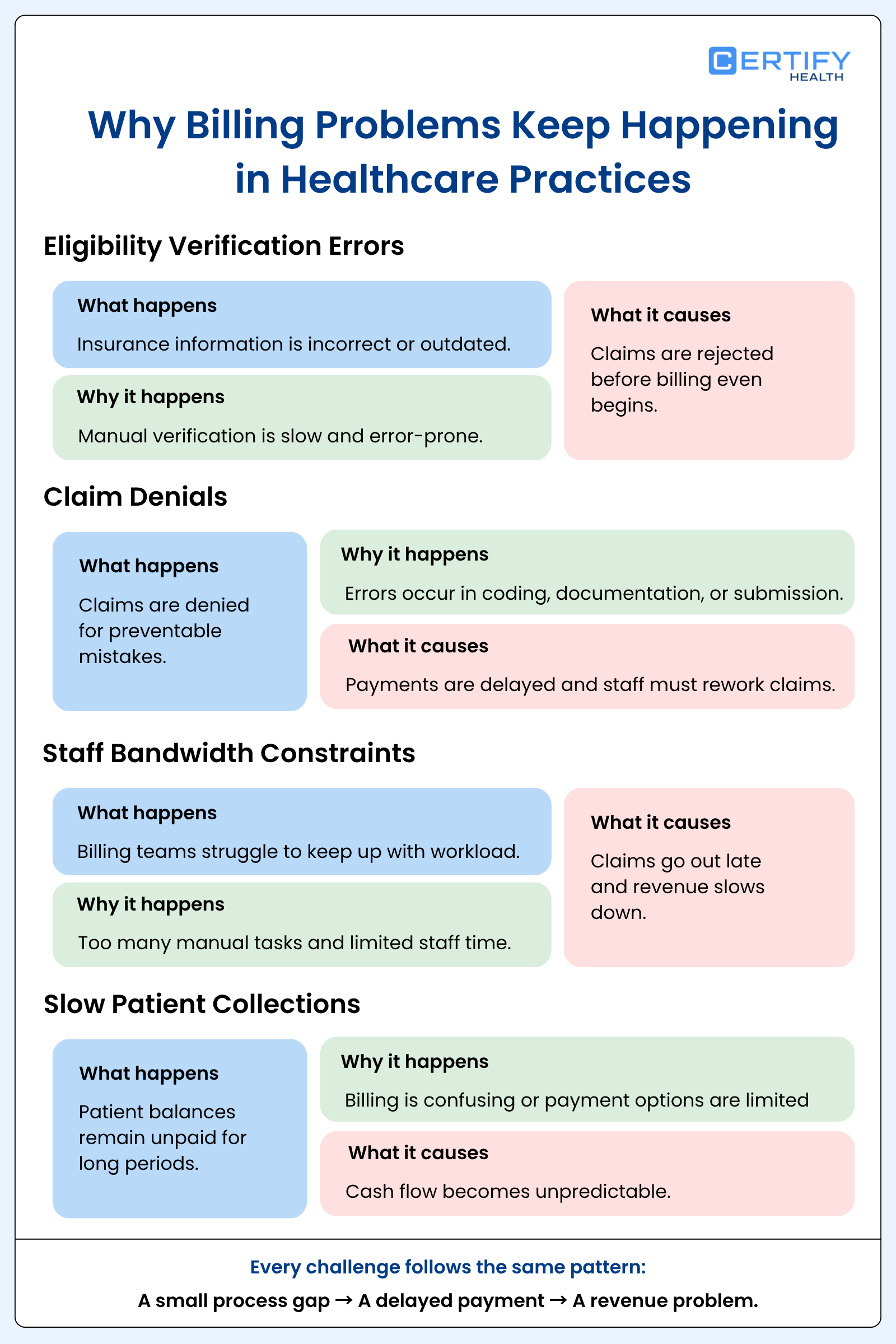
Even well-run practices face billing problems. Here are the most common RCM challenges — and why they keep happening.
4.1 Eligibility Verification Errors
This is the most common starting point for billing problems.
A patient comes in. Their insurance information is wrong. Maybe it’s expired. Maybe the ID number has a typo. Maybe they switched plans and no one updated the system.
The claim goes out with bad data. The insurance company rejects it.
Now, staff fix the errors, resubmit data, and wait until they hear from insurers.
Checking insurance manually is slow and error-prone. Automated tools do it in seconds — and catch problems before they become denials.
4.2 Claim Denials (Top Causes)
Claim denials cost practices thousands of dollars every month. Here are the most common reasons they happen:
- Wrong patient info — a typo in the date of birth or subscriber ID
- Coding errors — using the wrong diagnosis or procedure code
- Missing prior authorization — forgetting to get approval before a procedure
- Duplicate claims — accidentally filing the same claim more than once
- Late filing — Filing the claim after the insurer’s submission window has closed
Every one of these is preventable. Better processes and better tools eliminate most of them.
4.3 Slow Patient Collections
Patients owe more money than ever before. High-deductible plans are now very common.
But collecting from patients is hard. Many people don’t understand their bill. Some wait months before paying. Others never pay at all.
If your practice sends one paper statement and then gives up, you’re leaving money behind. Lots of it.
The solution: meet patients where they are. Send digital bills. Offer online payments. Give them a clear cost estimate before the visit. Make it easy, and more people will pay.
4.4 Staff Bandwidth
Billing takes a lot of time. Checking insurance. Reviewing codes. Sending claims. Following up on denials. Posting payments. Sending patient bills.
For small and mid-size practices, the billing team is often stretched too thin.
Claims go out late. Denials don’t get worked. Revenue slows down.
This is why many practices look at outsourced RCM or automation tools. Both help the team do more with less.
5. How Technology Solves RCM Challenges
The right tools make a huge difference. Here’s how modern RCM software solutions fix the problems above.
Automated eligibility checks provide immediate verification of coverage. The system flags problems before the appointment. Your team can fix issues the same day — not weeks later after a denial.
Claim scrubbing tools review every claim before it goes out. They catch errors a human might miss when they’re busy. More clean claims means faster payments.
AI-assisted coding reads clinical notes and suggests the right codes. This reduces coding mistakes. It helps accelerate the entire billing workflow.
Denial management workflows organize denied claims into a queue. Staff can see what needs attention, what deadlines are coming, and what patterns keep causing problems. Fix the pattern. Stop the denials.
Patient payment portals let patients view and pay their bill online — anytime, from any device. No phone calls needed. No paper statements lost in the mail. Collections go up with almost no extra staff effort.
Analytics dashboards show you your key numbers at a glance. Days in A/R. Denial rate. Collection rate. You see problems early and fix them before they get big.
CERTIFY Health is a unified medical practice software for ambulatory care.
It supports the full revenue cycle management software stack, from eligibility checks to patient collections.
The platform automates admin tasks, analytics, payments, and back-office workflows in one system.
One platform. Less manual work. More revenue.
6. Key RCM Metrics You Should Track
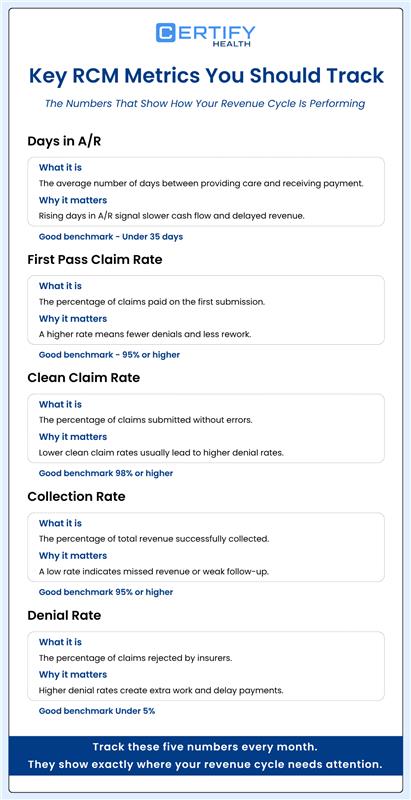
Progress is impossible without tracking performance.
These RCM metrics tell you how your revenue cycle is really performing.
6.1 Days in A/R
What it is: The average number of days between providing a service and getting paid for it.
Why it matters: This is your clearest sign of cash flow health. Most practices aim for fewer than 35 to 40 days. If the number is climbing, something is slowing your cycle down.
Good benchmark: Under 35 days.
6.2 First Pass Claim Rate
What it is: The percentage of claims that get paid on the very first submission — no corrections, no resubmissions.
Why it matters: Every denied claim costs time and money to fix. A high first pass rate means your front-end process is working well.
Good benchmark: 95% or higher.
6.3 Clean Claim Rate
What it is: The percentage of claims that pass through scrubbing with no errors.
Why it matters: This is an early warning system. If your clean claim rate is low, your denial rate will be high. Fix one, and you fix the other.
Good benchmark: 98% or higher.
6.4 Collection Rate
What it is: The percentage of money you actually collect out of everything you’re owed — after insurance write-offs are removed.
Why it matters: A low collection rate means you’re earning revenue but not capturing it. There are likely gaps in your patient billing or denial follow-up.
Good benchmark: 95% or higher.
6.5 Denial Rate
What it is: The percentage of claims that get denied by insurance companies.
Why it matters: Every denial is wasted work. MGMA data suggests the best-run practices keep their denial rate below 5%. Higher than that means something needs to change upstream.
Good benchmark: Under 5%.
Track these five numbers every month. They will tell you exactly where your healthcare revenue cycle needs work.
7. In-House vs. Outsourced RCM: Which Is Better?
This is a question many practice managers ask. There’s no single right answer.
Let’s look at both options honestly.
In-House RCM
With in-house RCM, your own staff handles all the billing.
The good:
- You have full control over the process
- Your team knows your patients and your workflows
- You get direct, real-time feedback when something goes wrong
- You can customize every step to fit your practice
The hard part:
- You need to hire, train, and retain billing staff
- If someone leaves, the whole operation can slow down
- Staying current on coding changes and payer rules falls on your team
- You need to put resources into reliable software
Outsourced RCM
With outsourced RCM, a third-party company handles your billing for you.
The good:
- You get access to billing experts right away
- They stay current on coding updates and payer changes so you don’t have to
- It scales easily if your patient volume grows
- Your team can dedicate their full attention to patient care.
The hard part:
- You have less direct control over day-to-day billing
- Quality varies a lot between vendors
- You typically pay a percentage of collections — often 4 to 8%
- Communication can be slower if a problem comes up
The Middle Ground
Many practices are finding a third option: use a revenue cycle management software solution that automates the repetitive parts in-house.
CERTIFY Health, a unified medical practice software come with Revenue Cycle Management as a core solution. It handles eligibility checks, claim scrubbing, and patient billing automatically. Your team handles the higher-judgment work — like working denials or talking to patients about payment plans.
You get the control of in-house RCM. With the efficiency of outsourcing.
Book a Demo, If You Want to Learn More.
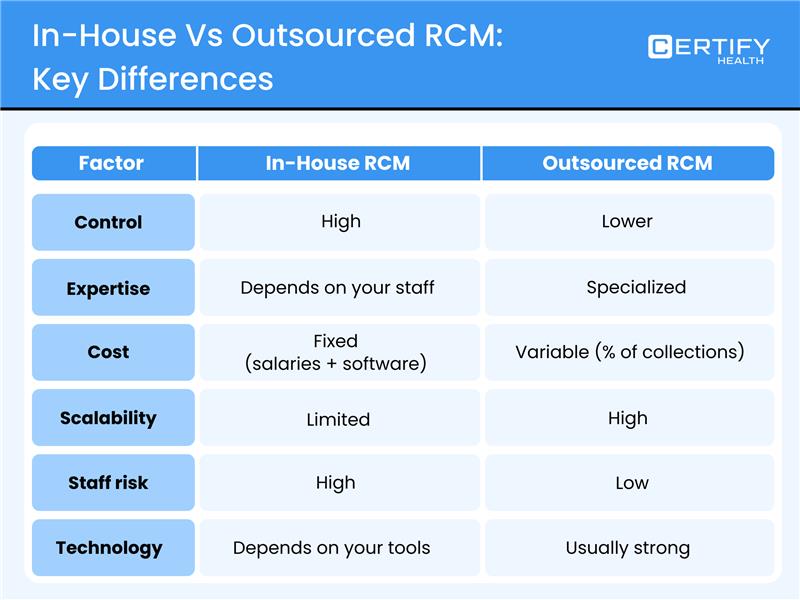
Choose what fits your practice size, budget, and goals.
8. How to Choose an RCM Software Solution
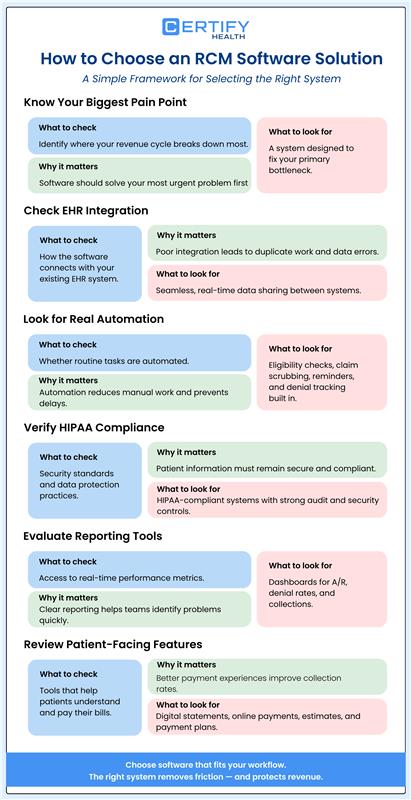
There are a lot of Healthcare Revenue Cycle Management Software out there. Every vendor promises faster payments and fewer denials.
How do you choose the right one?
Here’s a simple framework.
Step 1: Know your biggest pain point.
Where does your revenue cycle break down most? Eligibility errors? Claim denials? Patient collections? Slow A/R?
Find the software that solves your biggest problem first. Don’t buy a tool that’s great at things you don’t need.
Step 2: Check EHR integration.
Your healthcare revenue cycle management software needs to work with your electronic health record (EHR) system. If they don’t connect, your team ends up entering the same data twice. That drags out the process and leads to mistakes.
Ask any vendor: how exactly does your software connect with our EHR?
Step 3: Look for real automation.
Best revenue cycle management software should automate the common tasks. Real-time eligibility checks. Claim scrubbing. Patient payment reminders. Denial tracking.
If a vendor offers these as expensive add-ons — not core features — that’s a red flag.
Step 4: Verify HIPAA compliance.
Patient data is sensitive. Your software must protect it. Check that the platform is fully HIPAA compliant. Ask about their data security practices and audit trails.
Step 5: Evaluate the reporting tools.
Are you able to view your Days in A/R instantly? Can you track your denial rate by payer or by provider? Good reporting turns numbers into action.
Step 6: Look at patient-facing features.
Patients need to understand their bill. The best platforms offer digital statements, online payment portals, cost estimates before visits, and payment plans.
These features alone can raise your collection rate significantly.
Questions to ask any vendor:
- What is your average client clean claim rate?
- What percentage of claims are approved on the first submission?
- How do you handle coding updates and payer rule changes?
- What does onboarding look like?
- What happens when a billing issue comes up — who do we call?
What You Can Do with CERTIFY Health’s Revenue Cycle Management Module
Revenue cycle work should feel simple. Not stressful.
The right system keeps tasks clear and organized from the start.
CERTIFY Health’s Revenue Cycle Management module helps your team manage payments, claims, and reports in one place. From the first patient visit to the final balance, your staff always knows what to do next.
Here is how the system supports your team each day:
Eligibility check, co-pay prompts, reminders
Staff can run an eligibility check before the visit.
They can see coverage details right away.
Co-pay prompts remind patients about what they owe.
Reminders help patients show up prepared to pay.
This reduces confusion at check-in and speeds up collections.
Claim automation, rejection flags
Claim automation sends claims through the process without extra steps.
Your staff does not need to handle every claim by hand.
If a problem appears, rejection flags alert the team right away.
Staff can fix the issue before it slows payment.
This helps claims move faster and reduces delays.
Text-to-Pay, balance, installments, AutoPay, dues dashboard
Patients can pay using Text-to-Pay.
They can also set up installments for larger balances.
AutoPay keeps payments on schedule.
The dues dashboard shows staff which balances are still open.
This makes payments easier for patients and clearer for staff.
Reconciliation, dunning notices
Reconciliation matches payments to the right accounts.
This keeps records accurate without manual checks.
If a balance remains unpaid, dunning notices are sent automatically.
Staff do not need to track every overdue account.
This saves time and keeps collections steady.
Dunning notices
Administrative teams can manage overdue balances from one place.
Dunning notices help staff follow up in a clear and consistent way.
Everyone knows which accounts need attention.
This keeps collection work simple and organized.
Metrics dashboard, payer trends, revenue reports
Leaders can view performance in a metrics dashboard.
They can track payer trends and review revenue reports at any time.
This helps teams spot problems early and make better decisions.
Instead of guessing, they can act on real data.
9. RCM for Different Specialties
Healthcare revenue cycle management looks a little different for every type of practice. Here’s what matters most in three common ambulatory specialties.
9.1 Dental RCM
Dental RCM has its own unique challenges.
Dental practices deal with two types of insurance — medical and dental. Benefit structures are different for every plan. And patients often pay a bigger share out of pocket than in other specialties.
The biggest dental RCM challenges are:
- Checking benefit limits before a procedure (like how many cleanings are covered per year)
- Getting prior approval for major work like crowns or implants
- Handling patients with both dental and medical insurance
- Collecting larger patient balances after treatment
Dental RCM software needs to handle dental-specific codes called CDT codes. It also needs to work with dental practice management systems and make patient billing simple and clear.
9.2 Physical Therapy RCM
Physical therapy RCM is shaped by high visit volume and strict insurance rules.
PT patients often come in two or three times a week for several months. That’s a large number of claims—and each one must be precise.
Insurance companies require prior authorization for therapy visits. If you exceed the approved number of visits without re-authorization, those claims get denied.
Physical therapy RCM also requires detailed documentation. Insurance companies want proof that therapy was medically necessary. Without good documentation, they can reject claims — even retroactively.
The right tools track authorizations automatically. They flag when a patient is getting close to their approved visit limit. And they help your team stay on top of documentation so nothing gets denied after the fact.
9.3 Urgent Care RCM
Urgent care RCM moves fast. Patients walk in without appointments. Insurance information is gathered quickly, often while the patient waits to be seen.
That speed creates risk. Errors happen when people rush.
The biggest urgent care RCM challenges are:
- Checking insurance instantly for walk-in patients
- Handling a wide mix of insurance types — commercial plans, Medicare, Medicaid, workers’ comp, self-pay
- Billing correctly for both the facility and the provider
- Capturing charges for a huge variety of conditions and procedures
Urgent care RCM tools need to be fast and accurate at the same time. Real-time eligibility verification is not optional here — it’s essential. So is automated claim scrubbing that can handle high daily claim volume without slowing down.
Conclusion
Revenue cycle management is how your practice gets paid for the care it provides.
Every step matters. From checking insurance before the visit to collecting the last dollar after. When the cycle runs well, money comes in. When it breaks down, revenue disappears — often without anyone noticing.
The good news: most revenue cycle management challenges are fixable. They just need attention and the right tools.
The best-performing practices in 2026 all share the same habits. They send clean claims. They work denials fast. They simplify the payment process for patients. And they track their RCM metrics so they always know where they stand.
Whether you’re weighing in-house RCM vs. outsourced RCM, or just trying to figure out why your A/R keeps growing — the answer is always in the process.
Prepared to gain full control over your revenue cycle?
CERTIFY Health gives you one platform, full visibility, and better financial outcomes.
Download the Free RCM Best Practices Checklist: A simple, step-by-step guide to audit your current revenue cycle in healthcare and find quick wins.
Frequently Asked Questions
What is revenue cycle management in easy words?
It’s the process a healthcare practice uses to get paid. It starts when a patient schedules a visit. It ends when all the money — from insurance and from the patient — is collected.
What stages make up the healthcare revenue cycle?
There are six main steps: patient registration and eligibility verification, charge capture, claims submission, payment posting, denial management, and patient collections.
What is a good clean claim rate?
Aim for 95% or higher. Top-performing practices hit 98% or better. A strong clean claim rate leads to fewer rejections and quicker reimbursements.
What is the difference between in-house and outsourced RCM?
In-house RCM means your staff handles all billing. Outsourced RCM means a third-party company does it for you. In-house gives you more control. Outsourcing gives you more expertise and scalability.
How does RCM software help my practice?
It automates time-consuming tasks like eligibility checks, claim scrubbing, and patient billing. This reduces errors, speeds up collections, and frees your team to focus on patients.