
Table of Contents
- Dental practices are prime cyber targets, so securing intake forms, access control, and backups is now a core part of running a safe, trusted clinic.
- Moving from paper packets and unsecured email to HIPAA‑compliant digital intake, role‑based access, and a 3‑2‑1 backup plan creates immediate, high‑impact risk reduction.
- CERTIFY Health helps dental teams turn secure intake workflows into a daily habit, combining patient‑friendly forms with built‑in security and compliance controls.
Introduction – Why This Matters to Dental Practices
Your dental practice is not just a clinic; it’s an information business. Every day, you collect:
- Health histories
- Insurance and payment details
- Imaging and treatment notes
- Contact and behavioral data
All of this is patient data. All of it must stay safe.
In 2023, 746 healthcare data breaches of 500 or more records were reported in the U.S., affecting more than 289 million people (HIPAA Journal).
Dental practices are part of this story. Criminals now see dentistry as an easy way to steal social security numbers, insurance IDs, and medical details.
One dental group, First Choice Dental, agreed to pay about 1.2 million dollars to settle a class action lawsuit after a 2023 ransomware attack that exposed data for more than 150,000 patients. That is a high price for weak patient data security.
The problem is not only the EHR. Forms and workflows often break first:
- Paper packets at the front desk
- Unsecured new patient dental forms online
- Poor access control to charts and images
- Vendors and apps with no security review
This guide is a practical checklist for dentists, office managers, and practice owners. You will see:
- Common ways patient data security fails in dental practices
- Best practice for securing patient data using clear, simple steps
- How CERTIFY Health secure intake workflows and can help you protect patients and keep your operations smooth
Common Ways Patient Data Security Fails in Dental Practices
1. Paper‑Based & Physical Security Gaps
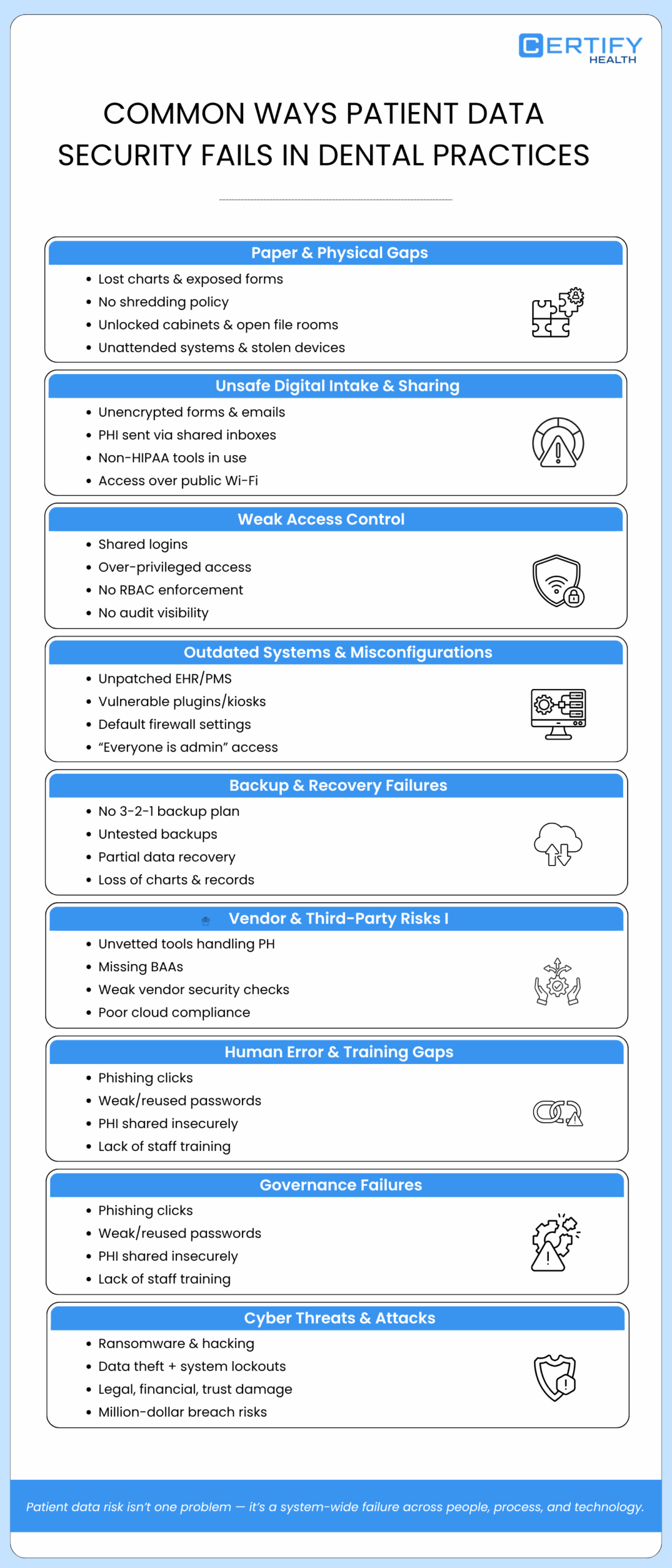
Paper feels simple. But it is easy to lose. Common risks include:
- Lost charts and clipboards
- New patient dental forms left on the counter
- Paper forms thrown in the trash instead of shredded
- Old files stored in open boxes
Without a clear medical record shredding policy, anyone who walks by, patients, visitors, cleaning staff, may see PHI. That is not a best practice for securing patient data.
Physical space matters too:
- Unlocked file cabinets
- Open file rooms
- Computers left logged in and unattended
Lost or stolen laptops, tablets, or kiosks that hold PHI or treatment plan forms can also lead to a reportable breach if the data is not encrypted.
2. Unsafe Digital Intake And Data Sharing
Many practices now use online new patient dental forms. This can protect patient data, but only when the forms are secure.
Problems show up when:
- Website forms send PHI to a shared inbox with no encryption
- Staff email completed dental patient intake form PDFs to one another
- Free tools are used as a screening form platform without HIPAA protections
In these cases, the forms are not HIPAA compliant intake forms. The hosting is not HIPAA compliant hosting. Attackers can read data in transit if it is not encrypted.
Patients and staff may also log in over public Wi‑Fi. That makes it even easier for attackers to steal login details or read data. To follow best practice for securing patient data, you need encrypted, cloud hosted intake tools and secure channels for all PHI.
3. Insufficient Identity and Access Governance
Inside your systems, patient data security can fail because of poor access control. For example:
- Everyone uses the same login
- Users can access information beyond their job role
- There is no clear view of who can see what
This is poor access control. It breaks the “minimum necessary” standard and makes incidents hard to trace.
Role based access control (RBAC) fixes this. With RBAC, you:
- Put users into roles (Dentist, Hygienist, Front Desk, Billing)
- Give each role only the access they truly need
- Use audit logs to see who opened which chart or form and when
RBAC is a key best practice for securing patient data because it limits both mistakes and insider misuse.
4. Outdated Systems & Misconfigured Security
Old systems create easy paths for attackers. Risks include:
- Legacy EHR or PMS that no longer receive patches
- Unpatched plugins or kiosks with known bugs
- Firewalls and routers that use default settings
- “Team‑wide” access where every user is an admin
Even if you have secure intake tools, misconfigured security can undo the benefits. Good Patient Intake Software hygiene belongs in every plan for how to secure patient data.
5. Risks to Data Backup, Restoration, and Accuracy
Imagine this:
- Ransomware locks your server.
- A storm damages your office.
- A hard drive fails without warning.
If you cannot restore your data, you lose more than your schedule. You lose charts, treatment plan forms, and years of trust.
Many offices still do not have a working 3 2 1 backup plan. The 3 2 1 backup plan is that you keep:
- 3 copies of your data
- 2 different types of storage
- 1 copy kept off‑site
Backups must be encrypted, tested, and include everything: imaging, digital dental new patient intake form data, consents, and notes. Otherwise, you may restore only part of each record, which also harms patient data security.
6. Vendor & Third‑Party Risk Mismanagement
You probably work with many vendors, such as:
- EHR and practice‑management systems
- Digital Screening form platform
- Imaging tools
- Payment processors
- Analytics and reporting tools
Each one can help or hurt patient data security. Common problems:
- Using free tools to collect PHI with no security review
- No Business Associate Agreements (BAAs) in place
- No questions asked about encryption, RBAC, or incident plans
Good vendor risk management means you vet every partner that touches PHI. You make sure they use HIPAA compliant hosting, follow a 3 2 1 backup plan, and have their own basic incident response plan in place.
7. Mistakes By Staff, Internal Risks, And Lack of Training
Most breaches still involve people. Examples you may have seen:
- A team member clicks a phishing email and enters a password
- A staff member forwards PHI to a personal email account
- Someone uses the same weak password everywhere
- A former employee’s login is never shut off
Without training, people cannot follow best practice for securing patient data. They do not know how to spot tricks or how to handle PHI in a secure way. Training plus clear rules help reduce these risks.
8. Governance & Oversight Failures
If “security” belongs to no one, it falls apart. Many small practices have:
- No named privacy or security officer
- No written policies on PHI use and storage
- No regular risk assessments or audits
They also lack incident preparedness. When a problem happens, staff do not know the data breach response steps. They guess. That slows everything down and adds stress.
9. Cyber Threats & Attack Exposure
Healthcare, including dentistry, has become a top target for ransomware and hacking. In some attacks, data is stolen first, then locked with ransomware.
Patients lose trust. You may have to pay for credit monitoring, legal fees, and long‑term support due to HIPAA non-compliance or data breaches. In one dental case, costs reached over a million dollars. For a mid‑size practice, that level of damage can be life‑changing.
Patient Data Protection: From Compliance to Culture
Understand Your Responsibilities (HIPAA in Plain Language)
Most dental clinics fall under HIPAA as covered entities. This means you must:
- Protect patient PHI
- Share only the minimum necessary data
- Distribute the Notice of Privacy Practices to patients
- Sign BAAs with vendors who handle PHI
HIPAA is not just about forms on a shelf. It is about behavior. Following best practice for securing patient data helps you meet HIPAA rules and build trust at the same time.
Think Risk, Not Just Checkbox Compliance
A risk assessment should follow the path of your data. Ask:
- How do we collect PHI? (Paper, online forms, kiosks)
- Where do we store it?
- Who can see it?
- How do we dispose of it?
Focus on forms and workflows: dental new patient intake form, treatment plan forms, and imaging requests. When you do this, HIPAA is not just a checklist. It becomes a way to design safer systems.
Build a Security Mindset Across Roles
Everyone has a job to do around patient data security:
| Role | What They Should Do |
|---|---|
| Dentist / Owner | Approve policies, choose secure tools, support incident preparedness. |
| Practice Manager | Run vendor risk management, keep BAAs current, track training. |
| Front Desk | Use the secure intake workflow, verify patient identity, avoid printing PHI unless needed. |
| Hygienists / Assistants | Protect screens, document carefully, access only the charts they need. |
| Billing / Insurance | Use HIPAA compliant hosting and portals, avoid fax‑to‑email shortcuts, follow data breach response steps. |
When each role knows how to secure patient data in daily work, security becomes a habit, not a burden.
Best Practices for Securing Patient Data in Your Dental Practice
1. Secure, Digital, HIPAA‑Compliant Intake Forms
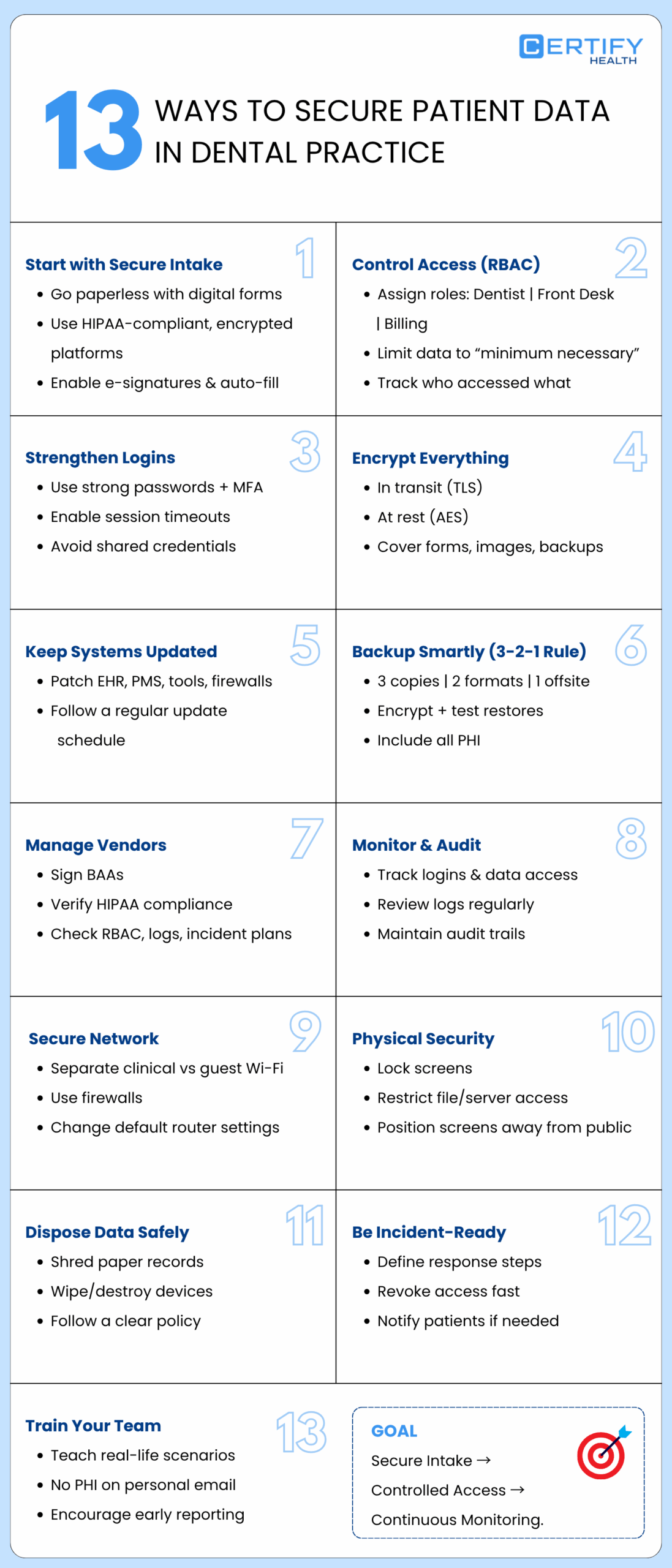
One of the biggest wins is moving from paper to secure digital intake. With a modern screening form platform, patients can:
- Complete new patient dental forms at home or on their phone
- Sign consents and treatment plan forms digitally
- Update details without re‑writing the same information
CERTIFY Health offers digital patient intake forms that are encrypted, tracked, HIPAA compliant, and fully integrated. Each dental patient intake form flows directly into your intake and registration tools. Staff do not have to re‑type data, which lowers errors and protects patient data security.
These forms run on HIPAA compliant hosting, with encryption and audit logs. That is a strong best practice for securing patient data starting at the very first interaction.
2. Role‑Based Access Control (RBAC) for Forms and Charts
After you collect data, you must control who can see it. As told earlier, with RBAC, you:
- Assign roles (Dentist, Hygienist, Front Desk, Billing)
- Give each role only the data they need
- Use logs to see who viewed or changed which record
RBAC stops poor access control and supports the “minimum necessary” rule. It is one of the core ways to secure patient data in any digital system.
3. Strong Authentication and Access Management
Strong passwords and multi‑factor authentication (MFA) protect your logins. Simple steps include:
- Use a password manager
- Require unique passwords for each system
- Turn on MFA for all tools that store PHI
Session timeouts can log users out after a period of no activity. This keeps charts and forms from staying open on unattended screens.
4. Encryption at Rest and in Transit
Data should be encrypted in two ways:
- In transit: when it moves from browser to server or between systems
- At rest: when it sits in databases, backups, or devices
Modern tools use TLS for data in transit and strong algorithms like AES for data at rest. Any secure intake workflow or screening form platform you choose should meet these standards.
5. Regular Patching and Software Hygiene
Keep all systems up to date:
- EHR and PMS
- Intake and consent platforms
- Imaging tools
- Firewalls and routers
Establish a timeline for updates and maintain it. Ask vendors about their patch cycles and service‑level agreements. Regular patching is a simple but powerful best practice for securing patient data.
6. Backup, Recovery, and Business Continuity
Make the 3 2 1 backup plan a standard in your practice. Also:
- Encrypt backups
- Test restores at least twice a year
- Include all PHI: forms, images, consents, notes
During recovery, check that treatment plan forms and imaging data still match the right patient chart. This protects both care quality and patient data security.
7. Vendor Risk Management & BAAs
For each vendor that touches PHI, you should:
- Have a signed BAA
- Confirm use of HIPAA compliant hosting and encryption
- Ask about RBAC, audit logs, and their own incident response steps
CERTIFY Health clearly describes how its patient experience platform supports secure intake, consent capture, and integrated recordkeeping, helping practices meet privacy standards while improving front‑desk flow.
That is vendor risk management done well.
Book A Demo to See HIPAA Compliant Intake Forms in Action!
8. Monitoring, Audits, and Incident Preparedness
Logs show you:
- Who signed in
- Which records they opened
- What changes they made
Reviewing logs on a schedule is part of best practice for securing patient data. It also supports HIPAA’s audit control requirements.
Pair logging with a basic incident response plan so your team knows the exact data breach response steps to follow when something looks wrong.
9. Secure Networks & Firewalls
Separate your networks:
- One private, protected network for clinical systems
- One guest Wi‑Fi for patients and visitors
Configure firewalls so the guest network cannot reach systems that hold PHI. Change default passwords on routers and disable ports you do not need.
10. Physical Security Controls
Remember simple moves:
- Lock workstations when you step away
- Turn screens away from public view
- Restrict access to file rooms and server rooms
These small habits help prevent unauthorized physical access to PHI.
11. Secure Data Disposal
When records reach the end of their life, dispose of them securely:
- Shred or use locked shred bins for paper
- Use certified wiping or destruction for hard drives and other media
A clear medical record shredding policy and device disposal process reduce the amount of data that could ever be exposed.
12. Incident Response (Action Layer)
Write down a simple plan for what to do when something goes wrong, including:
- Who to call first
- How to isolate affected systems
- How to change or revoke access
- How to notify patients and regulators
Perform this exercise one to two times each year. Incident preparedness turns confusion into clear action.
13. Audit Trails & Access Logging
Keep detailed access logs for all major systems. Over time, patterns in these logs can show you:
- Where to tighten RBAC
- Who needs more training
- Whether certain tools create more risk
Audit trails are a long‑term best practice for securing patient data for your dental practice and for proving that you did “the right thing” if you are ever audited.
Securing Forms End‑to‑End: From Intake to Archive
1. Designing Secure Intake Workflows
Look at every way patients complete forms today:
- Using their phone or laptop from home
- On a tablet or kiosk in the office
- On paper at the front desk
Aim to move as much as possible into a secure intake workflow using HIPAA compliant intake forms. With CERTIFY Health, patients can complete digital forms on their own device, and staff can manage everything from one dashboard.
2. Storage, Indexing, and Recordkeeping
Once data enters your system, it should:
- Attach to the right patient record
- Be easy to search and retrieve
- Follow clear retention rules
Good indexing and storage practices help protect patient data security and support fast, safe care.
3. Cloud vs. On‑Prem Considerations for Forms
Cloud hosted intake tools can:
- Lower your hardware costs
- Make updates and patches easier
- Offer strong built‑in security
On‑prem systems give you more control but require more in‑house work. Either way, ask vendors about encryption, RBAC, backups, and incident preparedness. Those answers show how they support best practice for securing patient data.
4. Protecting Imaging and Reference Data Linked to Forms
Do not forget images and scanned files that link to forms:
- Imaging‑based consents
- Photos attached to intake
- Scanned IDs or insurance cards
Make sure these are included in your 3 2 1 backup plan and protected by the same access rules as the rest of the chart.
How to Secure Patient Data in a Multi‑Vendor Environment
1. Mapping Your Data Ecosystem
List all vendors that touch forms and PHI:
- EHR / PMS
- Digital intake and Screening form platform
- Imaging tools
- Backup and disaster recovery provider
- Payment and analytics tools
This map helps you see where you must apply vendor risk management and where secure intake workflows matter most.
2. Evaluating Vendors for Security and Compliance
For each vendor, ask:
- Do you provide HIPAA compliant hosting and encryption?
- Do you support RBAC and audit logs?
- What is your incident preparedness plan?
- Do you follow a 3 2 1 backup plan?
Document the answers. This shows how you thought about best practice for securing patient data before signing contracts.
3. Enforcing BAAs and Contractual Obligations
Do not file BAAs and forget them. Revisit them when:
- You add new features
- You open new locations
- You shift how you interact with the tool
If a vendor has a breach, your BAAs and notes on vendor risk management will guide both your legal duties and your data breach response steps.
4. Centralizing Visibility
More vendors can mean more risk, or more insight. When intake, registration, and analytics are connected, you can:
- Track where PHI enters your systems
- See how teams handle intake forms
- Spot problem areas early
CERTIFY Health’s patient experience platform brings digital intake, registration, and other related workflows into one secure, integrated layer. That makes it easier to follow best practice for securing patient data without juggling many different tools.
Adopt a streamlined and secure intake workflow – Claim Your Free Demo!
Human Factors: Training, Culture, and Everyday Habits
1. Tailored Training for Dental Teams
Training should speak to real situations in your office, such as:
- “A message lands on your inbox, looks like it comes from a payer, asking you to access a link urgently. What do you do?”
- “What would you do when you receive a dental new patient intake form containing PHI sitting in your personal email?”
Short sessions, stories, and quick refreshers work best. They help your team remember how to secure patient data when it counts.
2. Clear Policies Around Forms and PHI
Write policies in plain language. For example:
- “No screenshots of PHI”
- “PHI should not be send to personal email or unauthorized messaging platforms”
- “Make use of only authorized & secure intake workflow tools”
Review these rules during onboarding and staff meetings. Design processes that support the right behavior
3. Build a culture where staff report concerns quickly
Tell your team:
- It is okay to ask questions
- It is good to report mistakes early
- You will focus on fixing the issue, not blaming the person
This culture supports incident preparedness and helps you respond fast when something seems off.
Why CERTIFY Health Is the Right Partner for Your Dental Practice
CERTIFY Health is built to support secure, digital patient intake for real‑world dental practices.
With CERTIFY Health, you can:
- Replace paper packets with digital, HIPAA compliant intake forms
- Use cloud hosted intake that protects PHI in transit and at rest
- Connect new patient dental forms, consents, and treatment plan forms directly to your registration and EHR systems
Behind the scenes, CERTIFY Health supports:
- Access based on job roles with complete activity tracking
- Centralized, compliant recordkeeping for forms and consents
- Analytics that help you spot workflow issues and possible risks
You get integrated security layers and dental‑specific workflows without adding work for your team. Together, you can secure patient data, smooth out intake, and protect the reputation you have spent years building.
Schedule a demo to see CERTIFY Health’s digital intake in action.
Conclusion – Don’t Let Forms Fail You
Forms should be one of the strongest parts of your patient data security, not the weakest.
When you follow best practice for securing patient data across intake, access control, vendors, backups, and training, you build a safer, calmer practice. Patient data security is not a one‑time task. It is an everyday habit.
With the CERTIFY Health patient experience platform, secure intake workflows, and a strong culture, your forms can protect your dental practice instead of putting it at risk.
Next: Learn How to Implement HIPAA-Compliant Dental Patient Forms