Table of Contents
Introduction
The best patient intake form solution is not the product with the longest feature list. It is the one that fits the way your organization assigns forms, collects information, verifies the patient, routes exceptions, writes data or documents into the right record, supports alternative completion paths, and produces evidence that the configured workflow is being governed.
Your patient’s first impression starts with the intake form.
Going digital isn’t enough.
A secure form page can still create operational risk when the wrong packet is sent, a field has no defined purpose, a patient cannot use the primary channel, staff copy information into the wrong chart, an integration writes only a PDF when structured data is needed, a connected application falls outside the approved workflow, or nobody reconciles failed submissions. HIPAA compliance belongs to the regulated organization and its actual use of the technology—not to a marketing badge attached to a form.
Publisher disclosure: CERTIFY Health publishes this comparison and is one of the eight products described. The list is not exhaustive, the numbering is not a performance ranking, and the profiles rely primarily on vendors’ public materials reviewed on August 5, 2026. Confirm whether any commercial relationship, referral arrangement, sponsorship, or compensation requires an additional disclosure before publication.
What “HIPAA-enabled” means in this comparison
This guide uses HIPAA-enabled to describe a product that publicly represents that it offers features or contractual arrangements intended to support HIPAA-regulated use. The term does not certify the customer, the vendor, every plan, every integration, or every configured workflow. A covered entity must still determine which parties are business associates, execute an appropriate BAA where required, conduct risk analysis, choose reasonable and appropriate safeguards, configure access and data flows, train its workforce, monitor use, and respond to incidents.
| Evidence to request | What it can establish | What it does not establish alone |
|---|---|---|
| Business Associate Agreement | The contractual scope, permitted uses, safeguards, reporting, subcontractor, return or destruction, and other duties agreed by the parties | That the customer has configured or is using the service correctly; that every connected product is covered |
| Security and privacy documentation | The vendor's described program, control environment, architecture, certifications, testing, and policies | That every control applies to the purchased module, tenant, integration, device, or workflow |
| Product demonstration | How a normal workflow appears in the vendor's selected scenario | How the system behaves with the customer's fields, record system, locations, roles, failures, accessibility needs, or support model |
| Integration documentation and test | Supported systems, data objects, direction, status, retry, and error behavior that are actually demonstrated | That every marketed integration writes every field or eliminates rekeying |
| Customer acceptance evidence | Whether the configured workflow passed normal, failure, privacy, accessibility, matching, writeback, downtime, and reconciliation tests | That future changes, new forms, new vendors, or staff workarounds remain controlled |
How we selected and evaluated the eight products
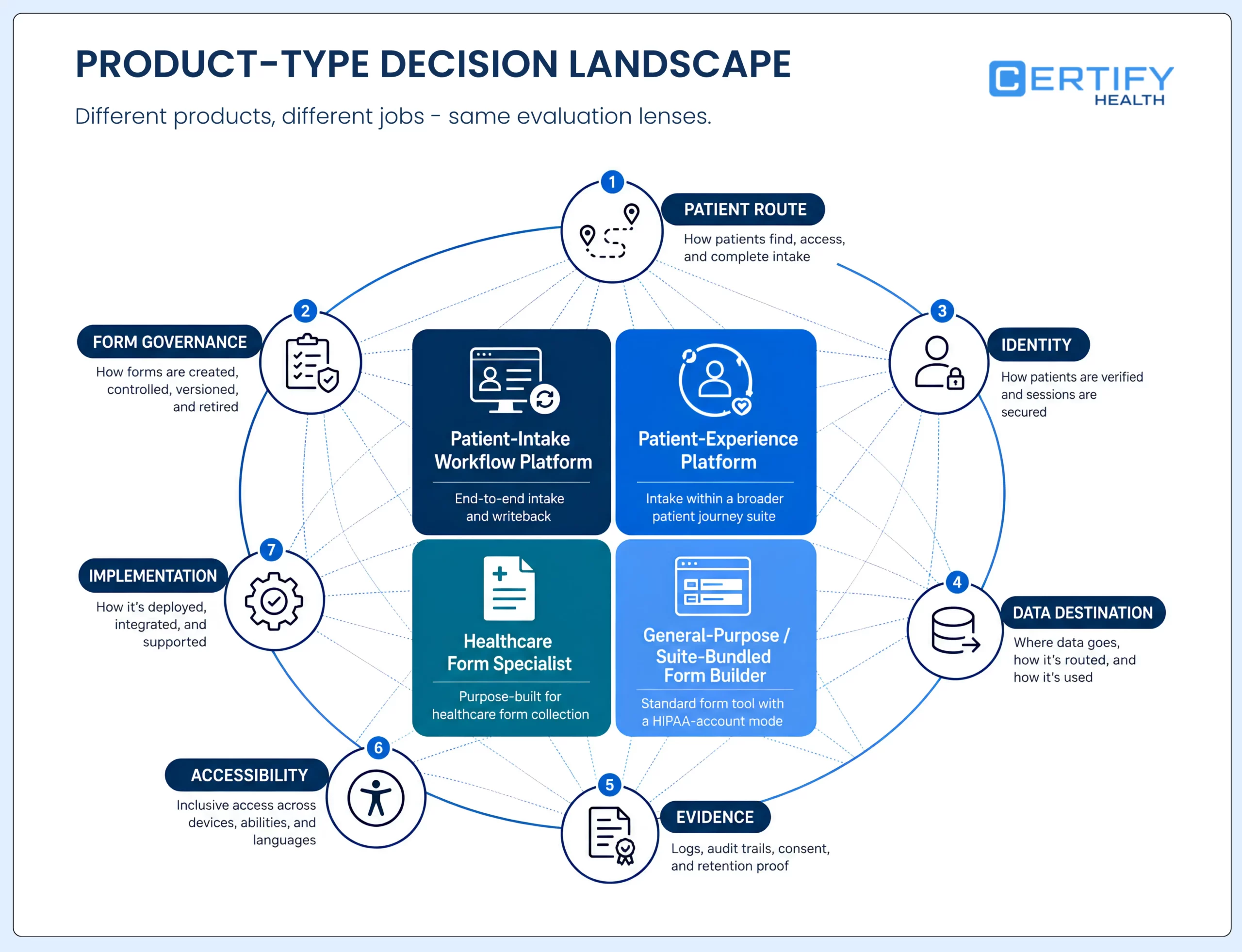
The starting set is the eight products already named on the live page. We retained a product only when an active first-party page reviewed on August 5, 2026 described a current patient, healthcare, or HIPAA-enabled form offering. Inclusion does not mean the products are equivalent, independently certified by CERTIFY Health, or suitable for every organization.
- Identify the product type and the job it is designed to perform: a broad digital patient-intake workflow, a patient-experience platform, a healthcare form specialist, a general-purpose form builder with a HIPAA-enabled account mode, or a form capability bundled with another suite.
- Record only capabilities described in current first-party product or help materials. Treat vendor outcome claims as vendor claims, not independently observed results.
- Separate what is publicly confirmed from what must be verified in a contract, security review, technical design, accessibility review, implementation workshop, or customer acceptance test.
- Avoid numeric scoring because public pages do not provide equivalent evidence for security controls, support, contract terms, integration depth, implementation effort, availability, and total cost.
- Give every product the same procurement questions so the reader can compare responses on equivalent evidence rather than marketing language.
| Evaluation lens | Decision question | Evidence to collect |
|---|---|---|
| HIPAA role and contract | Will the vendor create, receive, maintain, or transmit PHI for this service, and what exactly does the BAA cover? | Role analysis; BAA; service description; subprocessor list; data-use and incident terms |
| Form governance | Can teams control fields, required/optional logic, versions, approvals, specialty or visit assignment, signatures, files, languages, and retirement? | Builder demo; version history; approval flow; sample packet; export |
| Patient route | How do patients receive, resume, complete, and correct forms across mobile check-in, web, tablet, kiosk, staff-assisted, proxy, and paper alternatives? | Journey test; session behavior; accessibility review; language and assistance paths |
| Identity and matching | How does the workflow connect a submission to the right patient, guarantor, dependent, appointment, and record? | Matching rules; exception queue; duplicate and wrong-patient tests; correction process |
| Data destination | Does each item write as a structured field, document, image, signature, task, or status, and how are failures reconciled? | Field-level interface map; supported-system list; writeback test; error and retry evidence |
| Administration and evidence | Can the organization govern roles, access, logs, notices, incidents, retention, deletion, exports, and support access? | Role matrix; audit evidence; retention controls; support process; incident exercise |
| Implementation and exit | What work, dependencies, training, hardware, services, recurring governance, and exit tasks are required? | Implementation plan; responsibility matrix; support SLA; total-cost inputs; export and deletion test |
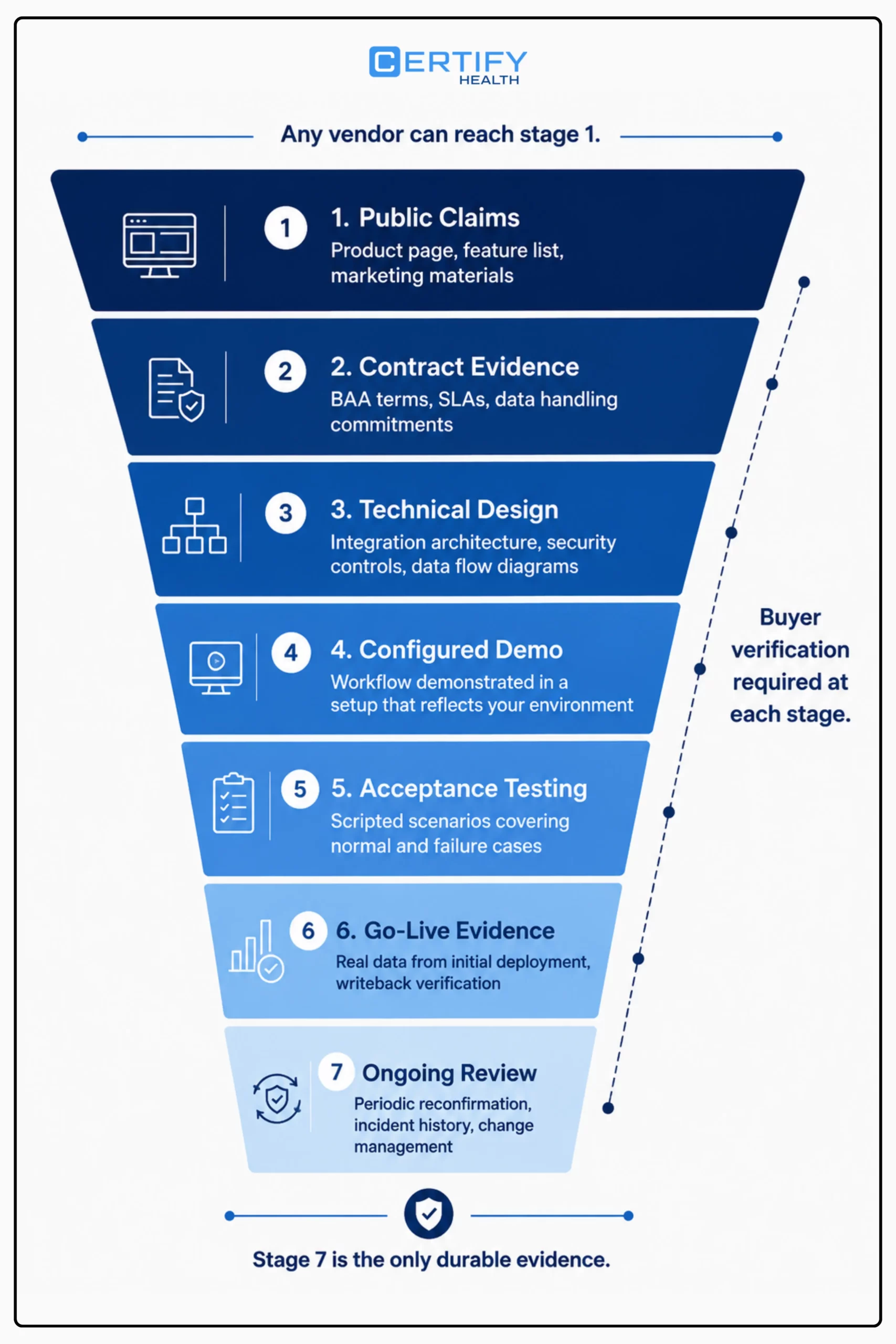
Eight patient intake form solutions at a glance
| Product | Product type | Current first-party form evidence | Priority verification |
|---|---|---|---|
| CERTIFY Health | Patient-intake workflow layer | Remote and in-office forms, consents, specialty workflows, and configured identity and intake routes around an existing clinical or practice-management environment | Exact modules, host-system direction, field writeback, identity route, scope of security and contractual evidence |
| NexHealth | Patient-experience platform | Forms sent by workflow rules, conditional logic, reminders, supported health-record synchronization, document copy, and in-office iPad route | Supported record system and objects, sync direction, exception handling, plan scope, accessibility, and BAA |
| FormDoctor | Healthcare form specialist and engagement suite | Form packets, SMS and email invitations, QR and tablet routes, signatures, uploads, reminders, tracking, exports, conditional logic, BAA, and integration options described by the vendor | Specific EHR or API route, structured versus document writeback, role model, audit, retention, and plan conditions |
| FormHippo | HIPAA-focused form builder | Drag-and-drop fields, electronic signatures, file uploads, and a BAA described for covered-entity subscribers | Workflow automation, integration depth, audit evidence, access model, retention, support, and organizational fit |
| Jotform | General-purpose form platform with HIPAA-enabled account mode | Healthcare forms, signatures, files, scheduling, payments, reports, and integrations; HIPAA features and BAA are tied to eligible account configuration | Gold or Enterprise requirements, connected-app scope, notifications, payment data path, admin controls, and integration governance |
| Paubox Forms | Form builder bundled with secure-email subscriptions | Templates, drag-and-drop fields, conditional logic, embeds, API access, and a forms capability included with paid Paubox subscriptions | BAA and service scope, signature workflow, record writeback, clinical integration, form assignment, and fit beyond secure collection |
| Curogram | Patient communication and intake platform | SMS or email delivery without a portal login, appointment-type customization, conditional fields, mobile uploads, signatures, reminders, and vendor-described EMR sync | Specific EMR and data objects, matching, authentication, fallback, language, accessibility, and support evidence |
| Updox | Healthcare communication suite with forms | Mobile-friendly forms, packets sent by text or email, status tracking, reminders, branding, and collection of consent, insurance information, and photos | Writeback behavior, structured data versus documents, logic, signatures, BAA scope, roles, retention, and implementation services |
How to read the table: A blank or unlisted capability means it was not established from the public sources used for this comparison—not that the product lacks it. Ask the vendor to demonstrate and document the capability in your environment.
CERTIFY Health is included because it supports digital patient-intake workflows rather than only standalone form creation. Its current product pages describe remote and in-office digital forms and eConsents completed from home, a waiting-room tablet, or a mobile device. Separate product routes describe insurance card capture, patient-identification verification, multi-channel intake, and connection to existing clinical or practice-management systems.
That broader scope may fit organizations that want forms, consents, patient identification, insurance information, check-in, and adjacent patient-access work governed as one connected implementation. It also means buyers should avoid assuming that every module is included, every capability is active, or every destination receives structured data automatically.
- Publicly described: remote and in-office forms, consent and specialty forms, configurable workflows, mobile and tablet routes, and patient-identification options.
- Internal product evidence: configurable patient portal, document, user, kiosk, identity, reporting, exception, and integration workflows; availability depends on the deployment.
- Best-fit hypothesis: ambulatory and multi-location organizations evaluating a broader patient-access workflow around an existing system of record.
- Verify before buying: modules and contract scope, BAA and security evidence, supported host systems, field-level writeback, failed-match and failed-interface handling, language and accessibility routes, roles, logs, retention, support access, implementation responsibilities, and total cost.
2. NexHealth
NexHealth describes a digital-forms workflow within its patient-experience platform. Its current forms page says practices can send forms based on appointment type, procedure code, or whether a patient is new or returning; use branching logic; follow up on incomplete paperwork; and let patients complete forms from their own device or an in-office iPad.
The vendor also publishes a supported-system list and states that selected demographics, medical history, medications, allergies, and conditions can sync to a supported health-record system, with a PDF copy saved to the document center. That is meaningful public integration detail, but it is not a substitute for a field-level test against the buyer’s exact record version and workflow.
- Publicly described: rules-based form delivery, conditional logic, reminders, mobile completion, an iPad option, medical alerts, supported-system synchronization, and document-center copies.
- Best-fit hypothesis: dental and ambulatory practices that want forms connected to a wider scheduling, communication, payment, or patient-experience platform.
- Verify before buying: supported system and version, inbound and outbound fields, writeback timing, document location, duplicate and failed-sync handling, BAA and plan scope, accessibility and language support, implementation work, and ongoing interface monitoring.
3. FormDoctor
FormDoctor is a healthcare-focused online-form specialist that also markets a broader patient-engagement suite. Its current site describes intake form packets, SMS and email invitations, QR codes, iPad and tablet completion, required fields, card-photo uploads, electronic signatures, reminders, patient progress tracking, PDF and CSV export, conditional logic, templates, branding, and an included BAA.
The vendor also describes EHR integration, custom API integration, HL7 data, and automatic upload of completed forms into patient charts. Those are different technical patterns. A buyer should require a field-level design showing whether each item becomes structured data, a document, an attachment, or a task—and what staff see when matching or transfer fails.
- Publicly described: healthcare form packets, multiple delivery routes, signatures, images, reminders, completion tracking, exports, conditional logic, BAA, and several integration options.
- Best-fit hypothesis: practices prioritizing a healthcare-specific form builder, packet delivery, and visible completion management.
- Verify before buying: exact plan and BAA, users and roles, audit events, session and resume behavior, retention and deletion, support access, EHR or API route, structured-field coverage, errors, reconciliation, accessibility, language support, and implementation services.
4. FormHippo
FormHippo describes a HIPAA-focused online form builder with drag-and-drop creation, common field types, electronic signatures, and file uploads. Its current product material states that covered-entity subscribers receive a BAA during signup.
That may suit an organization whose primary need is secure form creation and collection. The public material reviewed for this comparison does not establish the full depth of visit-based assignment, patient matching, record-system writeback, exception work queues, enterprise administration, or implementation services. Those are procurement questions, not reasons to infer that a capability is absent.
- Publicly described: drag-and-drop forms, common field types, electronic signatures, file uploads, and a BAA for covered-entity subscribers.
- Best-fit hypothesis: teams seeking a focused form builder and secure collection route rather than a broad patient-access platform.
- Verify before buying: form assignment and packet rules, notifications, identity and matching, roles and audit evidence, connected services, EHR or document routing, retention and export, accessibility, language support, support model, and service-level expectations.
5. Jotform
Jotform is a general-purpose form platform with a HIPAA-enabled account mode. Its current healthcare materials describe a drag-and-drop builder, consent signatures, file collection, scheduling, payments, reports, and integrations. Jotform’s current HIPAA FAQ states that HIPAA features require a Gold or Enterprise plan and that covered-entity customers with those features enabled can sign a BAA.
The breadth can be an advantage for teams that need flexible forms and adjacent workflows. It also expands the review surface. A form, notification, PDF, spreadsheet, cloud drive, payment processor, calendar, automation, or downstream integration can have a different data path and contractual scope. The organization should approve the complete route, not only the form builder.
- Publicly described: HIPAA-enabled forms, signatures, files, scheduling, payments, reports, embeds, and integrations; eligible account configuration and BAA are required for the vendor’s HIPAA offering.
- Best-fit hypothesis: organizations that value a broad, configurable form ecosystem and can govern account settings and connected services carefully.
- Verify before buying: eligible plan, BAA and in-scope services, notification content, connected-app roles and agreements, payment path, user administration, data residency, retention, exports, patient matching, record integration, accessibility, and support boundaries.
6. Paubox
Paubox Forms is a form builder included with paid Paubox subscriptions. The current product page describes prebuilt templates, a drag-and-drop field builder, conditional logic, embeds, and API access. Paubox positions the forms capability alongside its secure-email products.
That packaging may be attractive to an organization already evaluating Paubox for communication and secure collection. It does not by itself establish visit-based packet assignment, patient matching, clinical-record writeback, signature requirements, or the exception workflow needed for a complete intake program.
- Publicly described: templates, configurable fields, conditional logic, web embedding, API access, and inclusion with paid Paubox subscriptions.
- Best-fit hypothesis: organizations that want secure forms within a Paubox communication environment or need an embeddable and API-accessible collection route.
- Verify before buying: BAA and product scope, signature workflow, assignment and reminders, identity and matching, record writeback, API responsibilities, audit evidence, roles, retention, accessibility, language support, and total suite cost.
7. Curogram
Curogram describes a communication-led intake flow in which forms are sent by SMS or email and completed without a portal account. Its current page also describes appointment-type customization, conditional questions, mobile insurance or identity-document uploads, electronic signatures, reminders, and automatic EMR synchronization.
No patient login required
A low-friction route can improve access for some patients, but it changes the questions the buyer must ask about link delivery, recipient verification, proxy or shared-phone use, session expiration, correction, and wrong-patient or wrong-appointment matching. The EMR claim should be converted into a tested interface map for the organization’s exact system and fields.
- Publicly described: SMS or email delivery without a portal login, appointment-based customization, conditional fields, mobile uploads, signatures, reminders, and vendor-described EMR sync.
- Best-fit hypothesis: practices prioritizing patient communication and mobile-first form completion before the visit.
- Verify before buying: supported EMR and objects, structured versus document writeback, recipient verification, link and session behavior, shared-device and proxy workflows, exceptions, language and accessibility, BAA scope, audit evidence, and implementation support.
8. Updox
Updox describes online forms as part of a healthcare communication suite. Its current forms page says patients can complete forms on any device; practices can group forms into a packet, send the packet by text or email, track outstanding assignments, send reminders, add practice branding, and collect patient information, consent forms, insurance information, and photos.
The public page reviewed for this comparison does not establish the exact record-system writeback, structured-field mapping, signature model, conditional logic, BAA scope, or implementation services for a given customer. Those items should be demonstrated and documented rather than inferred from the suite description.
- Publicly described: packets, text and email delivery, mobile completion, status tracking, reminders, branding, and collection of patient, consent, insurance, and photo information.
- Best-fit hypothesis: organizations evaluating forms within a healthcare communication and engagement suite.
- Verify before buying: BAA and modules, signature and logic, user roles, audit events, data form and destination, EHR or document routing, patient matching, failures and reconciliation, retention, accessibility, language support, and implementation effort.
Run the same workflow through every finalist
Choose a real but de-identified visit scenario that is difficult enough to expose operational gaps. For example: a new patient receives a specialty packet in two languages, uses a mobile phone shared with a caregiver, uploads an insurance card, signs one acknowledgment and one treatment-specific consent, skips an optional field, triggers a clinical alert, corrects a demographic value, and submits after one reminder.
- Show how the appointment, patient, visit type, language, and packet are selected. Record every manual decision.
- Complete the patient route on mobile, desktop, and the supported self-service kiosk check-in channel. Test zoom, keyboard navigation, error messages, timeouts, save and resume, refusal, proxy use, and assisted alternatives.
- Submit normal, incomplete, duplicate, wrong-patient, expired-link, offline, and failed-interface cases. Do not accept a demo that shows only the happy path.
- Trace every field, signature, image, document, alert, task, status, and audit event into the downstream system. Confirm who owns unresolved exceptions.
- Change the form after approval, add a location, remove a user, export the records, open a support case, exercise an incident handoff, and test the exit or deletion process.
- Score evidence—not presentation quality. Mark each requirement demonstrated, documented, contracted, conditional, unavailable, or still unknown.
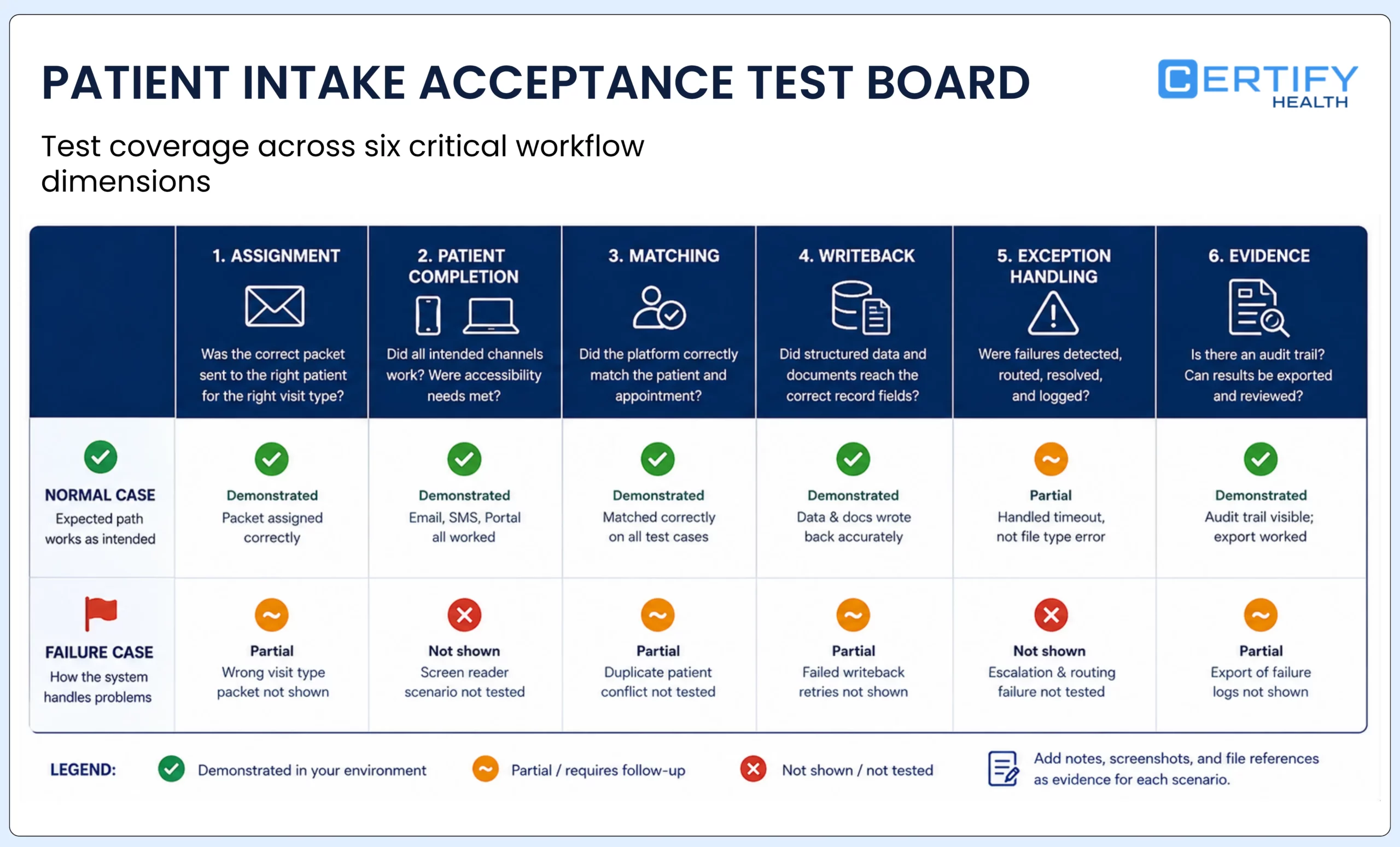
Choose the workflow you can govern
A focused form builder may be the right answer when the organization needs secure collection and can manage downstream routing itself. A patient-experience or communication suite may fit when forms are tightly connected to scheduling, reminders, payments, or messages. A broader intake workflow may fit when patient matching, insurance information, multi-channel check-in, exceptions, and system-of-record updates must be coordinated across locations.
The shortlist should therefore follow the operating model, not the headline. Choose the products that can demonstrate the required workflow in your environment, contract for the right responsibilities, pass the same acceptance tests, preserve accessible and assisted alternatives, and leave an evidence trail your teams can review after go-live.
Frequently asked questions
Is a form platform automatically HIPAA compliant if it signs a BAA?
What is the difference between a healthcare form builder and patient intake software?
Should every intake form write structured data into the EHR?
Can a practice rely on a vendor's integration list?
What accessibility evidence should a buyer request?
How often should this comparison be reviewed?
Recheck it before publication and at least whenever a vendor changes product scope, plan requirements, BAA terms, integrations, ownership, security documentation, pricing model, or the page’s annual label. Every dated vendor profile should display the date of its evidence review.