
Table of Contents
Key Takeaways
- HIPAA compliant patient communication requires encryption, BAAs, access controls, audit logs, and automatic logoff, not just a checkbox.
- Text and email PHI only via secure platforms; plain SMS/Gmail risks violations even if no breach occurs.
- Get dual HIPAA/TCPA consent for automated texts; honor opt-outs and preferences automatically.
- Follow the “minimum necessary” rule: Share only appointment time/date, not diagnoses or specialties.
- Use integrated tools – CERTIFY Health for two-way messaging, EHR sync, and built-in BAA to make compliance effortless.
- The proposed HIPAA Security Rule overhaul has not been finalized. The federal regulatory agenda now projects final action for July 2027, but the current Security Rule remains fully applicable in the meantime.
Introduction
In 2023, healthcare data breaches hit over 133 million people, the highest on record.
Most of those breaches start where you’d least expect: everyday patient communication.
- A text from a personal phone, a voicemail that names the specialty
- A communication sent via a personal Gmail inbox
All quietly create HIPAA‑compliant patient communication risk.
This guide is for administrators and practice owners who need to protect their practice, their staff, and their patients, without giving up texting, email, or modern tools.
What Does “HIPAA‑Compliant Patient Communication” Actually Mean?
If you’re hearing “HIPAA‑compliant patient communication” from your vendor, your IT team, or your compliance binder, you’re probably thinking:
“Can compliance be satisfied with only encryption and a BAA agreement?”
Wrong.
HIPAA compliant patient communication is not a single checkbox.
It’s a full stack of safeguards built around Protected Health Information (PHI), anything that can identify a patient and relate to their health, treatment, or payment.
To be safe, you need:
- Encryption for secure data transmission
- Documented BAAs covering each partner involved in handling PHI
- Access controls so only the right staff can see the right info
- Audit records that document who performed what and when
- Automatic logoff to lock systems when staff walk away
Miss any one of these, and your “HIPAA‑compliant” setup is already cracked.
The Core HIPAA Communication Rules Everyone Gets Wrong
Every practice we talk to is doing the same core things:
- Calling patients
- Leaving voicemails
- Sending appointment reminders
- Texting and emailing
- Following up on billing
Each of these can involve protected health information (PHI) and must follow HIPAA communication rules.
Here are the big mistakes practices make every day:
- Sharing too much PHI in texts, emails, or voicemails
- Forgetting patient consent and preferences
- Not verifying who is on the other end of the line
- Leaving voicemails that give away sensitive conditions
- Using public areas to talk about HIV meds, behavioral health, or other private info
HIPAA doesn’t expect perfection.
It expects intentionality, documentation, and reasonable safeguards.
Can You Text Patients? Everything About HIPAA‑Compliant Texting
The short answer
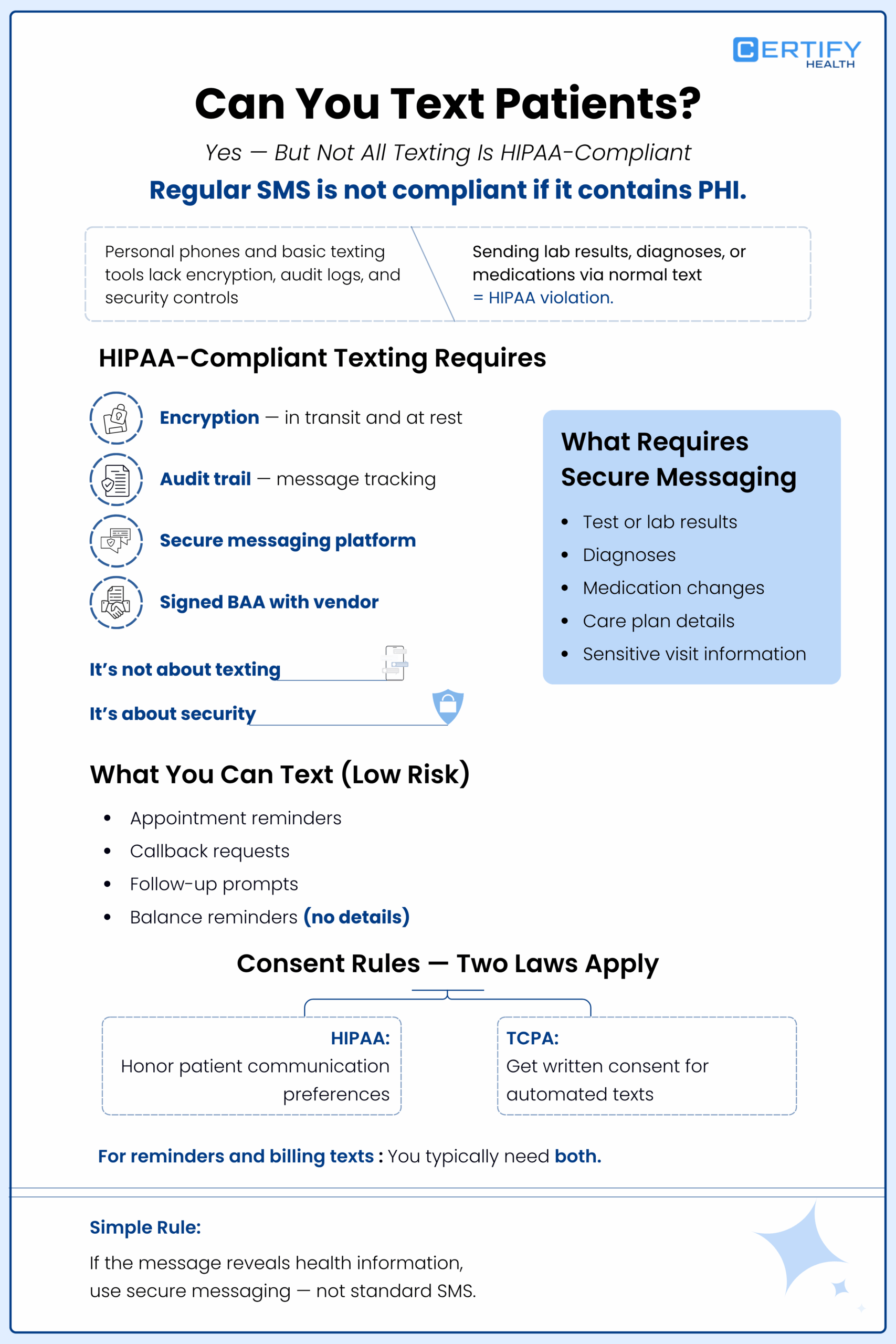
Yes, you can text patients — but regular SMS is not HIPAA‑compliant if it carries PHI.
A text from a personal phone, or a basic consumer SMS tool is not secure for patient communication. Those messages are not encrypted from end‑to‑end, stay on carrier servers, and leave no audit log.
Sending A1C results, lab details, or a diagnosis over a normal text is a HIPAA violation, even if nothing bad happens.
HIPAA‑compliant Texting Vs. Plain Texting
HIPAA‑compliant texting (or HIPAA‑compliant text messaging) means:
- Messages are encrypted in transit and at rest
- You use a secure messaging for healthcare platform that supports HIPAA‑compliant messaging platform standards
- The system keeps an audit log of who sent what, when, and to whom
- A formal BAA has been completed with the vendor
In other words, HIPAA‑compliant texting is not about the word “text” — it’s about the rules, tools, and safeguards around it.
What Can You Text Patients Under HIPAA?
Not all texts are the same.
Low‑risk, often okay messages (if kept clean):
- “Confirm or cancel your appointment for tomorrow at 2:00 PM.”
- “Please get in touch; our team is checking in following your appointment.”
- “Your balance notification is ready — please log in to see the details.”
These may not need full encryption because they share little or no PHI.
High-risk, HIPAA‑compliant texting only:
- Lab or test results
- Diagnoses or condition specific follow‑ups
- Medication changes
- Care plan details
- Mentions of departments that could signal confidential health issues
For these, you must use a secure patient communication tool — not SMS from a personal phone.
Do You Need Consent to Text Patients?
Yes, and this is where HIPAA rules and TCPA rules collide.
Under HIPAA:
- Patients can request how they want to be contacted (phone only, mail only, no texting, etc.)
- You must document and honor those preferences
Following the standards set by the TCPA:
- You cannot auto‑text patients without express written consent
- That consent must note that SMS has inherent security risk
- There must be an easy option for patients to opt out.
So:
- You need HIPAA consent for PHI sharing
- You need TCPA consent for auto‑texting
- You need both if you’re sending automated appointment reminders or balance texts
A good HIPAA‑compliant messaging platform will handle opt‑in and opt‑out management, so you’re not doing this in spreadsheets.
What To Avoid in Patient Text Messages
Here’s a simple rule:
If the message would tell a stranger something private about the patient’s health, it should not be in plain text.
Safe for standard secure messaging:
- Appointment confirmations
- Callback requests
- General check‑in instructions
- Satisfaction surveys (no clinical details)
- Simple balance notifications (no procedure codes)
Needs HIPAA‑compliant texting only:
- Test results
- Medication names and dosing
- Diagnosis language
- Specialty or visit type that reveals a sensitive condition
You can also use secure SMS healthcare tools that encrypt everything and keep logs, rather than consumer SMS.
Is Emailing Patients HIPAA Compliant? The Real Answer
Everyone wants to email patients.
It’s fast, familiar, and feels “normal.”
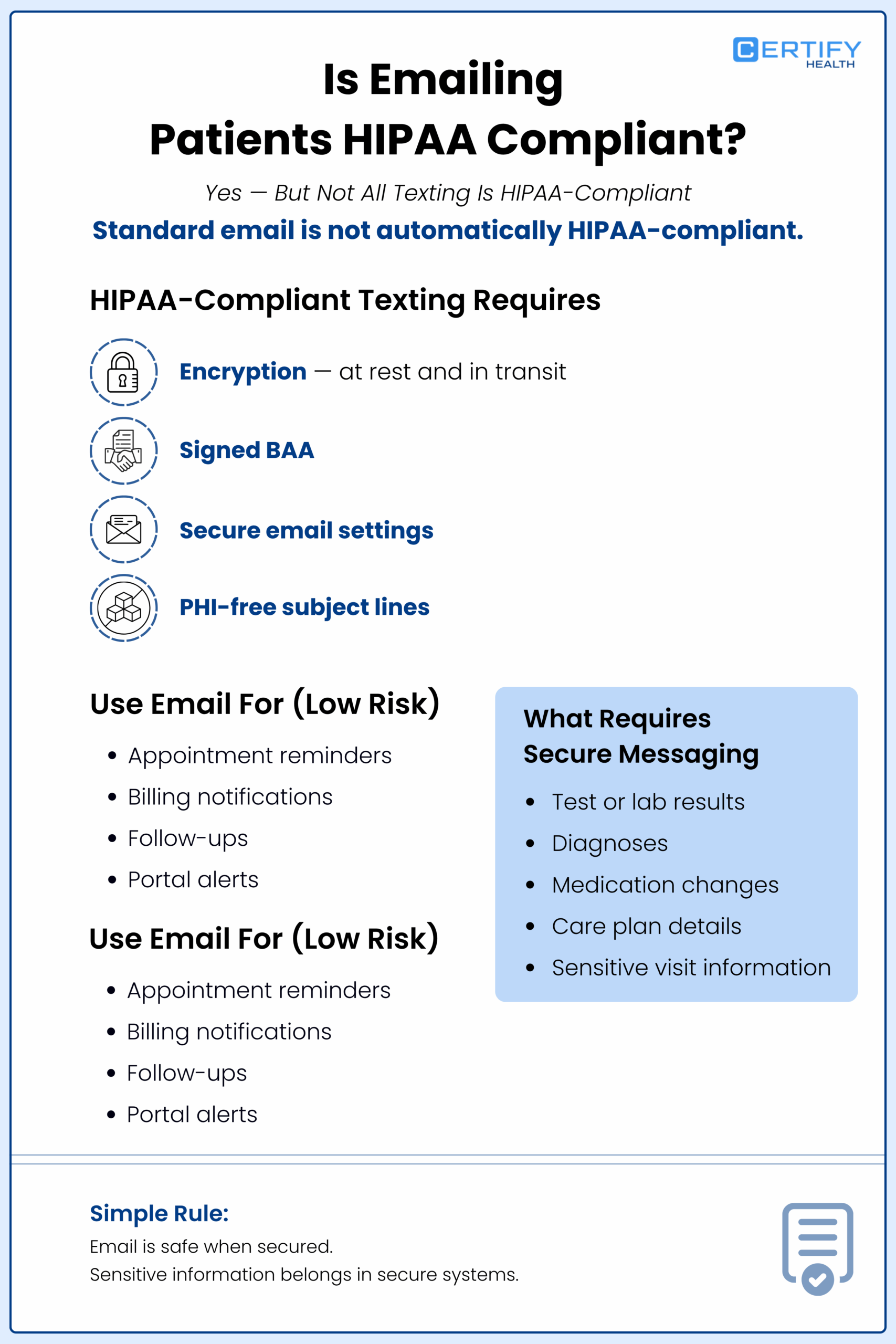
But here’s the truth: standard consumer email is not HIPAA‑compliant patient communication.
Most free Gmail, Outlook, and basic business email accounts:
- Don’t encrypt messages at rest
- Don’t come with a HIPAA‑compliant email requirements‑ready BAA
- Expose metadata (sender, recipient, subject) in ways you can’t control
So, is emailing patients HIPAA compliant?
It can — when the right protections are used.
What HIPAA‑compliant Email Really Looks Like
To make email HIPAA‑compliant, you need:
Encryption at rest and in transit
- TLS 1.2+ for in‑transit encryption
- Strong encryption for stored messages
A legally signed BAA covering your email platform
- For example, Google Workspace or Microsoft 365 for healthcare, with HIPAA settings turned on
PHI‑free subject lines
- “Regarding your upcoming visit” ✔
- “Your blood work suggests advancing liver disease” ✘
Patient consent and risk awareness
- It’s important for patients to recognize that emails may be vulnerable to interception.
- You should document their consent to email PHI
A lot of practices solve this by:
- Using HIPAA‑compliant email only for low‑risk messages
- Using a secure patient communication portal to share lab results, discharge summaries, and care plans
- Sending a simple email with the message, “Your results are ready – log into the portal to view them.”
How To Send HIPAA‑compliant Messages Over Email
Here’s a practical checklist for how to send HIPAA‑compliant messages over email:
- Verify you have the right email (no typo delivering to the wrong person)
- Use a HIPAA‑compliant email tool vendor with a BAA
- Keep clinical details out of the subject line
- Avoid sending raw PHI when a portal would be safer
- If contact begins from the patient, capture that interaction as consent on record.
- Keep communication logs in case of a question later
Email is not the enemy of HIPAA‑compliant patient communication.
Unmanaged, unencrypted email is.
Choosing the Right HIPAA‑Compliant Messaging Platform
If you’re Googling “best HIPAA‑compliant messaging platform” or “secure patient communication solutions,” you’re already in the right place.
But not every tool that says “HIPAA‑compliant” is actually built for care.
Here’s how to spot the difference and stop flying blind.
What Makes a Platform HIPAA‑compliant?
A patient communication platform cannot make a practice HIPAA compliant on its own. The practice must evaluate how the platform stores, transmits, accesses, and records electronic protected health information within its broader security program.
Under the current HIPAA Security Rule, regulated organizations must apply reasonable and appropriate administrative, physical, and technical safeguards. Some implementation specifications, including encryption, are currently classified as addressable. That does not make them optional. A practice must assess the safeguard, implement it when reasonable and appropriate, or document an appropriate alternative.
The proposed Security Rule would significantly raise that baseline by generally making encryption and multi-factor authentication mandatory, with limited exceptions.
Business Associate Agreement (BAA)
- No BAA = no HIPAA‑compliant patient communication
- This is required by law for any vendor handling PHI
Encryption standards
- TLS 1.2+ for in‑transit
- AES‑256 for data at rest
Audit logs (HIPAA audit log)
- Sender, message details, timestamp, and recipient
- Timestamps, user IDs, message types
Access controls
- Role‑based permissions (front desk vs. clinician vs. admin)
- Unique logins, no shared accounts
- Multi‑factor authentication
Automatic logoff and device security
- Sessions that time out
- Remote wipe and screen‑capture controls
If responses are vague or incomplete, it’s best to move on.
2026 HIPAA Security Rule Update: What the July 2027 Timeline Means
The proposed overhaul of the HIPAA Security Rule has not been finalized.
An earlier federal regulatory agenda projected final action in May 2026. The latest agenda moves the proposed rule to the Long-Term Actions category and now lists July 2027 as the projected date for final action.
That does not make July 2027 a compliance deadline. Regulatory agenda dates are planning estimates, and the final rule could be issued earlier, delayed again, revised substantially, or not finalized in its current form. No new compliance period has started.
The current HIPAA Security Rule remains in effect while the rulemaking continues.
Why this still matters for patient communication
The proposed changes focus heavily on the systems that create, receive, maintain, and transmit electronic protected health information. That includes patient messaging platforms, email systems, portals, appointment-reminder tools, payment communications, mobile devices, integrations, and the vendors supporting them.
If finalized substantially as proposed, the changes would introduce more prescriptive expectations, including:
- Encryption of ePHI at rest and in transit, with limited exceptions
- Multi-factor authentication, with limited exceptions
- Written technology asset inventories and network maps showing how ePHI moves between systems
- More detailed and documented security risk analyses
- Annual Security Rule compliance audits
- Vulnerability scanning at least every six months
- Penetration testing at least annually
- Stronger verification of business associates’ technical safeguards
- Documented incident-response, backup, and recovery procedures
What practices should do during the extended timeline
The additional time should be treated as planning runway, not permission to leave known risks unresolved.
Practices can begin by mapping every system through which patient information travels, including ordinary SMS, secure messaging, email, patient portals, EHR integrations, reminder platforms, staff devices, and third-party vendors.
For each communication channel, confirm:
- What patient information is collected or transmitted
- Whether the information is encrypted in transit and at rest
- Who can access it and how access is authenticated
- Whether activity is recorded in usable audit logs
- Whether the vendor will enter into an appropriate Business Associate Agreement
- How access is removed when an employee changes roles or leaves
- How communication data would be recovered following an outage or security incident
- Whether the platform is included in the practice’s documented risk analysis
The final requirements and dates may change. The responsibility to apply reasonable and appropriate safeguards to patient information today does not.
How To Choose HIPAA‑compliant Communication Tools
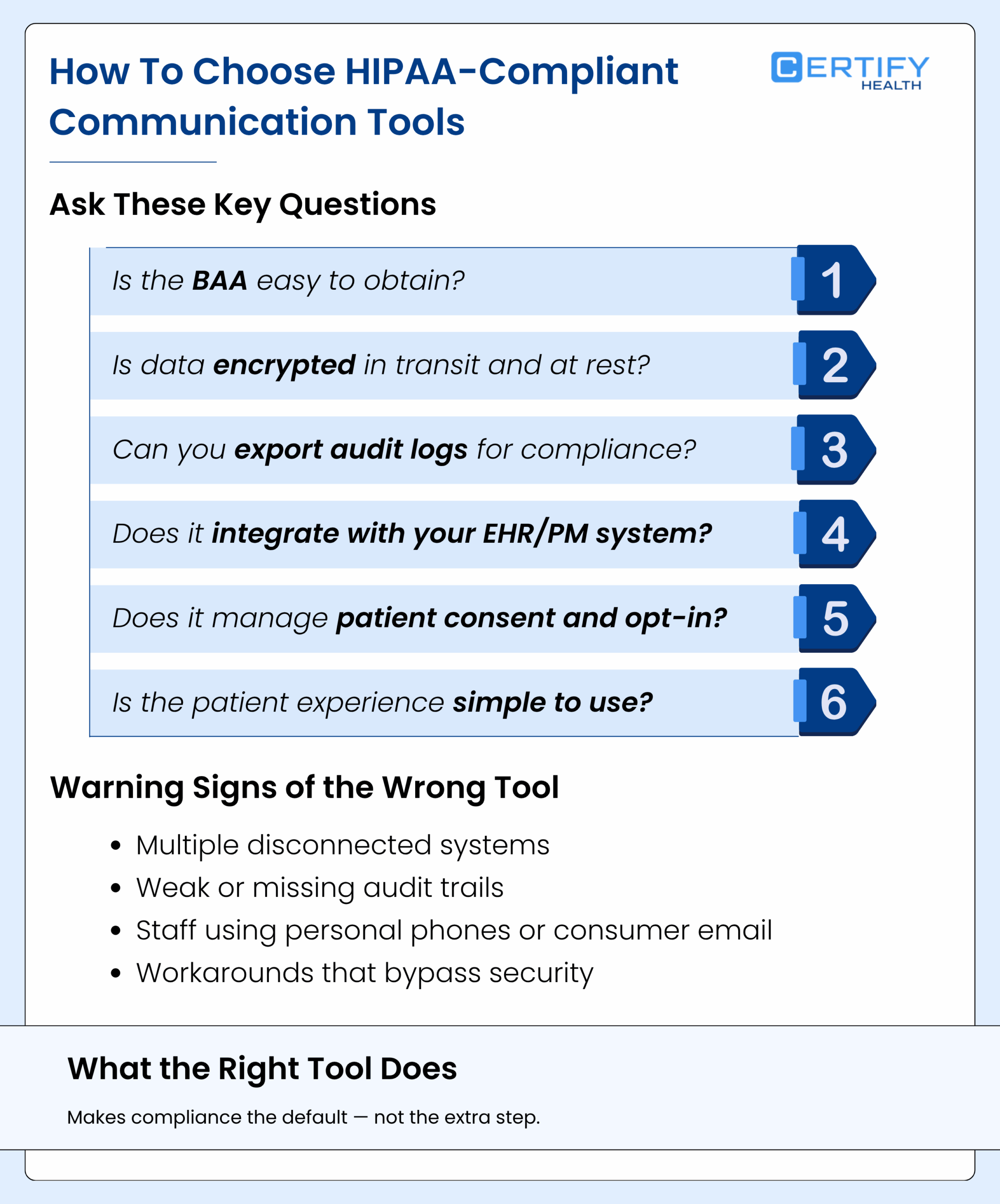
If you’re comparing healthcare messaging software, ask:
- Is the BAA standard easy to get?
- How is encryption implemented (in‑transit and at‑rest)?
- Can you export audit logs for compliance checks?
- Does the platform integrate with your EHR/PM system, so PHI isn’t scattered everywhere?
- How does it handle patient consent and opt‑in?
- Is the patient experience simple enough that people will actually use it?
Practices that pick the wrong tools end up with:
- Multiple siloed systems
- Weak audit trails
- Staff using personal phones and Gmail “because it’s faster”
Good secure patient communication tools make compliance the easy path, not the hard one.
HIPAA‑Compliant Appointment Reminders: The Gray Zone Everyone Misses
Appointment reminders are the most common communication in any practice, and also one of the riskiest if you’re not careful.
Here’s what happens in the wild:
- “You have an appointment with Dr. Chen in Behavioral Health tomorrow at 10 AM”
- “This is a reminder of your upcoming visit related to HIV medication on April 16, 2026.”
These messages reveal sensitive conditions and violate HIPAA rules for appointment reminders.
Here’s How to Send HIPAA‑compliant Appointment Reminders
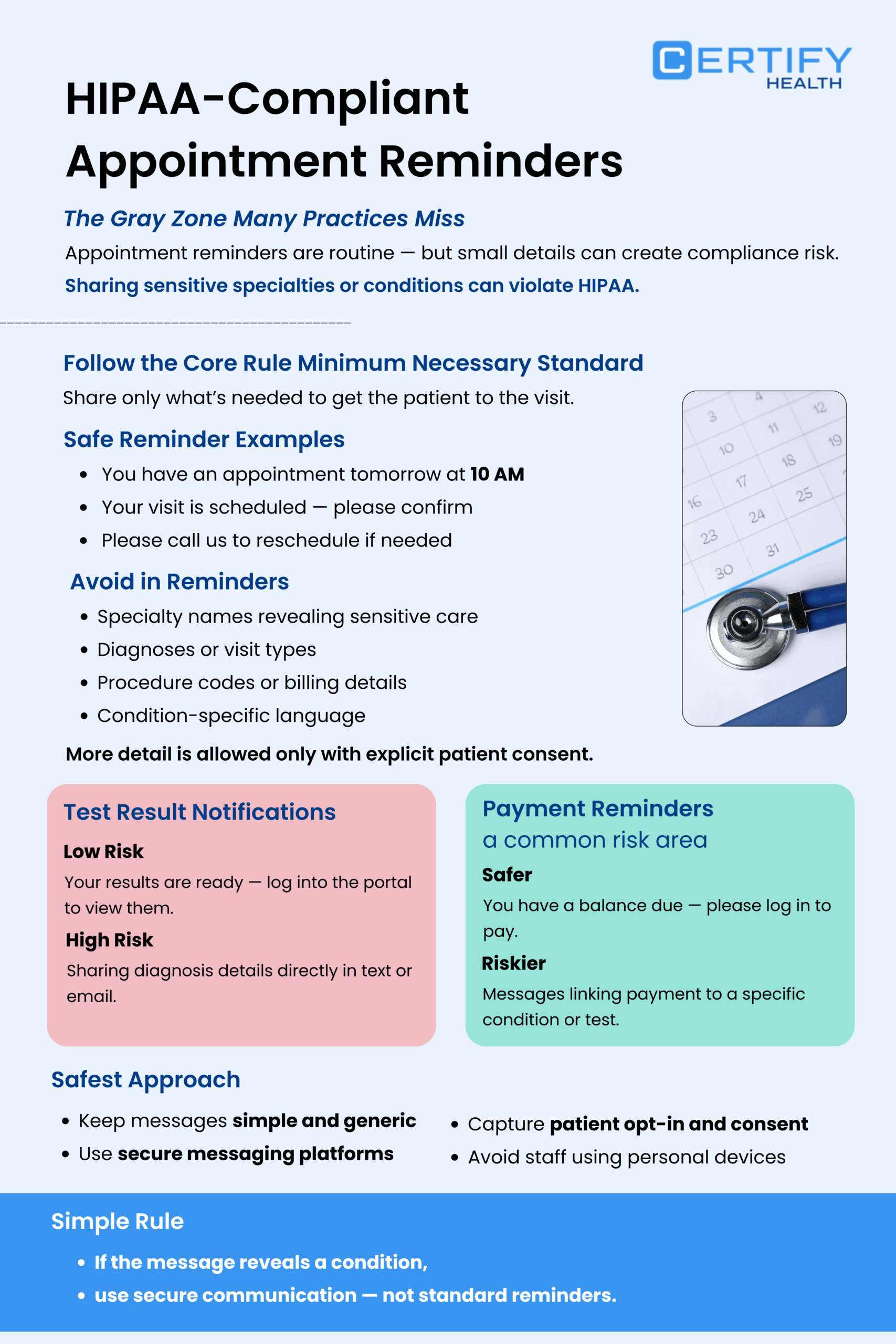
Follow the minimum necessary standard HIPAA rule:
Only share what’s needed to get the patient in the door.
Safe templates:
- “If your plans have changed, and you cannot make your 10 AM visit tomorrow, please call our office.”
- “Your appointment is scheduled for Thursday at 10 AM — reply YES to confirm your attendance.”
Avoid:
- Specialty names that reveal sensitive care
- Diagnoses or visit types that hint at a condition
- Procedure codes or billing details
If the patient has explicitly consented to more detail, you can add a bit more — but that’s the exception, not the rule.
Test Results and Payment Reminders: The Trickiest Spots
Test Result:
- “Your details are available, log in to the secure portal to review them” = low risk
- “Your biopsy came back positive for skin cancer” in a text = high risk and requires HIPAA‑compliant texting
Payment reminders:
- These sit at the crossroads of HIPAA and TCPA.
- A message stating “For your visit on April 10, you still owe $150.” is a different situation.
- A reminder mentioning a charge tied to a specific test date combines sensitive health and billing data, meaning it must be sent through HIPAA-compliant communication channels.
The safest way:
- Keep payment reminders simple and generic
- Use a secure messaging for healthcare platform offering Text-to-Pay with opt‑in and logging
- Route everything through HIPAA-compliant patient communication tools‑instead of staff phones
The Minimum Necessary Standard: What You Can and Can’t Say
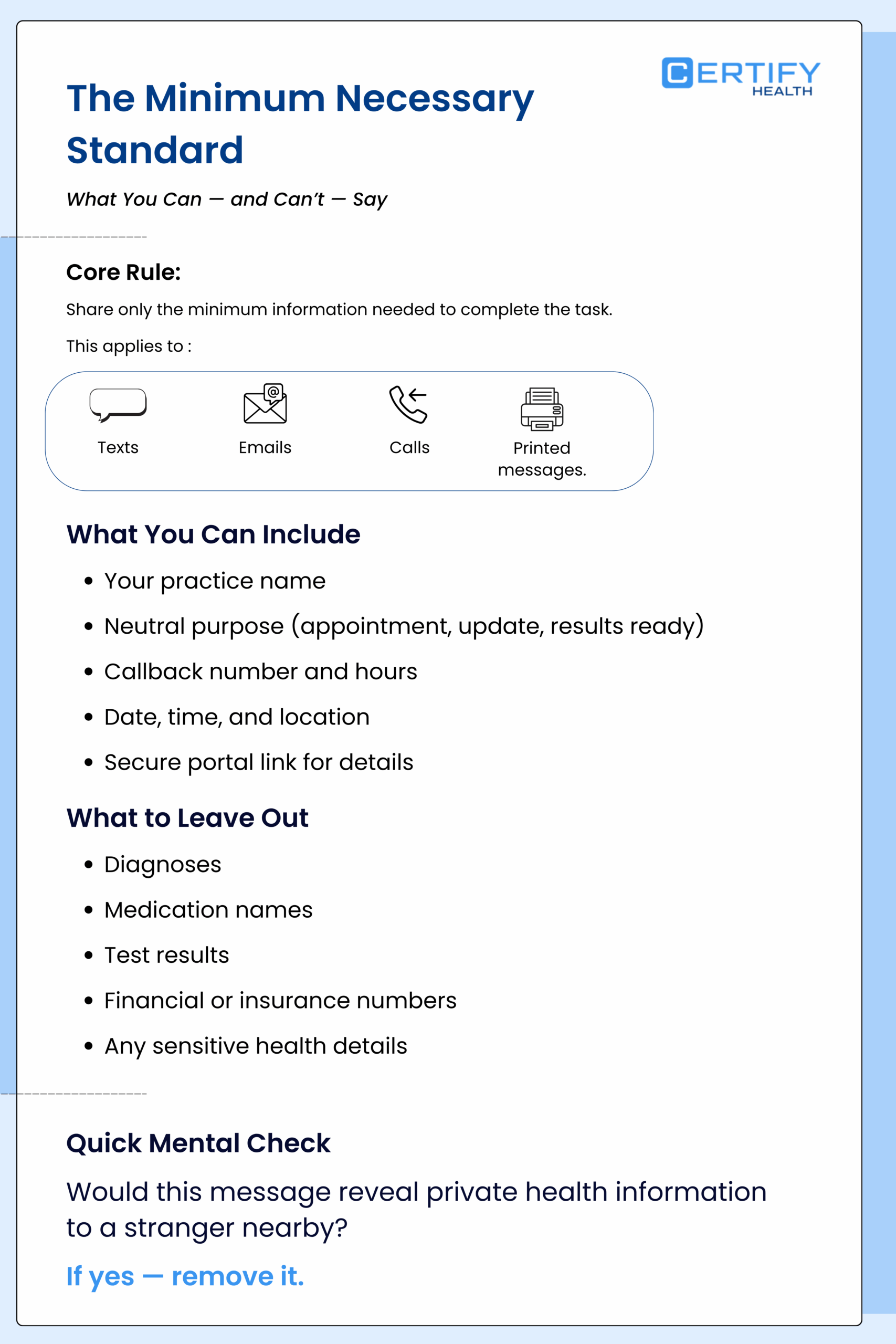
One of the most powerful (and misunderstood) rules in HIPAA communication rules is the minimum necessary standard HIPAA.
It means:
Only divulge the bare minimum of PHI required to complete the task.
What to include in patient messages
- Your practice name (so the patient knows who is calling/texting/emailing)
- A neutral message cue: “in connection with your upcoming visit,” “information is now accessible,” “a routine care update”
- A callback number and hours
- Basic scheduling logistics: date, time, location
- A link to a secure portal for details
What to leave out
- Diagnoses
- Medication names
- Test result details
- Insurance or financial account numbers
- Any info that would tell a stranger something private about the patient’s health
Use this mental model:
Would this message tell a stranger sitting next to the patient on a bus something about their health?
If yes, it doesn’t belong there.
This standard applies to voicemails, texts, emails, and printed messages.
HIPAA Breach Notification Rules and What Happens When You Mess Up
Even the best practices have incidents.
- A laptop gets stolen.
- An email was sent to someone else (e.g., email address).
- A vendor has a security event.
Here’s what you need to know about HIPAA breach notification rules.
- You must notify affected patients within 60 days of discovering a breach of unsecured PHI.
- If 500+ patients are affected, you must also notify HHS and the media in that area.
- Smaller violations are recorded in a yearly log.
“Unsecured” is the key word.
If the PHI was encrypted and the keys weren’t stolen, you may not have to notify them.
This is why encryption requirements for HIPAA and secure data transmission are so important.
Your HIPAA‑compliant messaging platform or secure patient communication vendor must:
- Have an incident response plan
- Notify you quickly if there’s a breach
- Let you document everything for your logs
Without that, you’re on your own when OCR comes knocking.
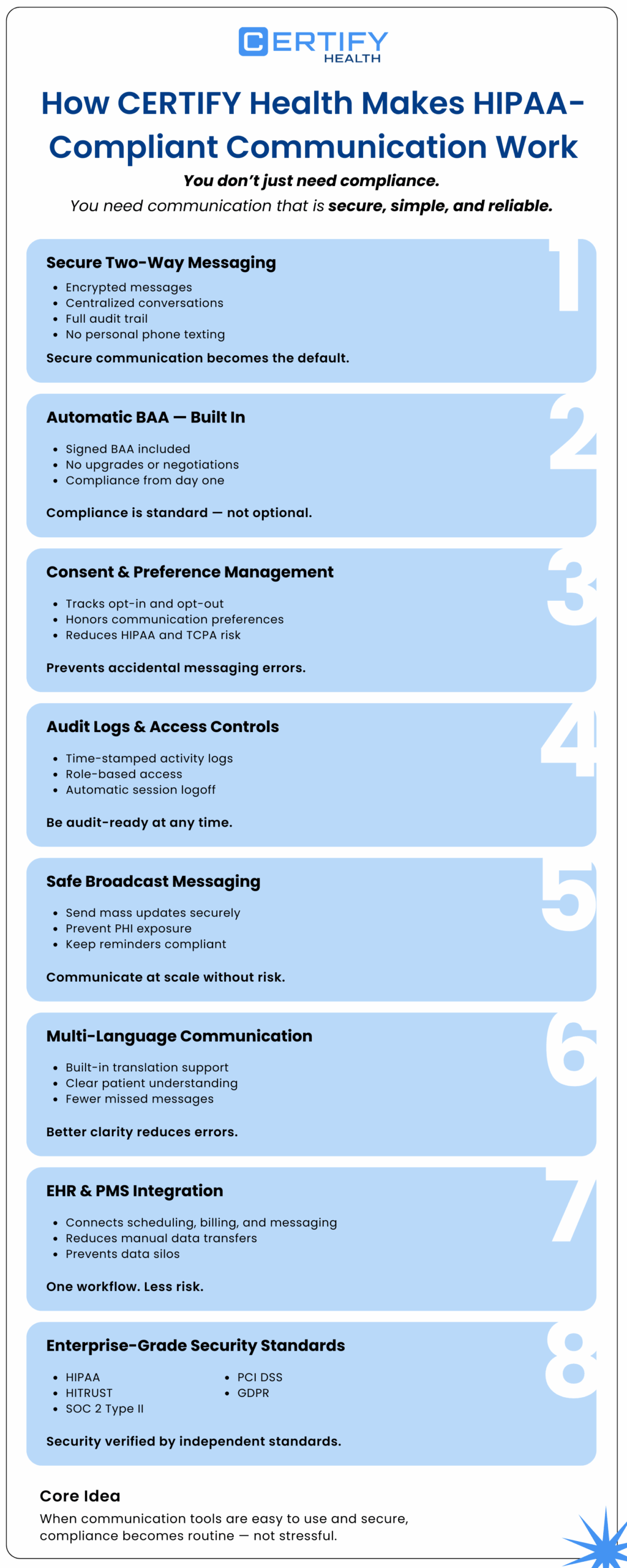
How CERTIFY Health Makes HIPAA‑Compliant Patient Communication Actually Work
If you’re a practice owner or administrator, you’re not asking:
“What’s the most HIPAA‑compliant patient communication platform I can buy?”
You’re asking:
“How do I make communication safer, faster, and more convenient for both staff and patients?
That’s where CERTIFY Health’s unified medical practice management tool is built differently.
Secure Two‑way Messaging That Replaces The “Text from My Phone” Habit
Most teams get into trouble with HIPAA‑compliant texting because the easy way is the risky way:
- A staff member fires off a quick text from their personal phone.
- No encryption. No logs. No structure.
CERTIFY Health’s secure two‑way messaging solves that.
- Messages are encrypted end‑to‑end, so lab results, care instructions, follow‑up questions, and appointment confirmations stay private.
- Every conversation is logged and auditable, so you can see who said what, when, and to whom.
- There’s no more “I lost that message in my inbox” chaos — everything lives in one place.
This is HIPAA‑compliant messaging platform design that actually works in real life, not just in a compliance checklist.
Automatic BAA: No more searching for “HIPAA‑compliant communication apps” that won’t sign a BAA.
Here’s a simple fact:
If a vendor won’t sign a Business Associate Agreement (BAA), you can’t use them for HIPAA‑compliant patient communication.
Too many practices waste time with “healthcare messaging apps” that either:
- Don’t offer a BAA
- Only add one on higher‑tier plans
- Make it hard to get legally signed
Not with CERTIFY Health.
- Every deployment includes a signed BAA by default.
- You don’t have to beg for it, negotiate it, or upgrade just to meet HIPAA‑compliant communication rules.
This is exactly what makes CERTIFY Health a true HIPAA‑compliant patient communication platform; compliance isn’t a feature you pay extra for. It’s baked in.
Opt‑in, Opt‑out, And Consent Management That Actually Works
If you’re worried about HIPAA communication rules and TCPA compliance, you’re probably sweating over:
- How do I track who said “yes” to texts?
- What if a patient says “no” but someone still sends a message?
CERTIFY Health’s opt‑in management is built to handle that.
- The platform captures patient consent to receive messages.
- It tracks opt‑in and opt‑out status automatically.
- It honors patient communication preferences, so you don’t accidentally send a text to someone who requested “calls only.”
This single piece keeps you safe on both HIPAA rules for patient communication and do you need consent to text patients under TCPA.
Audit Logs and Access Controls That Make Compliance Feel Normal
When HHS or your auditor asks, “Show me your logs,” you need to be able to answer fast.
CERTIFY Health’s audit logging and access controls are not afterthought.
- All message activity is logged with timestamps and user attribution.
- Role‑based access means the front desk can’t see things only clinicians should see, and vice versa.
- Automatic session logoff shuts things down when staff walk away.
This adds the HIPAA audit log and minimum necessary standard HIPAA layers without forcing your team to change their behavior radically.
Broadcast Messaging That Keeps Mass Texts Safe
Most practices send:
- Office closures
- Urgent schedule changes
- Public health updates
If you do this through regular SMS or email, you raise the risk of HIPAA‑compliant appointment reminders and HIPAA‑compliant texting problems.
CERTIFY Health’s broadcast messaging is different.
- You can send compliant mass messages via SMS or email.
- The system is built, so you don’t accidentally expose PHI in a blast.
- Everything stays under HIPAA‑compliant communication rules.
Multi‑language Support So No One Gets Lost In Translation
Miscommunication is a compliance risk, too.
If a patient doesn’t understand the text or email, they might not show up, miss meds, or call back stressed.
CERTIFY Health includes:
- Multi‑language support
- Auto‑translation for common patient‑provider interactions
This is not just about patient experience.
It’s about improving patient communication in healthcare in a way that reduces errors and keeps everyone on the same page.
EHR and PMS Integration That Stops the Data‑silo Madness
Most practices are stuck in a nightmare stack:
- One system for appointments
- One for billing
- One for patient messaging
- One for portals
Every time you copy‑paste data from one place to another, you expand your breach risk and weaken your secure data transmission controls.
CERTIFY Health connects to your existing EHR and PMS plus it’s HIPAA compliant scheduling software so:
- Appointment data, check‑in status, billing workflows, and messaging live in one place.
- You cut down on manual transfers and messy data duplication.
This is how you build secure patient communication into the way your practice already runs.
Certifications that go beyond “HIPAA‑compliant” on a banner
You’ve seen the word “HIPAA‑compliant” on a lot of bedsheets advertising a “HIPAA‑compliant messaging platform.”
But CERTIFY Health backs that up with real certifications:
- HIPAA
- HITRUST r2
- AICPA SOC 2 Type II
- PCI DSS
- GDPR
For practices that care about secure patient communication solutions and secure messaging for healthcare, that stack is a big deal. It means:
- You’re not just checking a box.
- You’re using a platform that is built to meet global data‑protection standards, not just U.S. ones.
The Core Idea: Compliance And Convenience Aren’t Enemies
Most tools force you to choose between:
- Ease of use
- Patient communication frequency
- HIPAA‑compliant texting
CERTIFY Health is built on the idea that you shouldn’t have to choose.
When tools are:
- Easy for staff to use
- Clear for patients to understand
- Built on HIPAA‑compliant communication standards
… then HIPAA‑compliant patient communication becomes the normal way you work — not the stressful exception.
Has the New HIPAA Security Rule Been Delayed Until 2027?
The proposed changes have not been withdrawn, but the projected timeline for final action has moved.
The federal regulatory agenda previously listed May 2026 as the projected date for final action. It now lists July 2027 and categorizes the rulemaking as a Long-Term Action.
July 2027 is not currently a compliance deadline. HHS has not issued a final rule, and no new compliance period has begun. Healthcare providers and business associates must continue following the existing HIPAA Security Rule while monitoring the proposal.
Practices should also avoid postponing reasonable cybersecurity improvements. Encryption, access controls, auditability, documented risk analysis, vendor oversight, and secure authentication already help protect patient communication and prepare organizations for potentially stricter future requirements.
Conclusion
You didn’t get into healthcare to argue about HIPAA‑compliant email requirements or debate HIPAA‑compliant texting rules.
You got into it to help patients.
But here’s reality:
Patient communication is not a side job.
It’s how your practice shows up in a patient’s life between visits.
And it’s where HIPAA vulnerabilities accumulate — one innocent text, one careless voicemail, one “fast” email at a time.
The good news?
HIPAA doesn’t force you to give up texting, email, or apps.
It just asks you to build HIPAA‑compliant patient communication on a solid foundation:
- Encryption and secure data transmission
- Access controls and HIPAA audit logs
- Patient consent and documented preferences
- Vendors that actually sign BAAs and follow HIPAA‑compliant communication rules
Practices that get this right:
- Cut their risk of data breaches
- Build real patient trust
- Reduce front‑desk chaos
The ones that don’t usually fail because they don’t care.
They’re failing because they’re patching together tools that were never built for HIPAA and expecting staff to “just be careful.”
If you’re even thinking about changing how your practice communicates with patients, do it before the incident, not after.
Ready to Audit Your Patient Communication Compliance?
You can’t just keep guessing.