
Key Takeaways
- Paper check-in slows people down. It can also be risky. A clipboard in a waiting room can let one patient see another patient’s private health data. That breaks HIPAA rules.
- Real research backs self-check-in. One U.S. study of emergency rooms found wait times were over 50% shorter at sites with self-check-in kiosks.
- Dental industry data shows the cost of staying manual. The CAQH Index tracks office costs each year. It shows dental offices spend more every year on tasks done by hand, like checking insurance.
Table of Contents
The DSO Check-In Problem
The biggest slowdown often starts before the patient sits in the chair. It starts at check-in.
Front desk staff do a lot at once. They hand out forms. They check insurance. They take payments. They greet walk-ins. All at the same time.
Dental service organizations, or DSOs, run many offices. Most use small teams. When one task runs slow, the whole day backs up.
Burnout makes this worse. A 2026 survey asked almost 8,000 dental workers in all 50 states about their jobs. The survey was run by GoTu, with help from the American Dental Hygienists’ Association. It found that 54.1% of dental workers feel burned out. For dental hygienists, the rate is even higher: 60.6%. The top causes were heavy workload and a hard office culture.
Paper intake adds to the load. Clipboards sit out in waiting rooms. Staff type the same form twice. Mistakes creep in.
For a DSO with 50 or more offices, small delays add up fast. A few extra minutes per patient, every day, at every office, becomes a real cost.
This guide shows how a dental kiosk can ease that load. We checked every number in it against a real source.
Why Clipboards Don't Scale
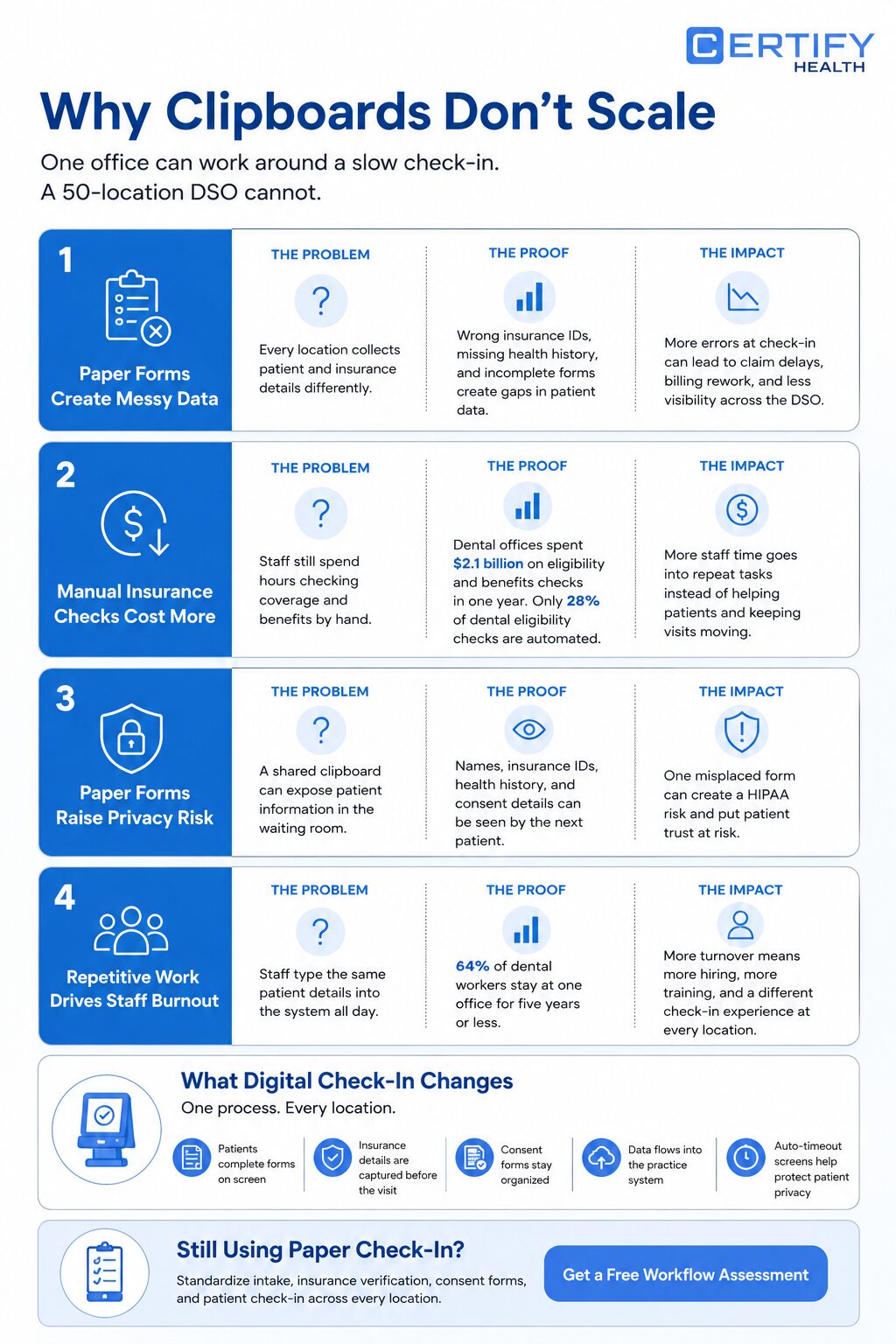
One office can fix a slow check-in by hand. A DSO with 50 offices can’t. Here is why.
Paper Forms Create Messy Data
Each office uses its own habits. One office may type an insurance ID wrong. Another may skip a health history form. Without one shared system, DSO leaders can’t see what is really going on across the network.
The American Dental Association reports that claim denials and claim rejections remain a major concern for dental offices. Inaccurate or incomplete patient and insurance data can lead to additional administrative effort, payment delays, and billing issues. The exact percentage varies, but the pattern is clear: better data leads to cleaner claims.
Manual Work Costs Real Money At Scale
The CAQH Index is the main yearly report on office costs in healthcare. It comes from CAQH, a healthcare data group. The 2024 report (using 2023 data) found dental offices spent $2.1 billion checking insurance and benefits that year. That was a 15% jump from the year before.
Also, only 28% of dental claim checks are done by computer. In medical offices, that number is 80%. CAQH says fully switching to computer-based claim checks could save $2.8 billion a year, across dental and medical offices combined.
In short: a lot of dental office work is still done by hand. The data shows it costs real money.
Paper Forms Raise HIPAA Risk
In a waiting area, a clipboard can display the name, insurance ID, or medical history of another patient. That is the kind of risk HIPAA rules try to stop.
HIPAA penalties can be severe. As of January 28, 2026, organizations that knowingly ignore compliance problems and fail to correct them can face penalties starting at $73,011 per violation. For repeated violations, annual penalties can reach $2.19 million. Even though many violations result in lower penalties, the potential financial risk is significant.
A digital kiosk removes the shared clipboard entirely. Patient data flows directly into your practice management system through an encrypted connection. Auto-timeout screens prevent the next patient from seeing the previous one’s information. No paper changes hands, and no data sits exposed on a waiting room clipboard.
Burnout Drives Staff Out
The same 2026 survey found that 64% of dental workers stay five years or less at any one office. Training new staff over and over costs money. It also makes the patient visit feel different at every office.
A staff member who types the same form for hours on end is more likely to burn out. Less typing means more time for actual patient care.
Still Using Paper Check-In?
See how DSOs standardize intake, insurance verification, consent forms, and patient check-in across every location.
What Is a Patient Check-In Kiosk?
A patient check-in kiosk is a self-service screen in your waiting room. The patient walks in. They tap the screen. They fill out a digital form. They scan an insurance card. They confirm the visit. That data goes straight into your office software. No clipboard. No retyping. Patients can also pay a copay or outstanding balance at the kiosk, removing one more task from your front desk staff.
A patient self check-in kiosk does not have to be a big standalone machine. It can also be:
- A tablet at the front desk
- A QR code the patient scans on their own phone
- A text link sent the day before the visit
The QR code and phone options also address a practical concern in clinical settings: shared touchscreens. When patients use their own device, there is no shared surface to disinfect between patients.
The shape can change. The goal stays the same: get the right patient data into the system, the first time, without a staff member typing it by hand.
Kiosks Across Healthcare
Dental offices are not the only ones using this idea. The same basic tool shows up across health care, under a few different names.
- A healthcare kiosk, also called a healthcare check-in kiosk, is the broad name for any self-service screen used for check-in.
- A medical office check-in kiosk, or check-in kiosk for medical office use, does the same job for a family doctor or a specialist.
- A medical check-in kiosk is common in urgent care and walk-in clinics, where speed matters most.
- A hospital check-in kiosk handles more patients. It may link to a full hospital records system.
- An automated patient check-in system is the software behind all of this. It takes the kiosk data and sends it to the right record, with no retyping.
The setting changes. The job stays the same. So does one fact from real research, which we cover next.
What the Research Says
A study used data from a U.S. government survey of emergency rooms. The survey covered over 40,000 visits. Researchers compared wait times at rooms with self-check-in kiosks against rooms without them. The study ran in a peer-reviewed medical journal, not a company blog.
The result: wait times were 56.8% shorter, on average, at sites with self-check-in kiosks.
This was an emergency room study, not a dental study. The exact number will not match a dental office one-for-one. But the main idea holds up well: when patients enter their own basic data, the line moves faster.
The Real Cost of Manual Check-In Across Multiple Locations
Managing check-in and intake manually becomes harder as a DSO grows. Different offices follow different processes, staff spend time re-entering information, and patient records become harder to standardize.
CERTIFY Health helps DSOs replace paper forms with a unified kiosk patient check-in workflow that includes:
- Digital patient registration
- Insurance verification
- Consent forms
- HIPAA-compliant check-in
- Centralized reporting across locations
The DSO Model
Many DSOs that drop the clipboard use the same basic shape. They put a check-in kiosk in every waiting room. They pair it with one central team, typically reallocated from existing front desk staff, not new hires. That team handles calls, scheduling, and harder insurance questions for every office at once, rather than each office handling those tasks independently.
Here is how it usually breaks down:
- A patient check-in kiosk at the front desk handles routine intake, insurance data capture, consent forms, copay collection, and patient identification. Local staff don’t have to.
- A central team handles calls and follow-up insurance questions for every office, from one place. This team is drawn from existing staff freed up by the kiosk, not added headcount.
- A shared dashboard in your dental patient software, often called dental patient management software, lets DSO leaders see check-in times and denial trends across every office, not just one.
This setup tends to make the patient visit feel the same at every office. No one office does it their own way.
As of 2024, about 16% of U.S. dentists were affiliated with a Dental Support Organization (DSO), according to data from the American Dental Association’s Health Policy Institute. The share is growing fastest among new dentists. As more dental care moves into this model, one shared system beats 50 separate paper habits.
A Practical Dental Kiosk Rollout Plan for DSOs
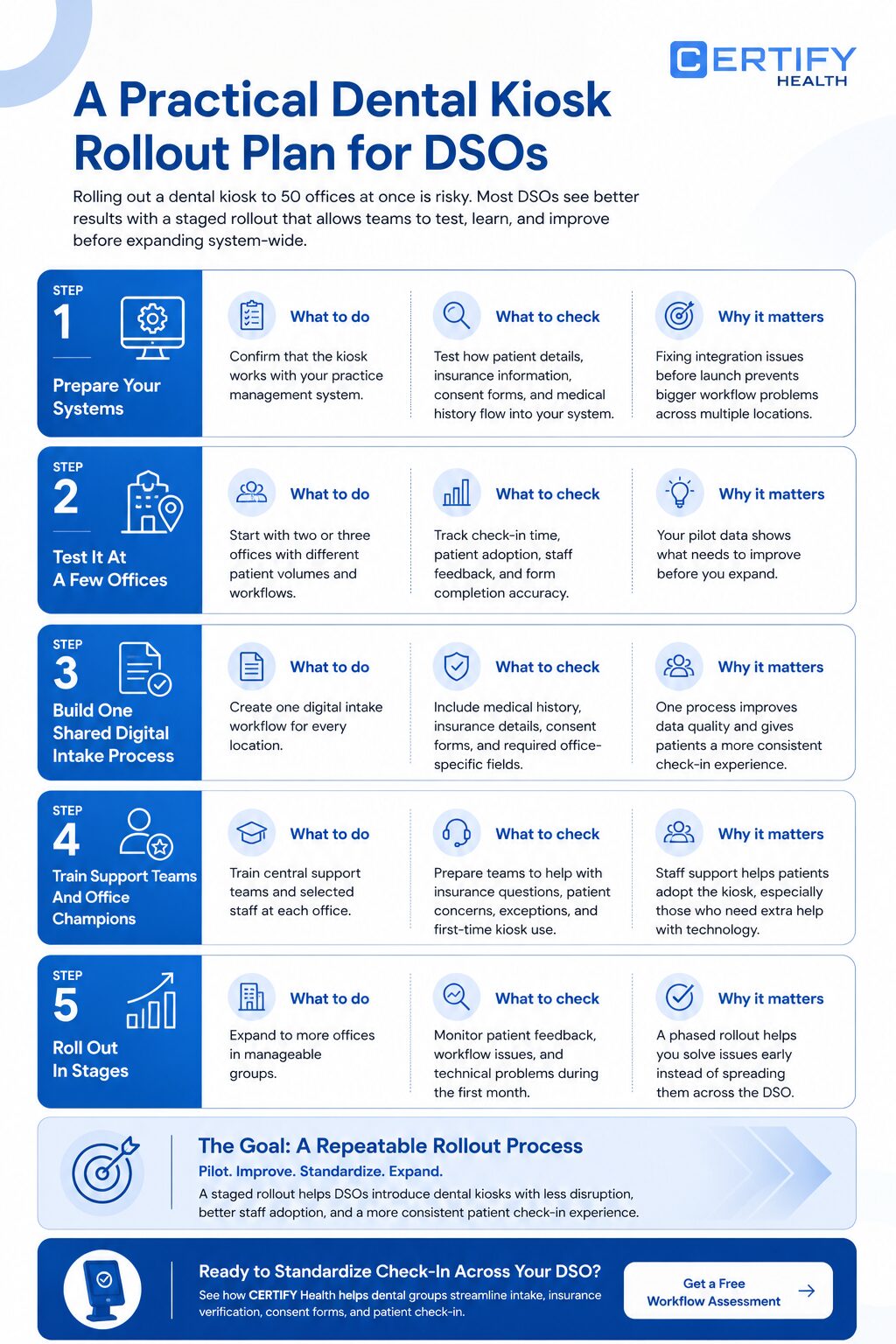
Rolling out a dental kiosk to 50 offices at once is risky. Most DSOs see better results with a staged rollout that allows teams to test, learn, and improve before expanding system-wide.
Step 1: Prepare Your Systems
Before introducing kiosks to patients, make sure the technology works with your existing systems. This includes your practice management software, whether that’s Dentrix, Eaglesoft, Open Dental, or another platform. Integration capabilities vary by vendor, so confirm compatibility before purchase.
Test how patient information, insurance details, consent forms, and medical histories flow into your practice management software. Fixing integration issues before launch prevents larger problems later.
Step 2: Test It At A Few Offices
Choose two or three offices with different patient volumes and workflows. Add a kiosk and run it alongside your existing check-in process for several weeks.
Track key metrics such as:
- Average check-in time
- Patient adoption rate
- Staff feedback
- Form completion accuracy
Use your own data to determine whether the rollout is meeting expectations.
Step 3: Build One Shared Digital Intake Process
Once the pilot is successful, create a standardized digital intake form for all locations. Include medical history, insurance information, consent forms, and any required office-specific fields.
Using one consistent process across the organization helps improve data quality and creates a more uniform patient experience.
Step 4: Train Support Teams And Office Champions
Your kiosk will handle routine tasks, but staff still need to manage insurance questions, patient concerns, and exceptions.
Plan for patient adoption variation. Some patients, including elderly patients or those with limited tech experience, will need assistance during early visits. Having a staff member nearby during the first few weeks of rollout, and configuring the kiosk with multilingual options if your patient population needs them, can significantly improve adoption rates. ADA accessibility features should also be confirmed with your vendor before deployment.
Both central support staff and selected office champions should receive training so they can assist colleagues, respond to inquiries, and promote adoption at every location.
Step 5: Roll Out In Stages
After the pilot and training phases are complete, expand to additional offices in manageable groups rather than all at once.
Monitor performance during the first month at each location. Address workflow issues, patient feedback, and technical problems early so they do not spread across the organization.
A phased rollout turns implementation into a repeatable process instead of a large-scale disruption.
Build Your Own Savings Math
You should carefully analyze any “savings per office” statistic you find online.
Most come from a vendor’s own page, not an outside check. Real savings change a lot by office size, area, and current staffing.
Instead, build your own number with your own data. Use this simple shape:
- Add up the staff hours your offices spend now on manual intake and retyping data.
- Multiply it by the hourly labor cost for those staff members.
- Add the value of fewer denied claims, based on your own denial rate.
- Subtract the cost of the kiosk hardware and software.
Start by calculating these numbers for your pilot office. That gives you a number you can show your finance team. It won’t be a number borrowed from a vendor’s website.
Example (Illustrative Only)
Let’s say a pilot office spends about 25 hours per week on patient intake, paperwork, and re-entering information into the practice management system.
- Staff time spent on intake: 25 hours/week
- Average loaded labor cost: $25/hour
- Annual labor cost for intake tasks: 25 × $25 × 52 = $32,500
The $32,500 represents hours your staff currently spend on intake. With a kiosk handling routine check-in, those hours can shift to patient care, follow-up calls, and other work that needs a real person, rather than being cut. (This is consistent with the burnout argument: the goal is better work for your team, not fewer jobs.)
Now assume the office also reduces claim rework costs by $5,000 per year through more accurate patient and insurance information.
Total estimated annual benefit:
$32,500 + $5,000 = $37,500
If the kiosk costs:
- Hardware: $2,000
- Software: $400/month ($4,800/year)
Total first-year cost:
$6,800
Estimated first-year net benefit:
$37,500 − $6,800 = $30,700
Your actual numbers will vary based on staffing costs, patient volume, denial rates, and kiosk pricing. The goal is to use data from your pilot locations to build a realistic ROI estimate for the rest of your DSO.
Choosing the Right Format of Kiosk
Not every dental kiosk looks the same. The right pick depends on how many offices you run, and what you already have.
| Feature | Tablet Kiosk | Standalone Terminal | Cloud Platform |
|---|---|---|---|
| Extra hardware needed | A tablet | A built-for-purpose machine | Often none |
| On-site server needed | No | Sometimes | No |
| Best fit | A first test, or a small office | One very busy office | A DSO with many offices |
| Easy to add new sites | Fairly easy | Slower, more hardware each time | Fastest, mostly software setup |
A cloud platform works best for most DSOs with 50 or more offices. There are no servers to run at each site. Leaders get one shared view across the whole network. A tablet kiosk is a fair, low-cost way to test the idea at one or two offices first.
Hardware and software prices change often. They also vary by vendor. Ask vendors for current quotes. Don’t rely on prices from any single blog post, including this one.
Front Office Automation and Burnout
Front office automation is not about cutting your team. It’s about removing the boring, repeat parts of their job.
Staff members spend less time retyping the same form when a kiosk handles regular intake. They spend more time talking to patients, fixing problems, and doing work that needs a real person. Given how high burnout runs in dental work, that shift matters for keeping good staff, not just for speed.
Dental office automation, used this way, is less about hiring fewer people. It’s more about putting your current team on better work. That trade is the real heart of dental office efficiency: not fewer staff, but staff who spend their day on work that actually needs a person.
Find Out How Much Time Your Front Desk Could Save
Every DSO is different. Mapping your existing intake workflow and determining where staff time is being wasted is the quickest method to assess a dental kiosk.
See how CERTIFY Health helps dental organizations standardize patient intake, reduce paperwork, and improve check-in efficiency across multiple locations.
FAQ
What's the best kind of dental kiosk for a DSO with 50 or more offices?
For a large DSO, a cloud-based kiosk is usually the best choice.
It does not need a server in every office. It can connect with your practice management software and give leaders one view of all locations.
CERTIFY Health is a cloud-based platform that combines patient forms, insurance checks, consent forms, and check-in tools in one kiosk check-in system. This makes it easier to use the same process across every office.
The bigger your DSO grows, the more important it becomes to have one system that works the same way everywhere.
What are the real trade-offs of kiosk check-in?
The benefits are easy to see. Patients can check in faster. Staff spend less time entering the same information again and again. Digital forms can also help reduce data-entry mistakes.
CERTIFY Health reports that self-service kiosks can reduce front-desk congestion by 60% to 80%. Actual results may vary based on practice volume, office layout, and existing workflows.
The main challenge is that every office needs a reliable internet connection. Some patients may also need help using the kiosk, especially during their first visit, including elderly patients and those who prefer to interact in a language other than English. Multilingual configurations and nearby staff support during busy periods address most of these cases.
Most offices solve this by having a staff member nearby to answer questions during busy times.
How do DSOs switch from clipboards to kiosks without disrupting patients?
Most DSOs do not switch all offices at once.
They start with a few locations and run the kiosk alongside paper forms for several weeks. This gives staff time to learn the process and find any problems.
Once the pilot works well, the DSO creates one standard digital intake form and rolls it out to more offices in stages.
This approach helps avoid confusion and makes the change easier for both patients and staff.
The goal is not just to replace clipboards. The goal is to create the same smooth check-in experience at every office.
The Bottom Line
Paper clipboards made sense when dental offices were small and worked alone. For a DSO with 50 or more offices, they bring real costs: messy data, slow check-in, and a real HIPAA risk with real fines attached.
A patient check-in kiosk, paired with one shared digital form and a central support team, does more than speed up the front desk. It gives DSO leaders one honest view of what’s really going on across their network, backed by real numbers, not borrowed marketing claims.
➤ Want to see where your DSO is losing time at the front desk?