Table of Contents
The Billing Question Every PT Practice Eventually Faces
How you handle billing shapes more than your revenue cycle. It affects how much time your team spends chasing claims, how quickly you get paid, and how much visibility you have into your practice’s finances.
For physical therapy practices, that raises a practical question: should billing stay in-house, go to an outside partner, or be supported by physical therapy billing software (sometimes called physiotherapy billing software) that automates more of the work?
There is no one-size-fits-all answer. The right approach depends on your staffing, claim volume, operational needs, and how much control you want over the billing process.
Let’s look at the three most common approaches to PT billing, the blended model most practices actually land on, and the tradeoffs that come with each.
Why PT Billing Breaks Down Faster Than Other Specialties
Physical therapy billing isn’t like billing for a general clinic. It has extra layers, and those layers make claims harder to track and easier to get wrong.
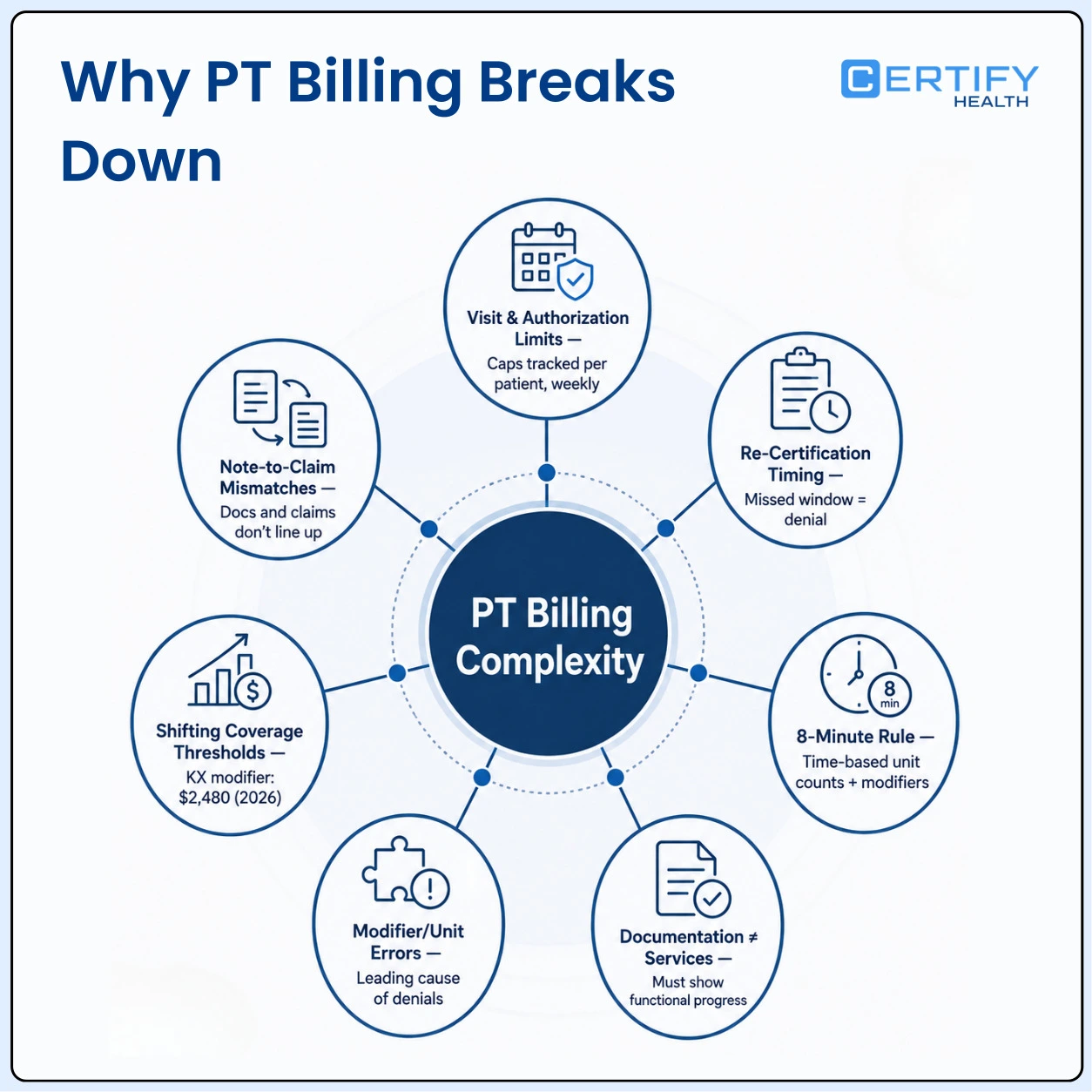
Here’s what makes PT billing different:
Visit and authorization limits. Many payers cap the number of visits a patient can have per plan of care. Someone has to track this for every active patient, every week.
💡 Did you know?
In APTA’s 2025 administrative burden survey, nearly one in three physical therapists reported waiting one to two weeks for a prior authorization decision, up 9 percentage points since APTA’s first survey in 2018, and three out of four practices said they’d hired extra administrative staff just to keep up with payer demands.
Re-certification timing. Plans of care need new sign-off on a set schedule. Miss that window, and the claim can be denied, even when treatment is correct.
The 8-minute rule. Medicare’s time-based billing rule ties unit counts directly to minutes of one-on-one treatment. Get the math wrong and a claim either underbills or invites scrutiny. Related modifiers add more places for it to go wrong: the GP therapy-discipline modifier, the CQ/CO assistant-provided-services modifiers (which carry a 15% payment reduction), and the Multiple Procedure Payment Reduction (MPPR) applied to the practice-expense component. Few billing rules are as specific to PT, or as easy to get wrong, as this one.
Documentation tied to medical necessity. Notes need to show functional progress, not just services provided. This still matters even though Medicare’s older mandatory functional-reporting codes (G-codes) were retired for dates of service on or after January 1, 2019; payers still expect documentation that justifies continued care.
Modifier and units-of-service errors. A small coding mistake on any of the modifiers above is one of the leading causes of PT claim denials, which is why getting the 8-minute rule right matters as much as it does.
Coverage thresholds that shift by payer. Medicare’s old hard annual therapy cap was eliminated by the Bipartisan Budget Act of 2018. In its place is a KX-modifier threshold and a separate targeted medical review threshold, and commercial payers layer their own visit and authorization rules on top.
💡 Did you know?
For calendar year 2026, CMS sets the KX-modifier threshold at $2,480 for combined PT and speech-language pathology services (and a separate $2,480 threshold for OT). Claims that cross this amount without the KX modifier are denied automatically. A separate, stricter targeted medical review threshold of $3,000 has held steady since 2018 and stays there through 2028.
Documentation-to-claim mismatches. When notes and claims don’t match, denials follow, and this happens more in PT than in many other specialties.
None of this means your staff failed. These challenges come with running a PT practice. They also make a well-managed billing process essential, and the right software can play an important role. A generic RCM process built for other types of care won’t be enough.
In-House PT Billing: Where It Holds Up and Where It Cracks
In-house billing covers the full cycle: insurance checks, charge capture, claim submission, claim tracking, denial work, payment posting, patient billing, and reporting. Many practices still do this without any real billing software, running it on spreadsheets, sticky notes, and staff memory.
Where it works well:
- The practice keeps full control over its own steps.
- Staff can see exactly what’s happening with each claim.
- Payer relationships stay inside the practice, built by people who know the details.
Where it starts to crack:
- A small billing team can only handle so much. Once that team hits its limit, deadlines get missed and old accounts sit untouched because nobody has time to chase them.
- Staff turnover makes this worse. When a skilled biller leaves, they take payer knowledge with them, often right when the practice needs it most.
- Manual work doesn’t scale in a straight line. Adding one new provider doesn’t just add “a little more work”; it can multiply the workload fast, and that catches many practices off guard. The right billing software helps this workload grow at a slower, steadier pace.
Outsourced PT RCM: What You Gain, What You Give Up
Outsourcing hands billing work to an outside partner. Many practices choose this path when they’re short on time, staff, or in-house billing expertise. Some outsourced partners run on their own software behind the scenes; others plug into the systems your practice already has. Credentialing and payer enrollment are often bundled into these contracts, a real, if easy-to-overlook, benefit, since that work is a hidden burden for most in-house teams.
What you gain:
- A team that specializes in RCM, not just general billing.
- Less paperwork load on your own staff.
- Room to grow patient volume without hiring more billers.
What you give up:
- Day-to-day visibility: you often hear about a denial only after it happens.
- Response times that may not match how fast you want a fix.
- A gap in accountability when a claim falls through the cracks.
- A cost that grows as your claim volume grows.
Building an in-house team and outsourcing to an RCM partner solve different problems: one buys control, the other buys capacity.
💡 Did you know?
As of August 2026, StrataPT’s benchmark data for its outpatient therapy customer base puts the average claim denial rate at roughly 8% and the average first-pass clean-claim rate at about 96%. Practices tracking noticeably worse than that likely have a process gap, not just a staffing gap
The Blend Most Practices Actually Land On
Framing this as a three-way choice is useful for comparison, but it’s not how most outpatient PT practices actually operate. The most common real-world setup is a blend: eligibility checks and charge capture handled in-house at the front end, A/R follow-up and aging-account cleanup outsourced at the back end, with both sides running on shared billing software so nothing gets lost in the handoff.
If you’re reading the sections above and seeing pieces of your practice in more than one column, that’s normal. It’s usually a sign you should be evaluating a blended setup, not forcing a single-model decision.
The Missing Middle: Automation as Capacity, Not Just Convenience
Many people treat automation as just a step between in-house and outsourced billing. That view sells it short. Automation goes after the real problem: PT billing has more moving parts than most specialties, and teams working by hand can’t keep up with all of them. This is where healthcare RCM automation earns its place: more practices now treat it as a core tool, not a nice extra.
Here’s what it changes:
- Real-time eligibility checks catch coverage and authorization problems early, before a claim ever goes out.
- Automated claim tracking and denial workflows shrink the backlog a stretched team can’t clear by hand.
- The practice keeps its payer relationships and daily control in-house, while offloading the repeat tasks that cause burnout and mistakes.
The right physical therapy software doesn’t replace your billing team. It gives that team back the hours they were losing to manual work. For a broader look at where automation fits into a practice’s technology stack, see our guide to physical therapy practice modernization.
💡 Did you know?
Deloitte’s “Healthcare revenue cycle reinvention” research, as reported by HFMA, found that automated claim-scrubbing and predictive validation can prevent up to 85% of avoidable denials while cutting administrative cost per claim by nearly a quarter. That’s the practical case for automation: not just faster claims, but fewer denials to rework in the first place. It’s also worth watching the other side of this trend: payers are increasingly running their own AI-driven denial engines, which makes predictive, upfront claim validation more of an arms-race necessity than a nice-to-have.
Automation isn’t free of tradeoffs, either. Implementation takes real time, and migrating from spreadsheets or a legacy system carries some risk. Most practices see a temporary dip in collections, commonly 30 to 60 days, during cutover. Automation applied to a genuinely broken process just automates the breakage faster, so it works best layered onto a process that’s already reasonably sound. Staff need training and time to adjust to new workflows. And automated eligibility checks are only as reliable as the payer connections behind them: a software claim of “real-time eligibility” is only as good as which payers it actually reaches.
What Billing Actually Costs, By Model
None of these numbers are exact for every vendor or every market, but the pricing structure is what makes the model comparison real, and it’s worth naming explicitly:
- In-house costs track a fully-loaded biller salary and benefits, plus the turnover and training risk that comes with staff.
- Outsourced RCM partners typically charge a percentage of collections. Cost scales directly with revenue, which is a feature for a shrinking practice and a cost driver for a growing one.
- Billing software is usually priced per provider or per location, plus any implementation or integration fees.
Whichever model you land on, it’s also worth budgeting for the patient side of the ledger. PT’s high visit frequency makes patient financial responsibility add up fast: a $40 copay across 18 visits is a $720 receivable collected in pieces, not one payment. Ask how any model you’re considering handles patient collections, not just payer claims.
In-House vs. Outsourced vs. Automated: Key Differences
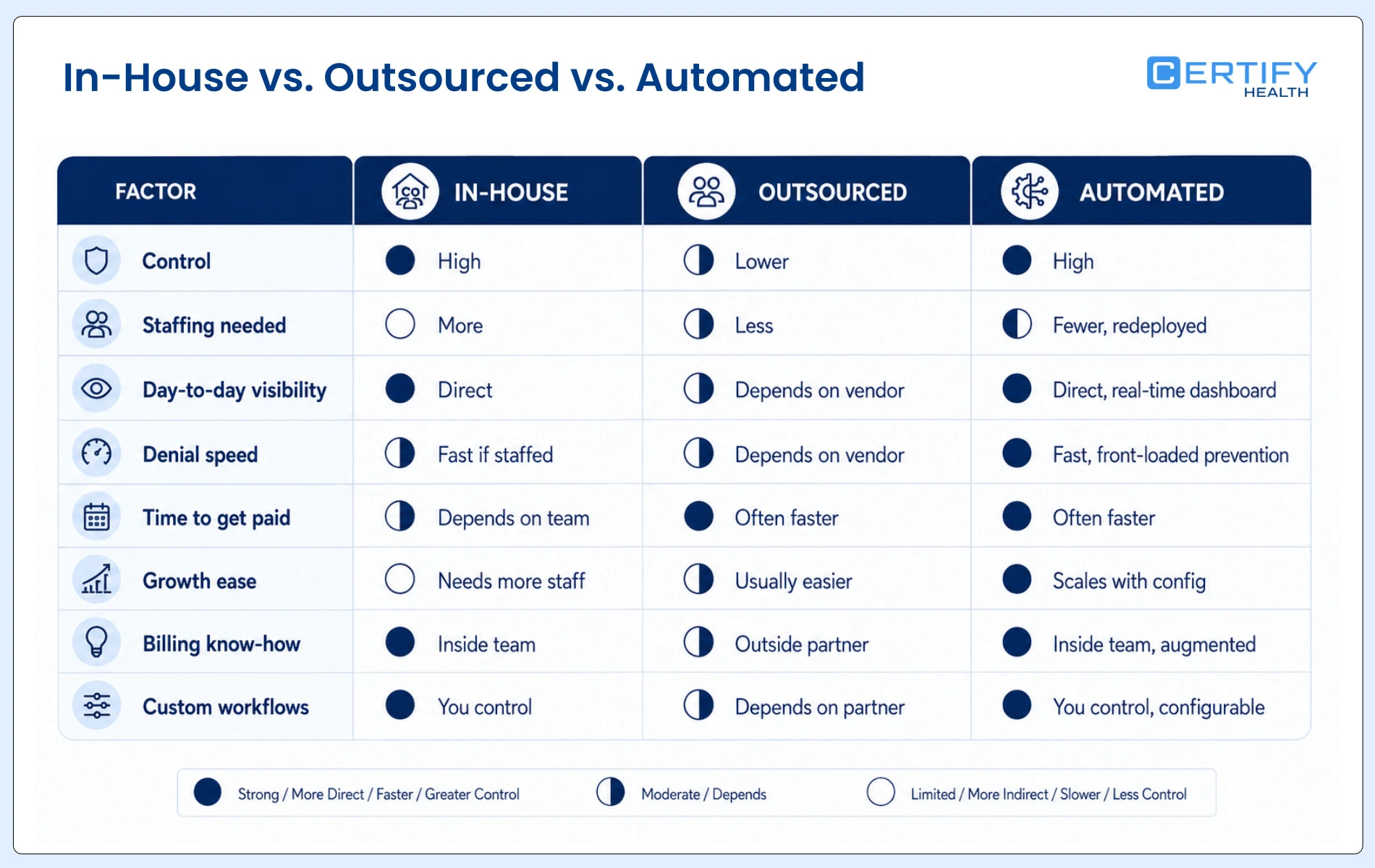
The right fit depends on your practice size, how your staff is holding up, how complex your claims are, and how your denial and A/R numbers already look. A strong billing strategy starts with an honest look at those numbers, whether you end up hiring, outsourcing, automating, or blending all three.
What to Look for in PT Billing Software
Not every feature matters equally. Here’s what to check first:
- Denial prevention and eligibility checks. Look for real-time eligibility checks, a clear view of authorization status, and built-in checks that catch errors before you send a claim. These checks are what separate strong physical therapy billing software from a plain claims tool.
- Denial and A/R management. A good system gives your team a denial work queue and clear A/R aging, so nothing sits untouched by accident.
- Claims and billing automation. This means automated claim steps, live claim status, and error checks that flag problems before you submit, not after a denial letter shows up.
- Reports and visibility. Look for reports on collections, denial trends, A/R aging, and payer-by-payer performance, all in one place.
- The software should connect with your EHR and your practice management system, keeping clinical notes and billing data in sync. This also closes the note-and-claim mismatch problem discussed above.
- Contract terms and data ownership. Before you sign anything, get clear answers on who owns your billing data and how easily you can export it, the termination terms and any lock-in period, SLA and support response times, whether a signed BAA is in place, and, for outsourced RCM specifically, whether staff handling your claims are onshore or offshore.
- Room to grow. As you add providers, locations, or patients, your platform should scale with you rather than needing a full rebuild each time. A basic, single-site setup often falls short once a practice expands past one location.
When Should a PT Practice Consider Each Model?
In-house may make sense when:
- You already have an experienced billing team.
- Denial rates are stable, and billing isn’t the main problem.
- Leadership wants to keep direct control over daily work.
Outsourcing may make sense when:
- Your practice lacks RCM expertise, not just extra hands.
- Staffing shortages are ongoing, with no fix in sight.
- Leadership wants billing off the practice’s plate for good.
Automation may make sense when:
- Denial rates are climbing due to eligibility or documentation issues, not staffing gaps.
- Your team is skilled but buried in repeat tasks.
- Leadership wants more visibility without giving up full control.
- The practice is growing, and current processes won’t scale.
How to Decide: A PT Billing Model Self-Assessment
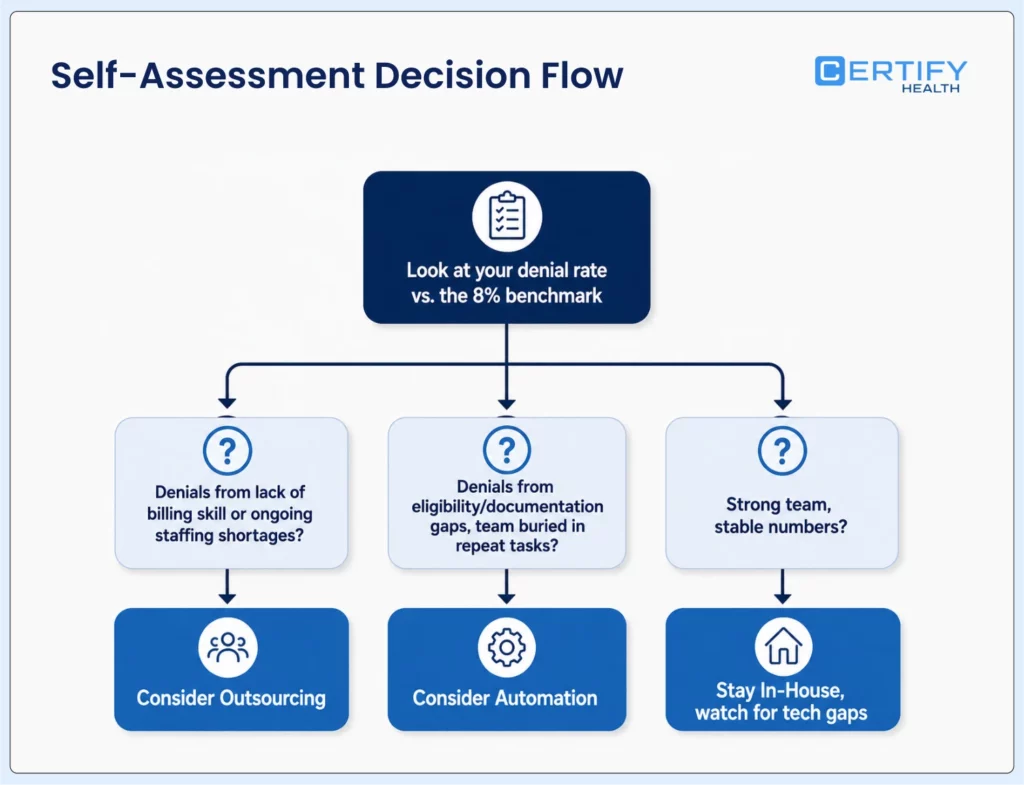
Before you pick a direction, look at your own numbers instead of going by how billing feels day to day. If you don’t already have a system that can surface these numbers cleanly, that gap is itself worth noting.
Pull together these facts:
- Your current denial rate, and how it compares to the roughly 8% benchmark cited above
- How many of those denials are tied to eligibility or authorization issues
- Your average days in A/R
- Whether your staff can keep up with billing volume
- Any tech gaps in your current process
- How much control your team wants to keep
- Your growth plans for the next 12 to 24 months
Here’s a simple way to read your results:
- Denials from a lack of billing skill, or ongoing staffing shortages? Look at outsourcing.
- Denials from eligibility or documentation gaps, with a skilled team buried in repeat manual tasks? Automation is likely the better fit.
- Strong team and stable numbers? Stay in-house and just watch for tech gaps.
This kind of check matters more than picking a model by size alone. A small clinic with clean documentation may do fine in-house. A larger group running on an outdated system may fit automation well, even with a strong staff.
FAQ
Does physical therapy billing software replace my billing staff?
Is outsourcing PT billing cheaper than hiring in-house?
It depends on your claim volume. Outsourced RCM typically charges a percentage of collections, which can be cheaper than a fully-loaded salary for a low-volume practice and more expensive than in-house staff as volume grows. Run the math against your own numbers rather than assuming either direction.
What's a good denial rate for PT?
How much does physical therapy billing software cost?
Most billing software is priced per provider or per location, with implementation and integration costs on top. Exact pricing varies by vendor, so ask for a structure, not just a headline number, when you’re comparing options.
CERTIFY Health: Physical Therapy Billing Software
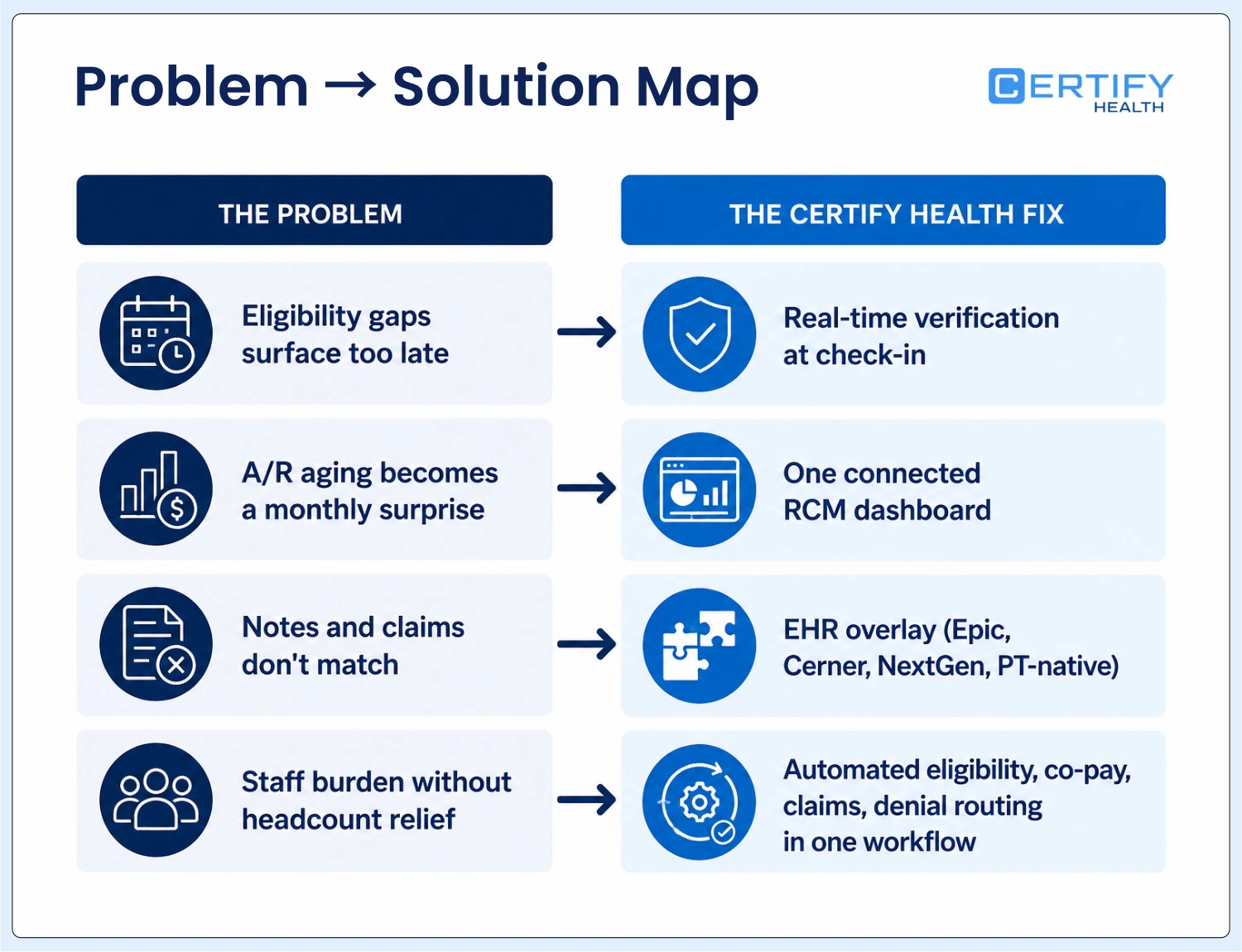
Every failure point in this piece traces back to a few recurring problems: eligibility gaps that surface too late, authorization tracking that falls on one overworked person, and documentation that doesn’t line up with what gets billed. CERTIFY Health is built to close exactly those gaps for outpatient physical therapy practices.
Here’s how it maps to the problems named above:
- Eligibility gaps → real-time verification at check-in. Coverage and co-pay status are checked at the point of intake, so a lapsed authorization or exhausted visit cap gets caught before treatment, not three weeks later in a denial letter.
- A/R aging → one connected view, not a monthly surprise. Denial trends, days in A/R, and payer-by-payer performance sit in a single RCM dashboard, so a slipping number gets caught in week one instead of at quarter close.
- Note-to-claim mismatches → an overlay, not a rip-and-replace. CERTIFY Health layers directly onto the EHR your practice already runs, including enterprise systems like Epic, Cerner, and NextGen as well as PT-native platforms, so clinical documentation and billing data stay in sync without forcing a system swap.
- Staff burden → automation that doesn’t add headcount. Eligibility checks, co-pay capture, claims submission, and denial routing run inside one workflow, freeing billing staff to focus on the accounts that actually need a human.
- Certified to HITRUST r2, SOC 2 Type II, and PCI DSS, and built for HIPAA compliance from the ground up, so practices don’t have to trade automation for security posture.
For a practice weighing in-house, outsourced, and automated billing, this is what the Automated column in the comparison table above looks like in practice: the team keeps its payer relationships and daily control and gets back the visibility and speed that used to cost a new hire.
Final Takeaway
In-house billing gives practices control, but it can break under denial problems and staff limits. Outsourcing brings in expertise and lightens the load, at the cost of day-to-day visibility. Automation lets practices keep control while getting back the hours that manual billing can’t keep up with on its own, and most practices end up blending pieces of all three.
The right model isn’t really about how big your practice is. It comes down to why your denials and A/R issues exist in the first place. Once you know why, the right billing model gets clear, and the right physical therapy billing software usually follows close behind.
Ready to see what closing your specific denial gaps could look like? Talk to our team or explore CERTIFY Health’s billing and RCM capabilities.