Table of Contents
Introduction
Patient balances are taking longer to collect. Most billing and RCM teams already know this. The problem is not awareness. It is workflow.
In ambulatory settings, the gap between service delivery and payment commonly runs 30 to 60 days. That window is driven by delayed statements, repeated follow-up calls, disconnected payment options, and manual reconciliation between the transaction and the billing ledger. Each of those steps consumes staff time. Each adds days to the collection cycle. And as time passes, the likelihood of collection falls.
The question most practices face is not whether to modernize patient payments. It is how to build a collection workflow that closes balances faster without shifting more administrative work onto billing and RCM staff.
Text-to-Pay and Autopay are part of that answer, but only part. Understanding where each payment pathway fits, how upstream workflows determine whether a digital payment request will actually be acted on, and what separates a genuinely automated collection cycle from a digitized paper statement is what this article is built to answer.
The Patient Collections Problem Billing Teams Already Recognize
Delayed statements are where the problem starts, not where it ends. When a paper statement takes 7 to 10 days to arrive after the claim clears, and payment takes another 2 to 4 weeks, the collection cycle is already past 30 days before any follow-up has been attempted.
From that point, the manual work compounds. Staff begin follow-up calls at 30 days. Statements are reissued. If the patient does not respond by 45 or 60 days, the cost of outreach is often approaching or exceeding the return value of the balance. Meanwhile, that AR event has consumed multiple staff touches across billing, patient access, and front desk.
The problem is rarely as simple as patients refusing to pay. More often, payment is delayed by friction: the bill arrives late, the amount is unexpected, the payment path takes too many steps, or the balance is larger than the patient can handle at once. A 2025 JPMorgan report found that 62% of consumers prefer digital payment options for medical bills. That doesn’t mean affordability disappears as a concern. It does show why practices should examine payment friction alongside willingness and ability to pay.
That distinction matters: a collections workflow should not assume every unpaid balance is a willingness problem. It should remove avoidable friction first, then give billing teams a clear path for the balances that still need human attention.
Paper statements require patients to locate a payment address or URL, initiate action on a separate device or system, and complete a process disconnected from the visit experience. Each friction point reduces the likelihood of payment. Each delay in the payment cycle adds another billing touch point.
The cost goes beyond AR days. Staff time that should go to scheduling, intake, and clinical coordination shifts into follow-up calls, reissued statements, and manual balance tracking. That is not a billing inefficiency in isolation. It is an operational constraint on the whole practice.
What Text-to-Pay Solves, and What It Does Not
Text-to-Pay addresses the friction at the payment request step. When a balance posts after the claim clears, the billing system sends an SMS with a secure payment link. The patient taps the link, reviews the balance, and pays from their phone. No portal login. No app download. No paper to locate and act on.
Channel matters, but speed matters just as much. A text message reaches the same device many patients already use to manage everyday financial tasks, and it lets them act without logging into a portal, finding a mailed statement, or moving to another device. The advantage isn’t that SMS is magically better. It shortens the distance between seeing a balance and doing something about it.
When the first message goes unanswered, the workflow sends follow-up reminders on a set schedule without staff action. Delivery and open status are visible in the billing dashboard. Staff act only when the automated sequence does not produce payment, rather than manually initiating each follow-up.
Text-to-Pay removes friction from the patient-facing payment step. What it does not do by itself is address the back-office work that surrounds that step: how contact information was verified before the message was sent, how the payment posts back to the ledger when the transaction completes, whether the patient who paid by text still receives a paper statement, and what happens when the patient cannot pay the full balance at once.
A practice can replace a paper statement with an SMS and still leave billing staff doing the same manual work behind it.
Digitizing a Payment Is Not the Same as Automating Collections
This is the distinction that separates a genuinely different collection workflow from a cosmetic change to the patient-facing step. A digital payment request changes the channel. An automated collection workflow changes the work. That is the difference practices should evaluate.
When a practice adds Text-to-Pay without changing what happens before and after the payment request, the result is a digital channel layered on top of an existing manual process. Contact information still needs to be verified at the point of billing. Payments still need to be manually posted to the ledger. Paper statements may still go out to the same patients who received the SMS. The billing team has a new outreach tool, but the administrative structure has not changed.
A digital collection workflow removes administrative steps across the full cycle, not just at the point of patient contact. That means the payment request originates from the billing workflow automatically when the balance posts, not when a staff member triggers it. It means payments post back to the patient record and billing ledger on their own when the transaction completes. It means patients who have opted into digital billing are removed from the paper statement queue entirely. And it means the communication, payment, and reconciliation steps all operate within a connected system rather than across separate platforms that staff have to coordinate.
The question for any billing or RCM leader evaluating a patient payment solution is not whether the system can send a payment text. It is whether it removes administrative steps across the collection cycle, or only moves the patient-facing step to a new channel while the back-office work stays the same.
Matching the Payment Pathway to the Balance Type
Text-to-Pay, Autopay, card-on-file, and payment plans serve different patient and balance scenarios. A collection workflow that offers only one pathway will underserve part of the patient population and create gaps that billing staff have to fill manually.
Text-to-Pay
Text-to-Pay is the right fit for standard one-time post-visit balances. When the claim clears and a balance posts, an SMS goes to the patient with a link to pay the amount. This works well for patients with predictable, single-event balances who have not enrolled in Autopay and have not stored a card on file. It also covers patients who are new to the practice and completing their first billing interaction.
Autopay
Autopay is the right fit for patients with recurring balances across multiple visits, particularly high-deductible health plan patients. An HDHP patient who visits the same practice several times in a year generates a billing event after each visit. Managing each of those as a separate statement and follow-up cycle multiplies the administrative work for both the practice and the patient. Autopay enrollment, ideally captured during intake or check-in, means the card on file is charged when each balance posts. The patient receives a confirmation. The billing team sees the transaction. Neither side has to restart the process for each billing event. Industry data shows 82% of consumers already manage active subscriptions with auto-billing, which means the model is familiar. What changes is whether the practice is part of it.
Card-on-file
Card-on-file captures a payment method without committing to automatic charges. It supports faster manual payment processing, reduces the number of calls needed to collect, and serves as the foundation for Autopay enrollment. Capturing card information at intake or during the visit, rather than at the billing stage, removes the need for a separate outreach step when a balance posts.
Payment plans
Payment plans are the right fit when a balance exceeds what a patient can pay in a single transaction. For practices with significant HDHP volume, or for any balance above a threshold the practice defines, installment plans keep the balance in-house and in a structured repayment sequence. A payment plan that can be established and managed within the billing workflow, without requiring staff to track each installment manually, extends the collection option without adding proportional administrative work.
A mature collections workflow should reduce how often billing staff have to decide the next step account by account. Enrollment status, balance size, payment preferences, and the patient’s prior setup can help guide the appropriate path: Text-to-Pay, Autopay, card-on-file, a payment plan, or staff follow-up. The objective is not to remove judgment. It is to reserve staff judgment for the accounts that actually need it.
The goal is not to automate every collection decision. It is to automate the repeatable steps so staff can focus on the balances that actually need their attention.
Text-to-Pay vs. Autopay: They Solve Different Collection Problems
Text-to-Pay and Autopay are often grouped together because both make payment easier. Operationally, they solve different problems.
Text-to-Pay reduces friction at the moment payment is requested. The patient still chooses when to act.
Autopay removes the need for a new payment decision each time a balance posts. Once the patient has enrolled and the agreed payment conditions are met, the workflow can continue without restarting the collection cycle.
Card-on-file sits between the two. It removes the need to recollect payment credentials but still allows the patient or practice to initiate the transaction when appropriate.
Payment plans solve a different issue altogether: not payment convenience, but payment affordability.
The practical question is therefore not, Which feature is better? It is:
What kind of balance are you trying to collect, and how much patient or staff action should that balance require?
| Situation | Best-fit pathway |
|---|---|
| One-time post-visit balance | Text-to-Pay |
| Recurring balances | Autopay |
| Stored payment method without automatic charging | Card-on-file |
| Larger balance | Payment plan |
| Known responsibility before the visit | Pre-service collection |
| Digital outreach does not resolve the balance | Staff escalation |
Why Collections Begin Before the Bill
Much of what decides whether a balance gets collected is settled before the bill ever goes out, by what the practice already knows about the patient.
A collections team can only work with the information the practice captured earlier.
- If the mobile number is wrong, the payment text fails.
- If coverage was never checked, the balance may surprise the patient.
- If payment preferences were never collected, the billing team has to restart that conversation after the visit.
This is why patient collections begin before a balance reaches AR. The quality of the billing workflow is partly determined by what happened during scheduling, eligibility, intake, and check-in.
This is why a complete collection workflow begins upstream of the billing step.
Eligibility and patient responsibility
Eligibility verification before the visit can surface current coverage, copays, deductibles, coinsurance, and other benefit information that helps staff communicate likely patient responsibility earlier. The goal is not to promise an exact final bill before the claim adjudicates. It is to reduce avoidable financial surprises and give the patient more context before the balance arrives. When the patient knows what they are likely to owe before the appointment, the balance that posts after the claim clears is expected, not a surprise. An expected balance is more likely to be paid promptly. It is also more likely to be paid in full, because the patient had an opportunity to make a financial decision before the visit rather than reacting to a statement after it.
Digital intake and verified contact information
Patient intake captures the information that the billing workflow depends on: the patient’s verified mobile number, preferred contact method, and consent to digital outreach. When intake is digital and completed before the visit, that data is already in the billing system when the payment request needs to go out. There is no gap in contact information. There is no manual verification step at the billing stage.
Payment readiness at intake
When Autopay enrollment and card-on-file capture are part of the intake workflow, practices can collect payment preferences before the visit concludes. A patient who is already completing forms, verifying insurance, and reviewing consent documents at intake is in a workflow state that supports adding a payment preference. Collecting that information at intake removes the need to initiate separate outreach for payment enrollment after the balance posts.
The workflow that produces faster collections at the billing stage is built during scheduling, eligibility, and intake, not assembled after the claim clears.
What the Complete Digital Collection Workflow Looks Like
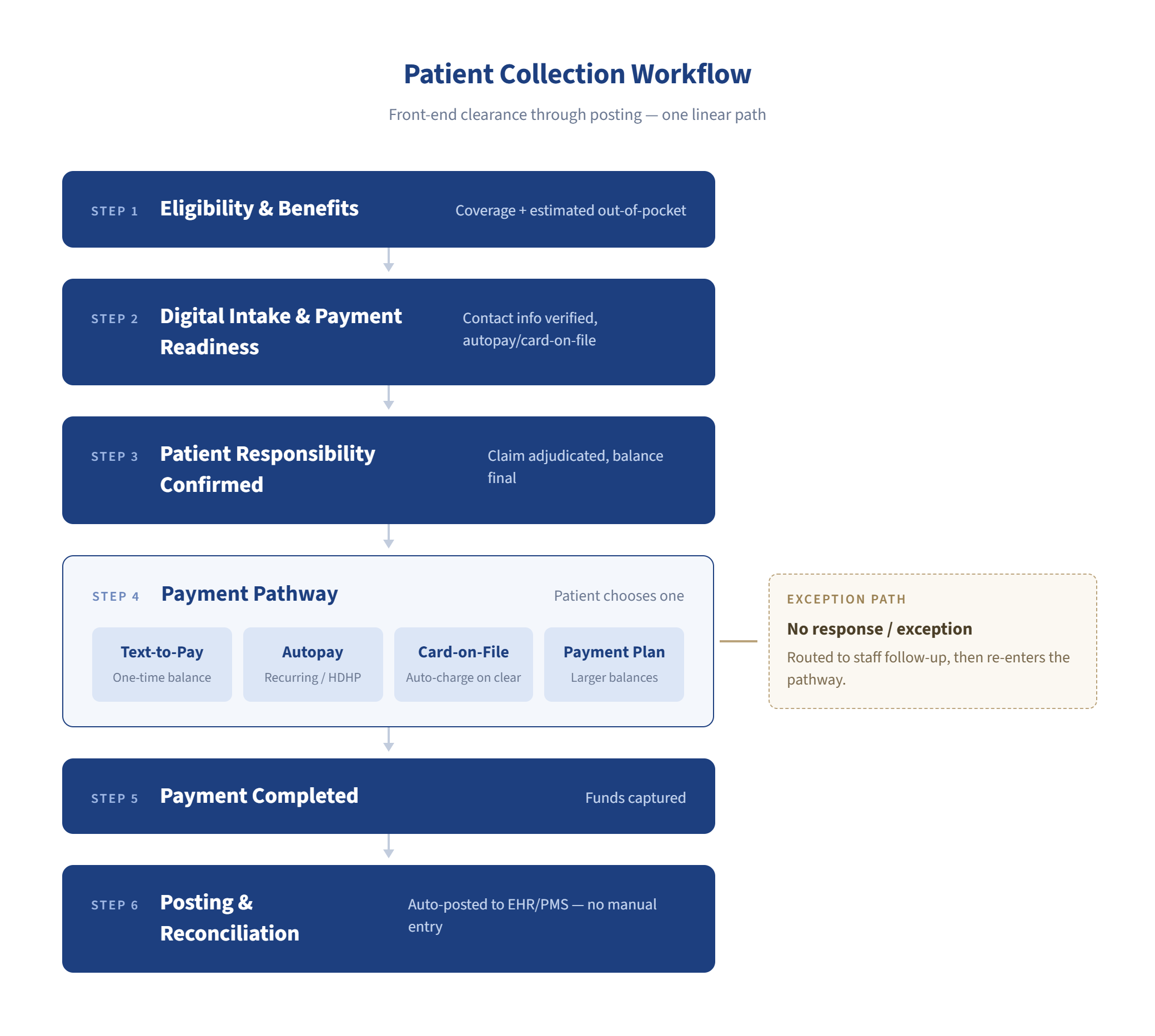
- What does the patient owe?
- How should that patient be asked to pay?
- What happens if they do not act?
- Where does the completed payment post?
- When does a staff member actually need to step in?
- Everything else in the workflow should support those decisions.
Balance identification and pathway selection
Once patient responsibility is confirmed, the collection workflow should already have much of the information needed to move payment forward. An enrolled patient may continue through Autopay, another may receive a Text-to-Pay request, while larger balances may be better suited to a payment plan.
The important part is not forcing every balance through the same collection path. It is giving the practice multiple ways to collect within one connected workflow, without making staff rebuild the payment process from scratch each time.
Communication and outreach
For unenrolled patients, a connected workflow can trigger an SMS payment request once patient responsibility is confirmed, rather than waiting for staff to initiate outreach manually. If the patient does not respond, follow-up communication can continue according to the practice’s configured cadence. The workflow should also give billing staff visibility into outreach activity before an account requires manual follow-up.
Payment completion
The point of collection will look different depending on the payment pathway. With Text-to-Pay, the patient reviews the request and chooses to pay. With Autopay, payment follows the terms the patient agreed to when enrolling. With a payment plan, the balance is collected according to the agreed instalment schedule. A well-designed workflow reduces the need for staff to manually initiate each individual payment event.
Posting and reconciliation
Once payment is completed, an integrated workflow should write the transaction back to the appropriate patient and billing record, reducing manual posting and reconciliation work. The goal is to keep the payment transaction and system of record aligned without creating another administrative step for the billing team.
Automation should know when to stop automating.
If the digital sequence does not produce payment, the account should surface with context attached: what was sent, when it was delivered, whether the patient opened it, what payment options were offered, and how much time has passed.
That way, when a billing specialist steps in, they are not starting from zero. Human follow-up becomes the exception path, not the default collection method.
Five Questions for Evaluating a Patient Payment Solution
Most payment platforms can process a transaction. That is not the same as improving collections.
The better evaluation question is how much work remains before and after the patient clicks Pay.
Does the payment request originate from the billing workflow?
Can Autopay be enrolled during intake?
Are payment plans supported within the same system?
Do payments write back to the existing EHR or practice management system?
Can digital patients be removed from the paper statement queue entirely?
What Happens When Automation Fails?
Every collection workflow eventually reaches accounts that do not respond, cannot pay in full, dispute the balance, or need additional support.
Ask the vendor to show exactly what happens next. Does the account surface for staff review with a complete outreach history? Can a payment plan be offered from the same workflow? Or does the team have to move into another system and reconstruct the history manually?
A good automation platform should make escalation easier, not hide the exceptions.
What Practices Should Actually Measure
The outcome of a better collection workflow is not only faster payments. It is a change in how the practice operates across the full billing cycle.
Days-to-payment
This is the primary metric for collection speed. It measures how long it takes from balance confirmation to transaction completion, and it reflects the combined effect of every step in the workflow, from the timeliness of the payment request to the ease of the payment path.
Patient collection rate
This measures the percentage of patient responsibility that is ultimately collected, accounting for balances that go to collections, are written off, or age beyond the point of recovery. A digital collection workflow that reduces early non-payment will show improvement here over time.
Digital payment adoption
This measures the percentage of patients receiving and acting on digital payment requests, distinct from patients still on paper statement cycles. As adoption grows, paper statement volume and the staff time associated with manual statement processing should decline proportionally.
Paper statement volume
This is a direct output measure. Practices that have implemented a functioning digital collection workflow should see this number decrease as Autopay enrollment, card-on-file capture, and digital billing consent grow.
Staff follow-up workload
This measures the number of manual touches, calls, and reissued statements generated per billing cycle. A workflow that automates the early outreach sequence should produce a measurable reduction here, freeing staff capacity for escalations, payment plan support, and non-billing work.
Autopay and payment plan adoption rates
These measure how effectively the practice is enrolling patients into self-managing payment pathways. Higher enrollment in these pathways reduces the number of individual billing events that require outreach.
Reconciliation exceptions
This measures how often payment transactions require manual intervention to post correctly to the billing ledger. In a well-integrated system, this number should be low. High exception volumes point to integration gaps between the payment tool and the system of record.
Cost to Collect
Faster payment matters, but so does the effort required to get there. Track the staff time, outreach touches, statement costs, and exception handling required to collect patient balances.
A workflow that collects the same amount with fewer staff interventions is doing more than accelerating AR. It is lowering the operational cost of collection.
What This Looks Like When the Workflow Is Actually Connected
This is where CERTIFY Health fits.
The value is not that CERTIFY Health can send a payment link. Plenty of systems can do that.
The difference is that payment sits alongside the workflows that determine whether collection succeeds in the first place: eligibility, intake, verified patient information, communication, payment options, transaction reporting, and reconciliation.
That means the billing team is not beginning the collection process from scratch after every claim. Much of the information and patient setup needed for payment has already been captured upstream.
Text-to-Pay, Autopay, card-on-file, and payment plans give practices different ways to manage patient responsibility within the broader payment workflow. Rather than treating each payment method as a separate point solution, CERTIFY Health connects payment with the patient information, communication, reporting, and reconciliation workflows surrounding it.
The outreach and communication steps are connected as well. Payment reminders, confirmations, and escalation records are visible in the same dashboard as other patient communications, so billing teams do not need to move between platforms to see the full picture of where a patient account stands.
The scale matters here. CERTIFY Health supported more than US$100 million in patient payments in a single year. That volume was not generated by one payment feature in isolation. It came through a broader payment environment that includes digital statements, Text-to-Pay, Autopay, payment plans, card-on-file, reporting, and reconciliation workflows.
That is the distinction: a payment feature helps complete a transaction. A connected collection workflow helps the practice manage thousands of them consistently.
See how CERTIFY Health connects eligibility, intake, patient payment options, and payment posting into one collection workflow.
Frequently Asked Questions
What is text-to-pay for medical bills?
How is Text-to-Pay different from Autopay for patient collections?
Can Text-to-Pay replace paper statements?
Text-to-Pay can replace paper statements for patients who have opted into digital billing. In a fully configured workflow, patients who consent to digital outreach are removed from the paper statement queue entirely. However, this requires the billing system to support complete paper bypass for opted-in patients, not simply run the SMS alongside an unchanged mailing process. Practices should confirm that their system can do both: send the digital request and suppress the paper statement for the same patient.
What happens when a patient ignores the payment text?
The system sends follow-up reminders on a configured schedule without staff action. Delivery and open status are visible in the billing dashboard, giving staff a clear record of what outreach has occurred before any manual contact is initiated. If the automated sequence does not produce payment, staff have the context needed to place a call or offer a payment plan without re-collecting information the system already holds.
How do payments post back to the EHR or practice management system?
In a properly integrated workflow, transactions post to the patient record and billing ledger on their own when the payment completes. No manual entry is required. The integration path depends on the patient payment platform and the specific EHR or practice management system in use. Practices should verify the exact posting mechanism and timing before implementation, rather than accepting a general claim of system compatibility.
How do practices automate patient collections end to end?
Is Text-to-Pay compliant with HIPAA and PCI standards?
Text-to-Pay can be used within HIPAA- and PCI-aligned healthcare payment workflows, but the two standards apply to different parts of the process.
HIPAA governs how protected health information is handled, while PCI DSS applies to payment card data. The SMS itself should avoid exposing PHI, and card information must be captured, transmitted, and stored through PCI-compliant payment infrastructure.
Practices should verify the vendor’s security controls, payment architecture, applicable agreements, and implementation requirements before processing patient data.