Table of Contents
Staffing pressure in dentistry is not just talk. It is a documented fact. Dental practices face ongoing staff shortages. Dentists now spend a growing share of their week on non-clinical tasks. Roughly a third say they feel overworked. That pressure is driving real demand for AI for dental practices. According to a mid-2026 ADA Health Policy Institute survey, 43.3% of dentists already use AI for at least one task. Another 26.4% plan to. Adoption is concentrated in a few areas. About one-fifth of dentists (22.8%) use AI for imaging and diagnostics. 13.2% use it to explain findings to patients. And 13.6% use it for insurance verification.
But adoption without oversight is its own risk. Dentists stay cautious about clinical use. Less than 5% use AI for treatment advice at all. That is far below the double-digit use seen in tasks like imaging review and insurance checks. Regulators are watching the gap between AI marketing and what vendors can prove. In a February 2026 letter to federal regulators, the ADA pushed for stronger vendor accountability. It says dentists should be able to trust vendors to build safe, compliant systems by default.
That is the real setting behind why a DSO needs an actual operating model for its front desk, not just an opinion about AI. There is real pressure to move fast. There is real caution about where AI belongs. And the rules are still being written. AI works best where language or interpretation is needed. Fixed rules should own high-confidence tasks. Staff should own clinical judgment, sensitive cases, and unclear calls. Every automated step needs a clear owner, a writeback rule, an escalation path, and a way to track failure. The model is the point. AI is one tool inside it, not the model itself.
Inside the Automation Model: Three Kinds of Work
Three types of work happen at a dental front desk. Each needs a different tool, and none of the three competes with the others. Together, they are the design of the automation model itself. The same split holds across medical office automation and healthcare automation at large. Dental office automation is just the sharpest case of it, because call and paperwork volume pile onto one small team.
AI interprets. It figures out what a patient is asking. It reads an inbound message. It sums up intake answers. And it handles a request that doesn’t fit a fixed script.
Deterministic automation executes. It sends a reminder at a fixed time. It checks a benefit against a known payer rule. It posts a payment to the ledger. Or it updates a scheduling slot. The right outcome is known ahead of time.
Human staff decide. That means clinical judgment, sensitive cases, complaints, and anything the system can’t solve with confidence.
Task-Classification Matrix
Use the Dental Front Desk Automation Decision Matrix and Pilot Readiness Scorecard below to classify your own front-desk tasks, assign ownership, and see whether your practice is ready to pilot, before taking any vendor’s word for it.
Use it to classify each front-desk task by type, confirm who owns it, and check whether your pilot clears the readiness bar before you launch it.
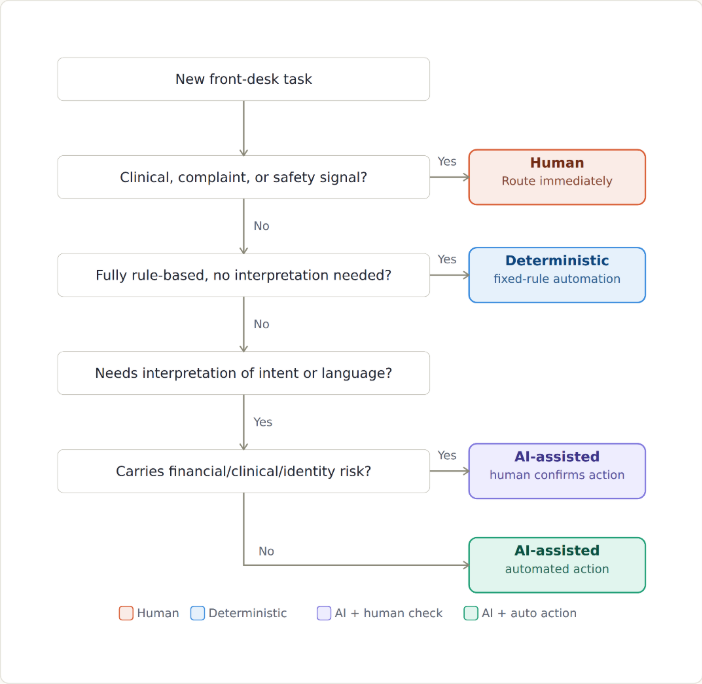
Classifying Any Task: The Decision Path
- Does the task involve clinical judgment, a complaint, or a safety signal? If yes, send it to a human right away, no matter how sure the system is.
- Is the right outcome fully known ahead of time, with no judgment needed? If yes, use deterministic automation, with a clear owner and error rate.
- Does solving it need reading open-ended language or intent? If yes, keep going. If a task fits neither rule nor language, break it into smaller parts first.
- Once read, does the action carry money, clinical, or identity risk? If yes, this is human in the loop automation. AI drafts or reads it, and a human confirms before it runs. If no, AI can hand off straight to a deterministic action.
- Either way, does the action write to the PMS? If yes, name an owner for writeback conflicts before it goes live.
Calls and Scheduling
Call volume and scheduling load are where most automation talk starts, because the cost shows up every day. The safe automation zone is narrow but real. Think self-service booking, rescheduling, and cancellation-slot recovery, all run by fixed rules. Most dental patient communication software already handles this layer well. When a call or message needs judgment, like a symptom mentioned mid-booking, the system should hand off to a person instead of guessing. Design against this failure: a booking made on a misread request.
Intake and Document Collection
Digitizing intake, forms, consents, and document capture is now often sold as automated patient intake. It’s one of the safest automation types, because the fields are structured and the rules are well known. The exception path matters more than the easy path. Think an unreadable document, a blank required field, or an ID that doesn’t match the patient record. Those cases should go to a staff queue. They should not fail silently or slip through unchecked.
Insurance and Benefit Questions and Verification
Eligibility and benefit checks split cleanly along the AI-versus-rules line. Checking coverage against a payer is a simple lookup. It can be automated and checked later, which is the promise behind most dental insurance verification software today. Explaining what that coverage means to one patient takes more judgment, especially with plan exceptions or partial coverage. AI can draft a plain-language summary of a benefit reply. A staff member should confirm anything with money at stake before it reaches the patient. This is also one of the top areas for planned future AI use: per the ADA’s mid-2026 survey, 32.6% of dentists who don’t yet use AI plan to for insurance verification, second only to charting and notetaking (34.8%), so it deserves deliberate care, not the least.
Patient Cost and Payment Interactions
Time-of-service payments, posted balances, and standard payment plans are deterministic. The amounts and rules are fixed. Hardship requests, disputed charges, and off-menu deals are not. These need a person with the power to make an exception. That power should not live inside an automated workflow by default.
Clinical, Sensitive, and Complaint Escalation
This is the category where a wrong automated step costs the most. So the escalation bar should be the most cautious. Any message with a clinical concern, a complaint, or signs of distress should reach a human right away. A confidence score is no substitute for a cautious bar here.
Identity, Security, and Data-Use Boundaries
Every automated workflow that touches PHI needs a clear line. What can it read? What can it write? Who can audit the action? How is identity checked before an exception is granted? CIO and security teams belong in this talk before a pilot starts, not after. Regulators are watching this space too. The ADA has flagged vendor accountability for safe, compliant-by-default systems as an open policy question. That means the line a DSO sets inside may soon need to match an outside standard too.
PMS Writeback and Exception Ownership
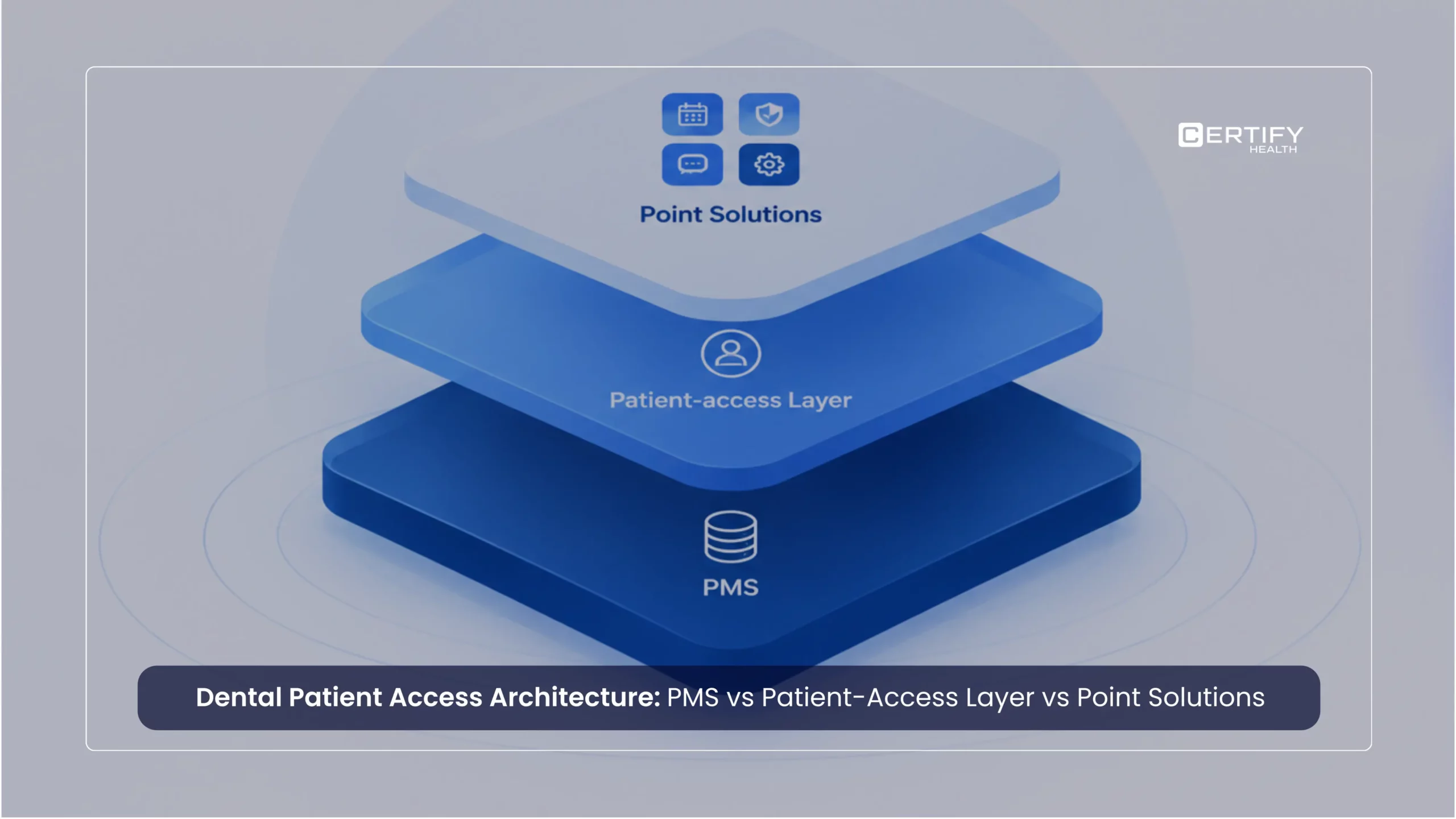
The PMS is the system of record. Every automated step that touches it needs an owner. Someone must be on the hook when a writeback fails, clashes with a manual edit, or makes a duplicate. This is also where a unified patient access platform proves its worth. Scheduling, intake, eligibility, and payment steps all need to match the same record, with no conflicting versions of the truth. A DSO looking at any automation vendor should ask exactly how writeback conflicts get caught and fixed, not just whether pms integration exists on paper. This is the layer that actually decides whether the model holds together, not whichever single step happens to carry an AI label.
Pilot Design and Stop Conditions
A pilot should have clear stop points before it starts. Think an error rate limit, an escalation volume limit, or a specific failure type that triggers a pause. Without a stop point set in advance, a practice only learns something is wrong after a patient or staff member reports it.
Failure Modes: What Actually Goes Wrong
Stop points only work if the practice knows what to watch for. In front-desk automation, failures tend to fall into a few repeat patterns, not a long list of random edge cases.
Silent wrong action. A fixed rule fires correctly on bad or stale input, like a lapsed eligibility file or an old fee schedule. It then gives a confidently wrong result with no error thrown. The system did exactly what it was told. What it was told was wrong. This is why an error rate needs a set way to catch it, not just a set limit.
Confident misread. AI reads an unclear request, gets the intent wrong, and hands off to an automated step anyway, because the next step doesn’t know the read was shaky. This is the risk of linking AI reading straight to an automated step with no check in between.
Missed escalation. A task that should have gone to a human, like a mild complaint or a clinical concern mentioned in passing, stays in the automated path. Why? Because the escalation bar was set for ease, not care. This is why the bar for sensitive cases should default to cautious. It should not get relaxed after one false alarm.
Writeback collision. An automated step and a manual staff edit hit the same PMS record at almost the same time. One silently overwrites the other. Neither side finds out until the record is wrong in front of a patient. A named writeback owner and a clear conflict rule are meant to catch exactly this.
Unauthorized exception. A gap in identity or approval lets an exception through, like a payment plan change or a record fix, without the check it should require. This is a security and audit failure, not just a workflow one. It belongs on the CIO and security side of the pilot review, not just the ops side.
None of these are made up. They are the direct, expected failure points of the same four types named earlier. Rules acting on bad data. AI reading turning into action. Escalation bars set wrong. And writeback happening with no owner. A pilot’s stop points should name which of these it is watching for, not just state one error rate.
Metrics That Matter
- Automation completion rate: share of a task type finished start to end without human help
- Assisted completion rate: share completed with AI or automation support plus a human step
- Error and escalation rate: how often an automated step was wrong, incomplete, or needed a fix
- Patient and staff impact: complaint volume, staff time saved, and patient-reported friction, not vendor-reported adoption numbers alone
Vendor Questions and Red Flags
The dental AI front-desk category is moving fast. Weave bought the AI front-desk tool TrueLark for $35 million in 2025. It now markets it as an AI Receptionist. In March 2026, ADA Member Advantage endorsed Weave as its patient engagement platform. The ADA’s own description of the product is worth a close read. It says Weave’s AI receptionist follows up on missed calls, answers routine questions, and escalates to a staff member when needed, not that it replaces staff entirely. That gap matters more than the marketing language around it. Other platforms in the category, including NexHealth, take a narrower stance. They frame themselves around workflow automation across scheduling, intake, and eligibility that syncs to the patient record, rather than leading with self-running call handling.
For a DSO looking at any vendor in this category, the useful question is not whether the product uses the word AI. It’s also not what a vendor’s marketing page claims. Ask which specific actions the tool can take without a human. Ask what happens when it doesn’t know the answer. Ask how writeback conflicts get fixed. And ask what happens, specifically, when the system is wrong. A vendor’s own account of its escalation path is a fair starting point. But confirm it with a live demo and a real test case. Don’t just take it as given.
Where This Leaves DSO Operations Leaders
None of this argues against automation. It argues for precision about which kind of automation does which kind of work. That work should be governed by rules a compliance and security team can actually check. And it should tie back to one system of record, instead of scattered point tools that each hold a different version of the patient. Whether a DSO calls this dental automation or healthcare workflow automation, the discipline is the same. The DSOs that get this right won’t be the ones with the most AI-labeled features. They’ll be the ones who can explain, task by task, why a given action is automated, escalated, or kept human, and show the failure data to prove it. AI is not the subject here, it is one tool inside the model. The subject is the model itself, and a platform earns its place inside it by orchestrating the workflows the model already depends on, not by claiming to be the AI running the front desk.