Table of Contents
Key takeaways
- Patient intake is complete only when required information is usable, exceptions are visible, and the right data reaches the system and team that need it.
- Pre-registration, forms, insurance and identity capture, consent, review, and check-in are connected stages, but they are not interchangeable.
- A digital form can still create manual work if staff must re-enter data, search for missing items, or correct the wrong document after submission.
- Submission rate alone is a weak success measure. Track visit readiness, exception resolution, rework, abandonment, and writeback success.
- A strong intake workflow supports mobile, web, tablet, kiosk, and staff-assisted completion while working around the existing EHR, EMR, or practice-management environment.
Introduction
Patient intake is the process of collecting, checking, and routing the information a healthcare organization needs to prepare a patient for a visit. It commonly covers demographics, contact details, insurance information, identity documents, medical history, consents, screening questions, and payment information when relevant.
But a submitted form is not the finish line. Intake is complete only when required information is usable, unresolved items are visible, and the right data reaches the record and team that need it before care moves forward.
In plain terms, the goal is patient readiness, not digital paperwork. This guide explains how the patient intake workflow should operate, where it usually breaks, how to improve it, and what to measure when a practice moves from paper or disconnected forms to digital patient intake.
Modern Patient Intake Is About More Than Replacing Paper Forms
Digital intake can help reduce incomplete information, manual data entry, and front-desk rework. See how CERTIFY Health helps practices create a smoother path from registration to visit readiness.
What Is Patient Intake?
Patient intake is the process of collecting and verifying the information required before and at the start of a visit, including demographics, insurance details, medical history, consents, and initial screening items.
A form is only one interface inside that process. Intake also includes validation, review, exception handling, and routing. If the submitted information never reaches the correct record, nobody reviews a flagged answer, or staff discover missing consent at the front desk, the workflow has not done its job. For the detailed anatomy and governance of forms, use the patient intake forms guide
Patient intake, registration, pre-registration, and check-in are related, but not identical
- Patient registration: creates or confirms the patient’s administrative record, including identity, contact details, and basic account information.
- Pre-registration: moves eligible intake work before arrival. It may include demographics, insurance capture, histories, consents, instructions, and other visit-specific requirements.
- Patient intake: is the broader process of collecting, validating, reviewing, and routing everything required to prepare for the encounter.
- Patient check-in: confirms arrival and completes any remaining arrival-day steps before the patient is ready to be seen.
- Patient onboarding: is a broader experience term that may include intake, portal access, welcome communication, education, and early relationship-building.
When Is Patient Intake Actually Complete?
The most useful way to evaluate intake is to separate four states that are often collapsed into one:
- Submitted: The patient reached the end of the workflow and sent information.
- Complete: All items required for that patient, visit, and location are present.
- Reviewed: Validation failures, changed information, clinical flags, and other exceptions have been checked by the responsible team.
- Ready: Usable information is available where it is needed, and unresolved issues are cleared or assigned before the patient moves forward.
A practice can have a high form-submission rate and still have poor readiness. The better question is: how many appointments reached the agreed ready state before arrival, and what prevented the rest?
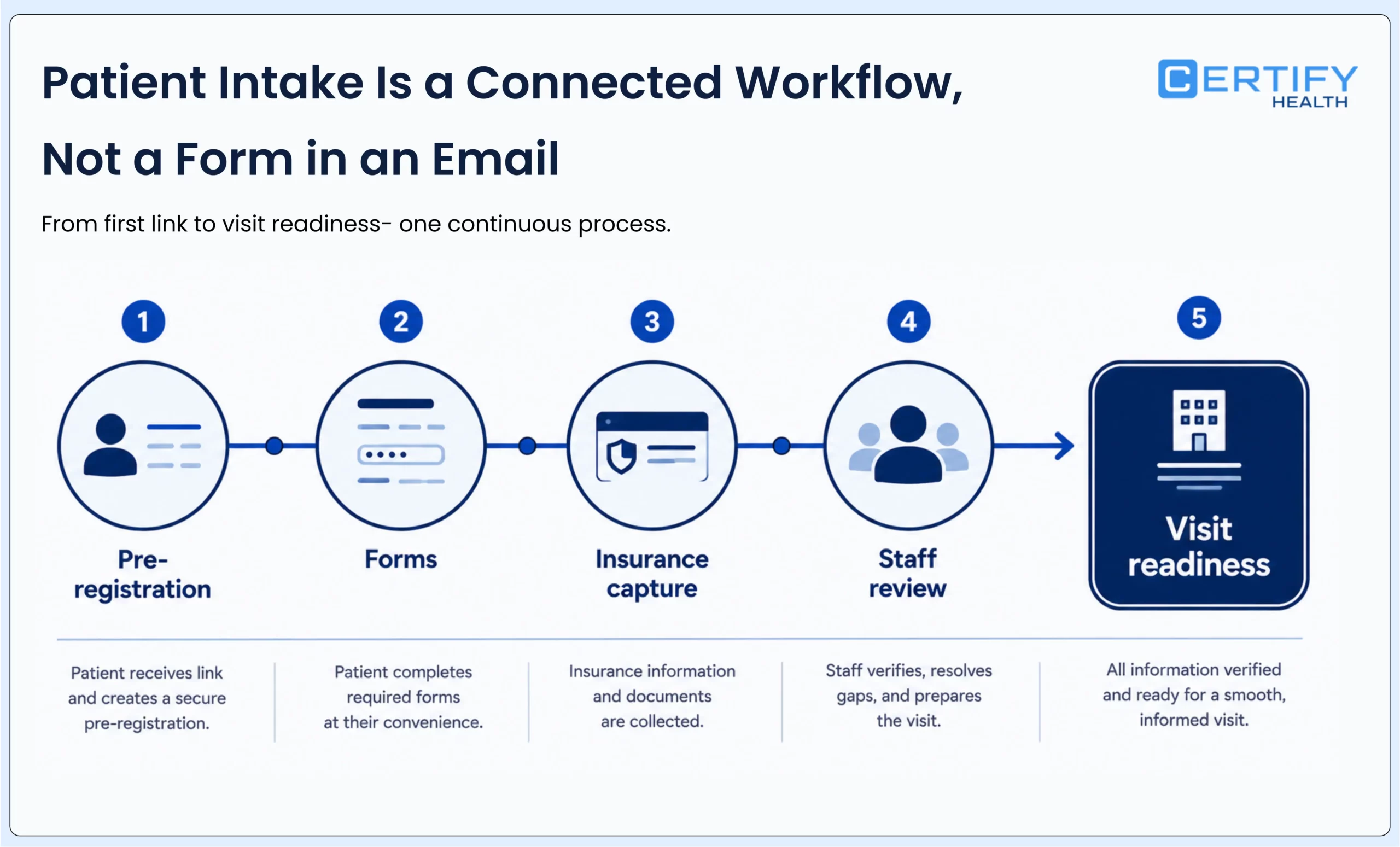
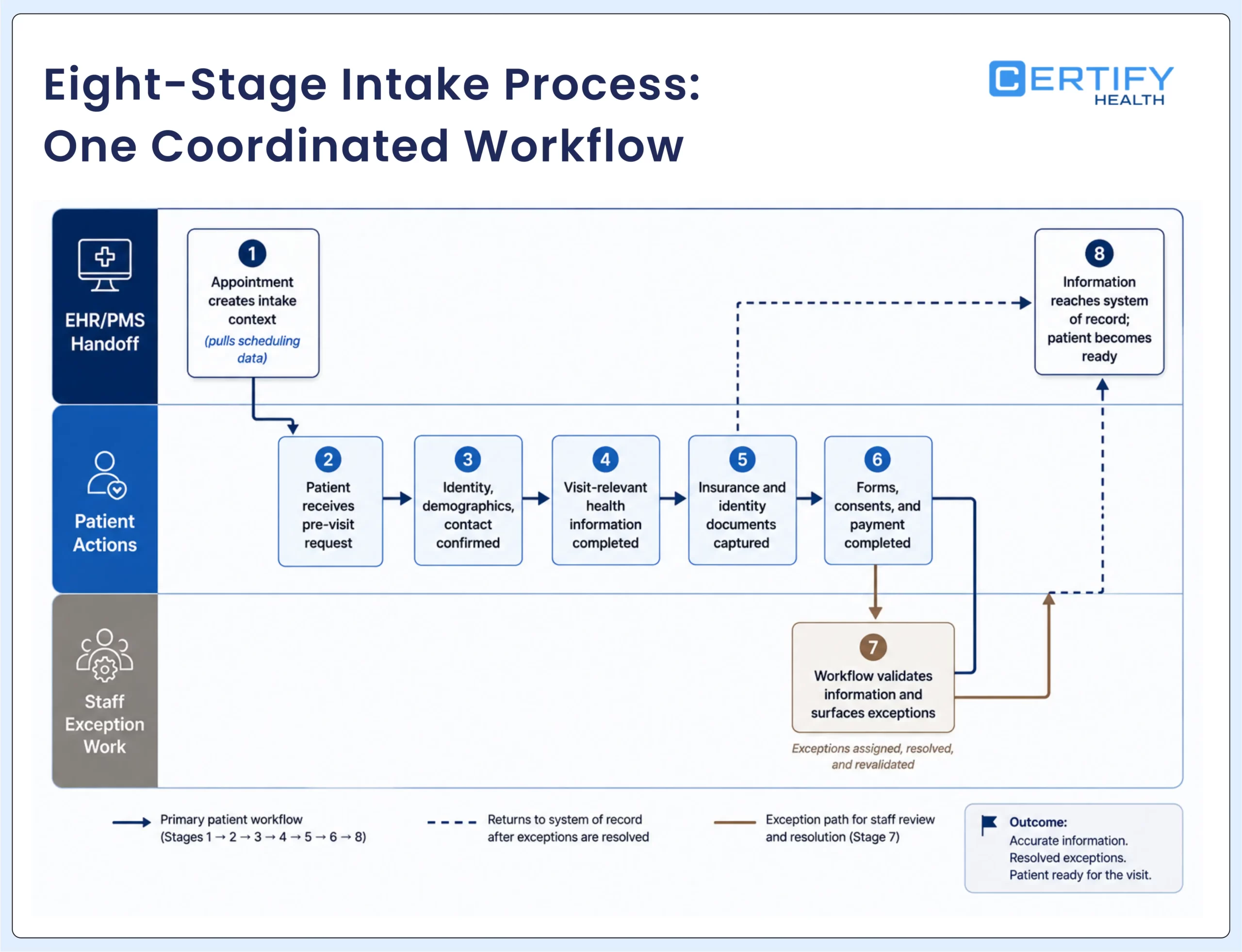
How the Patient Intake Process Works
1. The appointment creates the intake context
The scheduled appointment identifies the patient, provider, location, visit type, date, and workflow rules. That context should determine which questions, documents, reminders, and review steps apply. If the appointment or mapping is wrong, the patient may receive an irrelevant packet or the wrong consent.
2. The patient receives the pre-visit request
When the workflow allows it, the patient receives a secure link or instructions to complete eligible steps before arrival. Timing should leave enough room for the patient to respond and for staff to resolve missing or conflicting information. For a deeper operational view, see how to streamline patient pre-registration.
3. Identity, demographics, and contact details are entered or confirmed
New patients may need to supply their identifying and contact information. Returning patients should be able to review existing details and update what changed instead of retyping every field without explanation.
4. The patient completes visit-relevant health information
Health history, medications, allergies, symptoms, screening questions, and specialty-specific information should match the visit and the role of the person reviewing them. Every field needs a reason, an owner, and a destination.
5. Insurance and identity documents are captured
The patient may enter insurance details and upload or scan an insurance card or photo ID. Capturing a card is not the same as confirming eligibility, benefits, network status, or prior authorization. These connected workflows have different data sources and decision rules. See how insurance eligibility verification connects to pre-visit readiness without turning an eligibility response into a guarantee of payment.
6. Required forms, consents, and payment steps are completed
Depending on the visit, patients may sign treatment consent, privacy notices, financial policies, procedure-specific documents, or other forms. Known copays, balances, or payment choices may appear when configured for that workflow. Document version, language, age, location, provider, validity period, and signature rules can all affect whether a consent is usable. The patient intake forms guide owns the detailed form and consent design.
7. The workflow validates information and surfaces exceptions
Required fields, mismatched card details, missing signatures, incomplete questionnaires, and failed transfers should become visible work. A patient confirmation screen should not hide unresolved tasks from staff.
8. Information reaches the system of record and the patient becomes ready
Collected information should reach the appropriate field, document location, queue, or team in the existing EHR, EMR, or practice-management environment, based on the deployed integration. The final status should show what is ready and what still blocks the next step.
Where Patient Intake Commonly Breaks Down
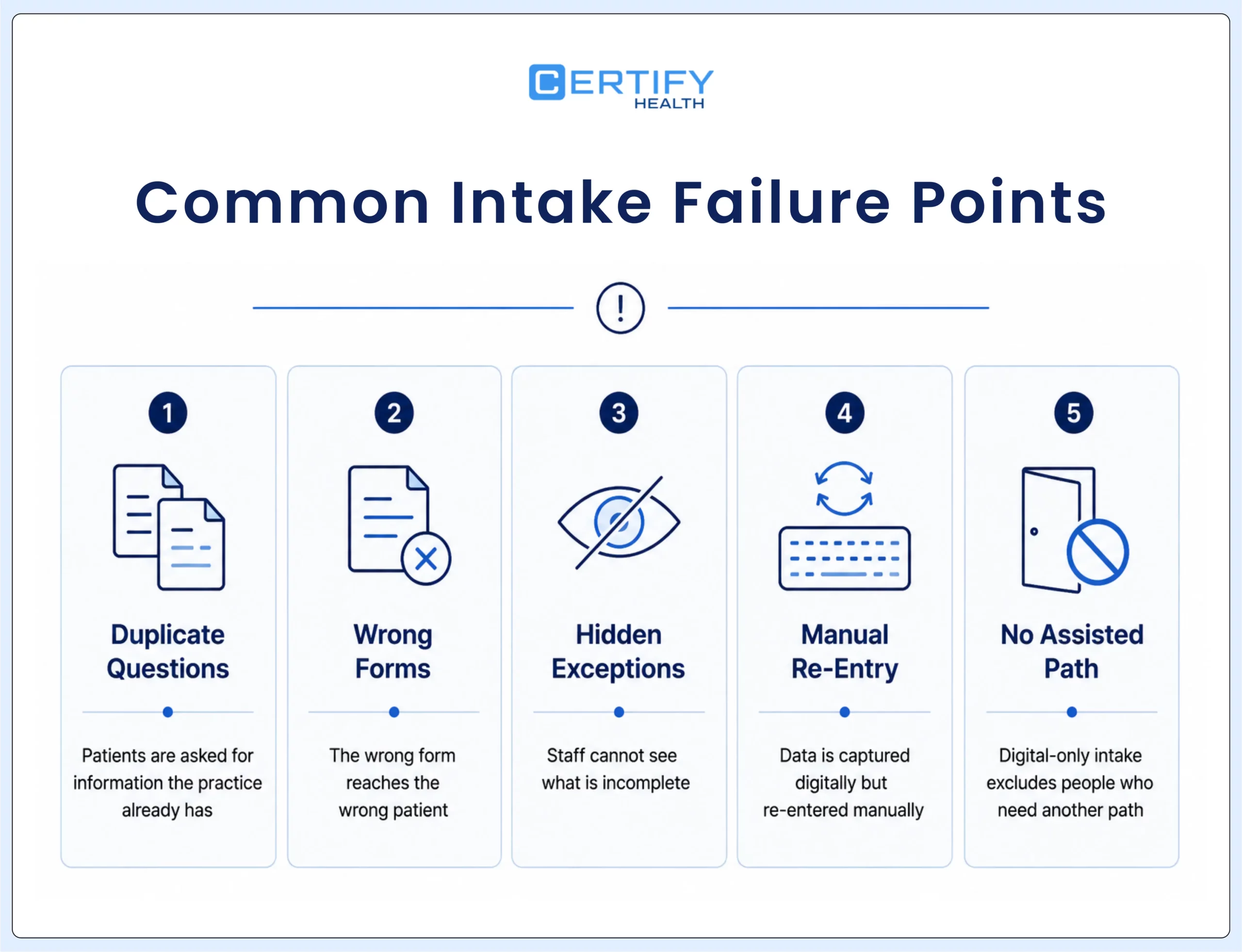
Patients are asked for information the practice already has
The workflow should distinguish between data that can be reused, data that must be reconfirmed, and data that must be collected again because the clinical or legal context changed.
The wrong form reaches the wrong patient
Generic assignment can send the same packet regardless of visit type, age, location, provider, or history. Test representative appointments and confirm that each patient receives the correct fields, language, and signature requirements.
Staff cannot see what is incomplete
A dashboard that shows only started and submitted hides the work that matters. Staff need to see what failed, what changed, who owns the exception, and when it must be resolved.
Insurance information is captured but not ready for action
An uploaded card may be unreadable, extracted data may not match the record, and active coverage may not answer a service-specific benefits question. Intake should keep capture, eligibility, benefits, network status, and authorization distinct.
Consent is collected without document governance
Electronic signature does not replace rules for document version, applicability, expiration, language, access, retention, and required signatures.
Data is captured digitally but re-entered manually
If staff still type submitted information into the host system, the workflow has moved the location of data entry instead of reducing it.
Digital-only intake excludes people who need another path
Some patients need language assistance, a caregiver, an accessible interface, a different device, more privacy, or direct staff help. The alternate route should be timely and visible.
Nobody owns the exception queue
Every exception category needs an owner, an expected response time, and an escalation path. Otherwise, the work waits until the patient arrives.
Traditional vs. Digital Patient Intake
| Workflow question | Paper or disconnected intake | Well-designed digital intake |
|---|---|---|
| When it starts | Often at arrival | Can begin before arrival and continue through check-in |
| How existing data is handled | Patients may rewrite information already on file | Existing information can be reviewed and reconfirmed when the integration supports it |
| How missing information is found | Staff inspect forms and ask at the desk | Rules can identify missing items and place exceptions in a visible queue |
| How information reaches the record | Scanning and manual re-entry | Mapped fields and documents can update the host system, depending on the integration |
| How patients receive help | Staff assistance at the front desk | Mobile, web, tablet, kiosk, and staff-assisted paths can be coordinated |
| How success is measured | Waiting-room experience and staff anecdotes | Completion, readiness, exception, rework, and writeback measures |
Not All Digital Intake Workflows Deliver the Same Results
Many solutions digitize forms but leave teams managing disconnected processes. Explore how CERTIFY Health helps practices connect intake, insurance capture, consents, and pre-visit workflows.
How to Evaluate Patient Intake Software
A feature checklist can tell you whether a product offers forms, signatures, insurance capture, reminders, or kiosk access. It cannot tell you whether the workflow will be usable in your environment. Ask vendors to demonstrate the following with representative visit types and systems:
- How does the platform assign the correct form to the correct patient, provider, visit, and location?
- Which existing data can patients review, and which changes require staff approval?
- What happens when a patient cannot use the primary digital channel?
- Which fields read from and write to the EHR, EMR, or practice-management system?
- How are failed updates, duplicate records, and data conflicts shown to staff?
- How are insurance capture, eligibility, benefits, and prior authorization kept distinct?
- How are document versions, signatures, validity rules, and access controlled?
- Which reports show completion, readiness, abandonment, exceptions, and writeback outcomes?
- What implementation, training, support, and governance work is required after purchase?
- Which capabilities are included in the proposed deployment, and which require separate configuration, integration, or services?
Use the digital intake solution selection guide for a scored evaluation method. If you are comparing products, the patient intake software comparison should own vendor-by-vendor analysis rather than forcing it into this workflow guide.
Best Practices and Common Pitfalls
Successful rollouts follow change-management and user-centered design principles. Best practices for practices to follow include:
- Create a cross-functional rollout team. Include front desk, billing, clinicians, and IT so workflows reflect real-world needs.
- Train every role: not just the front desk. Billing, clinical staff, and providers must understand new data flows and how intake affects claims and charting.
- Pilot before full launch. Start with a subset of patients and locations to collect feedback and refine forms and prompts.
- Communicate with patients. Short guides, SMS links, or on-site signage help patients adopt mobile check-in and digital forms.
- Track adoption and iterate. Use analytics to measure mobile vs. kiosk vs. in-clinic completion and optimize accordingly.
- Give every field a purpose, owner, and destination. Remove questions nobody uses, and identify who reviews unusual answers and where each item must land.
- Set a readiness deadline. Define when intake should be complete for each visit type, then time reminders and exception work around that cutoff.
- Reuse information carefully. Let patients review existing data where appropriate, reconfirm what can change, and make updates visible to staff.
- Test integration and failure behavior at field level. Confirm what reads, what writes, where documents attach, and what staff see when a transfer fails.
- Assign exception ownership before launch. Give each common exception a responsible role, response window, and escalation path.
Common pitfalls: overcomplicating forms, ignoring staff concerns, failing to test EHR integrations, and skipping patient education. Practices that focus on simplicity, staff buy-in, and continuous monitoring avoid the biggest setbacks.
Accessibility, privacy, and security should be part of the workflow design from the start. Review the HHS accessibility guidance, the current HIPAA Security Rule summary, and the HHS guidance on online tracking technologies with the appropriate compliance and legal teams. For an intake-specific operational review, see the digital patient intake security risk guide.
Digital Intake and Pre-Visit Readiness Checklist
- Each visit type triggers the correct forms, consent versions, language, and review rules.
- Patients can confirm existing information and update what changed without unnecessary repetition.
- Insurance capture, eligibility, benefits, and authorization are clearly separated.
- Incomplete work and failed transfers appear in a visible exception queue with an owner.
- Mobile, web, tablet, kiosk, caregiver, and staff-assisted paths are tested for continuity, privacy, and accessibility.
- The team can report visit readiness, rework, abandonment, and writeback rather than only form submissions.
How to Measure Patient Intake Performance
The right metrics show whether readiness is improving or whether work is merely moving from one team or system to another. Track results by location, visit type, channel, patient segment, and workflow version when possible.
| Metric | Definition | What it helps the practice decide |
|---|---|---|
| Pre-registration completion | Eligible patients completing required work before the cutoff | Whether invitations, timing, and the patient experience support adoption |
| Visit-ready before arrival | Eligible appointments meeting the agreed readiness rules before arrival | Whether the patient, record, and responsible teams are prepared |
| Missing-document rate | Appointments missing a required document at the deadline | Whether form assignment and consent governance are working |
| Exception rate and resolution time | Exceptions created and time to close them, by category | Where staff work remains and whether owners respond in time |
| Correction and rework rate | Submissions requiring manual correction, re-entry, or repeated contact | Whether validation, question design, and integration reduce work |
| Writeback success | Intended updates reaching the correct host-system field or document location | Whether the deployed integration is reliable |
| Abandonment by step and channel | Patients starting but not finishing, grouped by last step and channel | Where usability, accessibility, or technical issues create friction |
| Staff touches per appointment | Calls, messages, manual edits, and system switches used to finish intake | Whether workload falls or moves elsewhere |
What Digital Intake Can Change at Scale
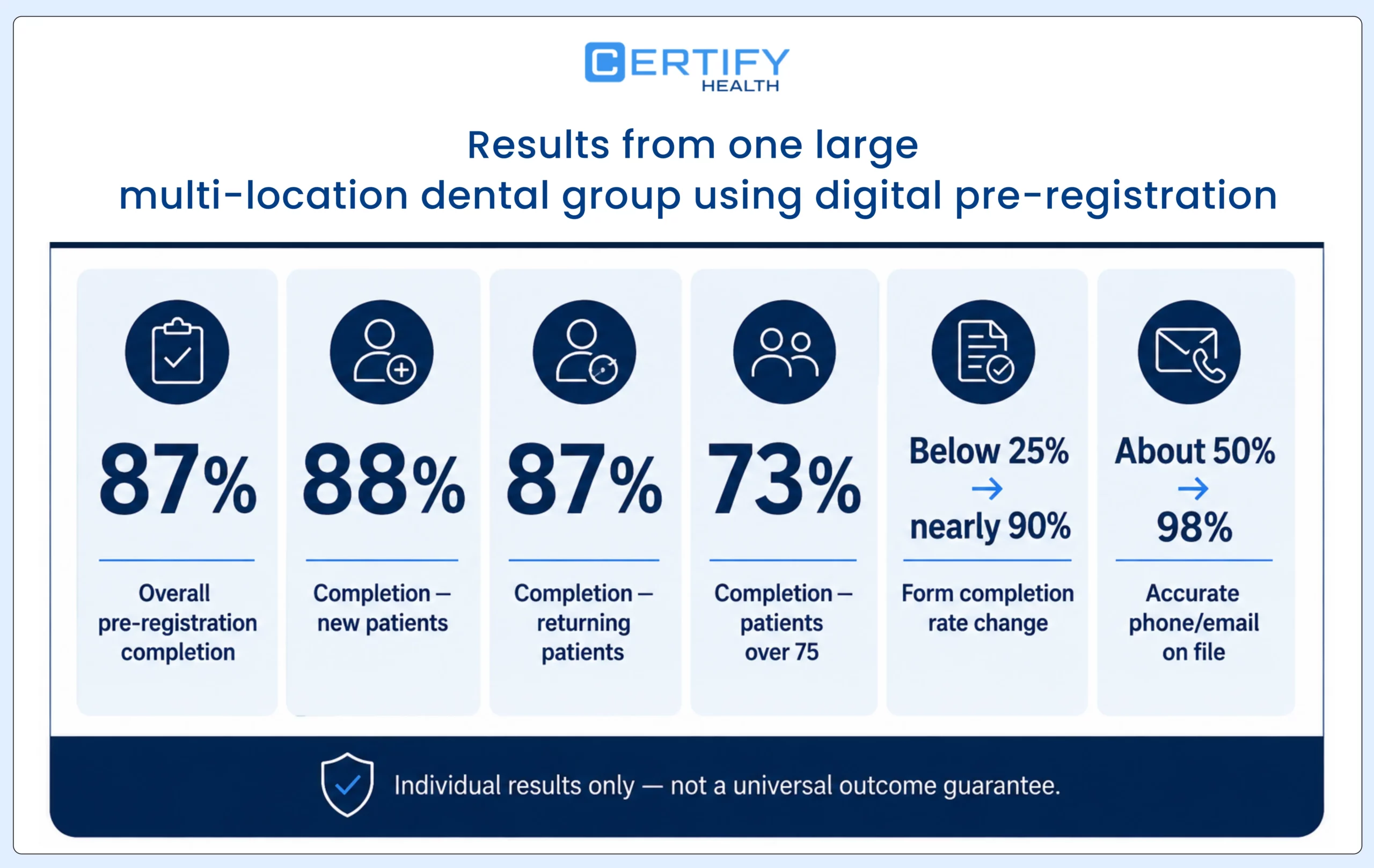
At one large multi-location dental group, 87% of patients completed pre-registration before the visit. Completion reached 88% for new patients, 87% for returning patients, and 73% among patients older than 75. Form completion rose from below 25% to nearly 90%, while accurate phone and email information increased from about 50% to 98%.
What this really shows is that digital intake can improve more than form completion. When patients can review and update information before arrival, the practice starts the visit with better documentation, more reliable contact details, and fewer gaps for the front desk to resolve.
Where CERTIFY Health Fits in the Patient Intake Process
CERTIFY Health supports digital patient intake and pre-registration workflows around an organization’s existing EHR, EMR, or practice-management environment. Depending on the configuration and integration, the workflow can include:
- Pre-registration through a patient portal or web link
- Intake through portal, tablet, or self-service kiosk
- Entry or review of demographic and contact information
- Insurance information and card capture
- Health questionnaires and visit-specific forms
- Digital consent and electronic signatures
- Required or optional field configuration
- Staff visibility into intake progress and changes
- Payment during intake when configured
- Updates to downstream systems based on the deployed integration
The existing clinical or practice-management system generally remains the system of record. Every deployment should be evaluated by its actual modules, mappings, rules, and integrations. The useful question is not whether a platform has digital intake. It is whether the deployed workflow moves a patient from scheduled to ready with less rework and better visibility.
The Goal Is Not Digital Forms. It Is Visit Readiness.
FAQs
What does patient intake mean?
What information is usually included on a patient intake form?
Common categories include identity and contact information, insurance details, medical history, medications, allergies, emergency contacts, reason for visit, consent, privacy acknowledgment, and financial policy information. The exact fields should depend on the specialty, patient, visit type, and purpose of the form.
What is the difference between patient intake and patient check-in?
Patient intake is the broader process of collecting and preparing the information needed for the visit. Check-in confirms that the patient has arrived and completes any remaining arrival-day steps. Much of intake can happen before the visit, while check-in happens at or near arrival.
How long should patient intake take?
Why do patients have to repeat information?
Some information must be reconfirmed because it can change or because a new visit requires a fresh consent or screening response. Unnecessary repetition often signals weak data reuse, disconnected systems, or poorly configured form rules.
Is digital patient intake automatically HIPAA compliant?
Can patient intake data update the EHR or practice-management system automatically?
It can when the relevant integration, field mapping, and workflow rules support it. Practices should verify what reads, what writes, where documents attach, how quickly updates appear, and what happens when an update fails.
What happens after a patient submits intake information?
Bottom Line
Patient intake is the bridge between a scheduled appointment and a visit that is genuinely ready to begin. When it works, patients know what to complete, staff can see what is missing, the record receives usable information, and exceptions are handled before they become front-desk emergencies.
Digital tools can support that outcome, but only when workflow design, integration, accessibility, governance, and measurement are considered together. The goal is not to collect more forms. It is to make the information useful at the moment the patient and practice need it.