Table of Contents
Here’s the math to start with. The American Medical Association studied more than 200,000 physicians and found they spend 5.8 hours in the EHR for every 8 hours scheduled with patients. According to the underlying study in the Journal of General Internal Medicine, documentation is the largest single piece of that: 2.3 hours per 8-hour day, more than any other task.
Run that across a 10-provider practice over a 5-day week and you get roughly 115 hours a week spent writing notes rather than seeing patients, close to three full-time staff positions’ worth of time, every week.
Most practices never run this math, because the EHR’s built-in notes box feels free. It’s already paid for, already installed, already there. But included isn’t the same as free. This guide looks past that assumption to what actually separates a basic notes field from real clinical documentation software, and what to evaluate if you decide you need the latter, whether you’re searching for clinical notes software, a full clinical documentation system, or medical documentation software generally.
What "Clinical Documentation Software" Actually Covers
The term gets used loosely, and that’s worth untangling before you evaluate anything. It spans at least three distinct product categories:
- Ambient AI scribes: listen to the visit and draft a structured note (this is what most of this guide focuses on)
- CDI and query workflow tools (e.g., 3M, Iodine, Nuance CDE): mostly inpatient, focused on coding specificity and query management
- Transcription and dictation software: front-end speech-to-text, no drafting or structuring
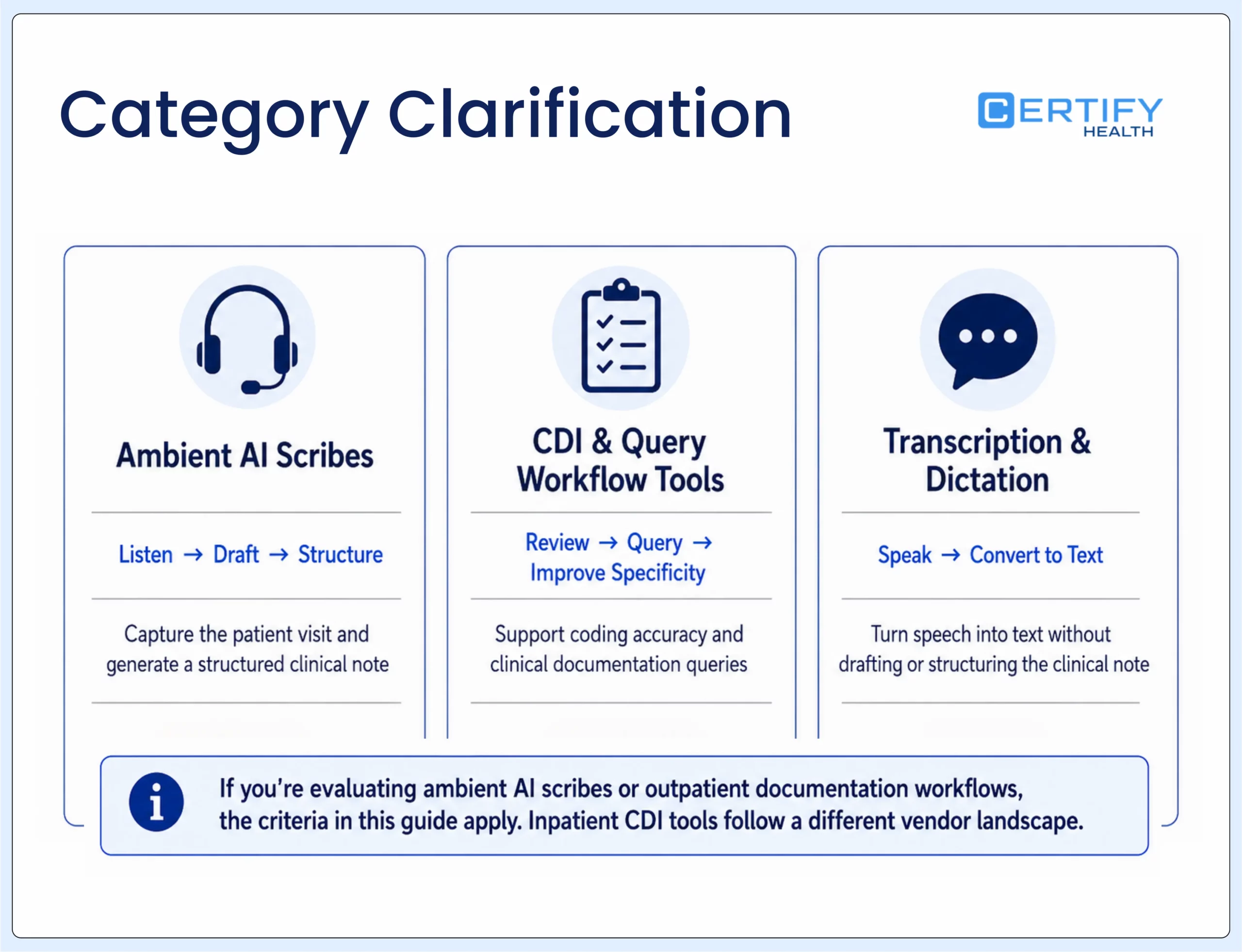
This guide is about ambient AI scribes and adjacent documentation workflow tools for outpatient practices. If you’re evaluating inpatient CDI tooling, the criteria below overlap but the vendor landscape is different.
Your EHR Has Notes. The Question Is Whether They're Enough.
Most EHRs ship with a notes box. That’s true, and it’s also not the same thing as clinical documentation software. A notes box stores text. Documentation software is built to reduce the time it takes to produce a note, keep formatting consistent, and hold up under an audit.
Some tools do this with ambient AI, listening to the visit and drafting the note. Others rely on structured templates and workflow rules without the ambient layer. Either way, the assumption that “the EHR already has notes, so we’re covered” is where practices get into trouble: it sounds safe, but it usually isn’t.
The 200,000-plus physician study led by Dr. Christine Sinsky is the source for the numbers above: 5.8 hours in the EHR per 8 hours of scheduled patient time, with documentation as the single largest component. Separately, Mayo Clinic Proceedings found that 45.2% of physicians reported at least one symptom of burnout in 2023, down sharply from 62.8% in 2021. A different, AMA-run operational survey (the AMA Organizational Biopsy) tracks the same trend using a different methodology: burnout was 43.2% in 2024, down from 48.2% in 2023 and 53% in 2022. That’s consistent directional improvement across both instruments, though burnout remains elevated relative to the general workforce. Administrative burden, including documentation, is cited as a contributing factor.
None of this means your EHR is a bad product. It means the notes field inside it was built to hold information, not to be fast, consistent, or audit-ready by design. The real question isn’t “does my EHR have notes?” It’s whether your documentation workflow actually works for your providers and your compliance team.
The Real Cost of Sticking with Native EHR Notes
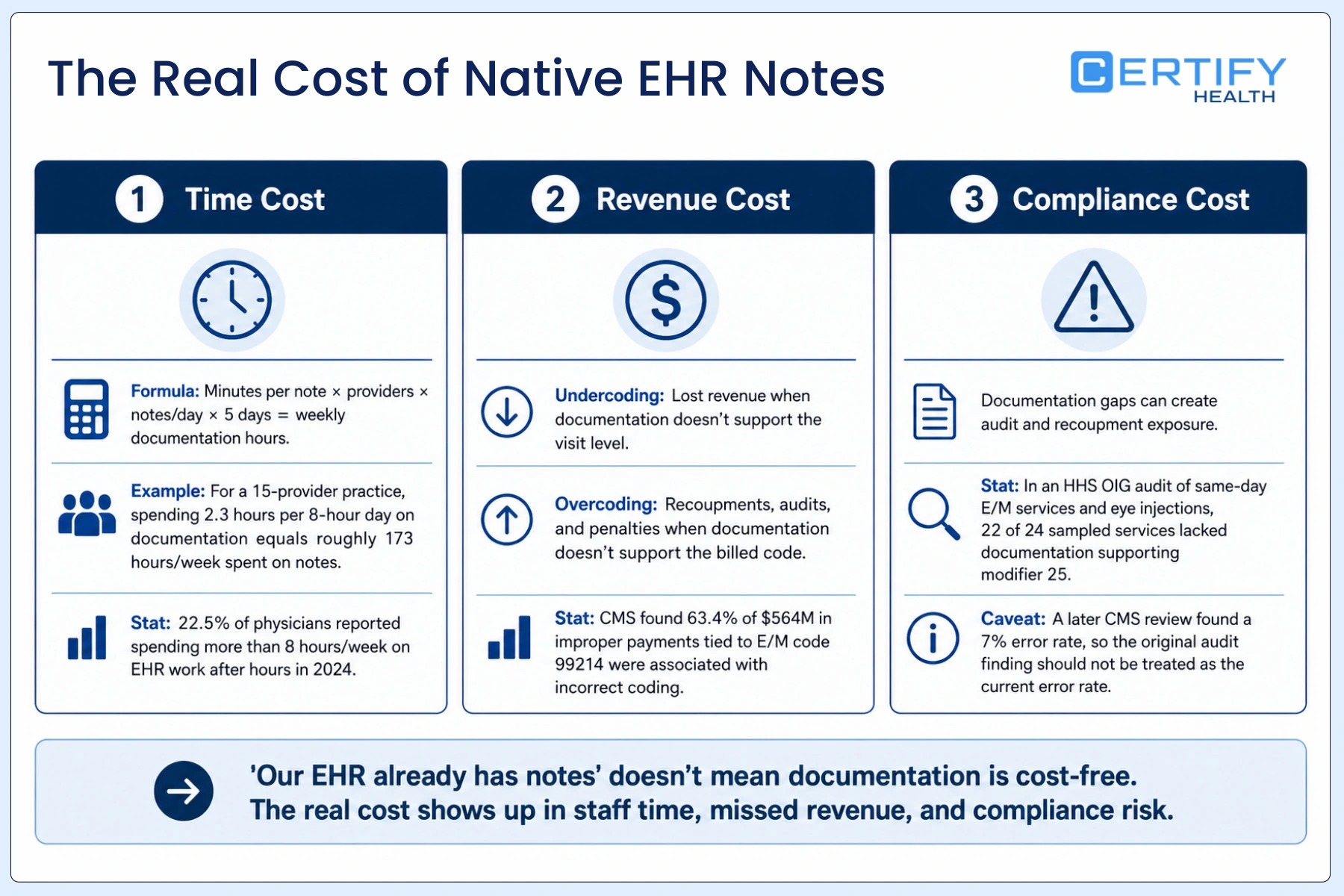
1. Time cost
A simple way to size this for your own practice:
(Minutes per note × number of providers × notes per day × 5 workdays) ÷ 60 = weekly hours spent on notes
Using the 2.3-hours-per-8-hour-day figure, a 10-provider group is looking at roughly 23 hours a day on documentation, close to 115 hours a week — the same baseline as the intro. That’s staff time you’re already paying for, going somewhere other than patient care.
It also doesn’t stay inside work hours. AMA data on 2024 physician activity found that 22.5% of physicians spent more than 8 hours a week on the EHR after hours (up from 20.9% in 2023), commonly called “pajama time,” and a recurring theme in burnout research.
One caveat worth stating plainly: pajama time specifically doesn’t reliably improve with ambient documentation software (the data is below) — treat it as a workflow and staffing question instead.
2. Revenue cost
Rushed notes cost money two ways. Undercoding happens when a note doesn’t include the detail needed to support the visit level billed, so the practice gets paid less than the visit actually earned. Overcoding is the reverse: the note doesn’t support the code billed, which invites recoupment, fines, and audits.
CMS’s most-billed E/M code, 99214, is also its most error-prone: of the $564,563,132 in improper payments tied to that code (2023 claims, published in CMS’s 2024 Medicare FFS supplemental improper payment data), 63.4% were linked to incorrect coding, 20.1% had no documentation at all, and 16.5% had insufficient documentation — meaning 36.6% of the improper payments on Medicare’s most-billed E/M code were pure documentation failures. Zoomed out to all of Medicare fee-for-service, CMS’s most recent published figures put the overall FY2025 improper payment rate at 6.55%, or $28.83 billion, down from FY2024’s 7.66% ($31.70 billion), and well below the $31.46 billion (FY2022) figure some older industry content still cites.
3. Compliance cost
This is the section your compliance team should read most closely, and it needs a fuller picture than a single audit finding.
An HHS OIG audit reviewed documentation for 24 sampled Evaluation & Management (E/M) services billed on the same day as intravitreal (eye) injections. Twenty-two of the 24 lacked documentation supporting use of modifier 25. Across the full audit period, Medicare had paid $124 million for 1.4 million same-day claims of this type, which OIG flagged as at risk of recoupment, not confirmed improper.
What’s happened since matters. CMS agreed to update its guidance and directed its Supplemental Medical Review Contractor, Noridian, to audit the flagged claims. Those audits, completed in March 2026, found an error rate of just 7%, a very different picture than the original 92%-of-sample finding suggested, and one the American Academy of Ophthalmology attributes to the appropriateness of how the specialty was actually billing. CMS also removed the ambiguous guidance language from its Medicare Learning Network materials in June 2026, following advocacy from the Academy, the American Society of Retina Specialists, and the AMA. As of August 2026, OIG’s own recommendation tracker still lists the broader medical-review-and-recoupment recommendation — to conduct medical reviews and recover the flagged improper payments — as open and unimplemented, so this isn’t fully closed, but the risk picture has narrowed considerably since the original audit, and a compliance officer who knows this file will notice if that follow-up is left out.
Add time, revenue, and compliance risk together, and “our EHR already has notes” starts to look like the more expensive assumption, not the safer one.
What Ambient AI Scribes Actually Deliver: By the Numbers
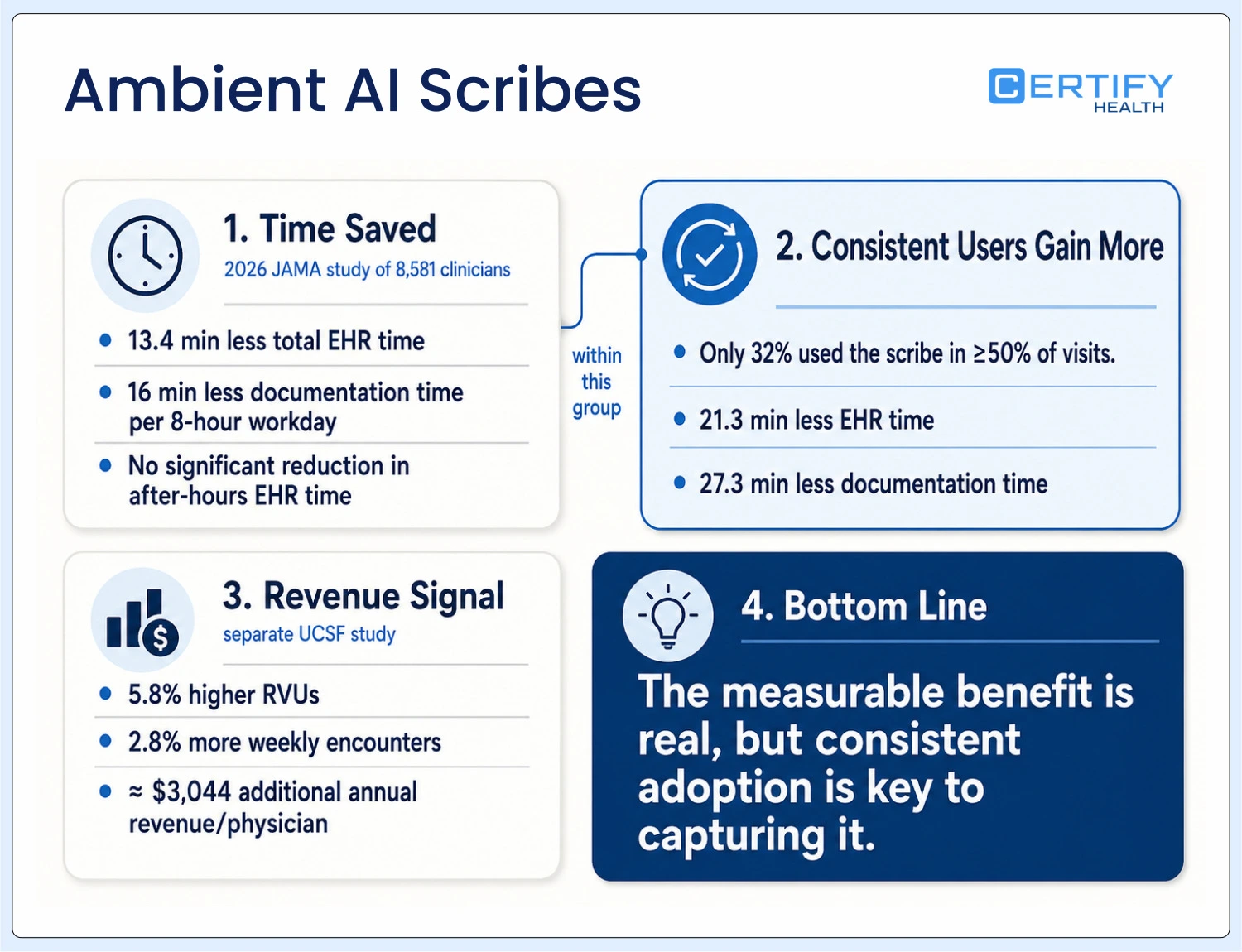
This is the section to read before you build a business case, because the honest numbers are still a real argument, just a different one than “it pays for itself in weeks.”
The largest and most current evidence comes from the Ambient Clinical Documentation Collaborative, a multisite study led by researchers at Mass General Brigham and UCSF, published in JAMA in April 2026. It tracked 8,581 ambulatory clinicians (1,809 who adopted an ambient AI scribe and 6,772 who didn’t) across Mass General Brigham, Emory Healthcare, UCSF, Yale New Haven Health, and UC Davis between June 2023 and August 2025. It found:
- 13.4 fewer minutes of total EHR time and 16 fewer minutes of documentation time per 8 hours of patient care, averaged across all adopters
- No significant reduction in after-hours EHR time among adopters
- The benefit was heavily concentrated among consistent users: only 32% of adopters used the scribe in half or more of their visits (the threshold at which the largest benefit appears), and that group saw substantially larger absolute reductions: 21.3 fewer minutes of EHR time and 27.3 fewer minutes of documentation time, both well above the all-adopter average reported above
- Primary care physicians, advanced practice clinicians, and female clinicians saw the largest gains
Applied to a 10-provider practice at the average adopter rate: 16 minutes × 10 providers × 5 days ≈ 13.3 hours recovered per week, about 12% of the 115-hour baseline, not “cut fast.” The same JAMA study measured the average adopter’s marginal revenue gain at roughly $167 per clinician per month — about $1,670 a month for a 10-provider practice, against a typical $2,000–$6,000 monthly subscription. Measured revenue alone doesn’t close that gap. It pays back if you price recovered time at full opportunity cost, if your providers are consistent heavy users, or if you count retention and reduced turnover, which are real but harder to put a number on.
A separate, single-site UCSF study published in JAMA Network Open in January 2026 found a more direct revenue signal: across nearly 1.2 million ambulatory encounters and 1,565 physicians, the 698 who adopted an ambient AI scribe generated 1.81 more RVUs per week than non-adopters, a 5.8% increase, translating to roughly $3,044 in additional annual revenue per physician at 2025 Medicare rates, alongside a 2.8% increase in weekly encounters, with no increase in claim denials. The study’s authors note they can’t yet tell whether the extra RVUs reflect genuine productivity gains or more accurate coding. The accompanying editorial noted that most health systems pay $200 to $600 per clinician per month in subscription fees.
The honest pitch: expect roughly 10–15% of documentation time back, concentrated in the providers who actually use the tool consistently. Adoption discipline, not which vendor you pick, is usually the variable that decides whether the subscription pays for itself. Ask any vendor for their own outcome data broken out by usage frequency, not a blended average.
Before You Look at Vendors: Check What Your EHR Already Offers
This is worth addressing directly, because it changes the buying decision. Several major EHRs now ship native or bundled ambient AI: eClinicalWorks bundles Sunoh.ai, NextGen offers Ambient Assist, and both athenahealth and Epic have rolled out ambient documentation capabilities. Availability and pricing change quickly, so verify current state for your specific EHR before assuming you need a separate product.
If your EHR has a native or partner ambient option, evaluate that first. The question then becomes whether it handles your specialty, your integration depth needs, and your volume, not whether you need ambient AI at all.
The Documentation Option Ladder
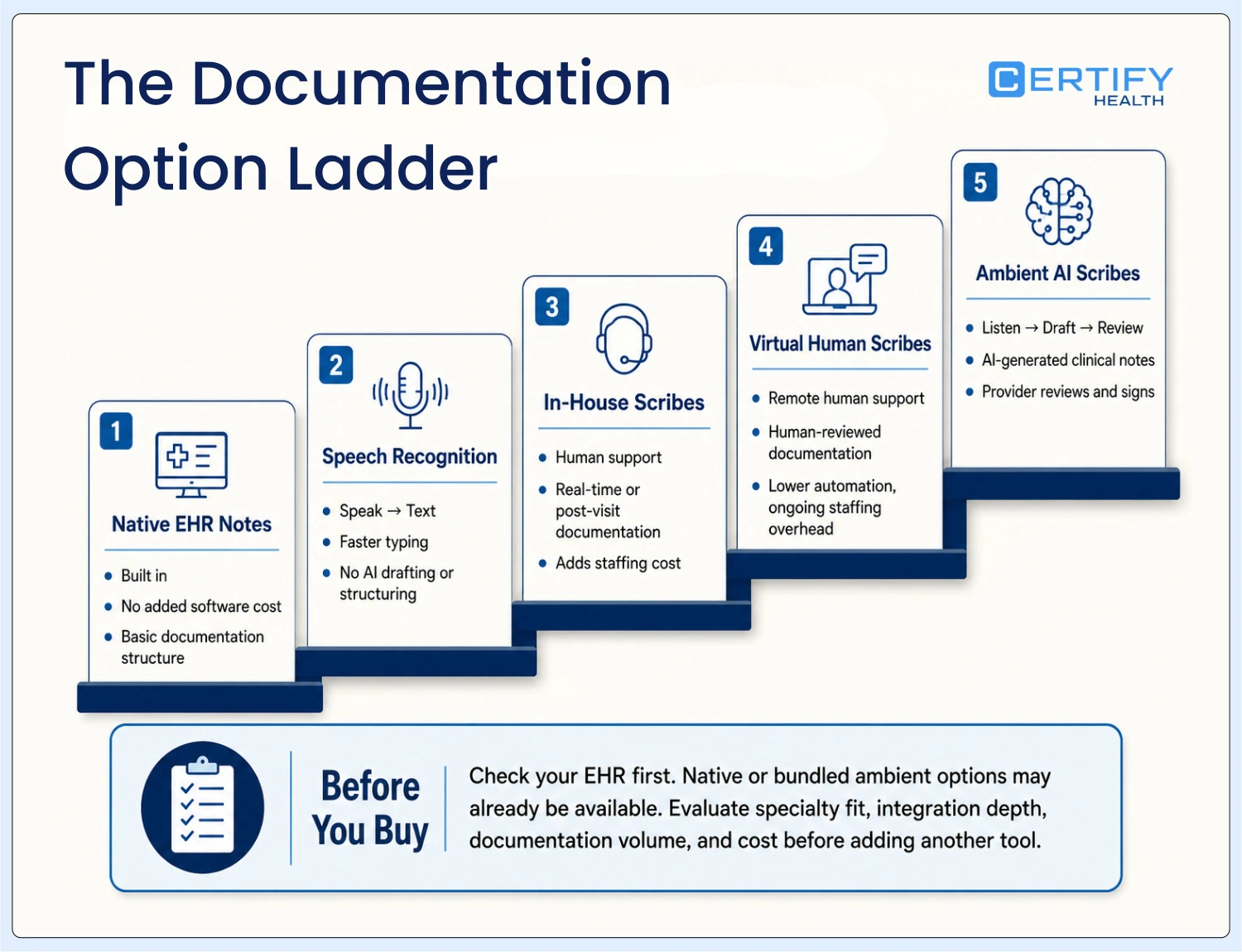
Framing this as “native EHR notes vs. dedicated software” is a false binary. There’s a full ladder of options, and the right rung depends on volume, specialty, and budget, not just whether you want software:
- Native EHR notes: no added cost, minimal structure
- Front-end speech recognition (e.g., Dragon Medical): faster typing, no drafting or structuring
- Team-based documentation / in-house scribes: a human documents in real time or shortly after; the AMA frequently recommends this as a first step before software
- Virtual human scribes: remote, human-reviewed documentation, often lower error risk than early-stage AI but with staffing overhead
- Ambient AI scribes: AI drafts the note from the visit audio; the provider reviews and signs off
Most practices land somewhere between rungs 3 and 5, and the right answer often depends more on specialty and visit complexity than on budget alone.
Who Sells Ambient AI Scribes: A Quick Vendor Landscape
The ambient AI scribe rung of the ladder above isn’t one product — it’s a market with real differentiation in specialty depth, EHR partnerships, and pricing model. A quick landscape, current as of this writing:
Abridge. Broad specialty coverage (50+ specialties) with native Epic integration (Abridge Inside); enterprise/custom pricing; used across 300+ health systems and rated Best in KLAS for ambient speech recognition.
Ambience Healthcare. Supports 200+ specialties across outpatient, ED, and inpatient settings; added to Epic’s Toolbox program for native in-app voice tools; pricing is enterprise/custom and not publicly listed.
Nuance DAX / Microsoft Dragon Copilot. Deep native Epic integration; licensed per-user or on a consumption basis; third-party estimates put costs around $369–$830+ per provider per month, though Microsoft doesn’t publish list pricing.
Suki. Covers 100+ specialties with voice-command features beyond passive listening; integrates with Epic, Cerner, athenahealth, and MEDITECH; enterprise sales model used by 350+ health systems and clinics.
Nabla. Broad specialty coverage with specialty-specific customization, including deployments in pediatrics and behavioral health; named EHR partners include Epic, athenahealth, Oracle, Altera, Greenway, and NextGen; pricing isn’t published — expect a sales conversation.
Availability, pricing, and specialty coverage change quickly in this market — confirm current details directly with each vendor before you build a shortlist.
9 Things to Evaluate When Comparing Documentation Software
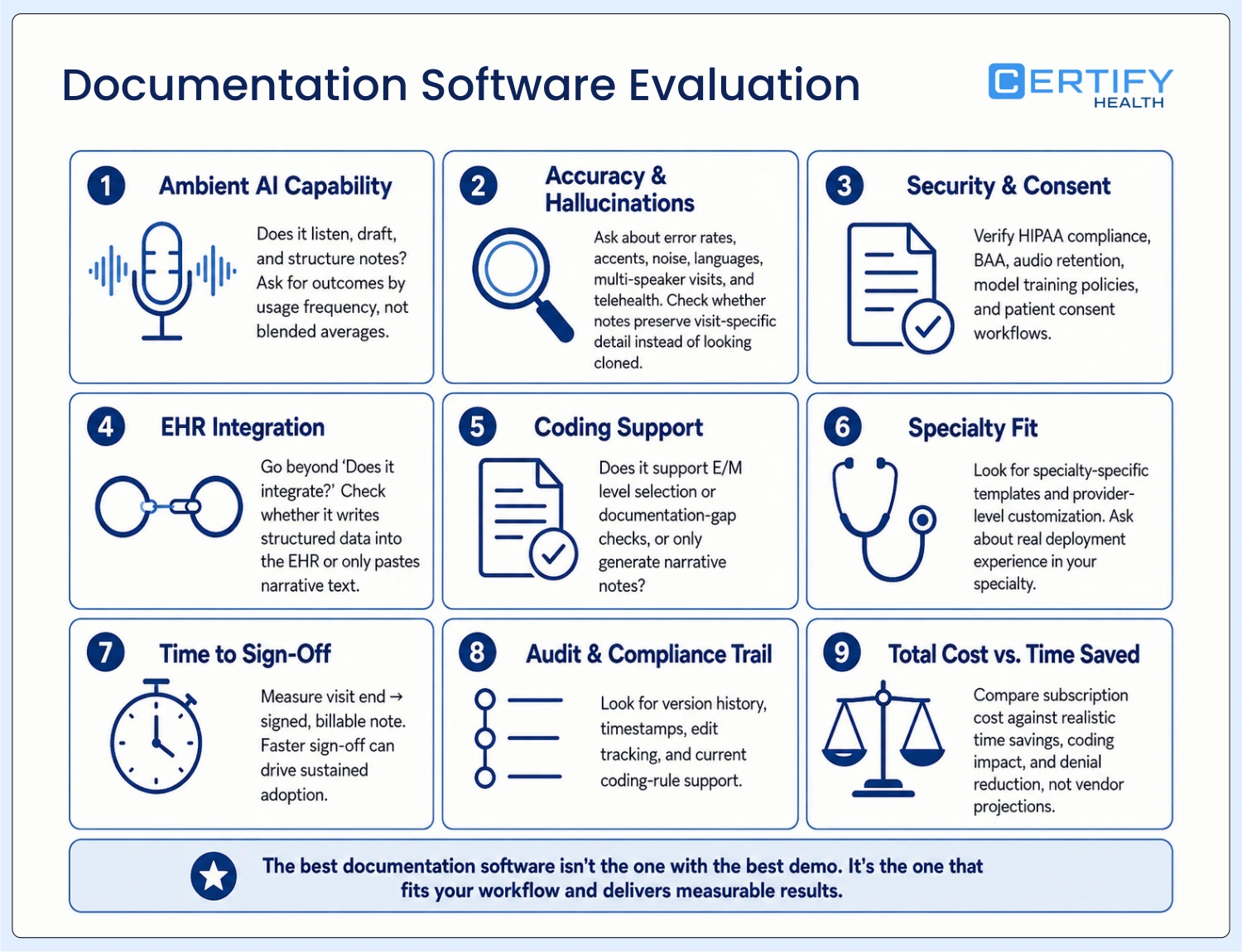
1. AI scribe and ambient documentation capability
This is what most people mean by “AI clinical documentation” today: a tool that listens to the visit and drafts a structured note for the provider to review and sign. Ask any vendor for outcome data broken out by usage frequency, not a demo script, and not a blended average across light and heavy users.
2. Draft accuracy and hallucination risk
This is the criterion missing from most evaluation checklists, and it shouldn’t be. Ask: What’s the vendor’s measured error rate, and how is it defined? How does the tool handle accents, background noise, and non-English speakers? What happens in multi-speaker visits: pediatrics, visits with an interpreter, or a family member present? How does it perform on telehealth audio versus in-person?
Also worth naming directly: templates and AI-generated notes that read as near-identical across patients can themselves become an audit flag. Templates help consistency, but consistency taken too far starts to look like cloned documentation to an auditor. A good evaluation asks how the tool balances structure with visit-specific detail.
3. Security, HIPAA, and consent
This is the single most conspicuous gap in most vendor conversations, and it’s often the first thing legal asks about once a pilot moves toward a contract. Ambient scribes record patient conversations, so you need clear answers on: Where does the audio go, and how long is it retained? Is any of it used for model training, and can you opt out? Does the vendor sign a BAA? Does your state’s wiretapping or consent law require the patient to be notified or to consent before recording, and does the vendor’s product support capturing that consent?
4. EHR-integrated vs. standalone, and integration depth
A standalone tool that doesn’t talk to your EHR creates a new manual step: someone copying information back and forth. Beyond the basic “does it integrate” question, ask about integration depth: does the tool write discrete, structured data into the problem list, orders, and coded fields, or does it drop narrative text into a single note box? Also check whether the vendor is a listed partner in your EHR’s marketplace program, which usually means a more supported, tested connection.
5. Coding support
If your business case includes under- and overcoding risk, and it should, ask directly whether the tool suggests E/M levels, flags documentation gaps relative to the level billed, or only drafts narrative text with no coding awareness. A tool with no coding support doesn’t address half of the revenue case you’re building for it.
6. Specialty-specific templates and flexibility
Generic templates rarely fit specialty care well, and this matters most for the specialty clinics, ASCs, DSOs, and FQHCs that make up a lot of the buyer base for this kind of software. A behavioral health note needs fields a general medical note doesn’t: treatment plans, “golden thread” documentation, and 42 CFR Part 2 considerations. A dental or ASC operative note, by contrast, follows an entirely different structure built around procedures rather than E/M levels, and an FQHC’s documentation often has to satisfy both clinical and grant-reporting requirements at once. Ask how easily templates adapt by specialty and by individual provider, and whether your specific specialty is one the vendor has real deployment experience with, not just a generic template they can point to.
7. Time-to-note and speed to sign-off
How long does it take from “visit over” to a signed, billable note? This single number is a strong predictor of whether providers will actually keep using the tool after the initial rollout enthusiasm fades.
Compliance and audit trail support
Look for version history, timestamped edits, and templates built around current E/M and coding rules. If a vendor can’t show you how their system holds up under an audit, treat that as a real red flag: this is the criterion most buyers underweight until an audit letter actually arrives.
8. Total cost vs. staff time saved
Run the ROI math from the section above using your own numbers, not a vendor’s projection. Ambient scribe subscriptions commonly run $200–$600 per provider per month. Factor in realistic (not best-case) time savings, plus any measurable change in coding accuracy or denials, before assuming the subscription pays for itself.
Comparison at a Glance
| Factor | Native EHR Notes | Dedicated Documentation Software |
|---|---|---|
| Ongoing cost | Included in EHR | Separate fee, typically $200–$600 per provider/month |
| Implementation effort | None | Weeks of integration, template configuration, and training |
| Note creation | Typing or basic templates | Templates, voice input, or AI-drafted notes |
| Specialty fit | Limited | Built for specialty-specific templates |
| Compliance support | Varies by EHR | Built-in audit trails, tied to coding rules |
| Time to sign-off | Often slow, provider-dependent | Faster, especially with ambient AI; verify with vendor data |
| Integration | Native | Connects via HL7/FHIR; verify integration depth, not just presence |
Binary for simplicity — the option ladder above (front-end speech recognition, virtual human scribes, and the rungs in between) still applies. Most practices land somewhere between these two columns, not strictly at one end.
Questions to Ask Vendors Before You Commit
Bring this list to your next vendor call:
- Does this integrate directly with our EHR, and does that cover notes only, or orders and billing too? Are you a listed partner in our EHR’s marketplace?
- Where does patient audio go, how long is it retained, and is it used for model training? Do you sign a BAA?
- What is your measured error rate, and how do you define and test it? How do you handle accents, background noise, and multi-speaker visits?
- What real outcome data do you have, broken out by how frequently clinicians actually use the tool, not a blended average?
- Does the tool suggest E/M levels or flag documentation gaps, or only draft narrative text?
- How does this support clinical documentation compliance during an audit?
- What does onboarding look like, week by week, and can templates change by specialty and by individual provider?
- What is the full cost per provider, including any per-visit fees, minimums, and auto-renewal terms?
- What happens to our data and notes if we leave? Is there a defined data-export process on exit?
- Who owns the note, and what attestation language is required to disclose AI assistance?
Piloting It Properly
“Ask for a timeline” isn’t enough on its own; you need a baseline to measure against. Before a pilot starts, pull your own EHR usage analytics (Epic Signal or your EHR’s equivalent) so you have real numbers, not estimates. During the pilot, track time-to-close, note length, after-hours minutes, provider satisfaction, and denial rate at the 30-, 60-, and 90-day marks. On the contract side, clarify per-provider versus per-encounter pricing, any minimums, auto-renewal terms, and what happens to your data if you leave.
A Few Things Easy to Overlook
"But What About…?": Common Objections, Answered
“Switching will disrupt our workflow.”
A fair concern. Most established vendors run a phased rollout, starting with one department or a small group of providers before expanding. Ask for a specific timeline up front, not a general sales pitch.
“Our providers won’t adopt new software.”
This is usually a training problem, not a technology problem. What tends to matter most in successful rollouts is hands-on training and a few early champions who can show colleagues it actually works, more than a provider’s age or years in practice.
“It’s another subscription cost.”
Go back to the honest ROI numbers above rather than assuming the tool “pays for itself fast.” Expect roughly 10–15% of documentation time back, concentrated among consistent users, and weigh that against the subscription cost using your own provider count and note volume, not a vendor’s best-case projection.
Not sure where your practice stands? Weigh the math in this guide against your own provider count and note volume, then request a demo to see how a connected documentation and billing workflow compares.
Why Practices Bring CERTIFY Health into This Evaluation
CERTIFY Health offers a structured clinical documentation: SOAP notes, progress notes, diagnosis logging, discharge summaries, and attachments, built as part of its broader Patient Management suite, alongside Encounter Tools for structured vitals capture, allergy alerts, and problem-list management. All of it is tied to the same longitudinal chart used for intake, eligibility, and billing, rather than sitting in a separate login.
That’s not just a claim on a spec sheet. North American Dental Group (NADG), a multi-state dental support organization running more than 250 practice locations, has pushed pre-registration completion to 87% and moved more than $100 million in collections through CERTIFY Health’s connected intake-to-billing workflow, using the same longitudinal chart described above. See the NADG case study →
That’s a different category than the ambient scribe evaluation this guide is mostly built around, and it’s worth deciding early which one your practice actually needs: a best-of-breed ambient layer on top of your existing EHR, or documentation folded into a connected intake-to-billing platform. Where CERTIFY Health’s pitch differs from a dedicated ambient AI vendor’s: the case isn’t “this makes your notes faster to write.” It’s that a note is only as good as the data behind it. Ambient AI can draft an accurate note from what’s said in the room, but it can’t fix a wrong insurance record, a missing consent form, or an eligibility issue, and those frequently cause denials independent of note quality. Once intake data is accurate, CERTIFY Health’s document management and billing-support tools carry that forward: eligibility checked before the visit, clean data flowing into billing, and payment collection that doesn’t rely on staff chasing patients afterward.
If your evaluation of clinical documentation software has you weighing a platform that handles documentation, intake, and billing together against a best-of-breed ambient scribe layered on top of your existing EHR, that trade-off is worth a direct conversation.
Conclusion
Go back to the math from the start: 2.3 hours of documentation for every 8 hours of patient care, multiplied across your team. That’s not a neutral cost; it’s hours, revenue exposure, and compliance risk, compounding every week.
Staying with native EHR notes because switching feels disruptive isn’t the safe choice; it just feels that way. Whichever way you go, whether that’s a dedicated ambient AI tool, a broader documentation system, or a mix built around a workflow your team will actually follow, the choice comes down to the same thing: keep absorbing the hidden cost, or address it with documentation software evaluated on realistic numbers.
Request a Demo and see what a connected patient management and documentation workflow actually looks like.
FAQ
What's the difference between an ambient AI scribe and clinical documentation software generally?
How much time does ambient AI documentation actually save?
The largest current multi-site study found about 13–16 fewer minutes per 8-hour clinic day among adopters overall. Expect 10–15% of documentation time back as a realistic planning number, not a “cuts hours fast” claim.
Does ambient AI documentation reduce after-hours charting?
Not according to the largest current study: it found no significant reduction in after-hours EHR use among adopters, even though total documentation time dropped. If after-hours work is your main concern, treat it as a separate workflow issue.
Do I need a separate documentation vendor if I already use an EHR with native ambient AI?
What should I ask a documentation software vendor about patient consent and data?
Ask where recorded audio is stored, how long it’s retained, whether it’s used to train models, and whether the vendor signs a BAA. Also check your state’s consent or wiretapping law: some states require patient notification or consent before a visit can be recorded, even for documentation purposes.