Table of Contents
New dental patients waited an average of 13.9 business days for their first appointment in Q2 2026, according to the ADA Health Policy Institute, a slight increase from the prior quarter but still below the Q2 2024 peak. The figure applies to practices accepting new patients and excludes emergencies. At the same time, roughly a quarter of dentists (26%, down from 32% in Q1 2026 and 33% in Q4 2025) still report they aren’t busy enough to fill their schedules. Rather than pointing to a simple access problem, the data suggests a broader operational challenge: practices need to turn available capacity into a seamless path from scheduling to completed appointments.
That capacity problem is also where the industry is already investing. The same ADA survey found that 43% of dentists currently use AI for at least one task, and among those planning to adopt it, the top intended uses are front-desk check-in, appointment scheduling, practice analytics, and charting — the same front-office workflows this guide treats as the patient-access layer’s job, not a future one.
Most DSOs already have a capable dental PMS, along with tools for patient communication, eligibility, reminders, or payments. Yet front-office friction persists because a dental software stack that works well tool by tool doesn’t always work well together. Fragmentation is a systems-design problem, not just a software problem.
The real question isn’t which tool to buy next, but what each system should own and how they should work together. This guide presents a dental patient access platform framework where the PMS remains the system of record, the patient-access layer coordinates front-office workflows, and point solutions are used only when specialized capabilities justify their integration burden.
Compressed to its core: the PMS stays the system of record no matter how many tools sit around it; a patient-access layer earns its place only where it removes real coordination work, and shouldn’t be added where it doesn’t; and the right architecture at one location looks nothing like the right architecture at 100+. What follows works through each of those claims in enough operational detail to test against your own stack, and closes with a model comparison and a TCO framework you can put in front of a vendor.
The Three Layers of a Dental Technology Architecture
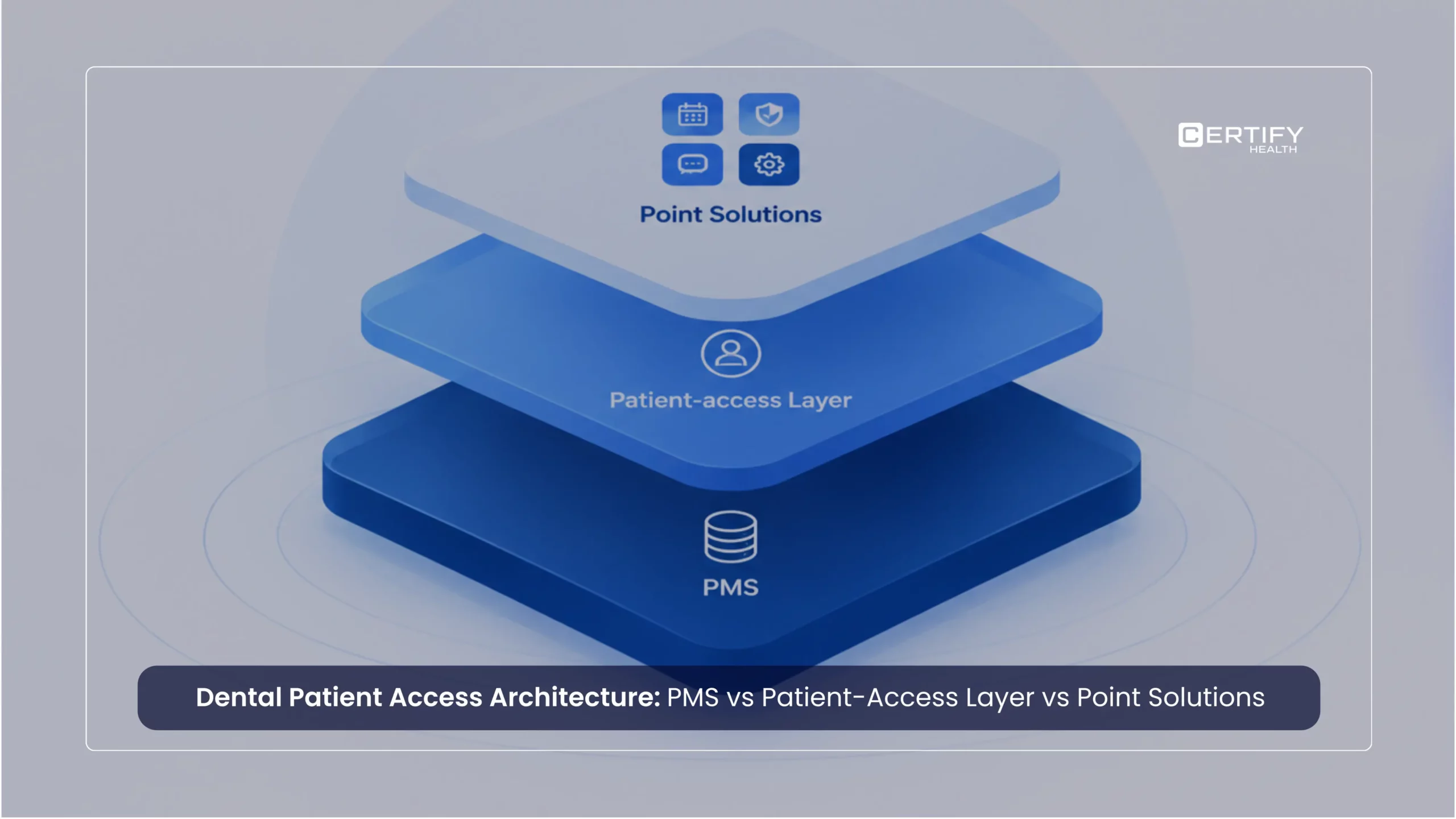
A useful way to evaluate any dental technology stack is to separate it into three layers, each with a distinct job.
Dental PMS
The dental PMS is the system that should remain authoritative for the core practice and patient record. It holds the chart, the treatment plan, the ledger, and the scheduling calendar that clinical and billing staff rely on day to day. This is the foundation of dental practice management system architecture: everything else in the stack should be built to work with it, not compete with it.
Patient-access layer
A patient-access layer coordinates patient-facing and front-office workflows that cross multiple touchpoints: scheduling, intake, eligibility, check-in, communication, and payments. Its job isn’t to hold the clinical record. Its job is to keep those touchpoints synchronized with each other and with the PMS, so that a status change in one place (a form completed, a balance paid) is reflected everywhere it needs to be.
Point solution
A point solution is most useful when a specific workflow requires specialized depth that the existing architecture can’t provide efficiently, such as a clinical imaging tool, a specialty scheduling requirement, or a niche compliance workflow. Point solutions are not inherently a problem. They become a problem when they duplicate functions the PMS or patient-access layer already covers, or when they create a new, disconnected version of patient state.
| Layer | Primary role | Should own | Should not be expected to own | Best fit |
|---|---|---|---|---|
| Dental PMS | System of record for the practice and patient | Chart, treatment plan, ledger, clinical scheduling | High-volume patient communication, multi-channel intake, patient-facing self-service | Core clinical and financial record-keeping |
| Patient-access layer | Coordination of front-office and patient-facing workflows | Workflow state across scheduling, intake, eligibility, check-in, communication, payments | The clinical record itself; deep specialty clinical functionality | Connecting existing systems so status is consistent across touchpoints |
| Point solution | Specialized depth in a narrow workflow | One well-defined capability the broader architecture can't handle adequately | General workflow coordination; a second patient record | A specific, high-value need that clearly outweighs added integration and support cost |
Read next: Dental practice management guide for a deeper look at what a modern PMS is, and isn’t, designed to do.
What Should the Dental PMS Remain Authoritative For?
The PMS should remain authoritative for the data and workflows it was built to manage: the clinical and patient record, treatment planning and documentation, the practice’s core ledger, and, in most systems, the scheduling calendar clinical staff work from every day. This is the system-of-record function, and it’s worth stating plainly: nothing in this framework suggests replacing it or treating it as a workaround for weak functionality elsewhere.
The PMS is not, by design, built to run multi-channel patient communication, coordinate digital intake across a dozen locations with different templates, or produce the cross-site operational reporting a 50-location DSO needs.
That’s not a criticism; it reflects what the category was built to do well. PMS platforms vary meaningfully in how much patient-facing and multi-location workflow they natively support and how open their APIs are. Generalizing across PMS products is a common mistake when evaluating dental PMS integrations, since capability genuinely differs by vendor and version.
In practice, that difference is architectural, not cosmetic. Open Dental runs on an open, directly queryable database, which makes deep, near-real-time integration comparatively straightforward. Dentrix and Eaglesoft are server-based systems that typically require a local bridge agent running on the practice server to exchange data, which shapes both integration depth and what breaks when that bridge goes down. Denticon and Dentrix Ascend are cloud-based and built with multi-location use in mind, which changes what a patient-access layer needs to coordinate versus what the PMS already handles natively. A DSO standardizing on one of these has a different architecture question to answer than a DSO running all three at once.
What matters operationally is less “does our PMS do X” and more “does our PMS remain the single place the clinical and financial record lives, regardless of how many other systems touch the patient.” When that discipline holds, everything layered around the PMS has a stable foundation to synchronize against.
What Does a Patient-Access Layer Coordinate?
The clearest way to understand a patient-access layer is to follow a single patient through the workflow it coordinates: scheduling, intake, eligibility, check-in, communication, and payments.
A patient books an appointment — online, through a centralized call center, or over the phone with front-desk staff. That scheduling event should trigger a digital intake request (forms, consents, insurance capture) sent through whatever channel fits the patient. As intake comes in, insurance details get captured or verified against what’s on file. When the patient arrives, check-in reflects whether intake is actually complete, not just whether an appointment exists on the calendar, so front-desk staff see exceptions (a missing form, an unverified plan) before the patient sits down, not after. From there, communication and payment workflows continue based on where the patient actually is, without staff manually reconciling each step across multiple screens.
Two patterns make dental coordination harder than a single-visit walkthrough suggests. Hygiene recall and recare cycles are the dominant scheduling pattern in dental — recurring on a roughly six-month or condition-specific cadence rather than booked once — and they are the hardest thing to coordinate across a PMS boundary: recall due dates, reminder cadence, and rebooking all have to stay synchronized with the PMS’s own recall list, not drift into a second, parallel one the front desk has to reconcile by hand. Family and household scheduling is just as distinctly dental: it is routine for one guardian to book, complete intake, and pay for several patients in a single visit, and each of those patients still needs their own record, consent, and treatment plan even though the booking and payment happened as one transaction. A patient-access layer modeled around a single patient moving through a single appointment will handle neither pattern well.
Centralized call centers are the dominant scheduling channel in much of dental. Where that software lives in the architecture comes down to integration depth, not to how central the channel is to the practice’s phone tree: a call center platform that only takes a booking and hands staff a confirmation to key in by hand is functioning as a disconnected point solution, whatever its market position, while one that writes directly into the same workflow described above — triggering digital intake, updating the PMS, and surfacing exceptions the same way an online booking would — is functioning as part of the patient-access layer, regardless of what it’s called on an invoice. The channel a patient uses to reach the practice doesn’t decide which layer owns the coordination; the integration depth does.
The value of a patient-access layer isn’t that it adds another application to the stack. It’s that it removes the need for staff to be the integration layer themselves, manually carrying status from the intake tool to the scheduling calendar to the front-desk tablet to billing. That coordination work is what dental front-office workflow software is actually for.
This is also where the digital touchpoints most visible to patients live. Dental patient intake software and dental patient check-in software sit inside this layer, as does dental patient payment software, each one a piece of the same coordinated journey rather than a standalone tool.
When a Patient-Access Layer Is the Wrong Answer
Every layer in this framework earns its place by being useful, not by being present. A patient-access layer is unnecessary — or actively the wrong call — in a few identifiable situations:
- The PMS already handles it: if a single-location practice’s PMS natively runs multi-channel communication, digital intake, and payment collection well enough that staff aren’t manually reconciling status across systems, adding a coordination layer adds cost without solving a problem that actually exists.
- The organization is consolidating onto one cloud PMS: a DSO standardizing every location on a single cloud-native platform, such as Denticon or Dentrix Ascend, that natively handles multi-location scheduling, intake, and reporting is solving the same coordination problem from a different direction. Layering a patient-access tool on top of a PMS built for that job duplicates functionality rather than filling a gap.
- The organization can’t staff the governance: a patient-access layer only pays off if someone owns integration monitoring, exception handling, and vendor management across locations. An organization that can’t commit that ongoing attention will get state drift inside the coordination layer instead of across separate point solutions — a different failure mode, not a solved one.
Apply the same scrutiny to whether a coordination layer belongs in the stack at all that you’d apply to picking one.
Where Patient Access Ends and RCM Begins
Eligibility and payments sit inside the patient-access layer, as just described. But that coordination role has a clear boundary: it stops well short of the revenue cycle.
Patient access owns the front-office side of these workflows: real-time eligibility and benefits verification at the point of scheduling or check-in, presenting the patient their estimated responsibility, and collecting payment. Claims submission, clearinghouse transmission, denial management, and accounts receivable are downstream revenue-cycle-management (RCM) functions that stay with the practice’s billing team, its clearinghouse, and, where one is used, its RCM platform — not the coordination layer.
Dental eligibility makes this boundary harder to gloss over than it sounds. A real-time eligibility check in dental routinely can’t answer the questions that actually determine what a patient owes: annual maximums already used, frequency limitations on services like cleanings or X-rays, waiting periods on major procedures, downgrades to a lower-cost equivalent procedure, and coordination of benefits when a patient has more than one plan. A patient-access layer can surface whatever eligibility data is available in real time and flag what isn’t; it can’t substitute for the practice’s own claims history and payer relationships when that data is incomplete, which in dental it frequently is.
When Does a Point Solution Actually Make Sense?
Not every specialized need justifies a new vendor relationship. It comes down to whether the specialization is worth what it costs in integration, support, and workflow complexity.
Use a point solution when:
- The workflow genuinely requires specialized depth: a capability the PMS and patient-access layer are not designed to provide
- The existing architecture cannot support the requirement adequately, even with configuration
- The operational value clearly and measurably exceeds the added integration cost
- The point solution has a clear, single owner for that workflow, so there’s no ambiguity about who’s responsible when something breaks
- The organization has the capacity to support another vendor relationship: contracts, support tickets, security review, staff training
A point solution is probably not worth it when:
- It duplicates a capability the PMS or patient-access layer already covers
- Staff end up manually moving information between it and other systems
- It creates a second, separate record of where the patient is in their visit
- It requires extensive custom integration work to function at a basic level
- The organization gains one feature but takes on meaningfully more operational complexity
This is the core of the point solution vs platform question, and it doesn’t resolve in one direction. A single well-chosen point solution for a genuine specialty need isn’t fragmentation. Ten overlapping tools solving the same problem is.
How Fragmented Dental Technology Architectures Fail
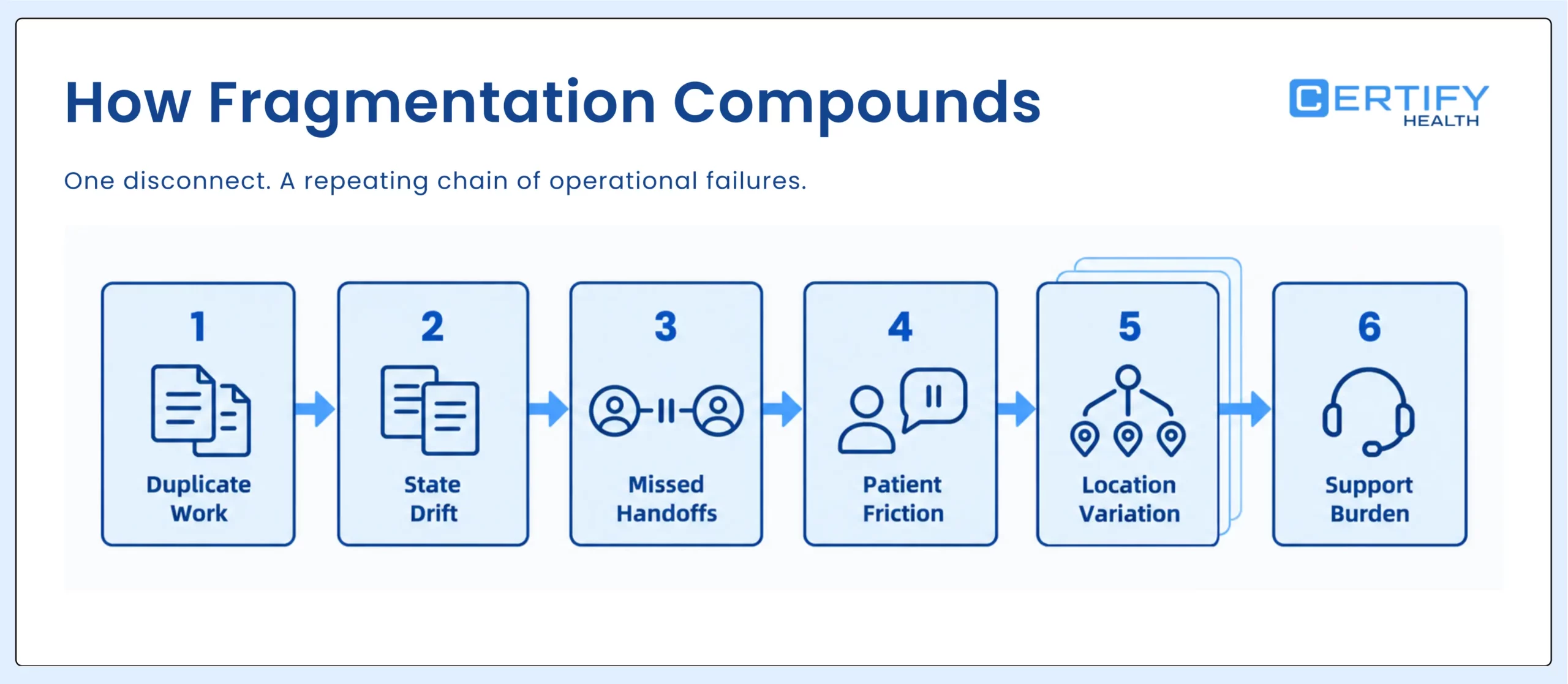
Dental technology fragmentation rarely looks like “too many tools” from the outside. It looks like a specific, repeatable failure chain: duplicate work, state drift, missed handoffs, patient friction, location variation, and rising support burden.
State drift is the clearest way to see how this happens. A patient completes digital intake on their phone the night before their appointment. The intake system marks them complete. But that status never reaches the PMS, because the two systems weren’t built to talk to each other, or the integration only runs on a nightly batch. The next morning, the front desk pulls up the patient in the PMS and sees intake as incomplete. Two systems now disagree about the same patient’s status. That disagreement is state drift, and it’s the mechanism, not just the symptom, behind most patient-facing friction in a fragmented stack.
The consequences compound predictably: staff re-key information the patient already provided (duplicate work), the disagreement between systems isn’t resolved automatically (state drift persists), a step like insurance verification gets missed because no single system had a complete picture (missed handoffs), and the patient experiences that as being asked twice for the same information or waiting while staff sort out a discrepancy (patient friction). Multiply that across locations that have each developed their own workaround for the same gap, and the organization ends up with location-by-location variation in how the same workflow runs. All of it eventually shows up as support tickets and staff time spent reconciling exceptions instead of serving patients.
None of this requires any individual system to be broken. It requires only that systems disagree about a patient’s state and that no layer in the architecture is responsible for keeping them synchronized.
Three Reference Architectures: From One Office to 100+ Locations
Architecture requirements don’t scale linearly. What works cleanly at one location introduces real risk at 50, and what’s sufficient at 50 becomes a governance gap at 100+.
The three reference points below aren’t the same diagram with different labels; each one adds something the smaller scale didn’t need.
One Office
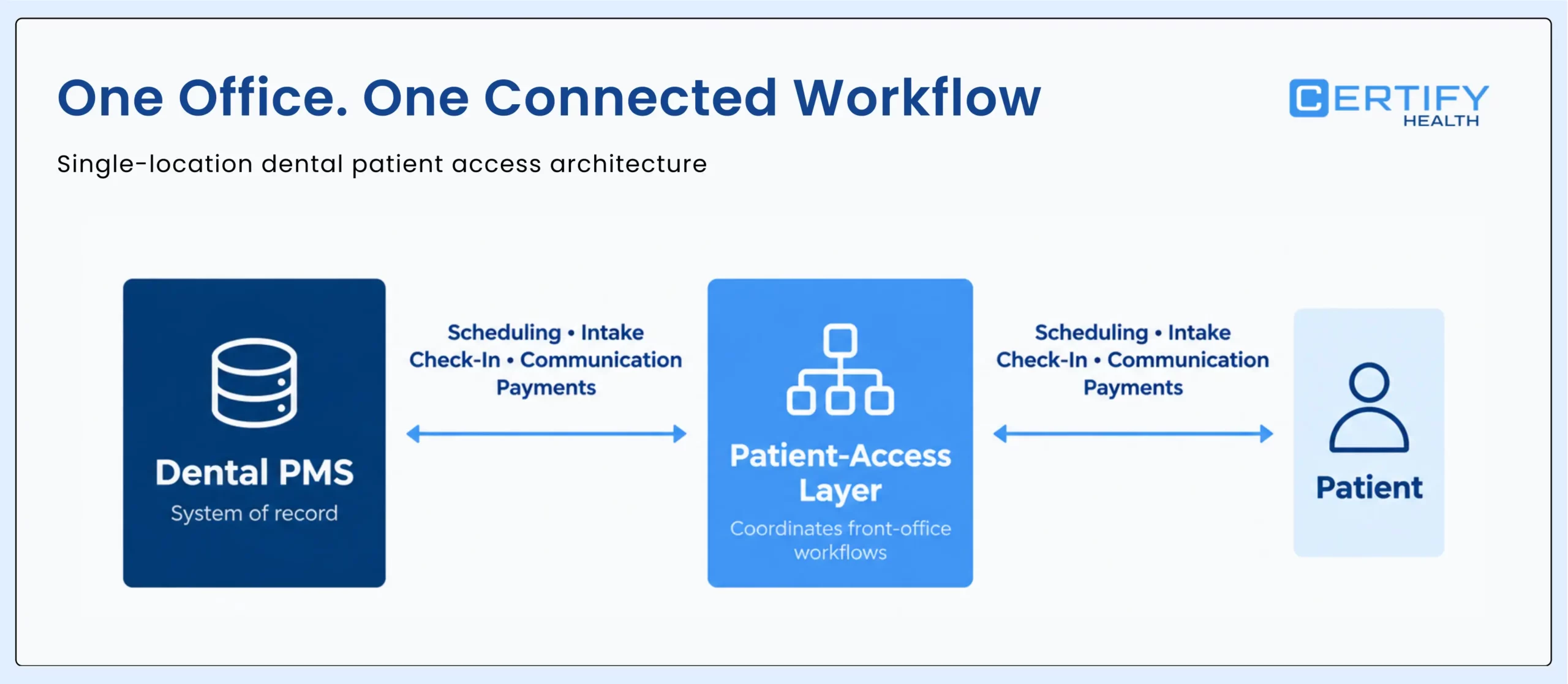
At a single location, the PMS remains central, and a patient-access layer can coordinate the core front-office workflows (scheduling, intake, check-in, communication, payments) around it. Governance is simple: one team, one set of habits, one point of accountability for how workflows actually run. A specialized point solution may make sense too, if the office has a genuine niche need, since the integration burden is limited to a single site.
The main risk at this scale isn’t complexity; it’s under-investment. A single office can tolerate more manual reconciliation than a larger organization can, which sometimes delays the point at which fragmentation becomes visible enough to fix.
10–50 Locations
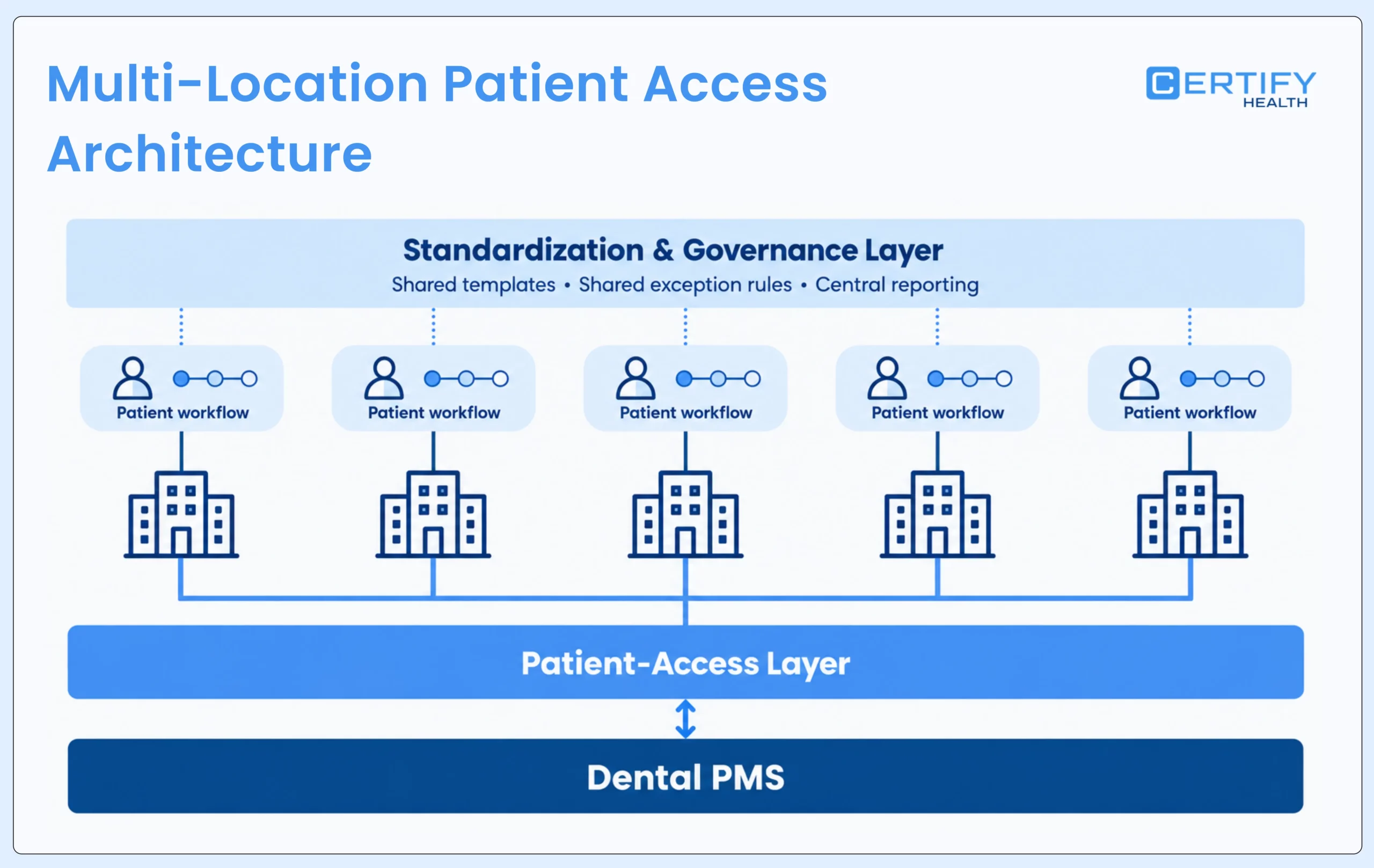
At this scale, standardization becomes the central concern. Workflow variation that was invisible at one office (different intake templates, different check-in habits, different exception handling) starts to create real inconsistency in the patient experience across sites. Central operations teams need visibility into how each location is actually performing, not just how the organization performs in aggregate. Integration consistency matters more, because the same patient-access layer now needs to behave predictably against however many PMS instances exist across the group. Location-level exceptions need a governance process rather than an ad hoc fix, and vendor sprawl (a different point solution adopted independently by three offices) becomes materially harder to manage than at one location.
The architecture here adds a standardization and governance layer on top of the same PMS-plus-patient-access-layer foundation: shared templates, shared exception rules, and central reporting that doesn’t require pulling data manually from each site.
100+ Locations
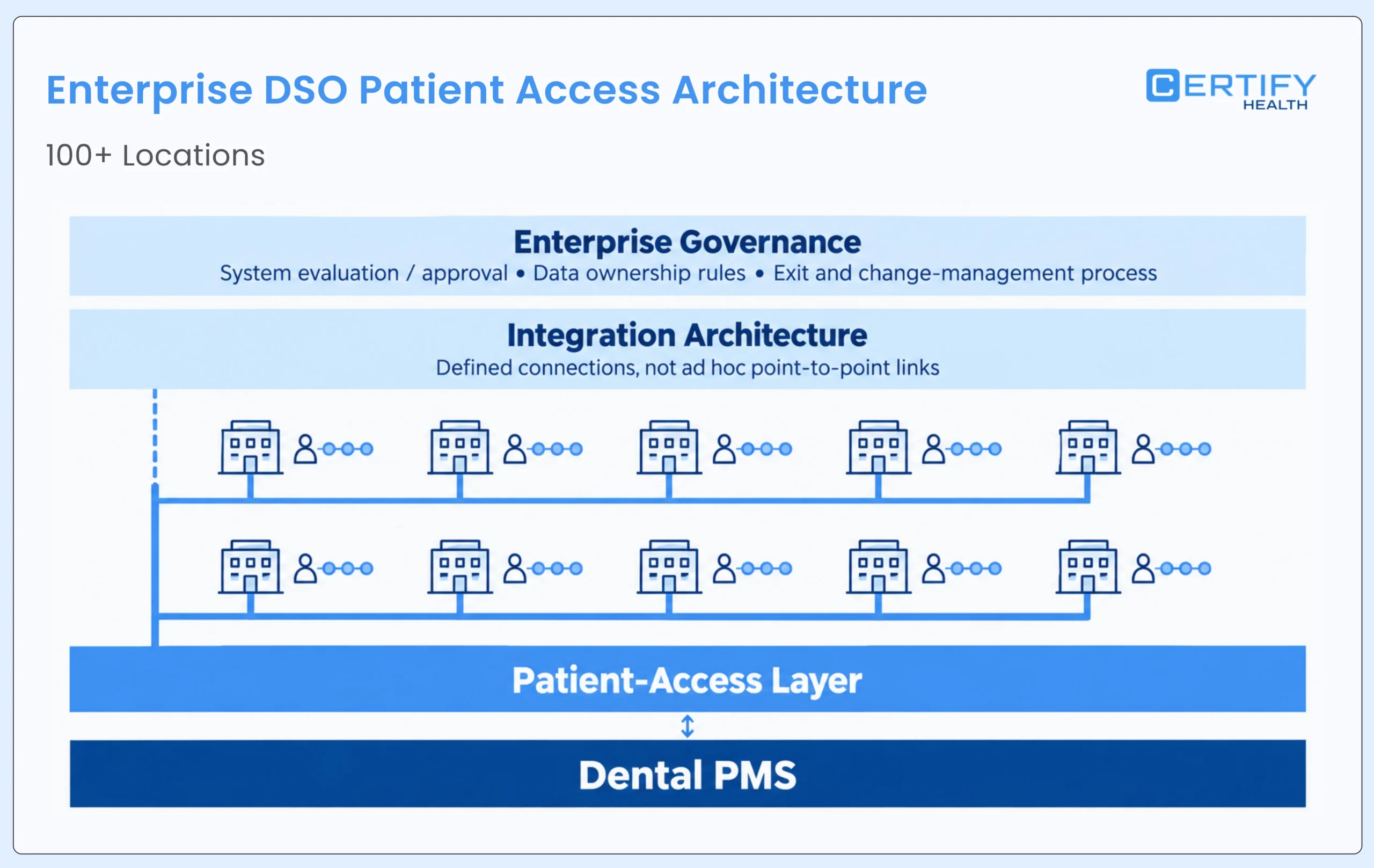
At enterprise scale, the architecture question becomes explicitly one of governance and integration design, not just tool selection. This includes enterprise governance over how new systems get evaluated and approved, a defined integration architecture rather than a growing set of point-to-point connections, clear data ownership rules so it’s never ambiguous which system is authoritative for which fact, standardized workflows enforced across sites, centralized monitoring so state drift is caught before it becomes a pattern, formal exception management, enterprise-level vendor management, and, critically, a defined exit and change-management process for every system, since replacing any layer at this scale touches hundreds of locations at once.
This is where decisions around the DSO technology stack carry the most long-term risk: a point-to-point integration that works at 20 locations can become a serious liability at 150, both operationally and in terms of exit costs.
Organizations operating at this scale, or approaching it, may find it useful to review how the framework applies specifically to dental groups on the DSO / Specialty Clinics Dental Hub.
Four Questions to Ask About Every Dental System
How deep is the integration?
A direct answer: integration depth determines whether two systems actually stay synchronized, or whether staff end up doing that synchronization by hand. The relevant distinctions are whether data flows one way or two ways, how often it synchronizes, whether workflow events trigger downstream actions or just sit until someone checks, how exceptions surface when something doesn’t match, and whether updates happen in real time or on a delay. A one-way, delayed integration can still create state drift even if it’s technically “connected.” This is the practical meaning of dental software integration depth—something rarely disclosed in a sales conversation with the level of specificity an operator actually needs.
Who owns the data?
A direct answer: every system in the stack should have a clear answer to “which of these is the system of record for this specific fact,” and ambiguity here is where duplicate and conflicting records come from. The useful framing is system of record vs system of engagement: the system of record holds the authoritative version of a fact (the PMS, for the clinical chart), while systems of engagement interact with the patient around that fact but shouldn’t be creating their own competing version of it. When two systems both believe they’re authoritative for the same piece of information, conflicting states are the predictable result.
What happens if we leave?
A direct answer: exit cost should be evaluated before a system is adopted, not discovered after the contract is signed. This includes how portable the data actually is, what the contract says about extraction and timelines, how many other systems depend on this one through direct integration, what it would take to migrate the workflow itself (not just the data) to a replacement, how much the transition would disrupt the patient experience during the changeover, and the realistic cost of rebuilding whatever was configured the first time. A system that’s easy to adopt and hard to leave is a real cost, even if it never shows up on an invoice.
What’s the security and compliance exposure?
A direct answer: every added vendor is another Business Associate Agreement to manage, another system in scope for a HIPAA risk assessment, and, wherever it touches payment data, another party inside PCI DSS scope. This belongs in the same checklist as integration depth and data ownership, not just in a cost table, because it’s a question about risk exposure as much as it is about spend: who can see or move patient data, what access controls and incident-response commitments they’ve made, and how a breach at that vendor becomes the practice’s problem regardless of whose system was actually compromised. A vendor that’s cheap and fast to integrate but light on security posture isn’t a bargain; it’s exposure that hasn’t been priced yet.
Where Does Analytics Fit in This Framework?
Analytics and DSO-wide reporting platforms are a fourth position in this framework: a reporting layer that sits above the PMS, the patient-access layer, and any point solutions, and depends on the data discipline in all three rather than replacing any of them.
They aren’t the PMS, since they don’t hold the clinical or financial record — they pull from it. They aren’t patient-access-layer functions either: DSO-wide analytics isn’t coordinating a single patient’s journey through scheduling, intake, and payment, it’s aggregating the result of that journey, and every other patient’s, after the fact. And they don’t fit the point-solution definition: a point solution solves one narrow, specialized workflow, while a reporting platform exists specifically to see across every layer at once.
State drift in the patient-access layer becomes bad analytics before it becomes anything else, which is why this position depends on the other three rather than standing apart from them. An organization evaluating an analytics or DSO-reporting platform should apply the same four questions this guide asks of everything else — integration depth into each underlying system, who owns which fact once it’s aggregated, what happens if the platform is replaced, and its security and compliance exposure — rather than assuming those questions don’t apply just because the tool sits one step removed from the patient.
The Real Total Cost of Ownership of Dental Software
License price is the easiest number to compare across vendors and the least complete measure of what a system actually costs. A more accurate total cost of ownership framework accounts for license fees, implementation, integration, training, duplication, vendor management, exit cost, security and compliance, and governance and analytics — categories that rarely appear on a single vendor’s pricing page but determine the real cost of a decision over its full lifecycle.
| Cost category | What to evaluate |
|---|---|
| License | Subscription or platform fees, and how they scale with locations or users |
| Implementation | Configuration, onboarding, and data migration effort required to go live |
| Integration | APIs, interfaces, and any custom development needed to connect to the PMS or other systems |
| Training | Staff and administrator time to learn and consistently use the system |
| Duplication | Manual reconciliation, re-keying, and duplicate data entry the system doesn't eliminate |
| Vendor management | Ongoing contract administration, support relationships, and coordination across vendors |
| Exit cost | Data migration, workflow rebuild, and replacement effort if the system is ever retired |
| Security & compliance | HIPAA risk assessments, BAA management for every added vendor, access controls, security reviews, incident-response readiness, and PCI DSS scope wherever payment data is involved |
| Governance & analytics | Reporting infrastructure, centralized monitoring across locations, workflow governance, and the ongoing work of reconciling data pulled from multiple systems |
A system with a low license fee and high duplication and exit costs can easily cost more over three years than one with a higher license fee and lower integration burden. The categories above are worth walking through with any vendor before signing, not after.
Which Architecture Model Fits Your DSO?
There’s no universally correct model; the right one depends on the organization’s size, its PMS’s native capabilities, and how much specialized functionality it actually requires. The table below compares five common models across the dimensions that matter most.
| Model | Operational complexity | Multi-location standardization | Workflow coordination | Specialized functionality | Integration burden | Governance | Scalability | Best fit |
|---|---|---|---|---|---|---|---|---|
| PMS only | Low at small scale, rises quickly with locations | Weak; depends entirely on PMS-native tools | Limited to what the PMS handles natively | Low unless the PMS covers the specific need | Minimal | Simple | Poor beyond a handful of locations | Single office with straightforward workflows |
| PMS + point solutions | Rises with each added vendor | Weak unless solutions are standardized across sites | Fragmented; each solution manages its own state | High, for the specific needs each solution addresses | High and grows with each addition | Requires active management per vendor | Moderate, if point solutions are chosen carefully | Organizations with a small number of genuine specialty needs |
| PMS + patient-access layer | Moderate, concentrated in one coordinating system | Strong; one layer enforces consistency | Strong across scheduling, intake, check-in, communication, payments | Limited to what the layer supports natively | Moderate; one primary integration to maintain | Centralized through the layer | Strong, built for multi-location use | Growing DSOs standardizing front-office operations |
| PMS + patient-access layer + selective point solutions | Moderate to higher, but concentrated and deliberate | Strong, with defined exceptions for specialty needs | Strong, with point solutions plugging in around the coordinated core | Highest; combines coordination with targeted depth | Higher, but scoped to a small number of well-justified additions | Requires clear rules for when a point solution is approved | Strong, if governance keeps point solutions limited | DSOs with both scale and specific specialty requirements |
| Single cloud PMS consolidation | High during migration, low afterward, once every location runs on one system | Strong by default; one platform, one configuration to govern | Strong for whatever the PMS covers natively; nothing to synchronize across systems | Limited to what the chosen cloud PMS supports out of the box | Low ongoing, but migration itself is a major one-time project | Centralized by default, since there’s only one system to govern | Strong, provided the PMS’s native capabilities keep pace with growth | DSOs willing to standardize on one PMS and accept its native ceiling in exchange for simplicity |
This is fundamentally a question of DSO standardization software and governance: the model that wins isn’t the one with the most capability on paper, but the one the organization can govern consistently across every location it operates.
Where CERTIFY Health Fits: Connecting Patient Access to Your Existing PMS
Within this framework, CERTIFY Health operates as a connected patient-access operating layer around the existing PMS, not a replacement for it. The PMS remains the system of record for the clinical and financial record; CERTIFY Health’s role is coordinating the patient-facing and front-office workflows that sit around that record.
In practice, that means supporting the workflow chain described earlier: scheduling, digital intake, eligibility and insurance verification, check-in, patient communication, and payments, coordinated as one connected journey rather than separate disconnected tools. CERTIFY Health is built to connect to a range of practice management and EHR/EMR platforms used across dental and broader ambulatory care, though integration depth, and specifically whether data exchange is one-way or two-way for a given workflow, varies by PMS.
The practical takeaway:
CERTIFY Health connects patient-facing and front-office workflows around the existing architecture.
It does not replace the dental PMS and shouldn’t be evaluated as though it were competing with one.
The right question remains the question this guide has returned to throughout: what should the PMS keep owning, and what does a coordination layer need to do around it? The answer depends on your specific PMS, locations, and specialty needs.
Frequently Asked Questions
What is a dental patient access platform?
What is the difference between a dental PMS and patient-access software?
A dental PMS is the system of record for the clinical and financial patient record. Patient-access software coordinates the workflows that surround that record and keeps status consistent as the patient moves through scheduling, intake, check-in, and payment.
Does a patient-access layer replace a PMS?
No. A patient-access layer works around the existing PMS, which remains authoritative for the clinical and financial record. The layer’s role is coordination, not record-keeping.
When should a DSO use point solutions?
When a workflow requires genuine specialized depth the PMS and patient-access layer can’t reasonably provide, and when the operational value of that specialization clearly outweighs the added integration and vendor-management cost.
What is the role of PMS integration?
PMS integration determines whether the patient-access layer and any point solutions can stay synchronized with the practice’s core record automatically, or whether staff will need to manually reconcile status between systems, which is where most fragmentation-driven friction originates.
How does architecture change as a DSO grows?
At one location, a PMS alone may be sufficient when workflows are straightforward and the practice can rely on the PMS’s native patient-access capabilities. A patient-access layer becomes valuable when the practice needs more coordinated scheduling, intake, check-in, communication, or payment workflows.
Between 10 and 50 locations, standardization and central visibility become increasingly important, making a dedicated patient-access layer more useful for coordinating front-office operations across sites. At 100+ locations, enterprise governance, a defined integration architecture, and formal exit planning become as important as the systems themselves.
How should DSOs calculate software TCO?
Beyond license price, DSOs should account for implementation, integration, training, duplicate work caused by disconnected systems, ongoing vendor management, and the cost of exiting the system if it’s ever replaced.
Run a Patient-Access Architecture Assessment
The frameworks in this guide are only useful once applied to a specific stack. A patient-access architecture assessment looks at what’s currently fragmented, how deep each integration actually runs, who owns which data, and what the real total cost of ownership looks like across the organization’s current systems, before deciding what, if anything, needs to change.