Table of Contents
Patient Check-In Kiosks: From Arrival to Visit Readiness
A patient check-in kiosk is useful when it does more than record that someone walked through the door. It should help the organization match the right patient and visit, complete the required arrival steps, update the staff-facing workflow, and make unresolved work visible before care begins.
Key takeaways
- Treat the kiosk as one check-in channel inside a larger patient-access workflow, not as a standalone tablet or replacement for the EHR, PMS, or front desk.
- Define the ready state before selecting features: correct patient, correct visit, current information, required tasks complete, arrival visible, and exceptions owned.
- Validate read and write behavior field by field. A vendor logo or interface connection does not prove reliable operational writeback.
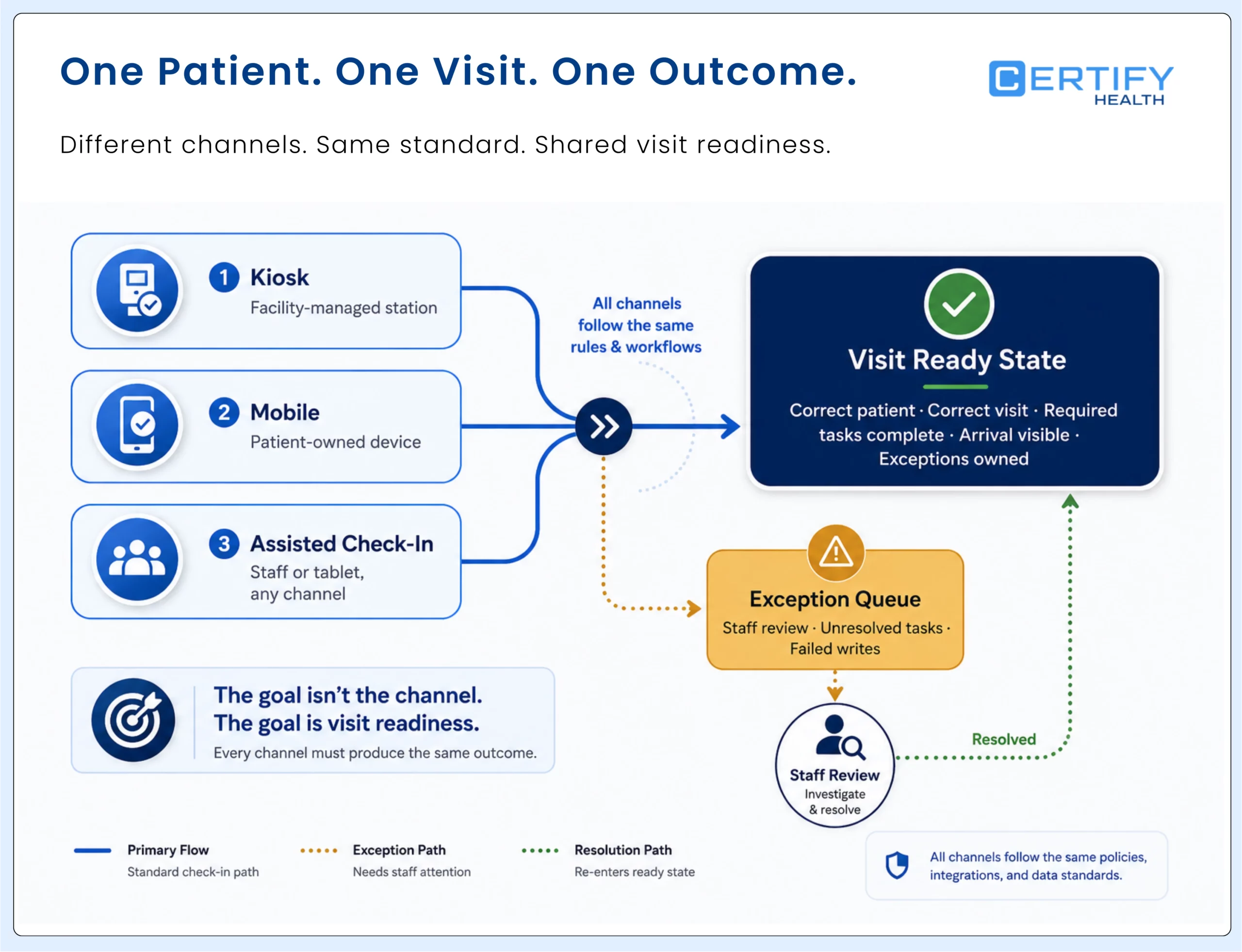
- Keep mobile, kiosk, tablet, and staff-assisted paths coordinated so patients can complete the same required job through an appropriate channel.
- Measure completion, abandonment, assisted completion, exception age, writeback success, data quality, and time to ready status—not device usage alone.
What is a patient check-in kiosk?
A healthcare kiosk does not replace your front desk team. It frees them up to do work that actually requires a human — answering clinical questions, handling exceptions, supporting elderly patients who need extra help.
A patient check-in kiosk is a guided self-service station inside a healthcare facility. It may be a freestanding unit, wall-mounted screen, counter tablet, or another configured device. The hardware presents a patient-facing workflow; the software determines how the patient is identified, which steps appear, what information is captured or confirmed, what reaches connected systems, and how staff see completion or failure.
| Term | What it means | What it does not prove |
|---|---|---|
| Check-in kiosk | Facility-owned self-service kiosk device used during arrival | That every patient must use it or every workflow is supported |
| Patient registration kiosk | Kiosk emphasizing demographics, forms, consents, and visit registration and intake | That submitted information has been reviewed or written back correctly |
| Mobile check-in | Patient uses a personal device before arrival or from the facility | That the same hardware, privacy, or assistance conditions apply |
| Staff-assisted tablet | Staff and patient complete the workflow together on a managed device | That self-service is mandatory or support has failed |
| Hybrid check-in | Coordinated kiosk, mobile, and assisted routes to the same operational outcome | That channels can use inconsistent rules or produce incompatible records |
For a deeper channel decision, use the kiosk vs. mobile patient check-in guide. This page remains the broad workflow owner.
Where the kiosk fits in the patient journey
Your front desk staff are not slacking. They are buried.
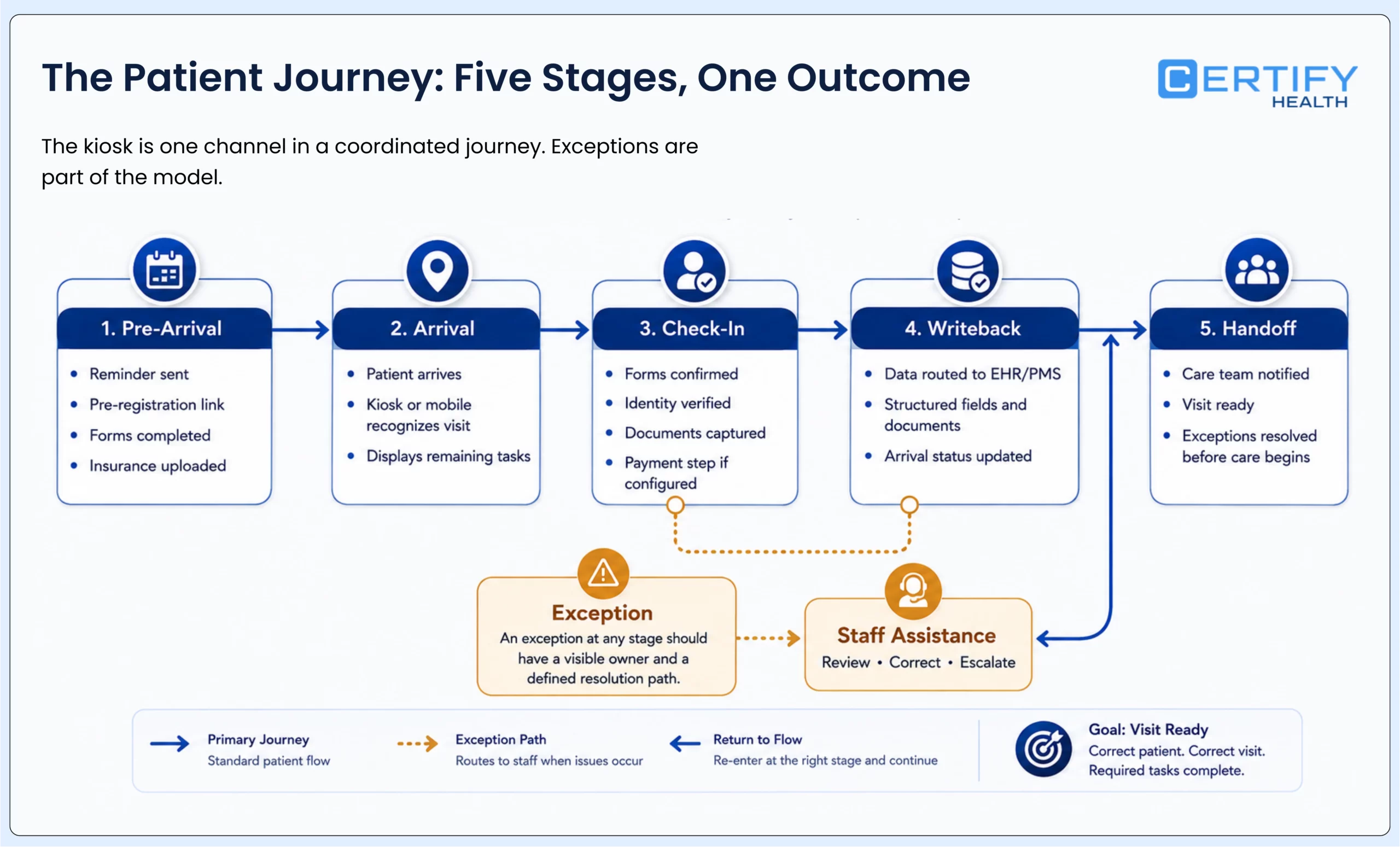
The arrival stage connects work that may have started days earlier with work the care team needs now. A patient may have received a reminder, opened forms, uploaded an insurance card, or paid before the visit. The kiosk should not ask the patient to repeat completed work simply because the channel changed. It should recognize the visit, show what remains, and make any exception visible to the right person.
| Journey moment | Primary job | Kiosk role | Staff visibility needed |
|---|---|---|---|
| Before arrival | Prepare the patient and collect eligible information | Usually none; preserve prior completion for arrival | What is complete, missing, expired, or changed |
| Arrival | Match the patient and visit | Present a configured identity and appointment path | Confidence, duplicates, walk-ins, and failed match |
| Readiness | Complete required administrative steps | Present only the tasks still required for this visit | Completion, review status, and exceptions |
| Handoff | Tell the operating team the patient is ready or needs help | Record arrival or check-in status where supported | Visible state, queue owner, and next action |
| After check-in | Preserve an auditable completion trail | Close the session and protect the next patient's privacy | What happened, when, through which channel, and what remains |
How patient check-in works from arrival to ready status
A check-in workflow should answer six operational questions in order. Each stage can be configured differently by organization and visit type, but the output must remain visible and supportable.
| Stage | Patient experience | Operational control | Exception example |
|---|---|---|---|
| 1. Match | Use a configured identifier, QR code, or assisted route | Confirm the correct person, appointment, location, and visit | No appointment found or possible duplicate |
| 2. Update | Review demographics, contact information, history, ID, or insurance card | Compare with the source of truth and decide what writes automatically or requires review | Changed coverage or conflicting address |
| 3. Complete | Finish assigned digital forms, eConsents, signatures, pre- and post-visit surveys, or payment steps such as text to pay | Apply the correct visit, state, specialty, and patient rules | Wrong form version or signature failure |
| 4. Arrive | Receive confirmation and any next instruction | Update arrival or check-in status in the connected workflow where supported | Writeback failure or incorrect queue |
| 5. Resolve | Ask for or accept staff assistance | Route the issue with context, age, priority, and owner | Accessibility need, payment question, or unmatched record |
| 6. Close | Leave a cleared screen with confirmation | End the session, remove residual data, and preserve the completion trail | Timeout, abandonment, or device restart |
Readiness rule: Submitted is not always complete, complete is not always reviewed, and checked in is not always ready. Use distinct states so staff can see what still requires judgment.
Insurance card capture and insurance eligibility verification are related but different. A current image can support verification work; it does not confirm active coverage, benefits, authorization, network status, or patient responsibility by itself. The same distinction applies to payments: presenting a configured balance and recording a payment attempt do not prove the account is reconciled.
What a practice should measure—not merely assume
A kiosk can redirect repeatable work, but the result depends on what work existed before, what the patient completes, what returns to staff, and whether the information reaches the right destination. Establish a baseline before the pilot and report the denominator beside every result.
| Measure | Definition | Why it matters |
|---|---|---|
| Eligible-arrival adoption | Completed kiosk check-ins divided by arrivals actually offered and eligible for the kiosk path | Prevents a high percentage built from an unclear denominator |
| Successful completion | Sessions that reach the defined end state without unresolved required tasks | Separates device use from visit readiness |
| Assisted completion | Sessions completed after staff takes over or helps | Shows both accessibility and hidden workload |
| Abandonment | Started sessions that do not reach a completed or intentionally transferred state | Reveals confusing, slow, or failing steps |
| Exception volume and age | Unresolved issues by type, owner, and time to resolution | Prevents automation from hiding work |
| Writeback success | Required data or state changes reaching the intended system and field correctly | Tests the operating integration, not the interface claim |
| Data correction and re-entry | Patient or staff corrections, rescanning, rekeying, and repeat questions | Connects check-in to data quality and staff capacity |
| Time to ready status | Time from recognized arrival to the organization's defined ready state | Measures the whole arrival workflow rather than screen speed |
Use the same definitions before and after the change. Segment by location, visit type, new versus returning patient, channel, and assistance need where sample size permits. If a pilot did not measure an outcome, leave it unknown instead of converting a vendor assumption into a promised result.
Privacy and security change when the screen is shared
Paper is not automatically unsafe, and a kiosk is not automatically compliant. HHS permits appropriately limited waiting-room sign-in sheets, which means the relevant question is what information is exposed and how safeguards are applied. A shared digital device introduces its own risks: shoulder surfing, residual screen content, cached data, weak session boundaries, inappropriate staff access, lost peripherals, payment-device handling, and unclear ownership when the workflow fails.
- Position and angle the screen to limit casual viewing; test the actual waiting-room sightlines.
- Clear patient information at the end of the session and after inactivity; define what happens to incomplete entries.
- Separate patient-facing access from staff administration and apply role-based access to reports and exceptions.
- Document data flow, storage, retention, logging, vendor responsibilities, and incident response for the configured deployment.
- Keep payment hardware and workflows within the organization’s approved payment-security and reconciliation process.
- Provide a private and assisted alternative for patients who should not disclose information at a shared screen.
For the broader threat model, read the digital patient intake security risks guide.
Accessibility requires an equivalent path, not a feature checklist
Patients must be able to perceive, reach, understand, operate, and complete the offered workflow—or receive an equivalent assisted service without delay or embarrassment. Test the device, software, physical environment, timing, privacy, and staff handoff together.
| Area | Evaluation questions | Fallback requirement |
|---|---|---|
| Physical access | Can patients approach, reach, and operate every required control from relevant positions? | Equivalent accessible device or immediate staff assistance |
| Vision and presentation | Are text, contrast, focus, instructions, errors, and privacy compatible with real users and the environment? | Accessible presentation or supported assisted route |
| Hearing and communication | Are prompts and confirmations available without relying on one sensory channel? | Text, visual, audio, interpreter, or staff support as appropriate |
| Motor and timing | Can people complete the workflow without precision gestures or timeouts that penalize slower interaction? | Adjustable timing and staff takeover without restart |
| Language and cognition | Are words, sequence, choices, and help understandable to the population served? | Approved language support and human explanation |
| Caregiver and dependent use | Can a caregiver complete an authorized workflow without creating the wrong record or signature? | Staff-owned verification and correction path |
HHS’s Section 504 rule includes a general nondiscrimination requirement when recipients use kiosks in health programs. The rule does not identify one technical kiosk standard that makes every deployment compliant. HHS separately extended web and mobile accessibility compliance dates to May 11, 2027 for recipients with 50 or more employees and May 10, 2028 for recipients with fewer than 15 employees. Those web and mobile dates should not be used to postpone accessible kiosk operations or an equivalent assisted alternative.
Integration must be proven at the field and failure level
The EHR, EMR, or practice management system may remain the system of record. The kiosk is a workflow layer around that environment. A useful integration plan names the source and destination for every important field and state change, then shows what happens when the expected path breaks.
| Object or event | Read question | Write question | Failure question |
|---|---|---|---|
| Appointment | Which schedule, location, provider, and status can the kiosk read? | Can it record arrival or check-in, and where? | How are missing, moved, duplicate, or walk-in visits handled? |
| Demographics | Which existing values appear and which are masked? | Which changes write automatically or require staff review? | How are conflicts, invalid formats, and partial updates surfaced? |
| Forms and consents | For digital forms and eConsent: How are the correct versions assigned? | Where do completed documents, signatures, and metadata land? | What happens when a form is incomplete, expired, or stored in the wrong place? |
| Insurance and ID | For insurance card capture and photo ID verification: Which existing images or fields can be shown? | Where do new images and values go? | How are poor images, changed coverage, and duplicates resolved? |
| Payment | Which approved amount and account context can be presented? | Where do attempt, success, receipt, refund, and reconciliation data go? | Who owns decline, mismatch, duplicate, or uncertain balance? |
| Status and exceptions | Which queues and states are visible to the kiosk? | Can the workflow create an owned exception and completion trail? | What alerts staff when the kiosk or integration fails silently? |
During acceptance testing, force network loss, device restart, failed patient match, duplicate record, abandoned session, payment decline, invalid scan, writeback error, and staff takeover. Do not approve the rollout until the organization can see the problem, preserve the right data, protect the patient, and recover without improvisation.
Choose the next guide for the decision you are making
| Decision | Use this owner | What it should answer |
|---|---|---|
| Kiosk, mobile, or hybrid? | Kiosk vs. mobile patient check-in | Channel fit, patient context, privacy, hardware, fallback, and workflow continuity |
| How do we choose and deploy hardware? | Healthcare self-service kiosk implementation guide | Placement, peripherals, connectivity, testing, training, downtime, and rollout |
| How do we standardize across dental locations? | DSO dental kiosk rollout guide | Enterprise template governance, local overrides, PMS writeback, adoption, and exceptions |
| Which software should we shortlist? | Patient check-in software comparison | Transparent criteria, deployment fit, evidence, limitations, and current vendor facts |
| What security risks need a deeper review? | Digital intake security risks | Threats, safeguards, ownership, incident response, and shared-device controls |
Compare kiosk and mobile check-in, plan the self-service kiosk implementation, or review the DSO dental kiosk rollout guide when that is the actual buyer job.
Where CERTIFY Health fits
CERTIFY Health can support patient check-in as a workflow layer around an organization’s existing EHR, EMR, or practice management environment. Depending on the configured deployment, the experience may connect pre-registration, digital forms and eConsent, insurance-card and photo-ID capture, patient identification, self-service kiosk or mobile check-in arrival, configured payment steps, patient communications, reporting, and staff exception workflows.
- Present the correct remaining steps for the patient and visit rather than forcing every arrival through one fixed flow.
- Support configured identity methods, including FaceCheck as a biometric patient-identification layer where deployed, with appropriate alternatives and governance.
- Capture or confirm information and route completion, review, or exceptions according to the configured workflow.
- Record arrival or check-in status and support reporting or workflow visibility where enabled.
- Coordinate kiosk, mobile, tablet, and staff-assisted paths through multi-channel intake without claiming that every module or integration is included in every deployment.
The exact systems, fields, read and write directions, timing, payment functions, devices, identity methods, and reporting outputs must be confirmed for the specific environment. CERTIFY should not be described as automatically replacing the system of record.
Frequently asked questions
What can a patient check-in kiosk do?
Does a patient check-in kiosk replace the front desk?
No. Self-service can absorb repeatable prompts and data-entry steps, while staff still handle ambiguity, accessibility support, anxious or ill patients, caregiver situations, complex coverage or payment questions, exceptions, and work that requires judgment.
Is kiosk check-in faster than manual check-in?
Can kiosks verify insurance?
Are patient check-in kiosks HIPAA compliant?
Should every patient be required to use the kiosk?
A mandatory digital-only route can block patients who need language, accessibility, caregiver, privacy, or technical assistance. Keep an equivalent assisted path and decide eligibility based on the workflow, not stereotypes about age or comfort with technology.
What should we test before rollout?
Test patient matching, new and returning visits, changed information, forms and signatures, cards and images, configured payment paths, writeback, abandonment, downtime, device restart, privacy, accessibility, staff takeover, exception ownership, and session clearing.
The kiosk is only as strong as the workflow around it
A patient check-in kiosk is not successful because the screen is online or the line looks shorter. It succeeds when patients can complete the right work through an appropriate channel, staff can see what happened, exceptions have owners, information reaches the intended system, privacy and accessibility are built into the service, and the organization can measure readiness without hiding rework.
Start by mapping one representative arrival path from appointment match to ready status. Count every manual touch, repeat question, exception, correction, and failed handoff. That evidence will tell you whether the next decision is channel design, integration repair, hardware selection, content governance, staff training, or software evaluation.