Table of Contents
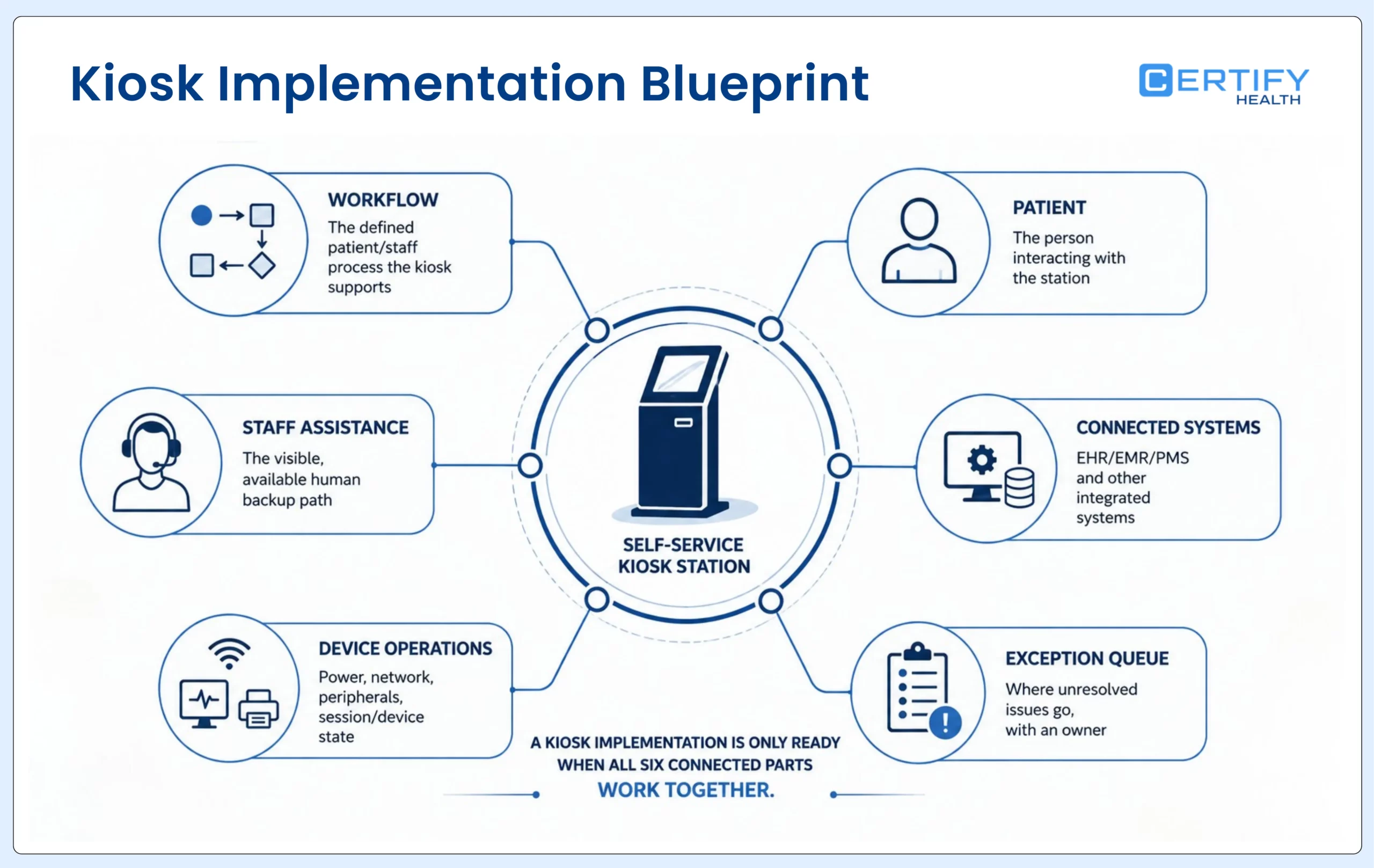
A healthcare self-service kiosk can be installed, connected, and powered on without being ready for patient use. The real implementation test is whether the kiosk supports the right arrival workflow, protects the patient, exchanges the right information, surfaces failures, and hands control to staff without making anyone start over.
Key takeaways
- Define the patient and staff workflow before comparing screens, stands, scanners, printers, cameras, or payment devices.
- Treat accessibility, privacy, assisted service, session clearing, downtime, and exception ownership as acceptance criteria—not post-launch enhancements.
- Prove integration field by field and state by state. A vendor logo or connected interface does not establish reliable read, write, reconciliation, or recovery behavior.
- Pilot a representative workflow and location, establish a baseline, and scale only when completion, assistance, writeback, and recovery meet agreed thresholds.
- Build total cost of ownership from the actual deployment: hardware, software, integration, configuration, connectivity, security, support, training, content governance, replacement, and internal labor.
Begin with the workflow, not the kiosk
Start with outcomes, not features: define the observable operating state the kiosk must help create. For patient check-in, that may mean the correct patient and visit are matched, required information and documents are complete, arrival is visible, unresolved work has an owner, and the session closes safely. Do not begin with a list of components and then invent a workflow around the purchase.
| Decision | Evidence to gather | Approval question |
|---|---|---|
| Workflow | Current steps, repeats, handoffs, exceptions, completion states, and staff queues | What exact patient and staff job will change? |
| Population and channel | Visit types, languages, assistance needs, caregiver use, device access, privacy, and arrival patterns | Who should be offered kiosk, mobile, tablet, or assisted service? |
| Environment | Space, traffic, lighting, acoustics, reach, power, network, cleaning, supervision, and evacuation routes | Can patients use the station safely and privately in the real location? |
| Information exchange | Source, destination, field, direction, timing, validation, version, and failure behavior | Can every required read and write be demonstrated? |
| Operations | Monitoring, support, replacement, updates, incidents, downtime, and local ownership | Who acts when the kiosk is slow, broken, abandoned, or wrong? |
| Scale | Pilot baseline, adoption, successful completion, assisted completion, exception age, writeback, and feedback | Is there enough evidence to repeat the deployment? |
If the unresolved question is whether a kiosk is the right channel at all, use the kiosk vs. mobile patient check-in guide. If the team needs the broad category and arrival workflow, use the patient check-in kiosk guide. This page owns selection, acceptance testing, pilot, support, and rollout execution.
Write requirements as patient and staff jobs
If the unresolved question is whether a kiosk is the right channel at all, use the kiosk vs. mobile patient check-in guide. If the team needs the broad category and arrival workflow, use the patient check-in kiosk guide. This page owns selection, acceptance testing, pilot, support, and rollout execution.
Write requirements as patient and staff jobs
Describe each requirement as a real scenario with a start state, user, data condition, expected result, visible exception, and recovery path. A returning patient with completed pre-registration should not be tested like a walk-in, a new patient, a caregiver, a patient with changed insurance, or someone who cannot use the kiosk independently.
| Workflow area | Requirement example | Evidence required |
|---|---|---|
| Appointment and identity | Match the correct patient, appointment, provider, location, and visit type; preserve an assisted route | Demonstrate normal, no-match, duplicate, walk-in, caregiver, and alternative-identification cases |
| Demographics and documents | Show current values where appropriate, capture changes, scan cards or IDs, and identify review needs | Confirm image quality, validation, masking, destination, duplicate handling, and correction path |
| Forms and consent | Assign the correct current version by visit and patient context and retain signature evidence | Trace version, conditional logic, completion, signature, metadata, chart destination, and expired-form behavior |
| Eligibility and payment | Present only configured information and create an owned exception when a response or payment fails | Separate card capture, coverage response, benefit interpretation, balance presentation, payment attempt, receipt, and reconciliation |
| Arrival and handoff | Record arrival or check-in status and make readiness or unresolved work visible | Verify staff queue, timestamp, owner, notification, correction, and downstream state |
| Session close | Clear patient information after completion, inactivity, abandonment, help, or restart | Test each ending and confirm the next user cannot recover the prior session |
Scope rule: A kiosk may support forms, identification, cards, payments, arrival status, reporting, and other steps when those capabilities are configured. Confirm the exact modules, devices, systems, fields, and workflows for the proposed deployment.
Choose hardware for the real environment
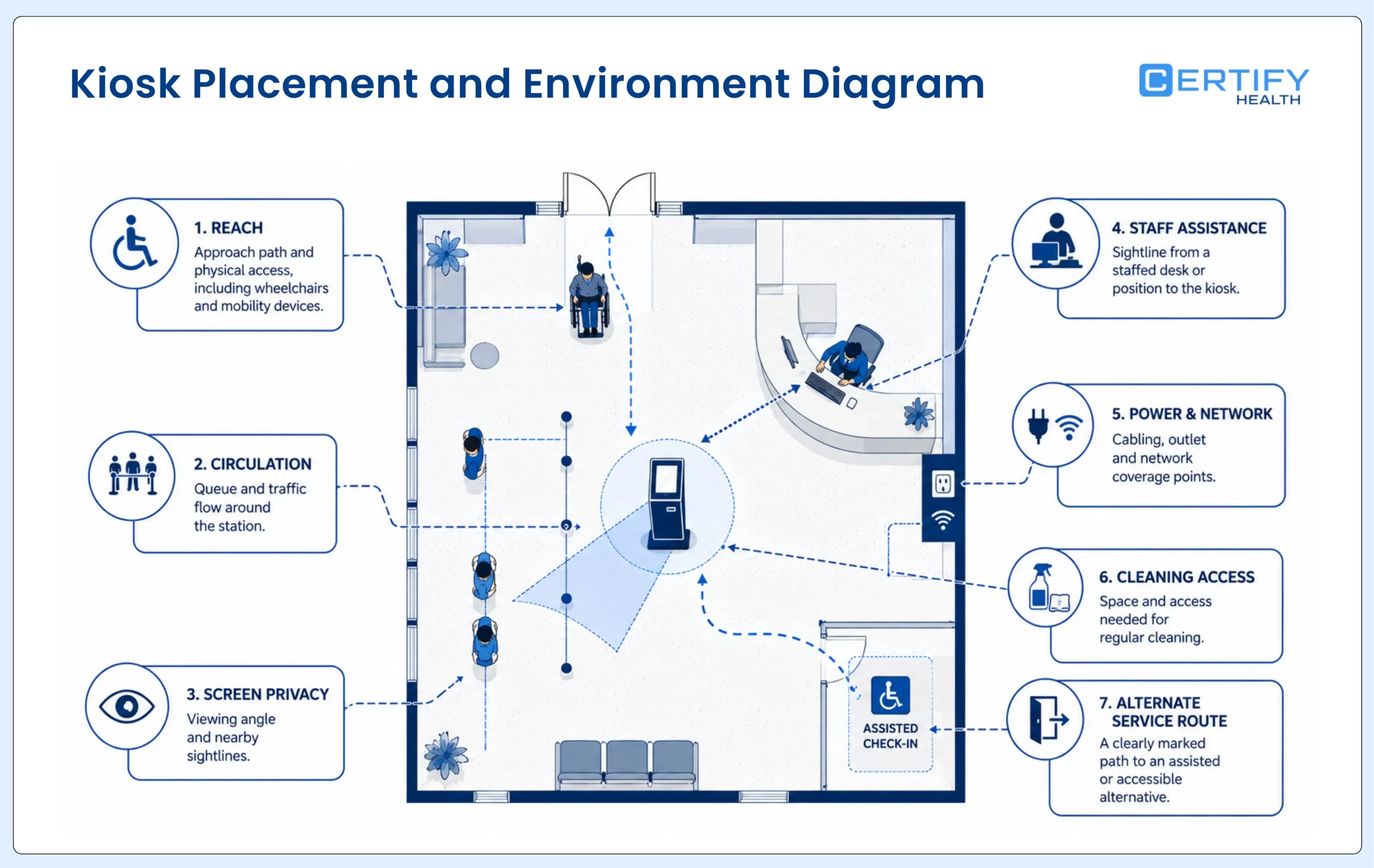
Walk the intended location at opening, peak volume, and close. Observe queues, wheelchairs and mobility devices, caregivers, children, bags, lighting, glare, noise, staff sightlines, power, network coverage, cleaning, and where a patient would ask for help. A kiosk that fits a floor plan can still fail the service environment.
| Component | Choose it when | Test before approval | Fallback |
|---|---|---|---|
| Freestanding station | A visible, stable arrival point is needed and the floor can support safe approach and circulation | Reach, viewing angle, stability, cable protection, traffic, relocation, and cleaning | Assisted desk or another accessible station |
| Wall-mounted or countertop device | Space is constrained and placement can still protect access and privacy | Mount height, approach, glare, reach, staff visibility, theft, and service access | Managed tablet or staff-assisted route |
| Card or ID scanner | The workflow genuinely needs current images or machine-readable data | Front/back capture, glare, worn cards, wrong document, retention, destination, and rescan | Manual verification or secure staff capture |
| Payment device | Approved balances or copays are presented at check-in | Amount source, card-present flow, decline, receipt, refund, reconciliation, tampering, and support | Approved staff or remote payment route |
| Camera or biometric component | A governed identification workflow is approved for the population and setting | Consent, notice, matching, false match/nonmatch, retention, alternatives, and staff review | Non-biometric identification and assisted verification |
| Printer | A paper receipt, label, or instruction is operationally required | Paper-out, jams, accessibility, abandoned output, PHI exposure, and supplies | Digital or staff-issued output |
Test privacy, accessibility, and assistance as one service
Accessibility can’t be an afterthought.
A patient must be able to approach, perceive, understand, operate, and complete the offered workflow—or receive an equivalent assisted service without delay, stigma, or loss of privacy. Test physical placement, software, content, timing, audio, language, caregiver use, and staff takeover together.
| Control area | Implementation test | Operational safeguard |
|---|---|---|
| Physical and sensory access | Can relevant users reach controls, see or hear prompts, understand errors, and complete without precision gestures or unsafe posture? | Equivalent accessible device or immediate staff assistance |
| Screen and session privacy | Can nearby people view information? What appears after inactivity, abandonment, help, restart, or completion? | Positioning, privacy filters where appropriate, masking, clearing, and supervised recovery |
| Language and cognition | Are instructions, choices, timeouts, confirmations, and help understandable for the served population? | Approved translations, plain language, adjustable timing, and human explanation |
| Caregiver and dependent use | Can an authorized person help without selecting the wrong patient, visit, record, form, or signature? | Relationship-aware workflow and staff verification |
| Authentication and administration | Are patient-facing functions separated from device, support, and administrative access? | Role-based access, managed credentials, logging, and controlled support sessions |
| Data flow and retention | Where is data transmitted, processed, stored, cached, logged, backed up, and deleted? | Documented responsibilities, safeguards, retention, monitoring, and incident response |
HHS’s Section 504 rule includes a general nondiscrimination requirement when covered recipients use kiosks in health programs. That is not the same as one technical kiosk specification that guarantees compliance. WCAG 2.2 is useful for web-content accessibility criteria, but a physical kiosk deployment also requires evaluation of the device, environment, workflow, assistance, and applicable law.
For a deeper review of intake data flow and vendor controls, use the digital patient intake security risk guide.
Prove integration at the field and failure level
Build an interface inventory before the pilot. For each object or event, name the source, destination, direction, trigger, timing, validation, transformation, conflict rule, retry behavior, alert, owner, and audit evidence. Then test both the expected path and the failures most likely to occur during a busy arrival period.
| Object or event | Read test | Write test | Failure test |
|---|---|---|---|
| Appointment | Correct schedule, location, provider, visit, status, and changes | Arrival or check-in status reaches the intended field and queue | Moved, cancelled, duplicate, walk-in, wrong location, or unavailable schedule |
| Patient and demographics | Correct person and appropriately masked current values | Approved changes reach the intended destination or review queue | Duplicate, invalid format, conflicting value, partial update, or incorrect patient match |
| Forms and consent | Correct assignment and version for the visit | Document, signature, timestamp, and metadata land correctly | Incomplete, expired, wrong version, abandoned signature, or wrong chart location |
| Cards and images | Existing image or field appears only when appropriate | New image and extracted values reach the approved destination | Poor image, wrong side, changed coverage, duplicate, OCR error, or unsupported format |
| Payment | Approved amount and account context are correct | Attempt, success, receipt, refund, and reconciliation data are recorded | Decline, timeout, duplicate, uncertain result, wrong balance, or device failure |
| Status and exceptions | Staff can see progress, age, and ownership | The workflow creates a visible, actionable completion or exception state | Silent failure, stale state, missing notification, or unresolved retry |
Acceptance rule: Force network loss, device restart, abandoned session, failed match, duplicate record, invalid scan, payment decline, writeback error, and staff takeover. Do not approve rollout until the organization can see the problem, preserve the right information, protect the patient, and recover without improvisation.
Design support before the first patient uses the kiosk
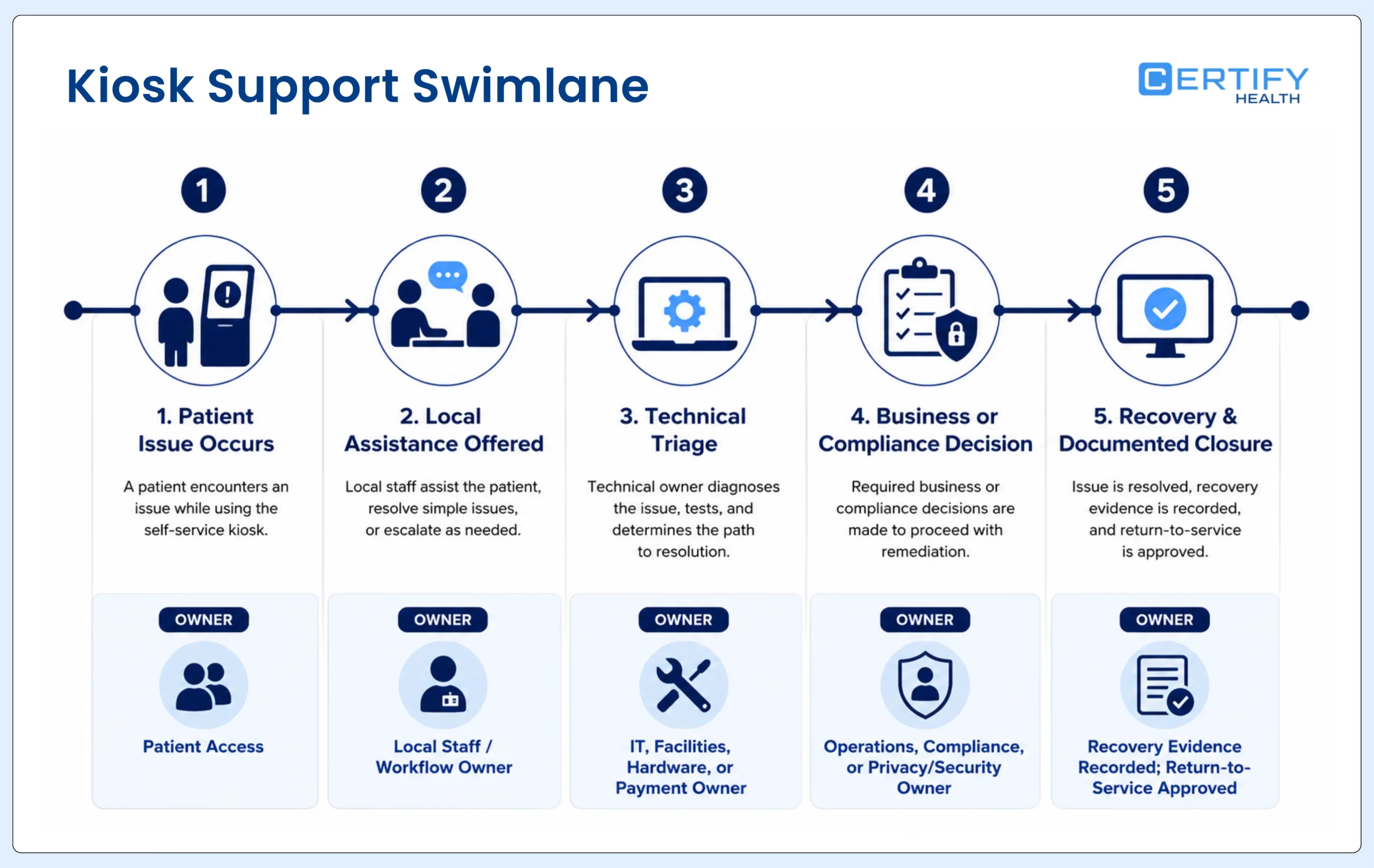
Create one operating runbook that covers the device, enclosure, network, power, peripherals, software, identity workflow, connected systems, content, payment path, security, and local patient assistance. A single symptom—such as a frozen screen—may have several owners. The runbook must tell staff what to do before they know the root cause.
| Event | Immediate local action | Technical or business owner | Recovery evidence |
|---|---|---|---|
| Patient cannot proceed | Offer assistance and an equivalent alternate route; preserve completed work where possible | Patient access plus workflow owner | Patient completes without restarting unnecessarily |
| Device or peripheral failure | Remove the station from service safely and redirect arrivals | IT, facilities, hardware, or payment owner | Health check, test transaction or scan, and return-to-service approval |
| Network or integration outage | Use the approved downtime path; avoid uncertain duplicate submissions | IT/integration owner and system owner | Backlog reconciled, retries reviewed, states corrected, and users notified |
| Content or form error | Stop the affected workflow or use an approved alternative | Operations, compliance, and content owner | Correct version deployed, impacted sessions identified, and rollback recorded |
| Privacy or security concern | Protect the patient, isolate the device or account as directed, and follow incident procedure | Privacy/security and incident-response owner | Containment, investigation, remediation, and documented release |
| Update or configuration change | Use the change window, test script, and rollback plan | Release owner plus local champion | Version, test results, approval, deployment, monitoring, and rollback evidence |
Build total cost from the deployment you will operate
| Cost group | Include | Common omission |
|---|---|---|
| Hardware and site | Device, enclosure, mount, delivery, installation, power, cabling, network, privacy controls, cleaning, spare parts, and removal | Facilities work, damaged units, relocation, and end-of-life disposal |
| Peripherals and transactions | Scanners, camera, payment terminal, printer, supplies, transaction fees, certifications, and replacements | Separate support contracts and consumables |
| Software and integration | Licensing, environments, configuration, interfaces, mappings, testing, monitoring, updates, and change requests | New form, payer, location, version, or system changes after launch |
| Security and compliance | Assessment, contracts, identity and access, logging, device management, vulnerability work, incident response, and audits | Internal privacy, legal, and security labor |
| Implementation and adoption | Workflow mapping, content, translation, accessibility testing, training, pilot support, signage, feedback, and local champions | Backfill, retraining, and support during the learning period |
| Operations and downtime | Help desk, on-site assistance, replacement, connectivity, monitoring, escalation, recovery, and reconciliation | Patient and staff time lost to unresolved exceptions |
Business-case rule: Value redirected staff capacity only when the organization can show which manual tasks changed and where the recovered time went. Do not convert device usage into labor savings, collections, denial prevention, or patient satisfaction without direct measurement.
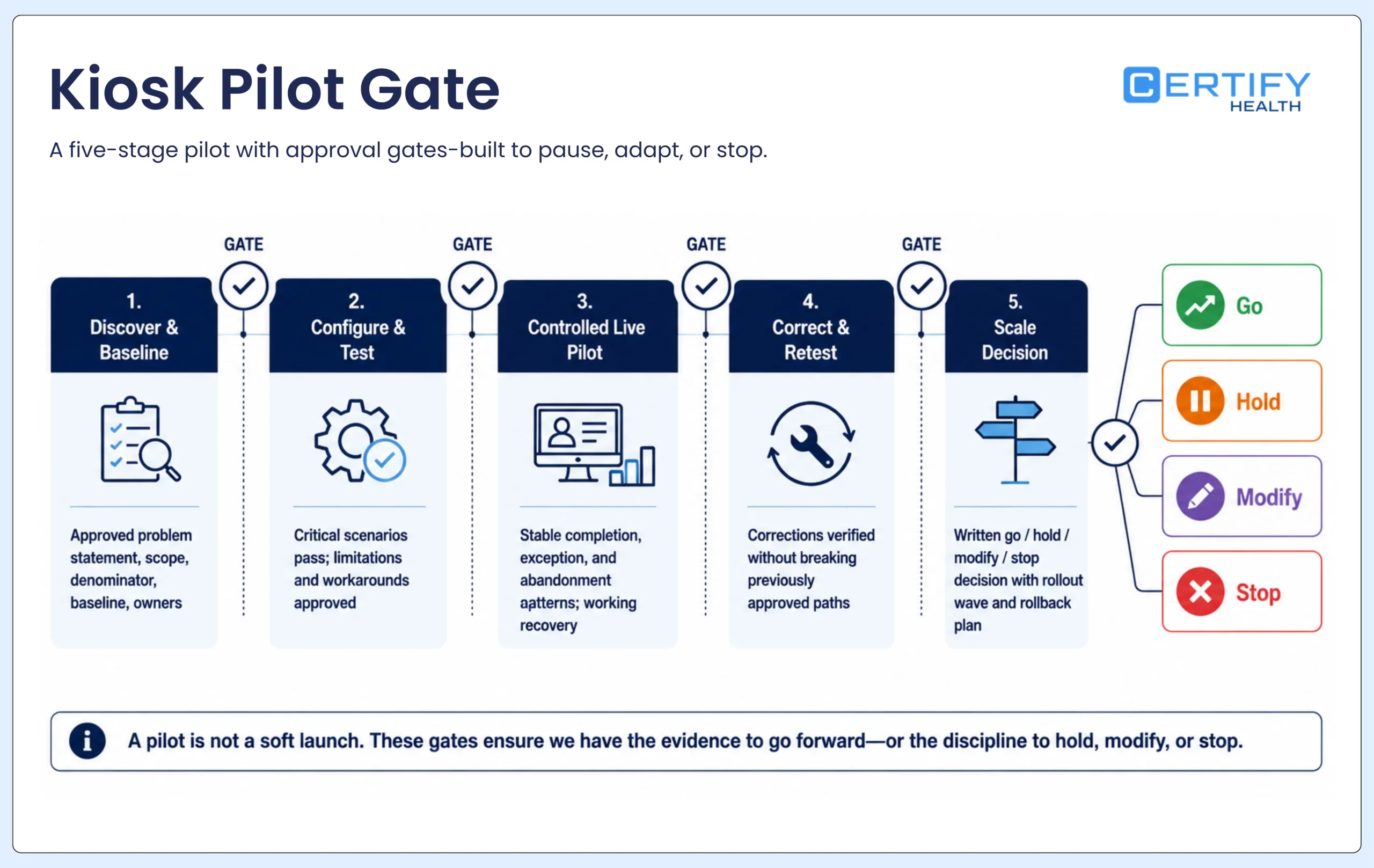
Run a pilot that can stop the rollout
Pilot 1-2 digital self-service kiosk units.
Choose a location and workflow that are representative enough to expose real conditions but contained enough to support closely. Do not choose only the quietest office, easiest visit type, strongest network, or most enthusiastic team. Document the baseline and define what would pause or reverse the pilot before it begins.
| Phase | Work | Exit evidence |
|---|---|---|
| 1. Discover and baseline | Map current arrival steps, manual touches, repeat questions, corrections, assistance, exceptions, time to ready status, and patient/staff feedback | Approved problem statement, scope, denominator, baseline, owners, and excluded workflows |
| 2. Configure and test | Build content and rules; validate accessibility, privacy, security, devices, peripherals, read/write behavior, errors, downtime, and staff takeover | All critical scenarios pass; known limitations and workarounds are approved |
| 3. Controlled live pilot | Offer the kiosk to defined eligible arrivals with visible support; monitor daily and review failed or assisted sessions | Stable completion, acceptable exception and abandonment patterns, working recovery, and no unresolved critical risk |
| 4. Correct and retest | Repair content, workflow, integration, placement, device, training, or ownership issues and rerun affected scenarios | Corrections verified without breaking previously approved paths |
| 5. Scale decision | Compare the pilot with baseline and evaluate location differences, support capacity, cost, change control, and readiness | Written go, hold, modify, or stop decision with rollout wave and rollback plan |
Measure workflow readiness, not device activity
| Measure | Definition | Segment or safeguard |
|---|---|---|
| Eligible-arrival adoption | Successful kiosk sessions divided by arrivals actually offered and eligible for the kiosk path | Report eligibility rules and location; do not divide by an unclear total |
| Successful completion | Sessions reaching the defined end state with no unresolved required step | Separate submitted, complete, reviewed, checked in, and ready states |
| Assisted completion | Sessions completed after staff help or takeover | Measure as a service and workload signal, not automatically as failure |
| Abandonment | Started sessions that end without completion or intentional transfer | Review screen, step, duration, device, visit type, and reason where known |
| Exception volume and age | Issues by type, owner, priority, and time to resolution | Prevent automation from hiding a growing staff queue |
| Writeback and reconciliation | Required data and state changes reaching the intended system correctly and resolving uncertain outcomes | Audit samples and all failures; do not rely only on interface uptime |
| Data correction and repeat work | Rescans, rekeying, duplicate questions, changed values, wrong records, and staff corrections | Connect kiosk use to operational data quality |
| Time to ready status | Time from recognized arrival to the organization's defined ready state | Report distribution and exception paths, not only an average screen time |
Scale gate: Do not scale because the kiosk was used. Scale when the organization can show that eligible patients complete the intended workflow, people who need help receive it, required information reaches the right destination, failures are visible and recoverable, staff can operate the service, and the total cost remains acceptable.
Where CERTIFY Health fits
Where CERTIFY Health fits
CERTIFY Health can support a healthcare self-service kiosk as one patient-access channel around an organization’s existing EHR, EMR, or practice management environment. Depending on the configured deployment, the workflow may connect patient identification, appointment matching, demographics, forms and eConsent, insurance-card and photo-ID capture, configured eligibility or payment steps, arrival status, reporting, and staff exception handling.
The exact devices, peripherals, systems, fields, directions, timing, identity methods, payment functions, reporting, support, and recovery behavior must be confirmed for the proposed environment. CERTIFY should not be described as automatically replacing the system of record or including every capability in every deployment.
- Map the current patient and staff workflow before the demonstration.
- Bring representative visit, exception, accessibility, caregiver, payment, and downtime scenarios.
- Ask the team to show required read, write, visibility, and recovery behavior in the target environment.
- Request a pilot plan with measurable entry criteria, support ownership, exit criteria, and rollback.
Frequently asked questions
What should we decide before choosing kiosk hardware?
Define the patient and staff job, eligible users, required completion state, information sources and destinations, privacy and accessibility requirements, physical environment, peripherals, assistance, downtime, support, measurement, and scale gate. Hardware should be selected against those requirements.
Does a healthcare kiosk need every possible peripheral?
No. Add a scanner, printer, camera, biometric component, payment device, or other peripheral only when a validated workflow requires it and the organization can operate, secure, support, replace, and recover that component.
Is WCAG compliance enough for an accessible kiosk?
No single label is enough. WCAG 2.2 can inform the accessibility of web content, but a healthcare kiosk also requires evaluation of the physical device, placement, reach, sensory presentation, timing, language, caregiver use, privacy, staff assistance, equivalent service, and applicable legal requirements.
How long should a kiosk pilot run?
What should stop a kiosk rollout?
The implementation decision
A healthcare self-service kiosk is not ready because the hardware arrived or the happy path worked once. It is ready when patients can complete the intended job through an appropriate channel, staff can see and resolve exceptions, information moves correctly, privacy and accessibility are built into the service, downtime has a safe alternative, and the organization can measure whether the change improves readiness without hiding work.
Review Your Kiosk Implementation Requirements With CERTIFY Health