Table of Contents
The right digital patient intake software is not the product with the longest feature list. It is the product your team can prove will assign the correct work, collect usable information through accessible channels, move each item to the intended destination, surface exceptions, and support the visit without creating another disconnected system.
As an independent physician practice owner, front desk manager, or revenue cycle manager, you’ve probably juggled a number of tasks at once—intake forms, invoicing, scheduling, and all the vendor relationships that come with them.
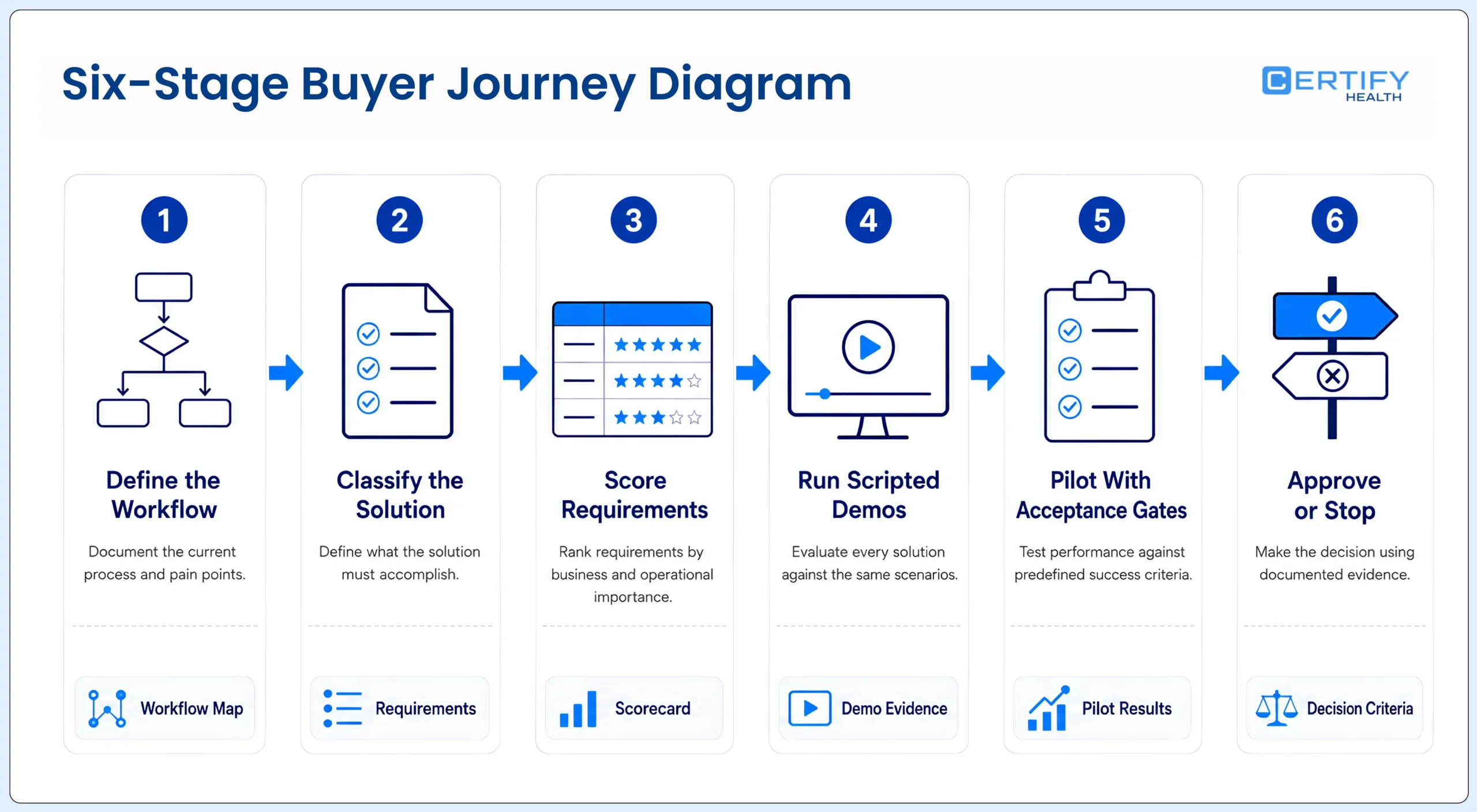
This guide turns that workload into a buying method. It shows how to define the problem before a demo, decide whether you need a focused tool or a broader workflow layer, test EHR or practice-management integration, review accessibility and security responsibilities, compare implementation burden and total cost, and run a pilot with measurable acceptance gates. For the process itself, start with the patient intake guide. For the form library, field map, and paper-to-digital procedure, use the patient intake forms guide.
One-sentence buying rule: Do not buy a feature promise that cannot be demonstrated in your workflow, with your roles, representative patient scenarios, intended host system, failure conditions, and agreed success measure.
Did You Know?
Digital Tools and Patient Behavior: 53% of patients would consider switching medical providers if they had access to touchless patient intake and registration tools.

First decide what kind of solution you are buying
A practice can solve an intake problem in several ways. The safest starting point is not ‘all in one’ versus ‘best of breed.’ It is the operating boundary: which system remains the source of truth, which workflow is failing, how many channels and locations must be supported, and what your team is prepared to implement and govern.
| Solution model | May fit when | Primary risk | Proof to request |
|---|---|---|---|
| EHR or PMS native intake | The native capability covers the required forms, channels, rules, and staff view | Limited workflow depth or patient experience; upgrades tied to the core vendor | Live demonstration in the current version and configuration, including exception handling |
| Focused point solution | One narrow problem is urgent and integration needs are limited and explicit | Another login, contract, handoff, data store, or support path | Exact read, write, document, status, security, support, and exit behavior |
| Patient-access workflow layer | The organization needs coordinated intake across channels while retaining the EHR, EMR, or PMS | Configuration and integration effort may be underestimated | End-to-end scenario in the target host environment, including failed and assisted routes |
| Broader patient-experience suite | Intake must coordinate with scheduling, communications, eligibility, or payments | Bundled breadth may exceed actual use; module and data dependencies can increase lock-in | Module-by-module scope, commercial terms, shared-data model, workflow ownership, and support model |
| Core EHR or PMS replacement | The system of record itself is no longer fit for purpose and the organization accepts migration risk | Large operational, data-conversion, training, and continuity burden | Separate formal selection and migration program; do not treat an intake purchase as a proxy decision |
If the buying question is really whether the EHR or PMS should be replaced, stop the intake procurement and run that decision separately. A workflow layer can connect patient access around the existing system of record; it should not be assumed to replace it. Use the healthcare interoperability evaluation guide to define the broader integration boundary.
Map the current workflow before you watch a demo
Time is one of the most precious resources for a physician’s office.
That does not make every minute an avoidable cost, and it does not prove that software will remove it. Observe the work first. Follow representative new, returning, specialty, minor, representative, limited-English-proficiency, disability, walk-in, telehealth, and changed-insurance scenarios from appointment creation through staff review and visit readiness.
| Workflow stage | Baseline to record | Failure question | Named owner |
|---|---|---|---|
| Assignment | Eligible appointments; correct packet rate; manual sends | Who receives the wrong or missing packet, and why? | Scheduling or patient access |
| Patient access | Delivery, open, authentication, abandonment, and assistance by channel | Who cannot enter or resume the workflow? | Patient access and accessibility |
| Collection | Completion, missing fields, uploads, signatures, and corrections | Which items are present but unusable or unreviewed? | Form and clinical owners |
| Matching and routing | Matches, duplicates, field writes, document posts, and exceptions | Where does information land, and what happens when it cannot? | HIM and integration |
| Staff review | Touch time, queues, escalations, and unresolved items | Does automation remove work or merely move it? | Front desk and operations |
| Visit readiness | Ready by cutoff, late completion, delayed visit, and downstream rework | Which unresolved item actually changes the visit? | Practice or site manager |
Build requirements around jobs, not feature labels
A useful requirement is specific enough to test. ‘Custom forms’ is a label. ‘Assign the approved Spanish-language consent version to a returning patient at Location B for Procedure X, capture representative authority when applicable, write the signed document to the correct chart, and place failures in a staff queue’ is a requirement.
| Requirement family | Questions the team must answer | Owner | Minimum evidence |
|---|---|---|---|
| Workflow assignment | What triggers a packet? Which appointment, patient, provider, specialty, location, language, age, payer, or status rules apply? | Operations and form owners | Configured scenario and rules export |
| Channels and assistance | Can the same governed work be completed remotely, on mobile, portal, tablet, kiosk, staff-assisted, representative, or paper routes where required? | Patient access and accessibility | Representative-device and assisted-route test |
| Identity and matching | How are the person, appointment, representative, and target record matched? How are duplicates and corrections handled? | HIM, privacy, and IT | Positive and negative matching scenarios |
| Forms and documents | Who builds, approves, versions, translates, activates, expires, and audits fields, notices, acknowledgments, consents, and authorizations? | Clinical, legal, privacy, and operations | Form-library and version-control demonstration |
| Insurance and images | What is collected, extracted, validated, reviewed, retained, and sent downstream? (Insurance Card Capture) What remains manual? | Patient access and eligibility | Card-change and low-quality-image scenarios |
| Staff work and status | Can staff see sent, opened, in progress, submitted, reviewed, accepted, rejected, expired, and failed states and take action? | Front desk and operations | Role-based queue and escalation demonstration |
| Integration | Which data, documents, images, payments, and statuses are read or written, in which direction, when, and with what retry and reconciliation? | Integration and host-system owner | Field-level interface specification and acceptance results |
| Reporting | Can the team segment completion, assistance, failure, touch time, writeback, and readiness by workflow, location, channel, visit, and patient context? | Operations and analytics | Metric definitions, sample report, and export test |
Treat integration as a test, not a logo
A vendor logo wall tells you that some connection has existed. It does not tell you which product version, fields, documents, locations, interface method, direction, latency, or failure workflow applies to you. Ask for an interface inventory and make the vendor prove the exact workflow in a representative environment.
| Object or event | Read test | Write test | Failure and reconciliation test |
|---|---|---|---|
| Appointment and visit context | Correct visit, provider, location, type, and status trigger the intended packet | Only approved status or task changes return | Canceled, rescheduled, duplicate, future, and walk-in scenarios |
| Patient and representative | Correct record and approved demographics prefill | Approved updates reach the correct record with provenance | Similar name, changed name, minor, proxy, duplicate, and mismatch scenarios |
| Fields | Current values and validity are visible where appropriate | Each approved field maps to its exact destination | Invalid value, conflict, locked field, partial write, correction, and rollback |
| Documents and signatures | Correct version and context are assigned | Signed artifact lands in the correct document class with signer and timestamp | Expired version, refusal, missing signature, representative authority, and failed post |
| Images and cards | Existing current image is not requested without reason | Image and any extracted data reach approved destinations | Unreadable image, wrong side, changed card, OCR uncertainty, and manual review |
| Payment and status | Approved amount and context are shown | Transaction and status post to the intended workflow when in scope | Decline, duplicate, reversal, processor outage, posting failure, and reconciliation |
| Completion and exceptions | Staff can see the current state | Final status or task is written only after defined conditions | Submitted but unreviewed, late, reopened, abandoned, integration-down, and retry exhausted |
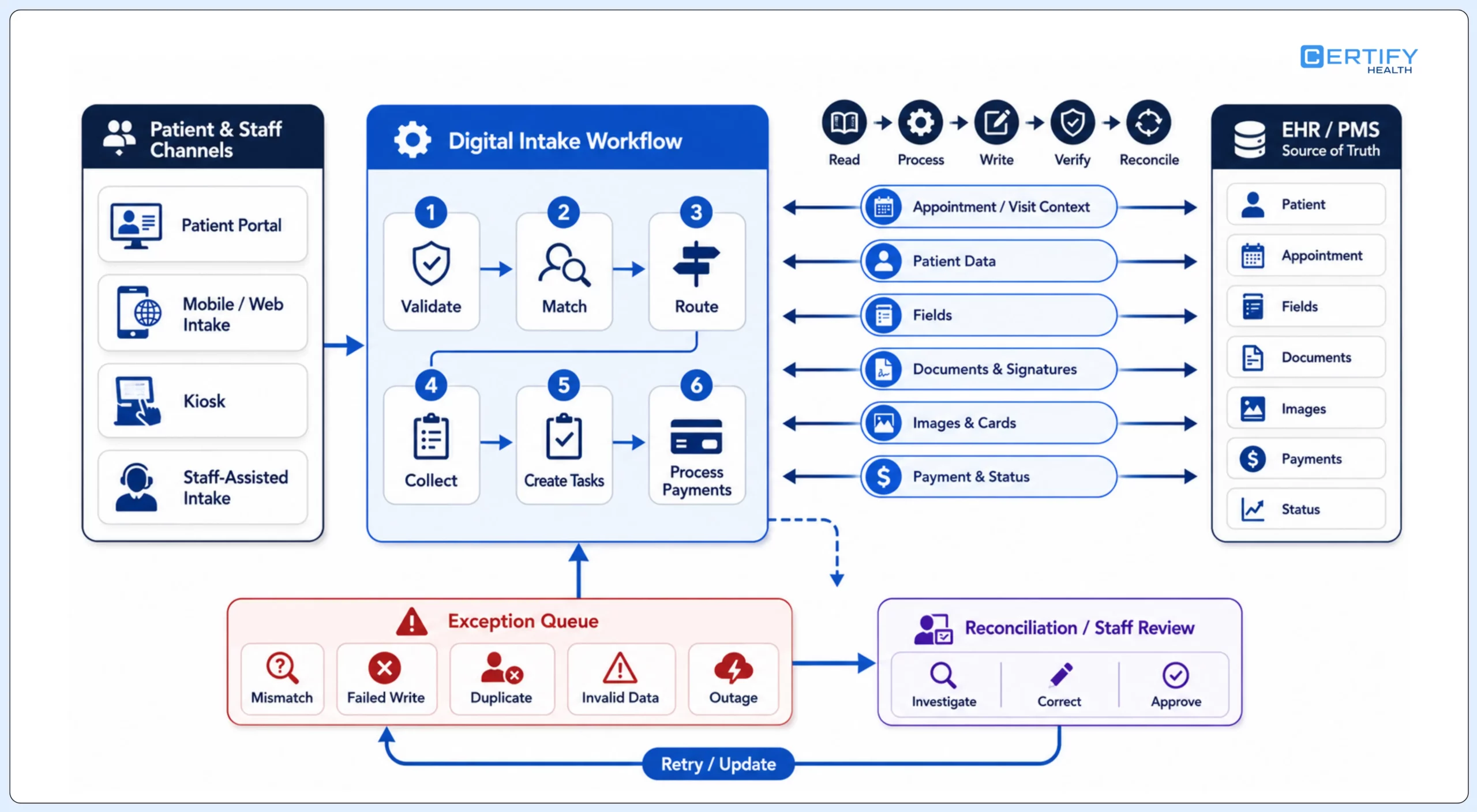
Acceptance artifact: For every integration claim, record the host-system name and version, interface method, object, field or document, direction, source of truth, trigger, expected latency, validation, retry, error visibility, reconciliation owner, and test result.
Test the patient route with people and conditions that can break it
| Scenario | What to test | Failure signal | Required recovery |
|---|---|---|---|
| Keyboard and screen reader | Labels, instructions, focus order, required status, errors, signature, upload, and completion confirmation | Unlabeled control, trapped focus, or error not described in text | Correct issue and retest the full path |
| Zoom, reflow, contrast, and motion | Mobile and desktop at representative zoom and orientation | Hidden fields, clipped controls, lost context, or unreadable status | Accessible responsive behavior or equivalent route |
| Authentication and timeout | Memory, transcription, one-time-code, session warning, extension, and resume behavior | Patient cannot authenticate, times out, or loses valid work | Accessible authentication, warning, save, resume, and assistance |
| Language and health literacy | Translated labels and documents, meaning, date and number formats, help text, and downstream fidelity | Translated route changes meaning or produces an unusable record | Approved translation, interpreter or staff-assisted route, and version control |
| Representative or caregiver | Authority, identity, attribution, signature, privacy, and correction | Proxy activity is attributed to the patient or blocked without explanation | Separate representative workflow and documented exception |
| No device or low confidence | Remote, kiosk, tablet, staff-assisted, phone-supported, and paper alternatives as applicable | Digital-only route delays or denies completion | Visible assistance and an effective alternative |
| Low connectivity or outage | Page weight, retry, save-and-return, partial submission, and staff fallback | Duplicate submission, lost work, or invisible failure | Resume, deduplicate, queue, reconcile, and communicate status |
If the purchase includes in-facility self-service, test the channel decision separately with the kiosk versus mobile check-in guide and the patient check-in kiosk implementation guide.
Evaluate privacy, security, and contractual responsibility separately
Patient privacy is critical.
Determine whether the vendor is a business associate for the proposed service and data flow. HHS explains that merely providing software does not create that relationship when the vendor has no access to protected health information; when the vendor needs PHI access to provide the service, it would be a business associate. Review the HHS software-vendor guidance and business-associate contract guidance with privacy and legal counsel for the actual relationship.
The organization must also incorporate the service into its own risk analysis and risk management. HHS describes risk analysis as supporting appropriate administrative, physical, and technical safeguards for the confidentiality, integrity, and availability of electronic PHI. The HHS risk-analysis guidance and the ONC Security Risk Assessment Tool can support review, but the tool itself does not guarantee compliance.
| Review area | Questions to document | Evidence |
|---|---|---|
| Data flow and purpose | What data is created, received, maintained, transmitted, inferred, logged, or exported, and why? | Data-flow diagram and data inventory |
| Access and identity | Which patient, staff, vendor, and subcontractor roles can access which functions and records? | Role matrix, authentication design, audit evidence |
| Safeguards | How are data protected in transit, at rest, on devices, in logs, backups, and support workflows? | Architecture, control descriptions, configuration, and test results |
| Retention and deletion | What is retained, for how long, where, under whose policy, and how is deletion or return handled? | Contract, retention schedule, deletion and export procedure |
| Incident and continuity | How are incidents, outages, vulnerabilities, recovery, notification, and subcontractors handled? | Incident terms, business-continuity plan, recovery evidence, support path |
| Contract and exit | What are permitted uses, data rights, service levels, change terms, export, termination, transition support, and residual-data rules? | Executed agreement, BAA where applicable, SLA, and exit plan |
Use the HIPAA patient intake compliance guide for organizational and workflow governance, and the digital patient intake security guide for threat, control, incident, and recovery review.
Make the vendor demonstrate the exception queue
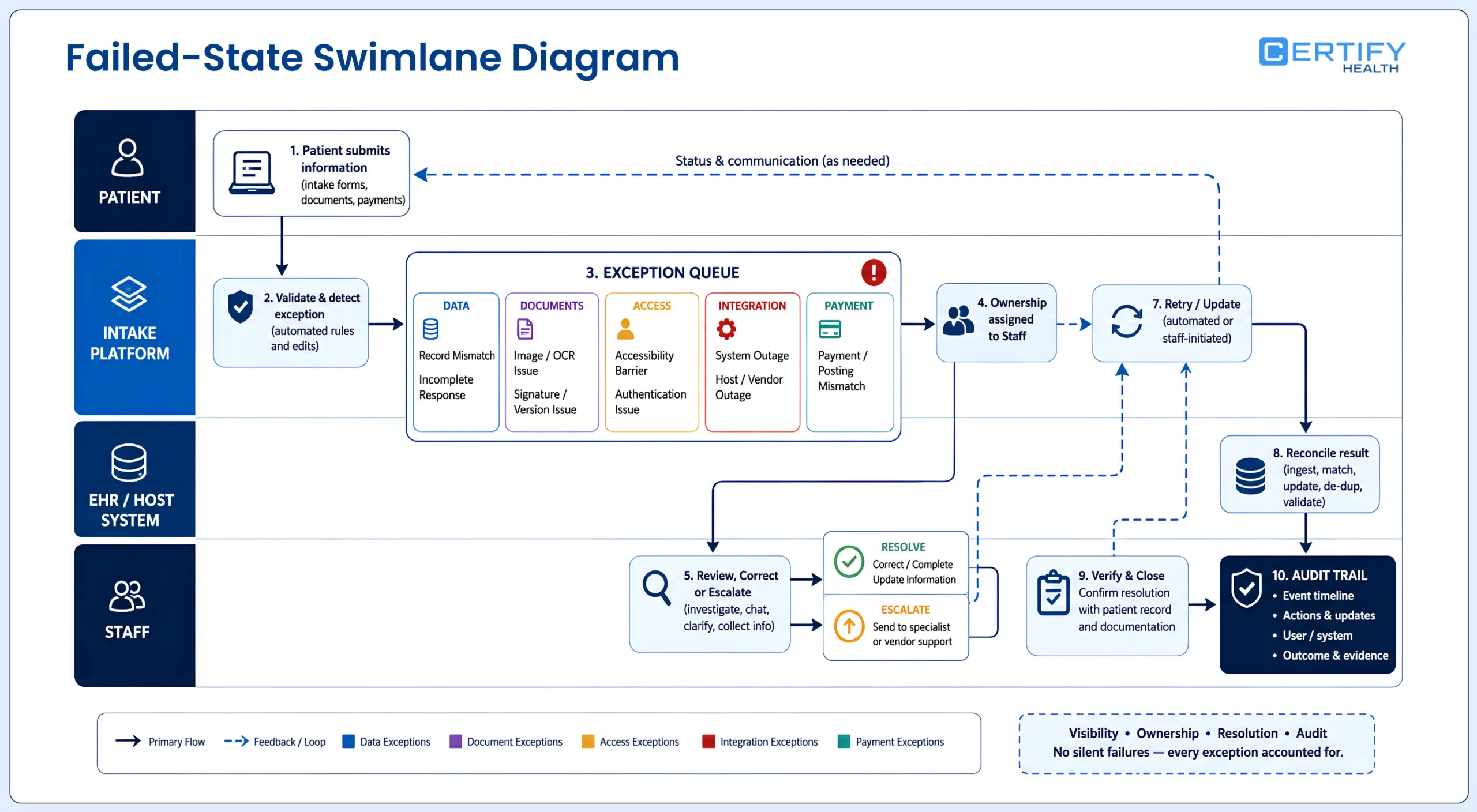
A product can show a polished patient path while hiding the work that returns to staff. Ask to see the queue, not only the form. Every exception should have a detectable state, responsible role, safe next action, time expectation, patient communication rule, and auditable resolution.
| Exception | System response to prove | Staff decision | Audit question |
|---|---|---|---|
| Wrong or duplicate record | Stop or quarantine the write and preserve source context | Match, merge, correct, or escalate under approved policy | Who changed what record, when, and why? |
| Incomplete or contradictory response | Identify the exact item without discarding valid work | Request correction, accept with reason, or route for review | Was the unresolved item visible before the visit? |
| Unusable image or OCR uncertainty | Flag confidence or quality and retain the original | Review, recapture, correct, or verify through another source | Can extracted data be traced to the image and reviewer? |
| Signature, authority, or version problem | Prevent a false complete state | Confirm signer and authority, reissue the correct version, or document refusal | Which document version and signer evidence were retained? |
| Authentication or accessibility barrier | Offer help without exposing another patient’s information | Use an approved assisted, representative, or alternative route | Was the alternative effective and equivalently governed? |
| Host-system or vendor outage | Queue safely, show status, avoid duplicates, and support retry | Use downtime workflow, reconcile later, and communicate impact | Were all queued items accounted for after recovery? |
| Payment or posting mismatch | Separate transaction success from ledger or workflow-posting success | Reconcile, reverse, correct, or escalate | Does the payment, receipt, ledger, and patient communication agree? |
Evaluate implementation and support before signing
As your practice grows, your system should grow with it.
Ask what changes when the tenth location, second specialty, acquired brand, new language, new EHR version, new consent rule, or new device is added. Scale is not a vendor’s customer count. It is the organization’s ability to add and change workflows without losing ownership, consistency, visibility, performance, accessibility, or recovery.
| Implementation area | Vendor must provide | Buyer must provide | Acceptance evidence |
|---|---|---|---|
| Discovery and design | Workflow workshops, requirement traceability, solution design, and dependency list | Owners, current-state evidence, policies, forms, host-system access, and decisions | Approved scope, RACI, and traceability matrix |
| Configuration and content | Configured rules, roles, channels, forms, languages, statuses, and reports | Approved form library, field map, language, branding, and exception policy | Configuration workbook and review sign-off |
| Integration | Interface specification, build, test data, monitoring, and defect process | Host-system owner, environments, data definitions, access, and reconciliation rules | Executed positive, negative, volume, retry, and recovery tests |
| Training and change | Role-based materials, train-the-trainer support, release notes, and help path | Super-users, scheduling, attendance, local reinforcement, and adoption plan | Competency checks and supported go-live coverage |
| Support and operations | Severity definitions, response and restoration targets, escalation, maintenance, status communication, and change process | Named support owners, monitoring, incident process, and governance cadence | SLA, escalation test, status access, and operating review |
| Expansion and exit | Location rollout, versioning, data export, transition help, and deletion procedure | Expansion criteria, budget, local owners, retention, and exit plan | Repeatable rollout pack and tested export |
The American Medical Association’s current EHR selection module emphasizes that technology selection is not one size fits all and should begin with organizational needs and readiness. Although intake software is not an EHR, that procurement principle still applies. Use the AMA software-selection resource as a supporting planning reference, not as an intake-product endorsement.
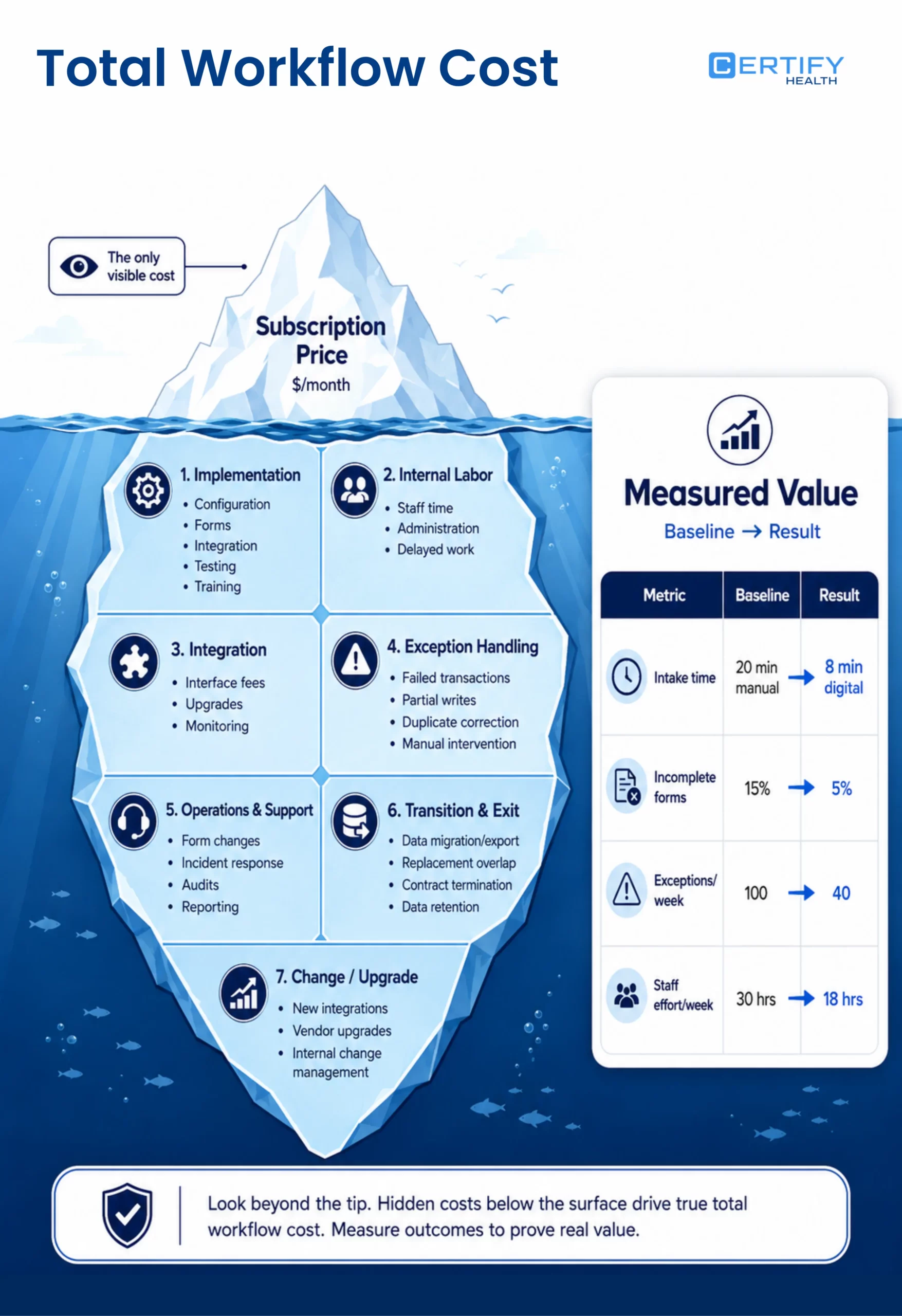
Compare total workflow cost, not subscription price
Running a practice means keeping track of multiple software subscriptions, vendor contracts, and integrations—each one with its own set of challenges.
Consolidation can reduce handoffs, contracts, support paths, duplicate data stores, and integration points. It can also bundle unused capability, increase dependency on one roadmap, complicate exit, or make a local problem wait behind an enterprise release. Model both sides.
| Cost layer | Include | Common omission | How to compare |
|---|---|---|---|
| Commercial | License, modules, locations, users, messages, devices, transactions, storage, services, and annual increases | Required add-ons and minimum commitments | Normalize the same scope and growth assumptions |
| Implementation | Discovery, configuration, forms, integration, testing, project management, travel, and training | Internal staff time and delayed work | Price vendor and buyer effort separately |
| Operation | Administration, form changes, monitoring, support, incident response, audits, and reporting | Work moved from front desk to IT, compliance, or billing | Map recurring role hours and exception volume |
| Integration | Interface fees, upgrades, host-vendor charges, test environments, monitoring, and reconciliation | Cost of partial writes, downtime, and duplicate correction | Include failed-state labor and upgrade frequency |
| Transition and exit | Data export, document retention, replacement overlap, contract termination, migration, and deletion validation | Switching cost and unavailable historical context | Require a priced, testable exit path |
| Value | Avoided work, reduced defects, earlier readiness, better visibility, and supported growth | Assuming every capability produces an outcome | Tie each value claim to a baseline, eligible population, observed change, and owner |
Use a scorecard, but keep non-negotiable gates outside the score
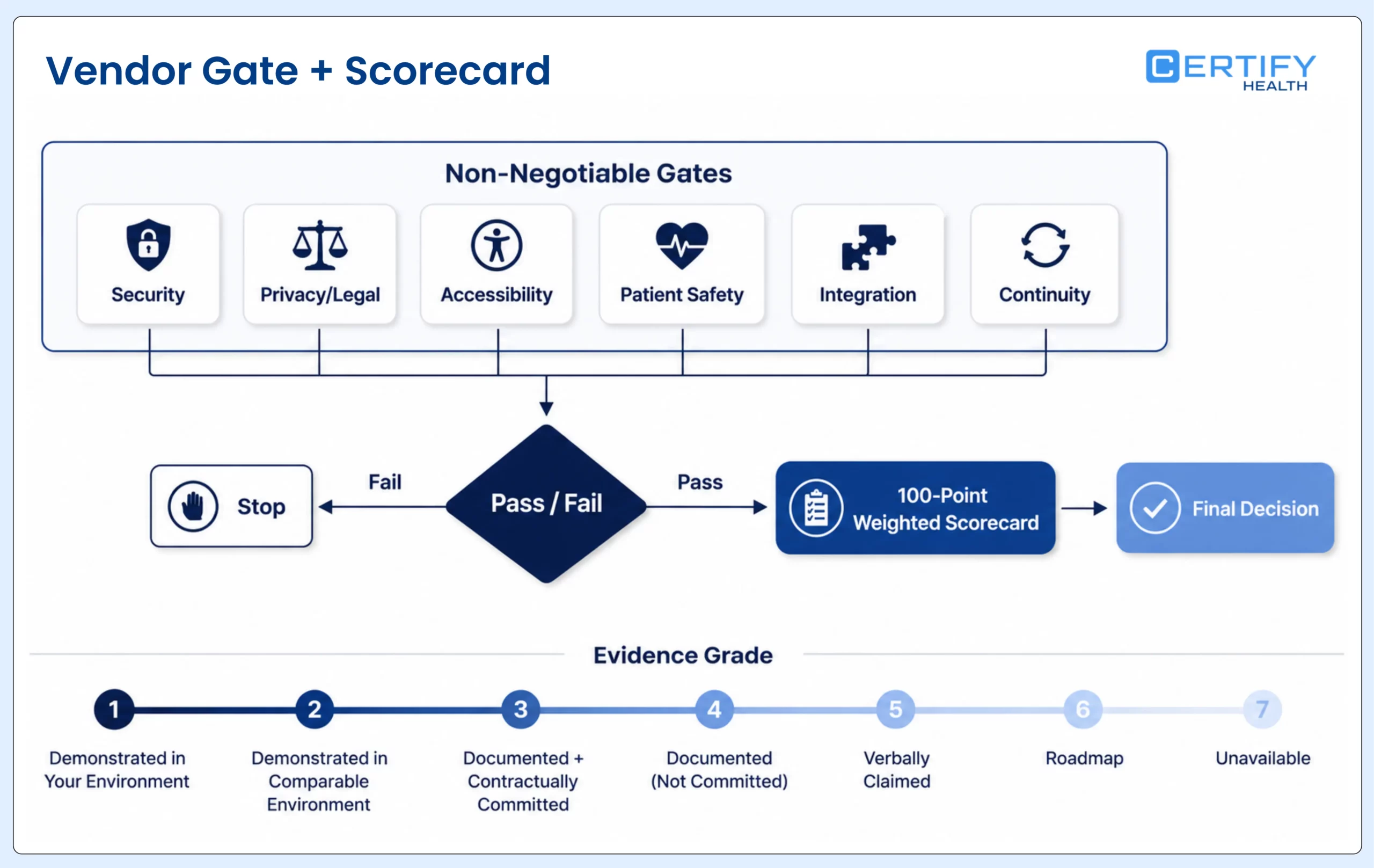
Weights should reflect the organization, not CERTIFY Health or any other vendor. The example below totals 100 points and can be changed before vendors are evaluated. A high score cannot override a failed legal, security, accessibility, patient-safety, integration, or continuity gate.
| Dimension | Example weight | Score 0–5 based on | Evidence adjustment |
|---|---|---|---|
| Workflow and rule fit | 20 | Priority scenarios, roles, assignment, forms, statuses, and exceptions | Cap score at 2 if only a slide or roadmap is shown |
| Integration and data quality | 20 | Exact reads, writes, matching, failures, retries, correction, and reconciliation | Cap score at 2 without host-specific technical evidence |
| Patient usability and accessibility | 15 | Representative devices, languages, disability, representative, assisted, and outage routes | Cap score at 2 without configured workflow testing |
| Privacy, security, and contract | 15 | Data flow, access, safeguards, risk, incident, subcontractor, retention, BAA, and exit review | Gate failure if required terms or controls are unacceptable |
| Implementation and support | 15 | Plan, ownership, staffing, training, SLA, change, scale, and recovery | Reduce for buyer effort or dependency not included in proposal |
| Measurement and proof | 10 | Metric definitions, reporting, customer evidence, methodology, and claim traceability | Exclude unsupported outcomes from the score |
| Commercial and total cost | 5 | Comparable scope, price, internal labor, integration, growth, renewal, and exit | Use risk-adjusted total cost, not first-year fee alone |
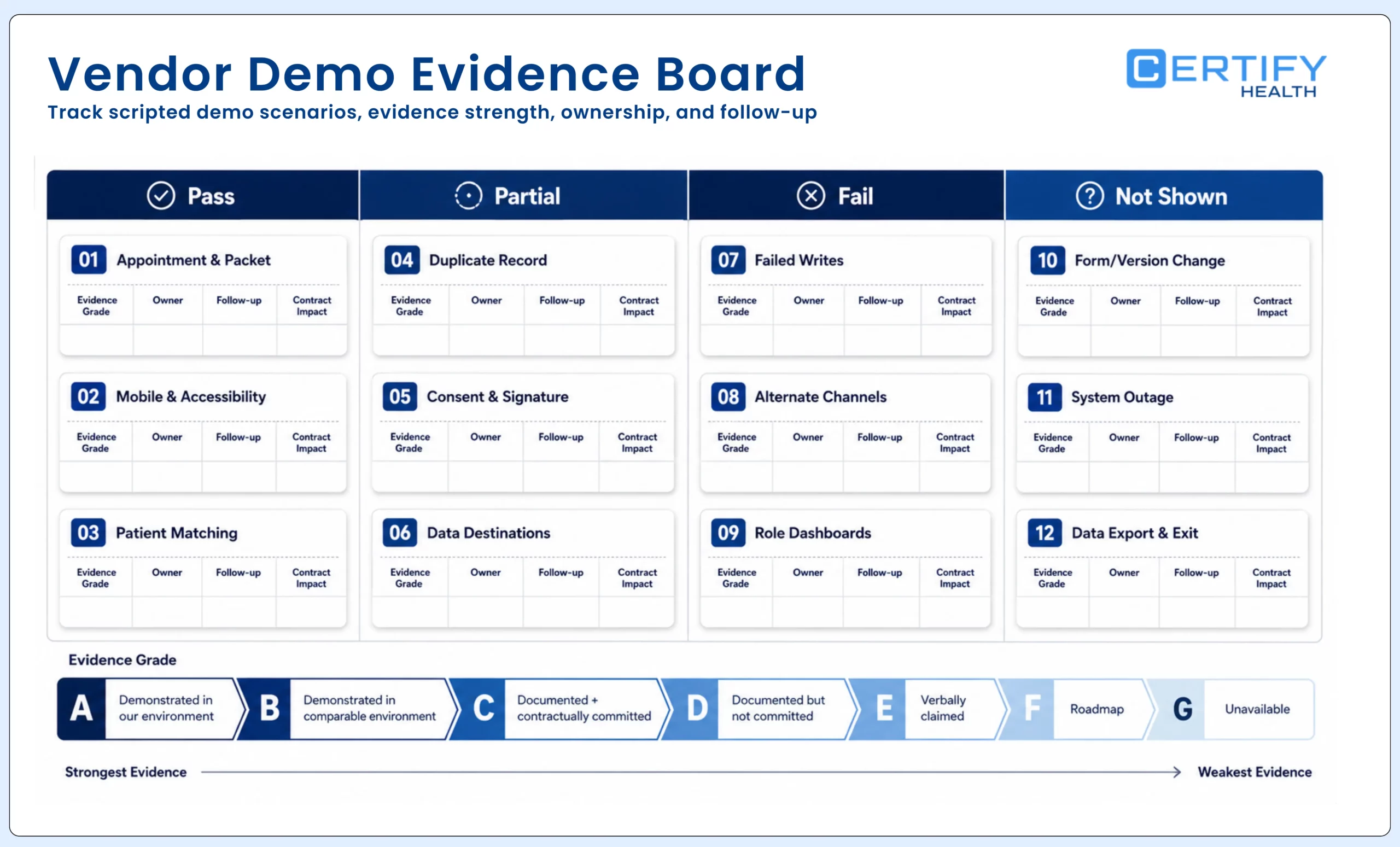
Evidence grades: Grade each response as demonstrated in your environment, demonstrated in a comparable environment, documented and contractually committed, documented but not committed, verbally claimed, roadmap, or unavailable. Score capability and evidence separately.
Run a buyer-led demo: show these scenarios, not a slide deck
Provide the scenario pack before the demo. Require the vendor to state which functions are generally available, which depend on modules or configuration, which require the host system or another vendor, which are custom, and which are roadmap. Record every unanswered question and promised follow-up.
- Create or receive a representative appointment and assign the correct packet using location, specialty, provider, visit, patient, and language rules.
- Send the workflow remotely and complete it on a representative mobile device using keyboard and screen-reader navigation, error recovery, save, timeout warning, and resume.
- Match a returning patient, display approved prefilled values, submit a changed address and insurance card, and show provenance and review.
- Process a similar-name or duplicate-record scenario without silently writing to the wrong chart.
- Assign a current notice or consent version, capture a representative or refusal scenario, and show signer, timestamp, document class, and audit history.
- Route approved items to a structured field, signed document, image, task, and completion status, then prove each destination in the host system.
- Cause one field write and one document post to fail. Show detection, patient impact, staff queue, retry, correction, reconciliation, and closure.
- Complete unfinished work through a kiosk, tablet, staff-assisted, or paper route as applicable without creating a second uncontrolled packet.
- Show role-based dashboards for front desk, manager, form owner, privacy or compliance, and integration support.
- Change a form rule or document version, approve it, publish it to one location, roll it back, and show the audit history.
- Simulate a vendor or host-system outage and show downtime, queuing, deduplication, recovery, reconciliation, and status communication.
- Export the organization’s data, forms, documents, configuration, audit evidence, and reports under the proposed exit terms.
Pilot the workflow with acceptance gates
The pilot should be large enough to expose variation but small enough to contain defects. Select representative locations, roles, appointment types, patient routes, host-system conditions, and peak periods. Define the eligible population, baseline, observation window, decision owners, and stop conditions before go-live.
| Gate | Required evidence | Example stop condition | Decision |
|---|---|---|---|
| Design approval | Scope, RACI, workflows, forms, fields, data flows, accessibility, security, support, and metrics approved | Unknown owner, destination, legal instrument, or critical dependency | Configure, revise, or stop |
| Functional acceptance | Positive and negative scenarios pass in representative environments | Wrong-record risk, inaccessible critical path, silent failure, or unreconciled write | Pilot, remediate, or stop |
| Operational readiness | Staff trained; queues, downtime, escalation, monitoring, and support tested | No safe fallback, no visible queue, or unresolved high-severity defect | Go, delay, or narrow scope |
| Controlled pilot | Defined completion, error, assistance, touch, writeback, readiness, and incident data | Patient-safety, privacy, accessibility, continuity, or material data-integrity issue | Expand, remediate, roll back, or stop |
| Expansion | Repeatable configuration, local readiness, support capacity, and stable measures | Performance degrades by location, channel, workflow, or patient segment | Stage, pause, or redesign |
| Operating review | Ongoing metric, incident, accessibility, content, integration, release, and contract review | Unowned drift, repeated unresolved exceptions, or unsupported product change | Optimize, constrain, replace, or exit |
Do not define success as adoption alone: A high completion rate can coexist with wrong destinations, staff correction, inaccessible alternatives, duplicate records, unread documents, or unresolved exceptions. Pair adoption with quality, readiness, writeback, assistance, and safety measures.
Measure whether the workflow became more ready—not merely more digital
| Measure | Definition to approve | Segment | Decision use |
|---|---|---|---|
| Eligible completion | Completed required intake ÷ patients eligible for that workflow by the agreed cutoff | New or returning, visit, location, channel, language, age, assistance | Find adoption and routing gaps |
| First-pass usable completion | Submissions requiring no patient or staff correction ÷ completed submissions | Form, field, channel, device, integration | Find confusing fields and validation defects |
| Assistance and alternative-route rate | Patients receiving approved help or another route ÷ eligible patients | Reason, disability, language, representative, device, channel | Resource assistance and remove barriers |
| Staff touch time | Measured active staff time attributable to intake per eligible visit | Role, task, location, workflow, exception | Confirm whether work decreased or moved |
| Writeback success | Eligible items posted correctly to the intended destination by cutoff ÷ eligible items | Object, field, document, host system, interface, failure reason | Monitor integration reliability and reconciliation |
| Visit readiness | Visits meeting the organization’s approved readiness conditions by cutoff ÷ eligible visits | Visit, provider, location, payer, required item | Protect schedule and clinical preparation |
| Exception aging | Open exceptions by severity and time since detection | Owner, cause, system, workflow, location | Prioritize defects and support |
| Total workflow cost | Commercial plus internal labor, integration, exception, support, change, and exit cost for the measured scope | Location, workflow, year, growth scenario | Compare options and validate business case |
Where CERTIFY Health may fit
CERTIFY Health positions its patient intake platform as a configurable workflow layer around an existing EHR, EMR, or practice-management environment—not an automatic replacement for the system of record. Depending on purchased and implemented scope, documented capabilities include remote pre-registration, portal, tablet, and kiosk routes; demographic and insurance updates; card and document capture; questionnaires; configurable digital forms and eConsents; document rules; staff progress visibility; payment during intake; and data, document, image, task, or status movement into supported host-system workflows.
Integration scope should be proven for the buyer’s environment. Review CERTIFY’s integrations and partners route, then require the same field-level, document-level, status, failure, retry, and reconciliation evidence described in this guide.
At one large multi-location dental group, 87% of patients completed pre-registration before the visit. Completion reached 88% for new patients and 73% among patients older than 75. Results like these are useful during evaluation because they move the conversation beyond whether digital intake is available. Buyers can ask how the workflow will be offered, where patients may need assistance, what information reaches staff before arrival, and how completion will be measured across locations.
A scoped assessment should end with a requirements traceability matrix, proposed solution boundary, dependency list, integration map, implementation RACI, test plan, metric definitions, commercial scope, and unresolved-risk register. Do not accept a demo recap as the implementation plan.
The buying decision should be explainable after the demo is over
A defensible selection does not begin with paperless claims or end with a feature checklist. It begins with a measured workflow, assigns ownership, separates non-negotiable gates from weighted preferences, tests exact scenarios, prices the full operating model, and requires evidence for every material claim. The strongest vendor is the one that can show where the workflow works, where it depends on configuration or another system, how it fails safely, and what both parties must do to keep it working.
Frequently asked questions
What is digital patient intake software?
Does digital patient intake software replace the EHR or practice-management system?
What is the most important integration question to ask?
Ask the vendor to show exactly what the integration reads and writes, in which direction, to which destination, on what trigger, with what latency, validation, retry, correction, duplicate handling, error visibility, and reconciliation. ‘Integrated’ and ‘bidirectional’ are not sufficient specifications.
Does a BAA or a vendor’s security certification make the intake workflow HIPAA compliant?
No single contract, product, control, or certification makes an organization’s workflow compliant in isolation. Determine business-associate status for the actual service and PHI access, obtain required agreements, perform the organization’s risk analysis and risk management, configure appropriate safeguards, define permitted use and access, train users, and monitor the deployed workflow with legal, privacy, and security guidance.
Should a small practice choose one platform or several point solutions?
It depends on the workflow, host system, internal capacity, required depth, integration burden, support model, total cost, and exit risk. A focused tool may solve one problem with less scope. A broader layer may reduce handoffs across several workflows. Compare the same required scenarios and price both the visible subscription and the work needed to implement, operate, reconcile, change, and exit.
What should a digital intake pilot prove?
The pilot should prove correct assignment, usable and accessible completion, identity and representative handling, form and document versioning, exact data destinations, visible exceptions, staff readiness, integration recovery, support, and approved metrics across representative workflows. It should also define conditions that require remediation, rollback, narrowed scope, or a stop decision.
How should vendors be scored when their feature sets differ?
Score the organization’s required jobs and evidence, not the vendor’s menu. Set weights before demonstrations, use the same scripted scenarios, grade proof quality separately, normalize total cost to the same scope, and keep legal, security, accessibility, patient-safety, integration, and continuity gates outside the weighted score.