Table of Contents
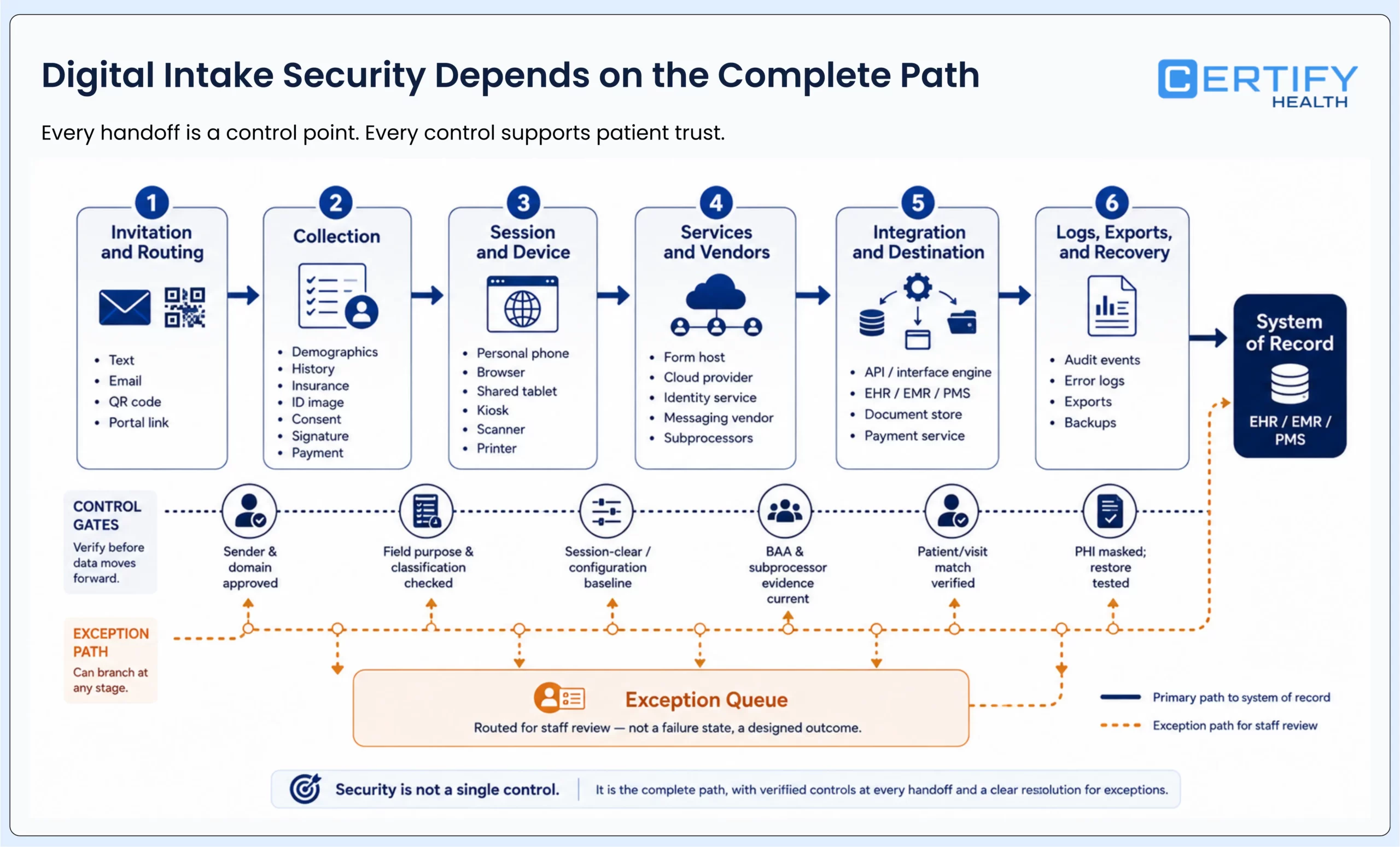
Digital patient intake security is not proved by a padlock icon, a vendor’s compliance label, or one encrypted form. It depends on the complete path: what is collected, where it travels, who can access it, what is written into the system of record, what remains on a device or in a log, and how the organization detects and recovers from failure.
Every day, patients trust their providers with deeply personal data (medical histories, demographic details, insurance credentials) and expect it to remain safe.
A secure intake program protects more than confidentiality. It also protects the integrity and availability of the information staff need to prepare a visit. A form can be private yet still unsafe operationally if it is matched to the wrong patient, written to the wrong field, stranded in an exception queue, retained longer than intended, or unavailable when care begins.
The short answer
- Map the complete intake data flow before evaluating a form, portal, mobile link, tablet, kiosk, integration, or vendor.
- Separate patient identification, workforce access, device security, data exchange, privacy, and incident response; one control does not prove the others.
- Treat every external script, message route, integration, subprocessor, export, log, and support path as part of the review.
- Require evidence for the configured deployment: diagrams, roles, data fields, retention, logs, test results, contracts, recovery procedures, and named owners.
- Keep current HIPAA Security Rule duties separate from proposed requirements, and have privacy and security counsel review the final design.
Start with the intake data flow, not a threat list
The HIPAA Security Rule establishes administrative, physical, and technical safeguards for ePHI and requires regulated entities to protect its confidentiality, integrity, and availability. HHS risk-analysis guidance starts with all ePHI an organization creates, receives, maintains, or transmits. For digital intake, that means the review cannot stop at the screen the patient sees.
| Flow stage | Examples to inventory | Failure to test | Evidence and owner |
|---|---|---|---|
| Invitation and routing | Text, email, QR code, portal link, domain, redirect, expiry, support contact | Spoofing, misdelivery, stale links, wrong location or visit | Approved sender/domain list; delivery and expiry tests; messaging owner |
| Collection | Demographics, history, insurance, ID images, consent, signatures, payment information | Excess collection, hidden fields, insecure transmission, unclear notice | Field inventory; purpose; classification; privacy and security approval |
| Session and device | Personal phone, browser, shared tablet, kiosk, scanner, camera, printer, local cache | Shoulder surfing, cached data, abandoned session, exposed printout, device tampering | Configuration baseline; session-clear test; physical assessment; device owner |
| Services and vendors | Form host, cloud provider, identity service, messaging vendor, analytics, support, subprocessors | Unapproved disclosure, unknown storage, incomplete BAA, weak support access | Data-flow diagram; contract and BAA; subprocessor list; vendor evidence |
| Integration and destination | API, interface engine, EHR, EMR, PMS, document store, payment service, work queue | Wrong-patient match, duplicate record, failed writeback, overbroad access | Field-level map; authentication method; retry and reconciliation tests; integration owner |
| Logs, exports, and recovery | Audit events, error logs, screenshots, reports, downloads, backups, support tickets | PHI in logs, uncontrolled exports, incomplete detection, failed restore | Log schema; retention; access review; alert test; restore evidence; incident owner |
Risk 1: Unknown collection, tracking, and disclosure paths
A digital intake page may load analytics, advertising, chat, fraud, session-replay, content-delivery, accessibility, tag-management, or support technologies. Some components can receive page URLs, device or network data, identifiers, form events, or entered information. The relevant question is not whether a tool is common. It is what data it receives in this exact context, why, under whose instructions, and under which agreement.
| Control test | Evidence to collect | Failure condition |
|---|---|---|
| Inventory every production component | Tag scan, page source, network observations, domain list, mobile and kiosk builds | A production component or endpoint is absent from the approved inventory |
| Trace data by page and event | Fields, URLs, identifiers, event payloads, cookies, local storage, screenshots, logs | A party receives data without a documented purpose and authorization basis |
| Review pre- and post-authentication pages | Separate flow maps for public pages, intake launch, active session, confirmation, and support | The review assumes every page has the same data and legal context |
| Govern changes | Tag owner, approval workflow, release log, monitoring, emergency removal process | Marketing, development, or a vendor can add a component without security and privacy review |
| Minimize collection | Field purpose, required/optional logic, retention, masking, downstream use | Sensitive information is collected because it might be useful later rather than for a defined workflow |
OCR’s online-tracking bulletin highlights HIPAA obligations when regulated entities use tracking technologies. Application depends on the page, information transmitted, parties, and current legal context; do not turn the bulletin into a claim that every IP address on every healthcare page is automatically PHI. Inventory first, then obtain privacy and security review for the actual deployment.
Risk 2: Weak identity, access, and session controls
Patient matching, patient authentication, workforce authentication, authorization, and transaction approval solve different problems. A date of birth or biometric may help identify a patient in a configured flow, while workforce access still needs named users, role rules, privileged-access governance, session controls, and reviewable activity.
| Identity or access subject | Required decision | Evidence to test |
|---|---|---|
| Patient or caregiver | How is the intended person and visit matched, and how are proxies or caregivers handled? | Match rules; failed/duplicate workflow; alternate route; correction and escalation tests |
| Front-desk and clinical workforce | Which intake data and actions are necessary for each role? | Role matrix; named accounts; joiner/mover/leaver process; periodic access review |
| Administrator and support | Who can change forms, routing, integrations, retention, terminals, or identity settings? | Privileged-role list; approval; strong authentication; time-bound support; activity review |
| Device and kiosk | How is the managed station enrolled, configured, locked, patched, and retired? | Device inventory; configuration baseline; certificate or device identity; remote action and disposal evidence |
| Integration and service account | What system, field, direction, scope, secret, and rotation rule apply? | Interface inventory; credential storage; least privilege; expiry/rotation; failure and revocation tests |
Biometric boundary: Where FaceCheck or another biometric step is deployed, describe it as a patient-identification layer—not proof of authentication for every actor, fraud prevention, or compliance. Preserve document-based and staff-assisted alternatives, refusal handling, and deployment-specific governance.
Risk 3: Insecure exchange, incorrect writeback, and hidden failure
Encryption protects data only within the scope of the chosen method and implementation. It does not prove that the right field reached the right patient record, that a retry did not create a duplicate, that an error log avoided sensitive content, or that staff can see and correct a failed transaction.
| Test | Question | Acceptable evidence |
|---|---|---|
| Transport and storage | Where is information encrypted, decrypted, cached, queued, exported, backed up, and destroyed? | Architecture and data-flow diagram; configuration; key ownership; retention and destruction evidence |
| Patient and visit match | What prevents wrong-patient, wrong-location, duplicate, or wrong-encounter writes? | Positive and negative test cases; exception states; correction procedure |
| Field and direction | Which fields are read or written, in which direction, at what time, under what rule? | Versioned field map; interface contract; approvals; sample transactions |
| Retry and reconciliation | What happens on timeout, partial success, downstream rejection, or duplicate submission? | Idempotency or duplicate handling; retry rules; reconciliation report; named owner |
| Logging and alerting | Can teams detect failure without placing unnecessary PHI in logs or tickets? | Log schema; masking; access and retention; alert test; escalation trail |
| Downtime and recovery | Can intake continue safely and can pending work reconcile after restoration? | Downtime procedure; backlog ownership; restore and replay test; recovery acceptance criteria |
For the end-to-end readiness model, use the patient intake guide. For channel-specific device and session questions, use the kiosk vs. mobile check-in comparison.
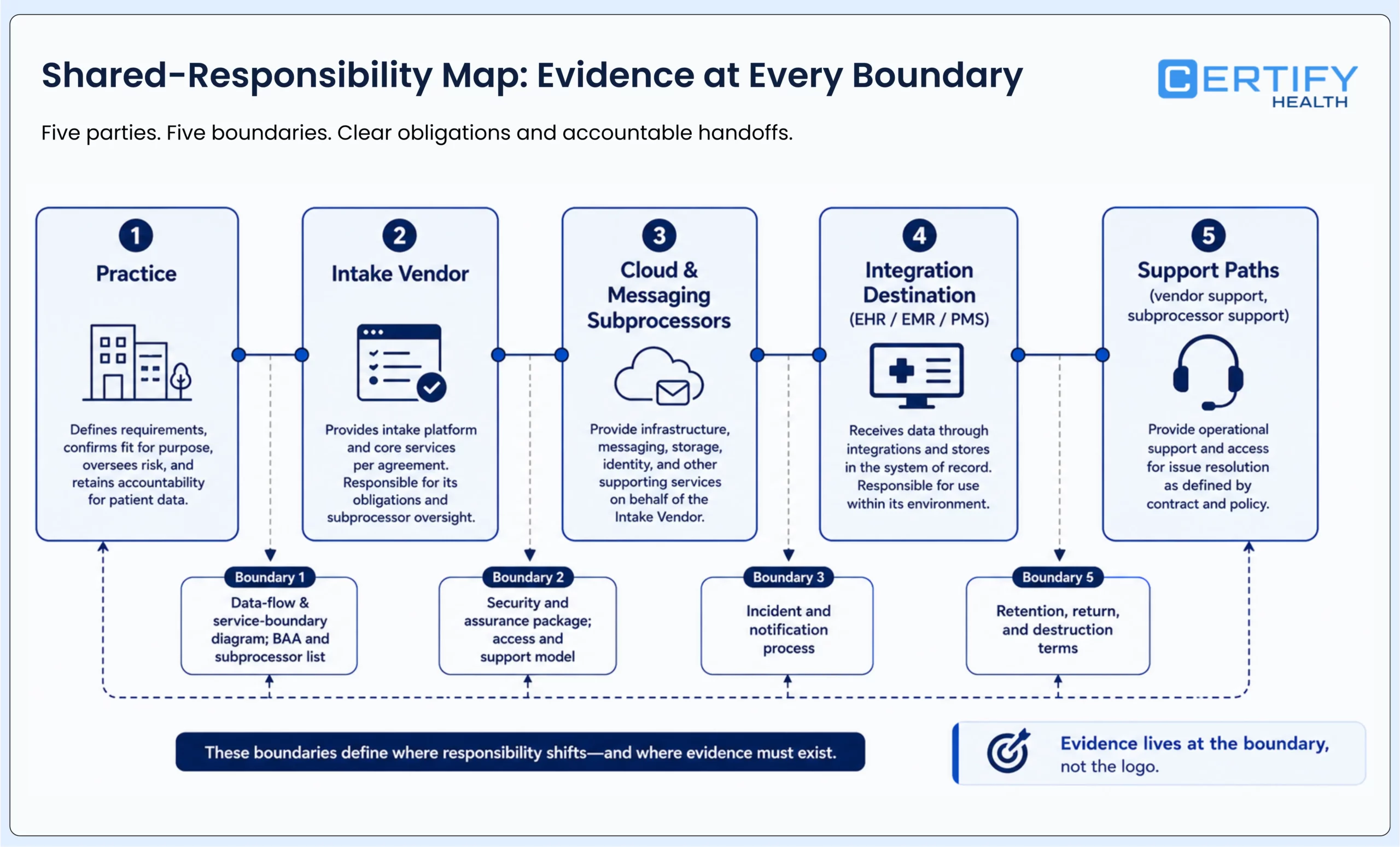
Risk 4: Vendor, subprocessor, and shared-responsibility gaps
A cloud service provider that creates, receives, maintains, or transmits ePHI for a covered entity or business associate is generally a business associate even if it cannot view encrypted data. HHS cloud guidance also makes the customer’s own risk analysis and risk-management responsibilities clear. A signed BAA is necessary where required, but it is not a substitute for technical and operational diligence.
| Evidence request | Decision it supports | Red flag |
|---|---|---|
| Data-flow and service-boundary diagram | What each party creates, receives, maintains, transmits, stores, logs, or supports | The diagram stops at the vendor logo or omits support and analytics paths |
| BAA and subprocessor list | Contractual roles, downstream handling, notification, and change governance | Unclear subcontractor terms, locations, services, or notice process |
| Security and assurance package | Whether evidence is current, scoped, independently assessed, and relevant to the service | A badge or report title is supplied without scope, period, exceptions, or remediation status |
| Access and support model | How vendor personnel gain, approve, time-limit, record, and revoke access | Standing broad access, shared accounts, or no customer-visible review trail |
| Incident and notification process | Who detects, preserves evidence, communicates, decides, and meets contractual or legal timelines | The contract is silent on suspected events, subprocessors, or evidence delivery |
| Retention, return, and destruction | What happens during normal operation, export, termination, backup expiry, and legal hold | Deletion is promised without scope, backup treatment, timing, or verification |
| Recovery and portability | How service resumes and how the practice retrieves usable data during failure or exit | Recovery targets are marketing claims with no test evidence or customer responsibilities |
Risk 5: Device, session, and physical-environment exposure
| Channel | Security and privacy tests | Required fallback |
|---|---|---|
| Patient-owned mobile or browser | Link expiry, shared phone, browser history, local storage, notifications, screenshots, lost device, insecure network, accessibility, caregiver use | Resume at arrival or transfer to private assisted service without losing approved work |
| Shared kiosk | Placement, screen angle, reflections, audio, idle timeout, session clearing, device lock, tamper evidence, patching, camera/scanner/printer output | Accessible staff-assisted route; safe downtime procedure; visible help without exposing prior patient data |
| Staff tablet | Named access, lock, handoff, shoulder surfing, mobile-device management, local files, camera roll, loss, support access | Approved workstation or paper downtime process with controlled reconciliation |
| Paper or scanned fallback | Minimum necessary fields, physical custody, queue visibility, scanner destination, temporary files, shredding, manual re-entry | Named owner, secure storage, verified upload/writeback, and documented destruction |
Session-clear acceptance test: Complete, abandon, time out, request help, lose connectivity, and restart a session. Confirm that the next user cannot see prior data, the intended work is either preserved or cleared according to policy, staff can identify the state, and logs record enough to investigate without exposing unnecessary PHI.
For hardware, placement, pilot, and operations, use the healthcare self-service kiosk implementation guide.
Risk 6: Phishing, spoofed intake messages, and support impersonation
Social engineering attacks exploit human psychology, manipulating people into taking unsafe actions like clicking a link or sharing credentials without realizing the consequences.
An intake program can create a repeatable trust signal—appointment reminder, form request, insurance update, copay prompt, or support callback. Protect that signal by standardizing domains, sender identities, message patterns, support routes, and escalation instructions. Patients and staff should know how to verify a request without using the same suspicious message or caller as the verification channel.
| Attack path | Preventive control | Detection and response |
|---|---|---|
| Spoofed text, email, or domain | Approved sender and domain inventory; email authentication where applicable; plain-language verification guidance | Monitor delivery and abuse reports; rapid block and patient communication procedure |
| Malicious QR code or redirect | Controlled placement and change process; destination allowlist; short-link governance | Routine physical and digital inspection; redirect and certificate alerting |
| Fake support or password reset | Independent callback route; identity verification; no shared credentials; strong workforce authentication | Support-ticket review; privileged-action alert; immediate credential revocation |
| Payment redirection | Approved payment destinations; amount and account confirmation; visible support route | Reconciliation; dispute escalation; preserve message and transaction evidence |
| Employee phishing | Role-specific training; safe reporting; least privilege; resilient authentication | Measure reports and time to containment, not only simulation click rate |
Risk 7: Unpatched components, ransomware, and untested recovery
In many hospitals, legacy systems or old technologies are retained because they still continue to run critical patient care operations. Similarly, unpatched software, which lacks the latest security updates, remains embedded deep within healthcare networks.
Outdated systems are open doors for attackers. Modernization starts with visibility, patching, and planned replacement.
For intake, recovery is not complete when a server restarts. The organization must know which invitations, sessions, forms, signatures, images, payment states, messages, and interface transactions were complete, pending, duplicated, or lost—and how each will be reconciled without asking every patient to start again or writing stale information into the record.
| Continuity control | Acceptance evidence | Failure to watch |
|---|---|---|
| Asset and dependency inventory | Supported versions, owners, external dependencies, criticality, maintenance windows, end-of-support dates | A form works while a hidden library, device, connector, or operating system is unsupported |
| Patch and vulnerability process | Prioritization, exception approval, compensating control, remediation age, validation | Automation is assumed to patch every component or failed updates are invisible |
| Resilient backup and recovery | Protected backups, recovery objectives, restore test, integrity checks, access and key recovery | A backup exists but cannot be restored within the needed workflow window |
| Intake downtime workflow | Minimum data, safe paper or alternate route, staff ownership, patient communication, privacy, later reconciliation | Downtime creates unsecured paper, duplicate intake, or lost consent |
| Incident response | Roles, legal and vendor contacts, evidence preservation, containment, communication, breach assessment, exercises | The plan begins only after a vendor declares a confirmed breach |
| Post-recovery reconciliation | Pending-session inventory, duplicate and wrong-patient checks, writeback review, patient follow-up, lessons learned | Systems return online while incomplete or misrouted work remains hidden |
HIPAA Security Rule status: current duties vs. proposed changes
| Status | What it means for this article | Publishing rule |
|---|---|---|
| Current HIPAA Security Rule | Regulated entities must protect the confidentiality, integrity, and availability of ePHI through reasonable and appropriate administrative, physical, and technical safeguards, including organization-specific risk analysis and risk management. | Present as current law; link to HHS and the current eCFR |
| January 2025 Security Rule NPRM | HHS proposed more specific requirements, including stronger written risk analysis, asset inventory and network mapping, and other cybersecurity measures described in the proposal. | Label every proposed item as proposed; do not publish a compliance deadline unless a final rule is verified |
| NIST CSF 2.0 | A voluntary risk-management framework that organizes outcomes across Govern, Identify, Protect, Detect, Respond, and Recover; it does not itself certify HIPAA compliance. | Use as a management framework, not a legal mandate or vendor badge |
| Organization action now | Maintain the current-rule risk analysis and improve inventory, access, monitoring, response, recovery, and vendor evidence according to the actual environment and applicable obligations. | Have privacy, security, and legal owners review deployment-specific decisions |
As of the sources reviewed on August 5, 2026, the Federal Register publication remains a notice of proposed rulemaking. The current Security Rule continues to apply. Check HHS and the Federal Register again immediately before publishing or materially updating this section.
For broad HIPAA rule education, penalties, and patient-intake compliance responsibilities, use the separate HIPAA compliance in patient intake guide. This page should remain the operational security risk owner.
How to review digital patient intake security before launch
Regardless of when the final rules land, healthcare organizations can reduce exposure today by taking these steps:
- Define the workflow and population: visit types, channels, locations, patients, caregivers, staff roles, integrations, and downtime routes.
- Inventory every field and file: purpose, classification, source, destination, optionality, retention, correction, disclosure, and deletion.
- Map every component and party: page, script, device, message, vendor, subprocessor, interface, log, report, export, backup, and support path.
- Complete a current-rule risk analysis for the actual environment and document the control decision, owner, evidence, exception, and residual risk.
- Review contracts and shared responsibilities, including BAAs where required, subprocessor changes, support access, incidents, retention, return, destruction, and exit.
- Test patient and workforce identity, least privilege, privileged actions, session expiry, abandonment, alternative routes, and access lifecycle.
- Test data exchange: wrong patient, wrong visit, duplicate submission, timeout, partial success, failed writeback, correction, and reconciliation.
- Exercise downtime and incident response with operations, IT, privacy, security, legal, communications, the vendor, and the system-of-record owner.
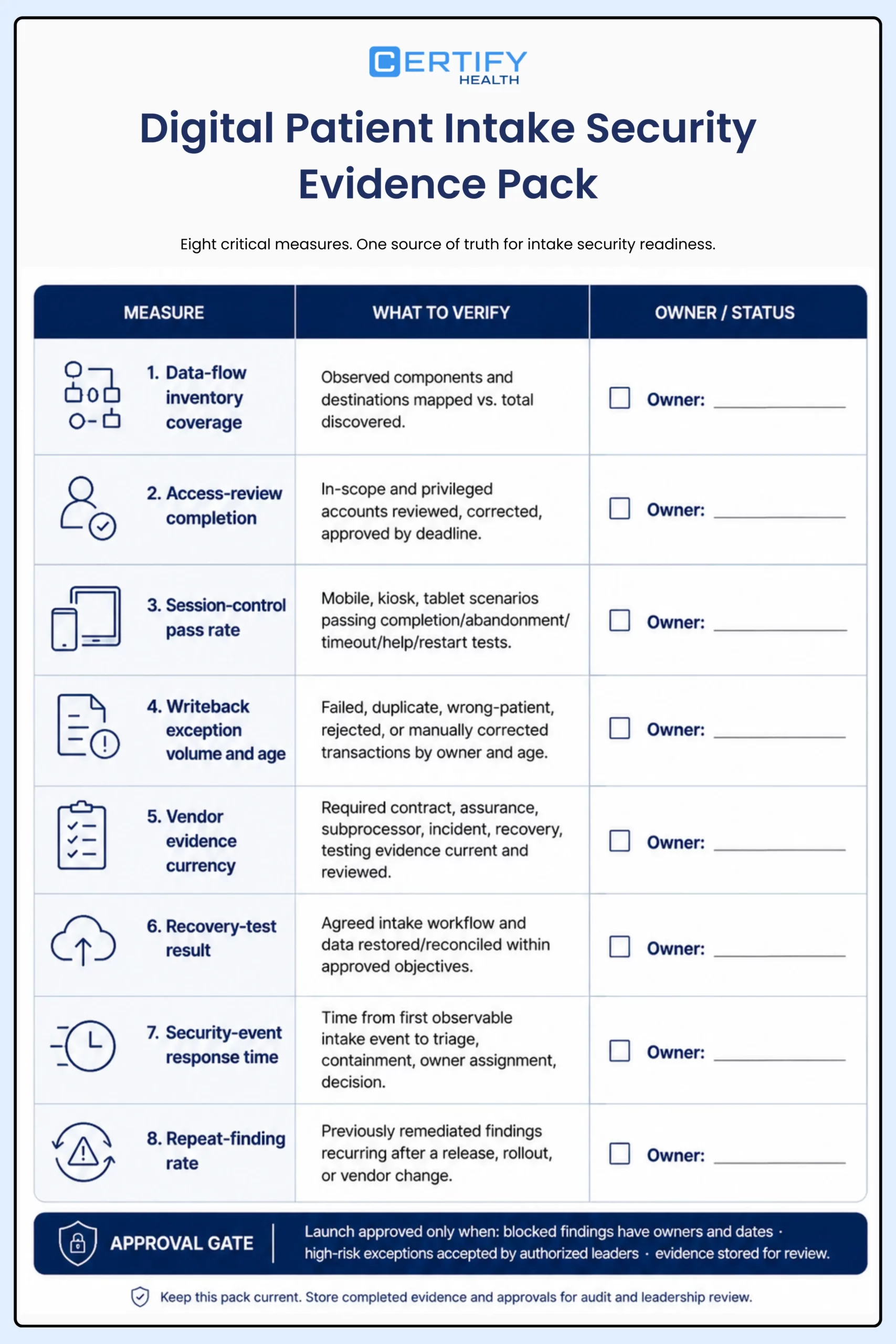
- Approve the launch only when blocked findings have owners and dates, high-risk exceptions are accepted by authorized leaders, and evidence is stored for review.
- Repeat the review after material changes to fields, forms, channels, integrations, devices, vendors, subprocessors, authentication, tracking, or retention.
Measures that reveal control quality
| Measure | Definition | What it reveals |
|---|---|---|
| Data-flow inventory coverage | Observed production components and destinations mapped divided by total discovered | Unknown services, scripts, routes, logs, or destinations |
| Access-review completion | In-scope accounts and privileged roles reviewed, corrected, and approved by deadline | Orphaned, excessive, shared, or stale access |
| Session-control pass rate | Approved mobile, kiosk, and tablet scenarios passing completion, abandonment, timeout, help, and restart tests | Residual data, lost work, or unclear staff states |
| Writeback exception volume and age | Failed, duplicate, wrong-patient, rejected, or manually corrected transactions by owner and time open | Hidden integrity failures and rekeying |
| Vendor evidence currency | Required contract, assurance, subprocessor, incident, recovery, and testing evidence current and reviewed | Assurance that has expired or does not cover the service |
| Recovery-test result | Whether the agreed intake workflow and data were restored and reconciled within approved objectives | Backups or continuity plans that do not work operationally |
| Security-event response time | Time from first observable intake event to triage, containment, owner assignment, and stakeholder decision | Detection and escalation gaps |
| Repeat-finding rate | Previously remediated findings that recur after a release, location rollout, or vendor change | Weak change control or controls that are not sustained |
How to evaluate CERTIFY Health in an intake security review
CERTIFY Health can support configurable patient intake and check-in workflows around an organization’s existing EHR, EMR, or practice management environment. Depending on the deployment, the workflow may include appointment matching, patient identification, demographics, forms and eConsent, insurance-card or photo-ID capture, configured eligibility or payment steps, status updates, reporting, and staff exception handling.
That capability description is not a security conclusion. During diligence, confirm the exact production architecture, data fields, identity methods, roles, integrations, directions, error handling, logging, retention, support access, subprocessors, contracts, incident process, recovery objectives, test evidence, and customer responsibilities. Features and security behavior can vary by configuration and environment.
Evidence boundary: The CERTIFY Care manual supports operational evidence such as configured portal and check-in steps, user and terminal administration, identity options, activity and exception reporting, document status, failed-document views, and downstream-audit workflows. It is not a legal opinion, security certification, penetration-test result, BAA, assurance report, or proof that every capability is enabled for every customer.
Frequently Asked Questions
What makes a digital patient intake system secure?
No single feature makes it secure. Evaluate the complete data flow, collection, identity, access, devices, session behavior, integrations, logging, vendors and subprocessors, retention, monitoring, incident response, recovery, and staff-assisted alternatives for the actual deployment.
Does a BAA make an intake vendor HIPAA compliant?
Is cloud-based patient intake safer than an on-premise system?
Not automatically. Either model can be implemented well or poorly. Compare architecture, shared responsibility, access, encryption scope, patching, logging, backups, recovery, support, contracts, evidence, and the organization’s ability to operate the service safely.
Are mobile intake forms more private than kiosks?
Privacy depends on context. A personal device may reduce shared-screen exposure but introduce shared-phone, notification, browser, network, and lost-device risks. A kiosk introduces placement, session clearing, peripheral, physical, and support risks. Preserve a private, accessible, assisted alternative.
What should a practice test before launching digital intake?
Is the proposed HIPAA Security Rule already in effect?
The January 2025 publication reviewed for this draft is a notice of proposed rulemaking, not a final rule. The current HIPAA Security Rule remains in effect. Verify HHS and the Federal Register immediately before publication because rule status can change.